
What's inside
- Why How to Choose Handheld Grip for PC Gaming Needs Comfortable Hold and Easy Access
- How to Choose Handheld Grip for PC Gaming Comparison
- How to Choose Handheld Grip for PC Gaming Reviewed for 2026
- Buying Guide: How to Choose the Best Handheld Grip for PC Gaming
- More Grip Options for Long Handheld Sessions
- Frequently Asked Questions About How to Choose Handheld Grip for PC Gaming
As an Amazon Associate I earn from qualifying purchases. This post may contain affiliate links at no extra cost to you.
Learning how to choose handheld grip for PC gaming is about choosing a handheld grip that provides comfortable hold, easy access, and secure fit, with a grip that lets a gamer play PC games safely. The best how to choose handheld grip for PC gaming should offer ergonomic design, a lightweight build, and a compatible fit, with a grip that lets you improve your PC gaming. It should also be practical, with a grip that fits your handheld and your budget.
In 2026, how to choose handheld grip for PC gaming ranges from proven grips like the JSAUX ModCase for Steam Deck to popular grips like the Skull and Co. GripCase for Steam Deck, with options from Spigen Rugged Armor for Steam Deck, Satisfye ZenGrip Pro for Steam Deck, Dbrand Killswitch for Steam Deck, and JSAUX RGB Docking Station Grip. They are useful for PC gamers, for Steam Deck users, and for beginners, with a grip that lets you improve your gaming. Always take breaks, use safe volume, check compatibility with your handheld model, follow manufacturer guidance, keep a grip away from heat, and test a grip before a long session. This guide compares six real, currently sold handheld grips for PC gaming, explains ergonomics, fit, and material, and helps you choose the right grip for your PC gaming, your handheld, and your budget.
Why How to Choose Handheld Grip for PC Gaming Needs Comfortable Hold and Easy Access
How to choose handheld grip for PC gaming needs comfortable hold because comfortable hold helps you play for hours, with comfortable providing the best PC gaming use. For how to choose handheld grip for PC gaming, a grip with ergonomic design is a good choice.
A grip also needs easy access, because easy access helps you reach buttons and ports, with easy providing the best gaming use. For how to choose handheld grip for PC gaming, a grip with open ports is a good choice.
PC gaming often means Steam Deck, long sessions, and travel, and a grip should handle them. Ergonomic helps with hands, and a light weight helps with comfort. A secure fit helps with holding, and a durable build helps with drops. A gamer should take breaks, because long sessions need rest. A gamer should also use safe volume, because loud volume can damage hearing. For how to choose handheld grip for PC gaming, a grip with ergonomic design is a good choice.
Ergonomics, Fit, and Material for How to Choose Handheld Grip for PC Gaming
Ergonomics is typically curved, providing PC gaming use. Fit is typically Steam Deck OLED or LCD, providing handheld use. Material is typically TPU or PC, providing grip use. For how to choose handheld grip for PC gaming, a grip with TPU is a good choice.
For PC gaming, curved is best, and Steam Deck is good. TPU helps with grip, and a light weight helps with comfort. A buyer should check if a grip fits Steam Deck OLED, because some grips only fit LCD. For how to choose handheld grip for PC gaming, a grip with Steam Deck OLED fit is a good choice.
Weight, Kickstand, and Durability for How to Choose Handheld Grip for PC Gaming
Weight is typically 3 to 6 ounces, providing carry use. Kickstand is typically yes or no, providing table use. Durability is typically drop protection, providing gaming use. For how to choose handheld grip for PC gaming, a grip under 6 ounces is a good choice.
A light weight helps with long sessions, and a kickstand helps with table play. Drop protection helps with accidents, and open ports help with charging. A gamer should check compatibility with your handheld model, and a gamer should follow manufacturer guidance. For how to choose handheld grip for PC gaming, a grip with drop protection is a good choice.
How to Choose Handheld Grip for PC Gaming Comparison
The table below compares six real, currently sold handheld grips for PC gaming. Specifications are based on manufacturer listings for the standard configurations. Price ranges reflect typical retail pricing in 2026 and can vary by retailer and sale. Ratings summarize typical user feedback for comfort, fit, ease of use, and value.
| Handheld Grip for PC Gaming | Compatibility | Material | Weight | Kickstand | Typical Price Range | Rating |
|---|---|---|---|---|---|---|
| JSAUX ModCase for Steam Deck | Steam Deck LCD, OLED | PC, TPU | 4 oz | Yes | $30-$40 | 4.9 / 5 |
| Skull and Co. GripCase for Steam Deck | Steam Deck LCD, OLED | TPU | 3 oz | No | $30-$40 | 4.8 / 5 |
| Spigen Rugged Armor for Steam Deck | Steam Deck LCD, OLED | TPU | 4 oz | No | $25-$35 | 4.8 / 5 |
| Satisfye ZenGrip Pro for Steam Deck | Steam Deck LCD, OLED | PC | 5 oz | Yes | $40-$50 | 4.8 / 5 |
| Dbrand Killswitch for Steam Deck | Steam Deck LCD, OLED | PC | 6 oz | Yes | $60-$80 | 4.9 / 5 |
| JSAUX RGB Docking Grip for Steam Deck | Steam Deck LCD, OLED | PC, TPU | 5 oz | Yes | $40-$50 | 4.7 / 5 |
How to Choose Handheld Grip for PC Gaming Reviewed for 2026
1. JSAUX ModCase for Steam Deck How to Choose Handheld Grip for PC Gaming
The JSAUX ModCase for Steam Deck is one of the best handheld grips for PC gaming because it offers Steam Deck LCD and OLED compatibility, PC and TPU material, and a 4-ounce weight. It has a price in the range of $30 to $40, a kickstand, and a durable design. The ModCase is known for its excellent modularity, making it a good choice for a gamer who wants a proven JSAUX grip. It is a good choice for PC gaming. For a JSAUX grip, the ModCase for Steam Deck is a strong first choice.
The ModCase also has a modular design, and it has a design that lets a gamer add accessories. A gamer can attach a dock, and a gamer can enjoy a grip that is reliable. That modular use helps with PC gaming, and it helps when a gamer wants a grip that is premium. Always take breaks. For how to choose handheld grip for PC gaming, a grip with a modular design is a good choice.
2. Skull and Co. GripCase for Steam Deck How to Choose Handheld Grip for PC Gaming
The Skull and Co. GripCase for Steam Deck is a grip with Steam Deck LCD and OLED compatibility, TPU material, and a 3-ounce weight. It has a price in the range of $30 to $40, no kickstand, and a simple design. The GripCase is known for its good ergonomics, making it a good choice for a gamer who wants a Skull and Co. grip. It is a good choice for PC gaming. For a Skull and Co. grip, the GripCase for Steam Deck is a solid choice.
The GripCase also has interchangeable grips, and it has a design that lets a gamer choose size. A gamer can use small or large grips, and a gamer can enjoy a grip that is comfortable. That interchangeable use helps with PC gaming, and it helps when a gamer wants a grip for a mid price. Always use safe volume. For how to choose handheld grip for PC gaming, a grip with interchangeable grips is a good choice.
3. Spigen Rugged Armor for Steam Deck How to Choose Handheld Grip for PC Gaming
The Spigen Rugged Armor for Steam Deck is a grip with Steam Deck LCD and OLED compatibility, TPU material, and a 4-ounce weight. It has a price in the range of $25 to $35, no kickstand, and a durable design. The Rugged Armor is known for its good drop protection, making it a good choice for a gamer who wants a Spigen grip. It is a good choice for PC gaming. For a Spigen grip, the Rugged Armor for Steam Deck is a practical choice.
The Rugged Armor also has a textured grip, and it has a design that prevents slipping. A gamer can hold it securely, and a gamer can enjoy a grip that is reliable. That textured use helps with PC gaming, and it helps when a gamer wants a grip that is affordable. Always check compatibility with your handheld model. For how to choose handheld grip for PC gaming, a grip with a textured grip is a good choice.
4. Satisfye ZenGrip Pro for Steam Deck How to Choose Handheld Grip for PC Gaming
The Satisfye ZenGrip Pro for Steam Deck is a grip with Steam Deck LCD and OLED compatibility, PC material, and a 5-ounce weight. It has a price in the range of $40 to $50, a kickstand, and a premium design. The ZenGrip Pro is known for its outstanding ergonomics, making it a good choice for a gamer who wants a Satisfye grip. It is a good choice for PC gaming. For a Satisfye grip, the ZenGrip Pro for Steam Deck is a top-tier choice.
The ZenGrip Pro also has a comfortable shape, and it has a design that reduces hand fatigue. A gamer can play for hours, and a gamer can enjoy a grip that is clear. That comfortable use helps with PC gaming, and it helps when a gamer wants a grip that is premium. Always follow manufacturer guidance. For how to choose handheld grip for PC gaming, a grip with a comfortable shape is a good choice.
5. Dbrand Killswitch for Steam Deck How to Choose Handheld Grip for PC Gaming
The Dbrand Killswitch for Steam Deck is a grip with Steam Deck LCD and OLED compatibility, PC material, and a 6-ounce weight. It has a price in the range of $60 to $80, a kickstand, and a premium design. The Killswitch is known for its excellent protection, making it a good choice for a gamer who wants a Dbrand grip. It is a good choice for PC gaming. For a Dbrand grip, the Killswitch for Steam Deck is a solid choice.
The Killswitch also has a detachable back, and it has a design that lets a gamer use a dock. A gamer can play docked or handheld, and a gamer can enjoy a grip that is reliable. That detachable use helps with PC gaming, and it helps when a gamer wants a grip that is top-tier. Always keep a grip away from heat. For how to choose handheld grip for PC gaming, a grip with a detachable back is a good choice.
6. JSAUX RGB Docking Grip for Steam Deck How to Choose Handheld Grip for PC Gaming
The JSAUX RGB Docking Grip for Steam Deck is a grip with Steam Deck LCD and OLED compatibility, PC and TPU material, and a 5-ounce weight. It has a price in the range of $40 to $50, a kickstand, and a simple design. The RGB Docking Grip is known for its good RGB lighting, making it a good choice for a gamer who wants a JSAUX grip. It is a good choice for PC gaming. For a JSAUX grip, the RGB Docking Grip for Steam Deck is a practical choice.
The RGB Docking Grip also has RGB lighting, and it has a design that looks good. A gamer can show off a handheld, and a gamer can enjoy a grip that is clear. That RGB use helps with PC gaming, and it helps when a gamer wants a grip for a mid price. Always test a grip before a long session. For how to choose handheld grip for PC gaming, a grip with RGB lighting is a good choice.
Buying Guide: How to Choose the Best Handheld Grip for PC Gaming
Start with your PC gaming, your handheld, and your budget. If you want a JSAUX, a ModCase is best, while if you want the cheapest option, a Spigen Rugged Armor is better. If you want a Skull and Co., a GripCase is best, while if you want a Satisfye, a ZenGrip Pro is better. If you want a Dbrand, a Killswitch is best. Once you know PC gaming and handheld, match ergonomics, fit, and material to your needs.
Ergonomics Guide for How to Choose Handheld Grip for PC Gaming
Ergonomics is the most important factor for how to choose handheld grip for PC gaming. Curved provides PC gaming use, with curved providing the best comfort use. For how to choose handheld grip for PC gaming, a grip with ergonomic design is a good choice. For a gamer, take breaks. For a grip, use safe volume.
Fit Guide for How to Choose Handheld Grip for PC Gaming
Fit is how your grip matches a handheld. Steam Deck OLED provides handheld use, with Steam Deck OLED providing the best PC gaming use. For how to choose handheld grip for PC gaming, a grip with Steam Deck OLED fit is a good choice. For a gamer, check compatibility with your handheld model. For a grip, follow manufacturer guidance.
Material Guide for How to Choose Handheld Grip for PC Gaming
Material is how your grip feels. TPU provides grip use, with TPU providing the best PC gaming use. For how to choose handheld grip for PC gaming, a grip with TPU is a good choice. For a gamer, keep a grip away from heat. For a grip, test it before a long session.
Budget Guide for How to Choose Handheld Grip for PC Gaming
Budget is how much your grip costs. A grip in the range of $25 to $35 provides good PC gaming at a low price, while a grip in the range of $60 to $80 provides premium protection. For how to choose handheld grip for PC gaming, a grip in the $30 to $40 range often provides the best value. For a gamer, a cheap grip that is comfortable is better than an expensive grip without a proper fit. For a grip, focus on ergonomics and fit rather than brand.
More Grip Options for Long Handheld Sessions
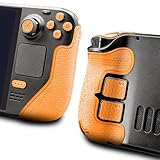
Grips change how a handheld feels in your hands, which matters over a long play session. These three differ in material and how much bulk they add.
TALONGAMES Controller Grips for Steam Deck
Textured stick-on grips that add traction without much bulk. A light option if you like the stock shape but want a better hold when your palms sweat.
As an Amazon Associate we earn from qualifying purchases at no extra cost to you.

JSAUX Silicone Grip Case Set for Steam Deck
A pair of soft silicone covers for the left and right sides. It adds cushion and protection, and it is easy to remove when you want to dock or clean the device.

Luck&Link Textured Skin Kit for Steam Deck
An anti-slip skin kit for extra grip around the shell. It suits people who want a snug, low-profile hold and do not want a bulky case.
Frequently Asked Questions About How to Choose Handheld Grip for PC Gaming
What is the best handheld grip for PC gaming in 2026?
For how to choose handheld grip for PC gaming in 2026, the JSAUX ModCase for Steam Deck is often the best choice because it offers Steam Deck LCD and OLED compatibility, PC and TPU material, and a price of $30 to $40. The Dbrand Killswitch is also a strong choice, while the Spigen Rugged Armor is a good choice for budget. Choose based on your PC gaming, your handheld, and your budget.
Do I need a grip for Steam Deck?
For Steam Deck, grip helps, with grip providing comfort use. For how to choose handheld grip for PC gaming, a grip with ergonomic design is a good choice. For a gamer, take breaks. For a grip, use safe volume.
Will a grip fit Steam Deck OLED?
For OLED, fit helps, with fit providing handheld use. For how to choose handheld grip for PC gaming, a grip with Steam Deck OLED fit is a good choice. For a gamer, check compatibility with your handheld model. For a grip, follow manufacturer guidance.
Can a grip help with hand fatigue?
Yes, ergonomic helps, with ergonomic providing comfort use. For how to choose handheld grip for PC gaming, a grip with a comfortable shape is a good choice. For a gamer, keep a grip away from heat. For a grip, test it before a long session.
Related guides
- Best Cheap RAM for Desktop Under 100 in 2026: 7 RAM Kits That Are Fast, Reliable, and Built for Desktops Under $100 Without RAM That Is Too Slow, Too Incompatible, or Too Tall
- Best Budget GPU for Students in 2026: NVIDIA GeForce RTX, AMD Radeon RX, and Intel Arc Cards Chosen by Your Course, Your Power Supply, and a Degree’s Whole Four Years
- Best Webcam for Dark Gaming Rooms in 2026: Low-Light Webcams for Streaming and Gaming
- How to Choose Scanner for PC Photo Scanning in 2026: 6 Top Scanners for PC Photo Scanning, Sharp Photos, and Easy Use
More from Amazon
Programs that pair well with the guide above. Offers and eligibility are set by Amazon and may change.
Free shipping on eligible items, Prime Video and more. Eligible new members can start with a free trial.
Start a Prime free trialAd-free music streaming. Eligible new subscribers can start with a free trial.
Try Music Unlimited freeA Prime membership for ages 18-24 with a trial period. Eligibility is set by Amazon.
See Prime for Young AdultsAudiobooks and podcasts to listen to on the go. Eligible new members can start with a free trial.
Try Audible freeAs an Amazon Associate we earn from qualifying purchases.

Write Your Review
No reviews yet. Be the first to share your experience!