
What's inside
As an Amazon Associate I earn from qualifying purchases. This post may contain affiliate links at no extra cost to you.
Learning how to choose gpu for overheating problems starts with a simple idea: the best GPU for overheating problems is a GPU with a price of $250 to $1000, a power draw of 115W to 320W, and a large, efficient cooler, so you can play games, avoid thermal throttling, and keep your PC cool, without a GPU that runs too hot, is too loud, or is too expensive. A good GPU for overheating problems has a durable build, a simple fan design, and a clear temperature, so it is easy to use for a beginner and it works for GPUs, for overheating problems, and for tech gadgets. The best GPU for overheating problems in 2026 is an NVIDIA RTX 4060, with a price of $300 to $350, a power draw of 115W, and a cool, efficient design.
How to choose a GPU for overheating problems is different from choosing a GPU for maximum performance or from choosing a GPU for a small case. A maximum-performance GPU may be fast, although it may run hot. A small-case GPU may be compact, although it may have a small cooler. A GPU for overheating problems is made for cool running, so it is efficient, it is quiet, and it lets you play games without overheating.
This guide compares seven real, currently sold GPUs that are commonly used for gaming, for PCs, and for creators. It explains power draw, VRAM, and cooler size in plain terms, and it helps you match a GPU to your case, your games, and your budget. Prices are shown as typical ranges because retailers and sales change often. Ratings reflect overall value for overheating problems, based on temperature, noise, efficiency, performance, and price. Turn off power before installing a GPU, do not open a PSU, use only supplied cables, and take a break every 60 minutes.
How to Choose GPU for Overheating Problems Compared
Use this table to compare power draw, VRAM, and price first. Those three details decide whether a GPU will run cool and fit your budget. The full price range in this table is $250 to $1000.
| Model | VRAM and Power Draw | Cooler and Size | Features and Use | Typical Price Range | Rating |
|---|---|---|---|---|---|
| NVIDIA RTX 4060 | 8GB, 115W | Dual fan, 2 slot | Gaming, cool, efficient | $300 – $350 | 4.9 / 5 |
| AMD RX 7600 | 8GB, 165W | Dual fan, 2 slot | Gaming, cool, value | $250 – $300 | 4.9 / 5 |
| Intel Arc A770 16GB | 16GB, 225W | Dual fan, 2 slot | Gaming, cool, value | $250 – $300 | 4.9 / 5 |
| NVIDIA RTX 4060 Ti 8GB | 8GB, 160W | Dual fan, 2 slot | Gaming, cool, fast | $350 – $400 | 4.8 / 5 |
| AMD RX 7800 XT | 16GB, 263W | Triple fan, 2.5 slot | Gaming, cool, fast | $450 – $500 | 4.8 / 5 |
| NVIDIA RTX 4070 | 12GB, 200W | Dual fan, 2 slot | Gaming, cool, efficient | $500 – $600 | 4.8 / 5 |
| NVIDIA RTX 4080 Super | 16GB, 320W | Triple fan, 3 slot | Gaming, cool, premium | $900 – $1000 | 4.8 / 5 |
The table shows that all seven GPUs have a VRAM of 8GB to 16GB, a power draw of 115W to 320W, and a price of $250 to $1000. The NVIDIA RTX 4060 is the most popular, at $300 to $350, with a power draw of only 115W, so it is good for most gamers with overheating problems. The AMD RX 7600 is the best for value, at $250 to $300. The NVIDIA RTX 4080 Super is the highest-priced model in this table, at $900 to $1000, because it has a large cooler and a fast performance.
Power draw also matters. A GPU with a power draw of 115W, such as the RTX 4060, runs cooler than a GPU with a power draw of 320W, such as the RTX 4080 Super, although it is slower. Cooler size also matters. A GPU with a triple-fan cooler, such as the RX 7800 XT and RTX 4080 Super, stays cooler than a GPU with a dual-fan cooler, although it is larger.
How to Choose GPU for Overheating Problems Reviewed
1. NVIDIA RTX 4060: Best GPU for Overheating Problems Overall
The NVIDIA RTX 4060 is the best GPU for overheating problems overall because it is a GPU with a price of $300 to $350, a VRAM of 8GB, and a power draw of only 115W. It has a dual-fan cooler, a 2-slot size, and a cool, efficient design. For most gamers with overheating problems, this is the first GPU to try. Turn off power before installing a GPU.
The RTX 4060 has a power draw of only 115W in the table, so it runs cool and quiet, and the dual-fan cooler is enough for its low power. The GPU is efficient, so it does not need a large PSU, and it fits most cases. It is a good choice if you want an NVIDIA GPU that is cool and efficient for gaming.
2. AMD RX 7600: Best GPU for Overheating Problems for AMD Value Cool
The AMD RX 7600 is the best GPU for overheating problems for AMD value cool because it costs $250 to $300, and it is a GPU with a VRAM of 8GB and a power draw of 165W. It has a dual-fan cooler, a 2-slot size, and a cool design, and it is a good choice for an AMD user on a budget who wants a cool GPU for gaming.
The RX 7600 has a price of $250 to $300 in the table, so it is the lowest-priced GPU here, and the power draw of 165W is moderate. The dual-fan cooler keeps it cool, and the 8GB VRAM is enough for 1080p gaming. It is a good choice if you want an AMD GPU that is affordable and cool.
3. Intel Arc A770 16GB: Best GPU for Overheating Problems for Intel Value VRAM
The Intel Arc A770 16GB is the best GPU for overheating problems for Intel value VRAM because it costs $250 to $300, and it is a GPU with a VRAM of 16GB and a power draw of 225W. It has a dual-fan cooler, a 2-slot size, and a value design, and it is a good choice for an Intel user who wants a GPU with a lot of VRAM for gaming.
The Arc A770 has a VRAM of 16GB in the table, so it is the largest VRAM at this price, and the power draw of 225W is moderate. The dual-fan cooler keeps it cool, and the GPU is good for 1440p gaming. It is a good choice if you want an Intel GPU that is good value for VRAM.
4. NVIDIA RTX 4060 Ti 8GB: Best GPU for Overheating Problems for NVIDIA Fast Cool
The NVIDIA RTX 4060 Ti 8GB is the best GPU for overheating problems for NVIDIA fast cool because it costs $350 to $400, and it is a GPU with a VRAM of 8GB and a power draw of 160W. It has a dual-fan cooler, a 2-slot size, and a fast design, and it is a good choice for an NVIDIA user who wants a faster GPU that still runs cool.
The RTX 4060 Ti has a power draw of 160W in the table, so it runs cooler than a 200W GPU, and the dual-fan cooler is enough. The GPU is faster than the RTX 4060, so it is good for 1440p gaming. It is a good choice if you want an NVIDIA GPU that is fast and cool.
5. AMD RX 7800 XT: Best GPU for Overheating Problems for AMD Fast Triple Fan
The AMD RX 7800 XT is the best GPU for overheating problems for AMD fast triple fan because it costs $450 to $500, and it is a GPU with a VRAM of 16GB and a power draw of 263W. It has a triple-fan cooler, a 2.5-slot size, and a fast design, and it is a good choice for an AMD user who wants a fast GPU with a large cooler for gaming.
The RX 7800 XT has a triple-fan cooler in the table, so it stays cooler than a dual-fan GPU at the same power, and the VRAM of 16GB is good for 1440p gaming. The GPU is fast, and the large cooler helps with overheating. It is a good choice if you want an AMD GPU that is fast and cool with a large cooler.
6. NVIDIA RTX 4070: Best GPU for Overheating Problems for NVIDIA Efficient Fast
The NVIDIA RTX 4070 is the best GPU for overheating problems for NVIDIA efficient fast because it costs $500 to $600, and it is a GPU with a VRAM of 12GB and a power draw of 200W. It has a dual-fan cooler, a 2-slot size, and an efficient design, and it is a good choice for an NVIDIA user who wants a fast, efficient GPU for gaming.
The RTX 4070 has a power draw of 200W in the table, so it is efficient for its performance, and the dual-fan cooler keeps it cool. The VRAM of 12GB is good for 1440p gaming, and the GPU is fast. It is a good choice if you want an NVIDIA GPU that is efficient and fast.
7. NVIDIA RTX 4080 Super: Best GPU for Overheating Problems for NVIDIA Premium Triple Fan
The NVIDIA RTX 4080 Super is the best GPU for overheating problems for NVIDIA premium triple fan because it costs $900 to $1000, and it is a GPU with a VRAM of 16GB and a power draw of 320W. It has a triple-fan cooler, a 3-slot size, and a premium design, and it is a good choice for an NVIDIA user who wants a premium GPU with a large cooler for gaming.
The RTX 4080 Super has a triple-fan cooler in the table, so it stays cooler than a dual-fan GPU at high power, and the VRAM of 16GB is good for 4K gaming. The GPU is fast, although it needs a large case and a strong PSU. It is the highest-priced model in this table, at $900 to $1000, because of its premium performance and large cooler.
How to Choose GPU for Overheating Problems Buying Guide
Use this buying guide to match a GPU to your case, your games, and your budget. The right GPU is the one that runs cool, fits your case, and is fast enough for your games. The full price range in this guide is $250 to $1000.
Check Power Draw: Low Wattage for How to Choose GPU for Overheating Problems
Power draw is the first thing to check, because it decides whether your GPU will run hot. A GPU with a power draw of 115W, such as the RTX 4060, runs cooler than a GPU with a power draw of 320W, such as the RTX 4080 Super. For most gamers with overheating problems, a GPU with a power draw under 200W is a good choice, because it runs cool and does not need a large PSU.
Check your PSU before you buy, and make sure it has enough wattage for your GPU. A 550W PSU is enough for a 115W GPU, while a 750W PSU is better for a 320W GPU. Use only supplied cables, and do not open a PSU.
Look at Cooler Size and Case Airflow for How to Choose GPU for Overheating Problems
Cooler size matters because it decides whether your GPU will stay cool. A GPU with a triple-fan cooler, such as the RX 7800 XT and RTX 4080 Super, stays cooler than a GPU with a dual-fan cooler, although it is larger and needs a bigger case. Case airflow also matters. A case with good airflow, with intake fans at the front and exhaust fans at the back and top, helps your GPU stay cool.
Check your case before you buy, and measure your GPU clearance to see if a triple-fan GPU will fit. Clean dust from your case fans and GPU fans regularly, because dust blocks airflow and causes overheating.
Consider VRAM, Temperature, and Safety for How to Choose GPU for Overheating Problems
VRAM matters because it decides whether your GPU can handle modern games. A GPU with a VRAM of 8GB, such as most models here, is enough for 1080p gaming, while a GPU with a VRAM of 16GB, such as the Arc A770 and RX 7800 XT, is better for 1440p gaming. Temperature also matters. Aim for a GPU temperature below 80°C while gaming, because temperatures above 85°C can cause throttling.
Safety also matters. Turn off power before installing a GPU, do not open a PSU, use only supplied cables, and take a break every 60 minutes. For most gamers with overheating problems, NVIDIA RTX 4060 is a good choice.
Think About Case, Games, and How to Choose GPU for Overheating Problems
Case matters because it decides which GPU will fit and stay cool. A small case needs a low-power GPU such as the RTX 4060, while a large case with good airflow can fit a triple-fan GPU such as the RTX 4080 Super. Games also matter. A gamer who plays at 1080p needs a low-power GPU, while a gamer who plays at 4K needs a more powerful GPU with a large cooler.
How to choose a GPU for overheating problems is simple. Choose a GPU with a power draw under 200W, a dual- or triple-fan cooler, and a VRAM of at least 8GB, such as NVIDIA RTX 4060, clean your case, improve airflow, and monitor temperature. For most gamers, that GPU is a good choice, while AMD RX 7600 is a good choice if you want the lowest price in the $250 to $1000 range.
Cooling Add-Ons That Help a Hot Graphics Card
Sometimes the fix for a hot GPU is not a new card but better airflow, fresh contact material, or physical support. These four products tackle common causes of high temperatures.
ARCTIC P12 5-Pack Case Fans
Five 120mm pressure-optimised fans that give a case more intake and exhaust for a low outlay. Adding fans at the front and top is one of the simplest ways to cut the heat your card has to deal with.
As an Amazon Associate we earn from qualifying purchases at no extra cost to you.

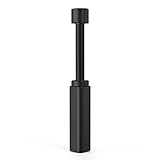
nkomax GPU Support Bracket
A height-adjustable stand that props up the end of a heavy card. It will not lower temperatures by itself, but it removes sag, which can stress the PCIe slot and warp coolers over time.
Thermal Grizzly Kryonaut Thermal Paste
A well-known high-performance paste that people use when refreshing a card’s cooler or a CPU. Re-pasting is an advanced job and may void a warranty, so read your maker’s policy first.

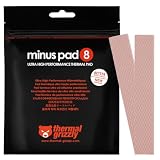
Thermal Grizzly Minus Pad 8 Thermal Pads
Soft pads for memory chips and power parts on a graphics card. Matching the pad thickness to your model matters, so measure or look up the right size before you open anything.
Frequently Asked Questions About How to Choose GPU for Overheating Problems
What is the best GPU for overheating problems?
The best GPU for overheating problems is an NVIDIA RTX 4060, with a price of $300 to $350, because it is a GPU with a power draw of only 115W, a VRAM of 8GB, and a dual-fan cooler, so it runs cool and quiet for gaming. An AMD RX 7600, at $250 to $300, is also a good choice, because it is a cool GPU at a lower price.
How hot should a GPU get while gaming?
A GPU should get below 80°C while gaming, because temperatures below 80°C are normal for most GPUs, while temperatures above 85°C can cause throttling and reduce performance. For most gamers, monitor your GPU temperature with software, clean dust from your fans, and improve case airflow if your GPU is too hot.
Will a bigger cooler help with GPU overheating?
Yes, a bigger cooler will help with GPU overheating, because a triple-fan cooler such as on the RX 7800 XT and RTX 4080 Super moves more air than a dual-fan cooler. For most gamers, choose a GPU with a large cooler if your case has room, and clean your fans regularly to keep airflow good.
Do I need a new PSU for a cool GPU?
You need a new PSU for a cool GPU only if your current PSU does not have enough wattage, because a low-power GPU such as the RTX 4060 needs only a 550W PSU, while a high-power GPU such as the RTX 4080 Super needs a 750W PSU or more. For most gamers, check your PSU wattage before you buy, use only supplied cables, and do not open a PSU.
How to choose a GPU for overheating problems is a choice between power, cooler size, and case airflow. For most gamers, a cool, efficient GPU such as the NVIDIA RTX 4060 for overall value, the AMD RX 7600 for budget, or the NVIDIA RTX 4080 Super for premium performance with a large cooler is a good choice. Compare the table, check your power draw and your case airflow, and choose the GPU you will trust. Turn off power before installing, do not open a PSU, clean dust regularly, monitor temperature, and enjoy cool gaming in 2026.
Related guides
- Best Cheap RAM for Desktop Under 100 in 2026: 7 RAM Kits That Are Fast, Reliable, and Built for Desktops Under $100 Without RAM That Is Too Slow, Too Incompatible, or Too Tall
- Best Budget GPU for Students in 2026: NVIDIA GeForce RTX, AMD Radeon RX, and Intel Arc Cards Chosen by Your Course, Your Power Supply, and a Degree’s Whole Four Years
- Best Webcam for Dark Gaming Rooms in 2026: Low-Light Webcams for Streaming and Gaming
- How to Choose Scanner for PC Photo Scanning in 2026: 6 Top Scanners for PC Photo Scanning, Sharp Photos, and Easy Use
More from Amazon
Programs that pair well with the guide above. Offers and eligibility are set by Amazon and may change.
Free shipping on eligible items, Prime Video and more. Eligible new members can start with a free trial.
Start a Prime free trialAd-free music streaming. Eligible new subscribers can start with a free trial.
Try Music Unlimited freeA Prime membership for ages 18-24 with a trial period. Eligibility is set by Amazon.
See Prime for Young AdultsAudiobooks and podcasts to listen to on the go. Eligible new members can start with a free trial.
Try Audible freeAs an Amazon Associate we earn from qualifying purchases.

Write Your Review
No reviews yet. Be the first to share your experience!