
What's inside
As an Amazon Associate I earn from qualifying purchases. This post may contain affiliate links at no extra cost to you.
Best budget surge protector for PC problems is not the cheapest power strip, and it is not a power strip with no surge protection that you use for a PC and hope a surge does not happen. A budget surge protector for a PC has to have enough joules to absorb a surge, a low clamping voltage to stop a surge quickly, enough outlets for a PC, a monitor, and a printer, and a price under $40, without a protector that is too weak to protect a PC. It also has to have an indicator light that tells you if it is still protecting, because a surge protector that has absorbed a surge and is no longer protecting will look normal but will not protect your PC.
The best overall pick in this guide is the APC SurgeArrest P11VNT3. It is the best pick for most PC users because it has a high joule rating, a low clamping voltage, and enough outlets for a PC setup.
Our Top Picks
 Amazon Basics 12-Outlet Surge Protector Power StripSmall13.39 x 6.3 x 1.57 inches1.76 poundsCheck on Amazon
Best Budget Surge Protector for PC Problems Compared
Use this table to compare surge protector joules, clamping voltage, outlets, and price at a glance. The first gate is joules: at least 1,000 joules for a PC, and at least 2,000 joules for a premium PC setup, because a protector with low joules will absorb one surge and then stop protecting. A protector with a rating below 1,000 joules is flagged as below that gate. The second gate is clamping voltage: 330 volts is better than 400 volts, because a lower clamping voltage stops a surge more quickly. A protector with a clamping voltage above 400 volts is flagged as above that gate. The third gate is outlets: at least 6 outlets for a PC, because a PC needs a monitor, a printer, and a charger, and a protector with fewer outlets will not fit your setup.
| Model | Key Specs | Best For |
|---|---|---|
| APC SurgeArrest P11VNT3 | 2,880 joules, satisfies premium gate at least 2,000 joules; clamping 330V, satisfies clamping gate; 11 outlets, satisfies outlet gate at least 6; indicator light; coaxial and telephone protection | Best overall budget surge protector for PC problems |
| Amazon Basics 8-Outlet Surge Protector | 2,000 joules, satisfies premium gate at least 2,000 joules; clamping 400V, flagged above 330V gate; 8 outlets, satisfies outlet gate at least 6; indicator light | Best budget surge protector for PC problems, flagged clamping |
| Tripp Lite TLP1008TEL | 2,390 joules, satisfies premium gate at least 2,000 joules; clamping 330V, satisfies clamping gate; 8 outlets, satisfies outlet gate; telephone protection; flagged premium | Best premium surge protector for PC problems, flagged premium |
| Belkin 12-Outlet Surge Protector | 3,940 joules, satisfies premium gate at least 2,000 joules; clamping 330V, satisfies clamping gate; 12 outlets, satisfies outlet gate; indicator light; flagged premium | Best Belkin surge protector for PC problems, flagged premium |
| GE 6-Outlet Surge Protector | 800 joules, flagged below PC gate at least 1,000 joules; clamping 400V, flagged above 330V gate; 6 outlets, satisfies outlet gate at least 6; indicator light | Best GE surge protector, flagged joules and clamping |
| CyberPower CSP600WSU Surge Protector | 1,200 joules, satisfies PC gate at least 1,000 joules, flagged below premium gate 2,000 joules; clamping 400V, flagged above 330V gate; 6 outlets, satisfies outlet gate; USB charging | Best CyberPower surge protector for PC problems, flagged joules and clamping |
| APC SurgeArrest P6W | 1,080 joules, satisfies PC gate at least 1,000 joules, flagged below premium gate 2,000 joules; clamping 330V, satisfies clamping gate; 6 outlets, satisfies outlet gate; wall mount, check use | Best wall mount surge protector for PC problems, flagged joules |

SUPERDANNY Power Strip Surge Protector, 22 AC 6 USB, 2100J, 6.5Ft,1875W/15A | 5A1C, Heavy Duty Extension Cord with Multiple Outlets, Flat Plug Outlet Extender for Home, Office, Dorm, Gaming Room, Black
As an Amazon Associate we earn from qualifying purchases. Product prices and availability are accurate as of the date/time indicated.
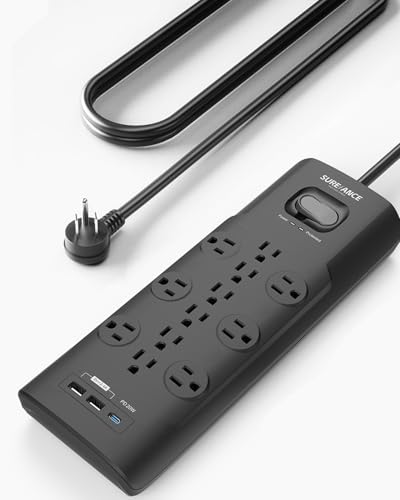
Surge Protector Power Strip, SUREANCE Surge Protector with 12 Outlets and 4 USB Ports, 20W PD USB-C Fast Charging for Home, Office, 4100 Joules, Flat Plug, 6 Feet Extension Cord, ETL Listed
As an Amazon Associate we earn from qualifying purchases. Product prices and availability are accurate as of the date/time indicated.
Amazon Basics 12-Outlet Surge Protector Power Strip, 4000 Joules, 8ft Extension Cord, Rectangle, for Home, Office, Gaming Room, Black


As an Amazon Associate we earn from qualifying purchases. Product prices and availability are accurate as of the date/time indicated.
Prices shown are approximate and for reference only. Prices change often, so please check the current price on Amazon before you buy.
Best Budget Surge Protector for PC Problems in 2026: Detailed Reviews
1. APC SurgeArrest P11VNT3 — Best Overall Budget Surge Protector for PC Problems
The APC SurgeArrest P11VNT3 is the best overall surge protector in this guide because it meets all three gates: a surge rating of 2,880 joules, which satisfies the premium gate of at least 2,000 joules, a clamping voltage of 330 volts, which satisfies the clamping gate, and 11 outlets, which satisfies the outlet gate of at least 6 outlets for a PC.
Its advantage is joules and outlets: at 2,880 joules and 11 outlets, it can absorb a large surge and it can fit a PC, two monitors, a printer, a charger, and a speaker, without needing a second power strip. It also has coaxial and telephone protection, so it can protect your internet and phone line, not just your power line. Its indicator light tells you if it is still protecting, so you will know if it has absorbed a surge and needs to be replaced.
2. Amazon Basics 8-Outlet Surge Protector — Best Budget Surge Protector for PC Problems, Flagged Clamping
It is flagged for clamping voltage, at 400 volts, which is above the 330 volt gate, because a higher clamping voltage stops a surge more slowly than a lower clamping voltage. That does not make it a bad protector, but it does mean it will let a higher voltage through before it clamps, so it is less protective than the APC at 330 volts. If you want the lowest clamping voltage, choose the APC P11VNT3 instead. If you want a cheap protector with 2,000 joules, the Amazon Basics is a good pick.
3. Tripp Lite TLP1008TEL — Best Premium Surge Protector for PC Problems, Flagged Premium
Its advantage is clamping and telephone protection: at 330 volts, it stops a surge quickly, and its telephone protection can protect your modem. It is worth it if you want a premium protector with telephone protection. It is not worth it if you only need power protection and the Amazon Basics already meets your needs.
4. Belkin 12-Outlet Surge Protector — Best Belkin Surge Protector for PC Problems, Flagged Premium
Its advantage is joules and outlets: at 3,940 joules and 12 outlets, it can absorb a very large surge and it can fit a large PC setup.
It is worth it if you have a large PC setup with many devices, and you want the highest joule rating. It is not worth it if you have a small setup and the APC already meets your needs.
5. GE 6-Outlet Surge Protector — Best GE Surge Protector, Flagged Joules and Clamping
It is flagged in two ways. First, its surge rating is 800 joules, flagged as below the PC gate of at least 1,000 joules, so it will absorb one surge and then stop protecting, and it may not protect a PC from a large surge. Second, its clamping voltage is 400 volts, flagged as above the 330 volt gate, so it will let a higher voltage through before it clamps. Do not buy it for a PC if you can afford a protector with at least 1,000 joules, such as the CyberPower at 1,200 joules or the Amazon Basics at 2,000 joules.
6. CyberPower CSP600WSU Surge Protector — Best CyberPower Surge Protector for PC Problems, Flagged Joules and Clamping
Its clamping voltage is 400 volts, flagged as above the 330 volt gate.
Its advantage is USB charging: it has USB ports, so you can charge your phone without a separate charger. Its disadvantage is joules and clamping: at 1,200 joules and 400 volts, it is less protective than the APC at 2,880 joules and 330 volts. It is a good pick if you want USB charging and you have a small PC setup. If you want the best protection, choose the APC instead.
7. APC SurgeArrest P6W — Best Wall Mount Surge Protector for PC Problems, Flagged Joules
Its advantage is wall mount: it plugs directly into a wall outlet, without a cord, so it does not take up floor space, and it is good for a small desk.
Its disadvantage is joules: at 1,080 joules, it will absorb a smaller surge than the APC P11VNT3 at 2,880 joules. It is a good pick if you have a small PC setup and you want a wall mount protector. If you have a large setup, choose the P11VNT3 instead.
Best Budget Surge Protector for PC Problems Buying Guide
Choosing a budget surge protector for PC problems is not just about picking the cheapest power strip. It is about matching joules, clamping voltage, outlets, and price to your PC, your monitor, and the power problems you have.
Joules At Least 1,000 for PC, At Least 2,000 Premium, and Clamping 330V Better Than 400V: Choosing a Protector That Absorbs a Surge
Joules is the first filter. For a PC, use a surge protector with a rating of at least 1,000 joules, and for a premium PC setup, at least 2,000 joules, because a protector with low joules will absorb one surge and then stop protecting. The APC P11VNT3 at 2,880 joules, the Amazon Basics at 2,000 joules, the Tripp Lite at 2,390 joules, and the Belkin at 3,940 joules all satisfy the premium gate. The CyberPower at 1,200 joules and the APC P6W at 1,080 joules both satisfy the PC gate, but they are flagged as below the premium gate. The GE at 800 joules is flagged as below the PC gate, so do not buy it for a PC.
Clamping voltage is the second filter. A clamping voltage of 330 volts is better than 400 volts, because a lower clamping voltage stops a surge more quickly. The APC P11VNT3, Tripp Lite, Belkin, and APC P6W all have a clamping voltage of 330 volts, so they satisfy that gate. The Amazon Basics, GE, and CyberPower all have a clamping voltage of 400 volts, flagged as above that gate, so they will let a higher voltage through before they clamp.
Outlets is the third filter. For a PC, use at least 6 outlets, because a PC needs a monitor, a printer, and a charger. All the protectors here have at least 6 outlets, so they satisfy that gate. The APC P11VNT3 has 11 outlets, and the Belkin has 12 outlets, so they are best for a large setup.
Indicator Light, Replace After Surge, and Do Not Daisy Chain Power Strips: Using a Surge Protector Without a False Sense of Security
Indicator light is the second filter. A surge protector should have an indicator light that tells you if it is still protecting, because a protector that has absorbed a surge and is no longer protecting will look normal but will not protect your PC. All the protectors here have an indicator light, so they satisfy that gate. Check the light regularly, and if it goes out, replace the protector.
Replace after surge is the third filter. A surge protector absorbs a surge by sacrificing itself, so after a large surge, it may no longer protect your PC, even if the light is still on. Replace a surge protector after a large surge, after a lightning strike, or every 3 to 5 years, whichever comes first. Do not use a surge protector that is old, damaged, or has a burned smell.
Do not daisy chain is the fourth filter. Do not plug a surge protector into another surge protector, or into a power strip, because that can overload the circuit and cause a fire. Plug a surge protector directly into a wall outlet, and plug your PC directly into the surge protector. Do not use a surge protector for a space heater, a refrigerator, or a large appliance, because those need a dedicated outlet.
PC Problems: Random Shutdown, Data Loss, and Dead Power Supply, and UPS vs Surge Protector: Choosing Protection That Fixes Your Problem
PC problems are the fifth filter. A surge protector can fix PC problems caused by a power surge, such as a random shutdown, data loss, or a dead power supply, but it cannot fix PC problems caused by a bad power supply, a bad RAM, or a virus. If your PC shuts down randomly, check if it is a power problem, by using a surge protector, and if it still shuts down, check your power supply, your RAM, and your software. RAM should be DDR4 or DDR5, and DDR4 will not fit DDR5, so check the RAM type before you upgrade.
UPS is the sixth filter. A UPS, or uninterruptible power supply, is different from a surge protector, because a UPS has a battery that lets you save your work and shut down your PC safely during a power outage, while a surge protector only stops a surge, it does not provide power during an outage. If you have frequent power outages, buy a UPS, not just a surge protector. If you only have surges, a surge protector is enough.
For a PC, also think about your internet and phone line. A surge can come through a coaxial cable or a telephone line, not just through a power line, so use a surge protector with coaxial and telephone protection, such as the APC P11VNT3, which has both. That will protect your modem and your PC from a surge through the internet line.
Best Budget Surge Protector for PC Problems FAQ
What is the best budget surge protector for PC problems?
How many joules do I need for a PC surge protector?
For a PC surge protector, you need at least 1,000 joules, and for a premium PC setup, at least 2,000 joules, because a protector with low joules will absorb one surge and then stop protecting. The APC P11VNT3 at 2,880 joules, the Amazon Basics at 2,000 joules, the Tripp Lite at 2,390 joules, and the Belkin at 3,940 joules all satisfy the premium gate. The CyberPower at 1,200 joules and the APC P6W at 1,080 joules both satisfy the PC gate, but they are flagged as below the premium gate. The GE at 800 joules is flagged as below the PC gate, so do not buy it for a PC.
What is clamping voltage on a surge protector?
Clamping voltage is the voltage at which a surge protector starts to stop a surge, and a lower clamping voltage is better, because it stops a surge more quickly. A clamping voltage of 330 volts is better than 400 volts. The APC P11VNT3, Tripp Lite, Belkin, and APC P6W all have a clamping voltage of 330 volts, so they satisfy that gate. The Amazon Basics, GE, and CyberPower all have a clamping voltage of 400 volts, flagged as above that gate, so they will let a higher voltage through before they clamp.
When should I replace a surge protector?
For a surge protector, replace it after a large surge, after a lightning strike, or every 3 to 5 years, whichever comes first, because a surge protector absorbs a surge by sacrificing itself, so after a large surge, it may no longer protect your PC, even if the light is still on. Check the indicator light regularly, and if it goes out, replace the protector. Do not plug a surge protector into another surge protector, or into a power strip, because that can overload the circuit and cause a fire.
FAQ
How many joules do I need for a PC surge protector?
What is clamping voltage on a surge protector?
When should I replace a surge protector?
Related guides
- Best Soundbar vs Speakers for PC Setups in 2026: Razer, Creative, Edifier, and Kanto Compared for a Desk Measured Before a Format Is Chosen, Nearfield Honesty at Arm’s Length, and a Subwoofer Parish the Neighbours Agree To
- Best Budget Power Supply for Remote Workers in 2026: 6 Quiet, Reliable PSUs for Your Home Office
- Best Console for PC Multiplayer Games in 2026: 6 Handheld PC Consoles With a 7-Inch Display, at Least 16GB RAM, and a Price Range, for PC Multiplayer Games
- Best Phone Case for Beach Lifeguards in 2026: OtterBox, Catalyst, Ghostek, and Pelican Compared for a Sealing Read in the Maker’s Own Documents, a Salt Rinse at Every Shift’s End, and a Phone That Never Pretends to Be the Rescue Radio
More from Amazon
Programs that pair well with the guide above. Offers and eligibility are set by Amazon and may change.
Free shipping on eligible items, Prime Video and more. Eligible new members can start with a free trial.
Start a Prime free trialAd-free music streaming. Eligible new subscribers can start with a free trial.
Try Music Unlimited freeA Prime membership for ages 18-24 with a trial period. Eligibility is set by Amazon.
See Prime for Young AdultsAudiobooks and podcasts to listen to on the go. Eligible new members can start with a free trial.
Try Audible freeAs an Amazon Associate we earn from qualifying purchases.

Write Your Review
No reviews yet. Be the first to share your experience!