
What's inside
- Best Starter ATX Case Build Kit: Quick Comparison Table
- What Is the Best Starter ATX Case Build Kit?
- Best Starter ATX Case Build Kit Reviewed
- Buying Guide: How to Choose the Best Starter ATX Case Build Kit
- How to Build Your First PC in a Starter ATX Case
- Which Best Starter ATX Case Build Kit Should You Buy?
- Frequently Asked Questions About the Best Starter ATX Case Build Kit
As an Amazon Associate I earn from qualifying purchases. This post may contain affiliate links at no extra cost to you.
It helps a first-time PC builder build a desktop PC, fit a graphics card, keep components cool, and manage cables, without a case that is too small, too hard to build in, or too expensive for a starter build. A good starter ATX case build kit is not just the cheapest case on the shelf. It is a practical kit for a builder who needs a simple, spacious case that fits standard parts, and the wrong one can be too small for a graphics card, too hot for a gaming PC, or too hard to cable manage.
That combination gives enough room for a standard build, enough airflow for a mid-range GPU, and enough value for a budget. A smaller case can work well for a simple office PC, while a larger case is better for a gaming PC with a long graphics card.
At thetechchart.com, we focus on tech gadgets. For this guide to the best starter ATX case build kit in 2026, we compared current ATX cases that are widely sold, designed for first-time builders, and suitable for a builder who wants the best starter ATX case build kit. We looked at form factor, dimensions, GPU clearance, fan support, and price. Dimensions, GPU clearance, and fan figures are manufacturer listings, and real performance depends on the parts, the cooling, and how the case is used. Always check the case specifications before you buy, and always check that it fits your motherboard, GPU, and cooler.
Our Top Picks
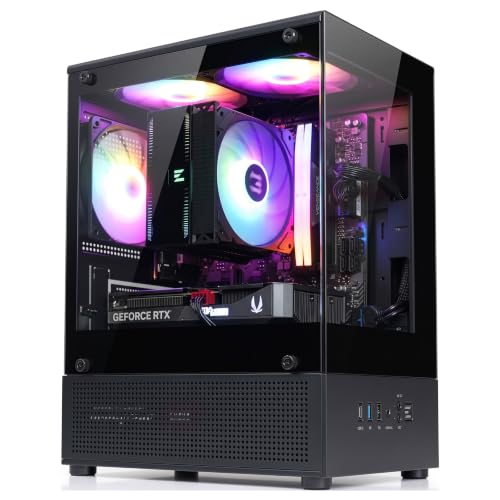 Zalman CUBIX-G Micro-ATX MATX Compact Mini Tower Gaming11.42 x 7.87 x 15.63 inches7.05 poundsCheck on Amazon
Best Starter ATX Case Build Kit: Quick Comparison Table
The table below compares seven starter ATX case build kits. Form factor is the motherboard support, where given. Dimensions are the case dimensions, where given. GPU clearance is the maximum GPU length, where given. Fans is the number of pre-installed fans, where given. Side panel is the side panel type, where given. Best for is a note on what the case is best for, such as best starter ATX case build kit.
| Starter ATX Case Build Kit | Form Factor | Dimensions | GPU Clearance | Fans | Side Panel | Best For |
|---|---|---|---|---|---|---|
| NZXT H5 Flow ATX Mid-Tower Case | ATX, Micro-ATX, Mini-ITX | 18.5 x 8.5 inches | Up to 365mm | 2 fans | Tempered glass | Best overall, best starter ATX case build kit |
| Corsair 4000D Airflow ATX Case | ATX, Micro-ATX, Mini-ITX | 18.9 x 9.1 inches | Up to 360mm | 2 fans | Tempered glass | Best for Corsair, 4000D Airflow |
| Lian Li Lancool 216 ATX Case | ATX, Micro-ATX, Mini-ITX | 19.2 x 8.9 inches | Up to 392mm | 2 fans | Tempered glass | Best for Lian Li, Lancool 216 |
| Fractal Design Pop Air ATX Case | ATX, Micro-ATX, Mini-ITX | 18.9 x 8.5 inches | Up to 405mm | 3 fans | Tempered glass | Best for Fractal, Pop Air |
| Montech Air 903 Max ATX Case | ATX, Micro-ATX, Mini-ITX | 19.3 x 9.2 inches | Up to 400mm | 3 fans | Tempered glass | Best value, Montech Air 903 Max |
| Phanteks XT Pro Ultra ATX Case | ATX, Micro-ATX, Mini-ITX | 19.1 x 9.1 inches | Up to 435mm | 4 fans | Tempered glass | Best for Phanteks, XT Pro Ultra |
| Cooler Master MasterBox Q300L Micro-ATX Case | Micro-ATX, Mini-ITX | 15.1 x 9.1 inches | Up to 360mm | 1 fan | Acrylic | Best budget, Cooler Master Q300L |

MUSETEX ATX PC Case 7 PWM ARGB Fans Pre-Installed, Type-C Mid Tower Computer Case with Full-View Dual Tempered Glass, Gaming PC Case, Black(K2)
As an Amazon Associate we earn from qualifying purchases. Product prices and availability are accurate as of the date/time indicated.

Open Air PC Case, PC Test Bench PC Case, ATX Open Frame Computer Case, DIY PC Rack for ATX MATX ITX Motherboards


As an Amazon Associate we earn from qualifying purchases. Product prices and availability are accurate as of the date/time indicated.
Zalman CUBIX-G Micro-ATX MATX Compact Mini Tower Gaming PC Case, Black | Includes 3x 120mm FRGB Fans, Panoramic View Tempered Glass Panels, USB Type-C, Up to 280mm GPU Support


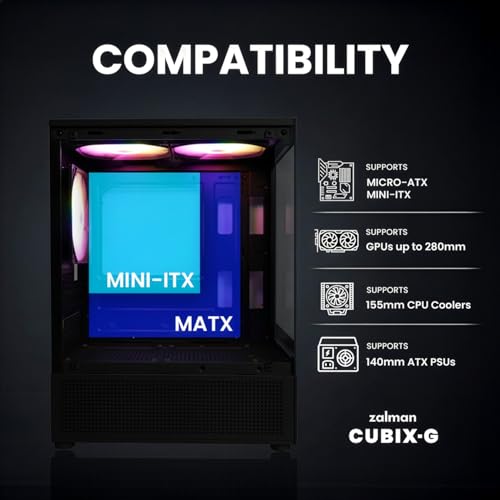

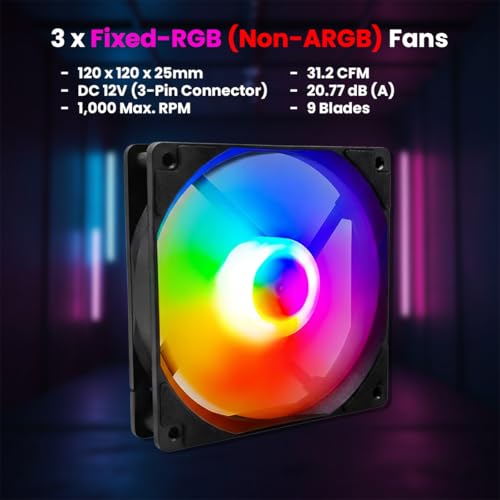


As an Amazon Associate we earn from qualifying purchases. Product prices and availability are accurate as of the date/time indicated.
Prices shown are approximate and for reference only. Prices change often, so please check the current price on Amazon before you buy.
Note: Dimensions, GPU clearance, and fan figures are manufacturer listings, and a case that lists a GPU clearance of 365mm may have less clearance with a front radiator, because a radiator takes space. A case that lists 2 fans may need more fans for a gaming build. Always check the case’s form factor, GPU clearance, and fan support in the listing, and confirm the current price with the retailer. The best starter ATX case build kit should be measured for your GPU and cooler before you buy.
What Is the Best Starter ATX Case Build Kit?
It helps you build, cool, and upgrade, without a small case that cannot fit a GPU, or a large case that is too big for a desk.
The best starter ATX case build kit is different from a prebuilt PC alone, which is made for a ready-to-use computer, while a case build kit is made for a builder who wants to choose their own parts. It is also different from a laptop alone, which is made for portability, while an ATX case is made for a desktop with upgradeable parts.
The best starter ATX case build kit is best for a first-time PC builder who wants to build a gaming or office PC, has a budget of $40 to $120 for a case, and wants a simple, spacious case that can be built in easily.
Best Starter ATX Case Build Kit Reviewed
1. NZXT H5 Flow ATX Mid-Tower Case – Best Starter ATX Case Build Kit Overall
It is one of the most popular starter cases, and it is easy to see why: it is easy to build in, it has good airflow, and it looks clean.
NZXT designs the H5 Flow with a focus on a case that is made for first-time builders. The perforated front panel helps airflow, the cable management is simple, and the case is spacious for a mid-tower. It is a good choice for a builder who wants a premium starter case.
The main limitation is fans. At 2 fans, it may need an extra fan for a hot gaming build, though it is still good for most builds. Choose the NZXT H5 Flow if you want the best overall case, you want NZXT, and you have a budget of $90 to $120.
2. Corsair 4000D Airflow ATX Case – Best Starter ATX Case Build Kit for Corsair Users
It is a good choice for a builder who uses Corsair and wants a case with excellent airflow.
Corsair designs the 4000D Airflow with a focus on a case that is made for cooling. The front panel is perforated, the cable management is excellent, and the case is easy to build in. It is a practical choice for a builder who wants a Corsair case.
The main limitation is similar to NZXT, though it is a Corsair product. Choose the Corsair 4000D Airflow if you want Corsair, you want good airflow, and you have a budget of $90 to $120.
3. Lian Li Lancool 216 ATX Case – Best Starter ATX Case Build Kit for Lian Li Users
It is a good choice for a builder who wants a Lian Li case with a large GPU clearance.
Lian Li designs the Lancool 216 with a focus on a case that is spacious and well-ventilated. The case has a mesh front, large fans, and a roomy interior for a long GPU. It is a practical choice for a builder who wants a Lian Li case for a gaming build.
The main limitation is size. At 19.2 inches tall, it is slightly larger, though it is still a mid-tower. Choose the Lian Li Lancool 216 if you want Lian Li, you want a large GPU clearance, and you have a budget of $90 to $120.
4. Fractal Design Pop Air ATX Case – Best Starter ATX Case Build Kit for Fractal Users
It is a good choice for a builder who wants a Fractal case with 3 pre-installed fans.
Fractal designs the Pop Air with a focus on a case that is simple, colourful, and easy to build in. The case has a mesh front, 3 fans, and a large GPU clearance. It is a practical choice for a builder who wants a Fractal case at a mid-price.
The main limitation is that it is not as premium as NZXT, though it is still a good case. Choose the Fractal Pop Air if you want Fractal, you want 3 fans, and you have a budget of $80 to $110.
5. Montech Air 903 Max ATX Case – Best Starter ATX Case Build Kit for Value
It is a good choice for a builder who wants a value case with 3 fans and a large GPU clearance.
Montech designs the Air 903 Max with a focus on a case that is affordable and well-ventilated. The case has a mesh front, 3 large fans, and a spacious interior. It is a practical choice for a builder who wants a good case at a lower price.
The main limitation is brand recognition compared with NZXT or Corsair, though it is still a good case. Choose the Montech Air 903 Max if you want a value case, you want 3 fans, and you have a budget of $70 to $90.
6. Phanteks XT Pro Ultra ATX Case – Best Starter ATX Case Build Kit for Phanteks Users
It is a good choice for a builder who wants a Phanteks case with 4 fans and the largest GPU clearance in this guide.
Phanteks designs the XT Pro Ultra with a focus on a case that is made for airflow and for a large GPU. The case has 4 fans, a mesh front, and a roomy interior. It is a practical choice for a builder who wants a Phanteks case for a gaming build.
The main limitation is similar to Fractal, though it offers more fans. Choose the Phanteks XT Pro Ultra if you want Phanteks, you want 4 fans, and you have a budget of $80 to $110.
7. Cooler Master MasterBox Q300L Micro-ATX Case – Best Starter ATX Case Build Kit for Budget Use
It is the lowest-priced case in this guide, and it is a good choice for a builder on a tight budget who wants a small, simple case.
Cooler Master designs the Q300L with a focus on a case that is affordable and compact. The case is smaller than a mid-tower, it has a magnetic dust filter, and it is easy to build in for a Micro-ATX board. It is a practical choice for a builder who wants a budget case for an office PC.
The main limitation is form factor. It does not support full ATX boards, though it is good for Micro-ATX. Choose the Cooler Master Q300L if you want a budget case, you want Cooler Master, and you have a budget of $40 to $60, and you use a Micro-ATX board.
Buying Guide: How to Choose the Best Starter ATX Case Build Kit
Before you buy, think about your motherboard, whether it is ATX, Micro-ATX, or Mini-ITX, your GPU length, whether it is 250mm or 400mm, your cooler height, whether it is an air cooler or an AIO, and how much you want to spend. A case that is perfect for a Micro-ATX board may be too small for an ATX board, and a case that is perfect for a short GPU may be too small for a long GPU.
1. Form Factor: ATX vs Micro-ATX, and Your Motherboard
Form factor is the first decision. An ATX case supports ATX, Micro-ATX, and Mini-ITX boards, while a Micro-ATX case supports only Micro-ATX and Mini-ITX. An ATX case gives more room for expansion, while a Micro-ATX case is smaller and cheaper.
Choose an ATX case if you have an ATX board, you want room for upgrades, or you have a budget of $70 to $120. Choose a Micro-ATX case if you have a Micro-ATX board, you want a small case, or you have a budget of $40 to $60. For most first-time builders, an ATX mid-tower is the best choice, because it fits standard parts and is easy to build in.
2. GPU Clearance: 360mm vs 435mm, and Your Graphics Card
GPU clearance is the second decision. A GPU clearance of 360mm is enough for most mid-range GPUs, while a clearance of 435mm is better for a long, high-end GPU. Check your GPU length in the listing before you buy a case.
Choose a case with a GPU clearance of 360mm if your GPU is short, you have a mid-range GPU, or you have a budget of $40 to $120. Choose a case with a GPU clearance of 400mm or more if your GPU is long, you have a high-end GPU, or you have a budget of $70 to $110. For most builders, a clearance of 360mm is enough, though a larger clearance gives more options.
3. Airflow: Mesh Front vs Solid Front, and Your Cooling
Airflow is the third decision. A mesh front panel lets more air in than a solid front panel, which helps keep a gaming PC cool. A case with 3 or 4 fans gives better airflow than a case with 1 or 2 fans.
Choose a mesh front case if you build a gaming PC, you want good airflow, or you have a budget of $70 to $120. Choose a solid front case only if you want a quieter PC, you have a low-power build, or you have a specific look. For most first-time builders, a mesh front case with 3 fans is the best choice for cooling.
4. Fans: 1 Fan vs 4 Fans, and Your Build
Fans are the fourth decision. A case with 1 fan needs more fans for a gaming build, while a case with 4 fans is ready for a gaming build. A case with 2 or 3 fans is a good starting point for most builds.
Choose a case with 3 or 4 fans such as Fractal Pop Air or Phanteks XT Pro Ultra if you build a gaming PC, you want good airflow, or you have a budget of $80 to $110. Choose a case with 2 fans if you build an office PC, you want a lower price, or you have a budget of $90 to $120. For most builders, 3 fans is a good balance.
5. Cable Management: Space Behind the Tray, and Your Build
Cable management is the fifth decision. A case with space behind the motherboard tray, cable routing holes, and velcro straps makes it easier to build a clean PC. A case with good cable management also helps airflow.
Choose a case with good cable management if you are a first-time builder, you want a clean build, or you have a budget of $70 to $120. All cases in this guide offer decent cable management, though NZXT and Corsair are known for it. For most builders, a case with at least 20mm of space behind the tray is enough.
6. Price, Total Cost, and Choosing a Starter ATX Case Build Kit on a Budget
Consider total cost as well as price. Do not buy the cheapest case if it cannot fit your GPU, and do not buy the most expensive case if you only build an office PC. A case that matches your motherboard, your GPU, and your budget will make your first build easier than a case that is cheap but too small, or premium but too expensive for your parts.
How to Build Your First PC in a Starter ATX Case
Building your first PC in a starter ATX case starts with installing the motherboard standoffs, placing the motherboard in the case, and screwing it in. Install the CPU, RAM, and cooler on the motherboard before you place it in the case if you can, then install the power supply, connect the cables, and install the GPU last. Use cable ties to manage cables, and test the PC before you close the side panel.
For a first build, read the manual, watch a build guide, and take your time. Check that all cables are connected, that the GPU is seated fully, and that the fans spin. After the build, install the operating system, update drivers, and test temperatures. If you are unsure, ask a friend or a local PC shop for help.
Which Best Starter ATX Case Build Kit Should You Buy?
If you want the best starter ATX case build kit, buy the NZXT H5 Flow ATX Mid-Tower Case.
If you want Corsair, buy the Corsair 4000D Airflow ATX Case. If you want Lian Li, buy the Lian Li Lancool 216 ATX Case. If you want Fractal, buy the Fractal Design Pop Air ATX Case. If you want value, buy the Montech Air 903 Max ATX Case. If you want Phanteks, buy the Phanteks XT Pro Ultra ATX Case. If you want a budget case, buy the Cooler Master MasterBox Q300L Micro-ATX Case.
All seven cases in this guide are currently sold, designed for first-time builders, and suitable for a builder who wants the best starter ATX case build kit. Pick the one that matches your motherboard, whether it is ATX or Micro-ATX, your GPU length, and your budget, and always check that it fits your parts before you buy.
Disclosure: thetechchart.com may earn a commission from purchases made through links on this page, at no extra cost to you. Dimensions, GPU clearance, and fan figures are manufacturer claims and can vary by model, parts, and use.
Frequently Asked Questions About the Best Starter ATX Case Build Kit
What is the best ATX case for a first-time builder?
Choose NZXT if you want the best overall case, and Corsair if you want the best airflow.
Do I need an ATX case or a Micro-ATX case?
Choose ATX if you want room for upgrades, and Micro-ATX if you want a compact build.
How many fans do I need in a starter ATX case?
Choose a case with 3 fans for most builds, and 4 fans for a hot gaming build.
What is the best budget starter ATX case build kit?
Related guides
- Best Soundbar vs Speakers for PC Setups in 2026: Razer, Creative, Edifier, and Kanto Compared for a Desk Measured Before a Format Is Chosen, Nearfield Honesty at Arm’s Length, and a Subwoofer Parish the Neighbours Agree To
- Best Budget Power Supply for Remote Workers in 2026: 6 Quiet, Reliable PSUs for Your Home Office
- Best Console for PC Multiplayer Games in 2026: 6 Handheld PC Consoles With a 7-Inch Display, at Least 16GB RAM, and a Price Range, for PC Multiplayer Games
- Best Phone Case for Beach Lifeguards in 2026: OtterBox, Catalyst, Ghostek, and Pelican Compared for a Sealing Read in the Maker’s Own Documents, a Salt Rinse at Every Shift’s End, and a Phone That Never Pretends to Be the Rescue Radio
More from Amazon
Programs that pair well with the guide above. Offers and eligibility are set by Amazon and may change.
Free shipping on eligible items, Prime Video and more. Eligible new members can start with a free trial.
Start a Prime free trialAd-free music streaming. Eligible new subscribers can start with a free trial.
Try Music Unlimited freeA Prime membership for ages 18-24 with a trial period. Eligibility is set by Amazon.
See Prime for Young AdultsAudiobooks and podcasts to listen to on the go. Eligible new members can start with a free trial.
Try Audible freeAs an Amazon Associate we earn from qualifying purchases.

Write Your Review
No reviews yet. Be the first to share your experience!