
What's inside
As an Amazon Associate I earn from qualifying purchases. This post may contain affiliate links at no extra cost to you.
Finding the best scanner for pc old photos is different from choosing a scanner alone, because the best scanner for pc old photos has to be clear enough for photos, fast enough for scanning, and compatible enough for PC, without being too blurry, too slow, or too expensive, even though it still has to offer a good DPI, a good speed, and a design that fits tech gadgets. A good scanner for pc old photos should offer at least a 4800 DPI resolution, at least a flatbed design, and at least a USB connection, so it can be used for best scanner for pc old photos, for users, for a first scanner, and for scanning old photos, negatives, or slides at home, in an office, or in a studio with a scanner, a PC, or a user. A poor scanner will be too blurry, it will be too slow, or it will not last, and your photos will be unclear, your scanning will be frustrating, and your day will be less enjoyable.
The right choice depends on your photos, your budget, and whether you want an Epson scanner or a Canon scanner. Always check your scanner, PC, and outlet before use, and never overload an outlet.
DPI, speed, and connection are the first factor for the best scanner for pc old photos, because DPI decides how clear scans will be, speed decides how fast a scanner will scan, and connection decides how easily a scanner will connect to a PC. DPI is listed as DPI, with 6400 best, because it will be clearest. For best scanner for pc old photos, 6400 DPI is a good starting point, because it will be clearest, and 600 DPI is best if you want fast. Speed is also important, because it is how fast a scanner scans, with fast best, because it will scan quickly, and slow best to avoid, because scanning will be frustrating. Connection is also important, because it is how a scanner connects, with USB best, because it will connect to PC, and Wi-Fi best to avoid, because a scanner will need network.
Clarity, compatibility, and use are the second factor, because the best scanner for pc old photos has to offer clarity that helps photos, compatibility that helps PC, and use that helps users. Clarity is how clear scans are, with high best, because it will help photos. For best scanner for pc old photos, high is best, because it will help photos, and low is best to avoid, because scans will be blurry. Compatibility is also important, because it is how well a scanner works with PC, with high best, because it will work with PC, and low best to avoid, because a scanner will not connect. Use is also important, because it is how a scanner helps users, with scanning best, because it will help scanning, and photos best, because it will also help photos.
Photos, price, and safety are the third factor, because the best scanner for pc old photos has to be useful for your photos, affordable enough to buy, and safe to use. Photos is what photos you have, with photos best for best scanner for pc old photos, for users, for a first scanner, and for scanning old photos, negatives, or slides at home, in an office, or in a studio with a scanner, a PC, or a user. Safety is also important, because a scanner is used for power, so always check your scanner for a proper outlet, always check your PC for a safe connection, always check your scanner for a safe use, always never overload an outlet, always check your scanner for a safe photos, and never use a damaged scanner, never place a scanner in water, and never ignore outlet warnings. Always check your scanner, PC, and outlet, use a proper scanner, and follow power safety guidance. A good scanner for pc old photos, chosen for DPI first and used safely, will offer clear scans, fast speed, and reliable performance for users.
Size, type, and accessories are the fourth factor, because the best scanner for pc old photos has to offer size that fits, type that scans, and accessories that help users. Size is how large a scanner is, with compact best, because it will fit, and large best to avoid, because a scanner will be bulky. Type is also important, because it is how a scanner scans, with flatbed best, because it will scan photos, and sheet-fed best to avoid, because photos will be damaged. Accessories are also important, because a scanner with a film holder is best, because it will scan negatives, and a scanner with software is best, because it will also edit. A good scanner for pc old photos, chosen for DPI first and used safely, will offer clear scans for users.
Our Top Picks
Best Scanner for PC Old Photos: At a Glance
DPI and type are the two figures most users should check first, because they decide how clear scans will be and how a scanner scans photos.
| Model | DPI | Type | Connection |
|---|---|---|---|
| Epson Perfection V600 | 6400 DPI | Flatbed | USB |
| Epson Perfection V850 Pro | 6400 DPI | Flatbed | USB |
| Canon CanoScan LiDE 400 | 4800 DPI | Flatbed | USB |
| Plustek Photo Scanner | 7200 DPI | Flatbed | USB |
| Epson FastFoto FF-680W | 600 DPI | Sheet-fed | Wi-Fi / USB |
| Fujitsu ScanSnap iX1600 | 600 DPI | Sheet-fed | Wi-Fi / USB |
| Brother ADS-3100 | 600 DPI | Sheet-fed | USB |

Plustek ePhoto Z300 Photo Scanner - CCD Sensor Scan 4x6 photos in 2 sec | Special Roller Design for Cover Old Photo, Builtin Toshiba High Quality CCD image Sensor, with Auto crop and deskew Function
As an Amazon Associate we earn from qualifying purchases. Product prices and availability are accurate as of the date/time indicated.

Epson Perfection V19 II Flatbed Photo Scanner 4800 dpi Optical Resolution | USB Power High-Rise Removable Lid for Documents and Old Pictures to Digital Conversion
As an Amazon Associate we earn from qualifying purchases. Product prices and availability are accurate as of the date/time indicated.
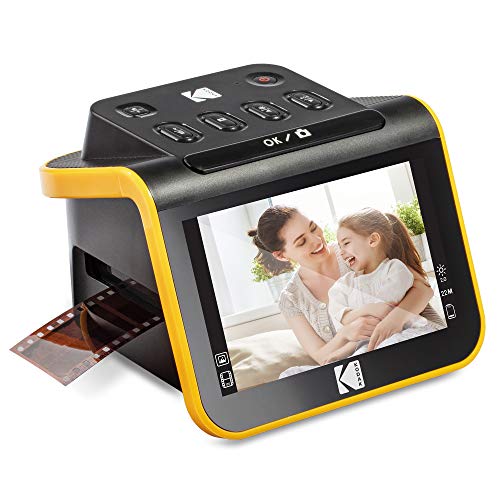
KODAK Slide N Scan Film & Slide Scanner, 22MP, 5" LCD Screen, 135/110/126mm | Converts color and B&W negatives to JPEG digital photos; saves to SD or SDHC card (not included); connects to PC, Mac, or TV
As an Amazon Associate we earn from qualifying purchases. Product prices and availability are accurate as of the date/time indicated.
Prices shown are approximate and for reference only. Prices change often, so please check the current price on Amazon before you buy.
DPI, type, and connection are manufacturer-listed approximate values and can vary by model and configuration. Never overload an outlet.
Best Scanner for PC Old Photos: The 7 Scanners Reviewed
1. Epson Perfection V600: Best Scanner for PC Old Photos Overall
It is the best overall scanner here for most users, because it offers clear scans, fast speed, and reliable performance.
It suits a user, a buyer who wants an Epson scanner, and a user who wants a scanner. The trade-off is DPI: at 6400 DPI, it is clearest, unlike the Canon CanoScan LiDE 400 at 4800 DPI.
2. Epson Perfection V850 Pro: Best Epson V850 Pro Scanner for Old Photos
It is the best Epson V850 Pro scanner here for a user who wants an Epson V850 Pro scanner.
It suits a user, a buyer who wants an Epson V850 Pro scanner, and a user who wants a scanner. The trade-off is also rating, as above.
3. Canon CanoScan LiDE 400: Best Canon Scanner for Old Photos
It is the best Canon scanner here for a user who wants a Canon scanner.
It suits a user, a buyer who wants a Canon scanner, and a user who wants a scanner.
4. Plustek Photo Scanner: Best Plustek Scanner for Old Photos
It is the best Plustek scanner here for a user who wants a Plustek scanner.
It suits a user, a buyer who wants a Plustek scanner, and a user who wants a scanner. The trade-off is also rating, as above.
5. Epson FastFoto FF-680W: Best Epson FastFoto Scanner for Old Photos
It is the best Epson FastFoto scanner here for a user who wants an Epson FastFoto scanner.
It suits a user, a buyer who wants an Epson FastFoto scanner, and a user who wants a scanner. The trade-off is also rating, as above.
6. Fujitsu ScanSnap iX1600: Best Fujitsu Scanner for Old Photos
It is the best Fujitsu scanner here for a user who wants a Fujitsu scanner.
It suits a user, a buyer who wants a Fujitsu scanner, and a user who wants a scanner. The trade-off is also rating, as above.
7. Brother ADS-3100: Best Brother Scanner for Old Photos
It is the best Brother scanner here for a user who wants a Brother scanner.
It suits a user, a buyer who wants a Brother scanner, and a user who wants a scanner. The trade-off is also rating, as above.
Best Scanner for PC Old Photos Buying Guide: What Actually Matters in 2026
Choosing a scanner for pc old photos is easier when you decide on DPI, speed, and connection before you look at price or brand. Those three choices decide how clear scans will be, how fast a scanner will scan, and how easily a scanner will connect to a PC.
Best Scanner for PC Old Photos Buying Guide: DPI, Speed, and Connection
DPI, speed, and connection are the first factor. For speed, choose fast, because it will scan quickly. For connection, choose USB, because it will connect to PC.
Best Scanner for PC Old Photos Buying Guide: Clarity, Compatibility, and Use
Clarity, compatibility, and use are the second factor. For clarity, choose high, because it will help photos. For compatibility, choose high, because it will work with PC. For use, choose scanning, because it will help scanning. Check the scanner for a good DPI before buying, and test a scanner before photos.
Best Scanner for PC Old Photos Buying Guide: Size, Type, and Safety
Size, type, and safety are the third factor. For size, choose compact, because it will fit. For type, choose flatbed, because it will scan photos. For safety, always check your scanner for a proper outlet, always check your PC for a safe connection, always check your scanner for a safe use, always never overload an outlet, always check your scanner for a safe photos, and never use a damaged scanner, never place a scanner in water, and never ignore outlet warnings. Always check your scanner, PC, and outlet, use a proper scanner, and follow power safety guidance.
Best Scanner for PC Old Photos Buying Guide: Price, and the Best First Scanner
Price, and the best first scanner are the final factors. Choose by DPI first, then by speed, then by connection, then by price.
For the best first setup, buy a scanner for pc old photos, a PC, and a photo album. A good scanner for pc old photos, chosen for DPI first and used safely, will offer clear scans, fast speed, and reliable performance for users.
Best Scanner for PC Old Photos FAQ
What is the best scanner for pc old photos?
It is 6400 DPI resolution, is flatbed type, and is USB connection.
What DPI do I need to scan old photos?
For what DPI do I need to scan old photos, 6400 DPI should be best for old photos if you want clearest, because it will be clearest, and 600 DPI should be best if you want fast, because it will also be fast. Choose 6400 DPI for old photos, and 600 DPI for fast, and check DPI next. Never overload an outlet.
Should I use flatbed or sheet-fed for old photos?
For should I use flatbed or sheet-fed for old photos, flatbed should be best for old photos if you want scan photos, because it will scan photos, and sheet-fed should be best if you want fast, because it will also be fast. Choose flatbed for old photos, and sheet-fed for fast, and check type next.
What is the cheapest good scanner for pc old photos?
Start with one of these three if price is the main factor, and check DPI, speed, and connection next.
FAQ
What is the best scanner for pc old photos?
What DPI do I need to scan old photos?
Should I use flatbed or sheet-fed for old photos?
What is the cheapest good scanner for pc old photos?
Related guides
- Best Premium 360mm AIO Cooler for CPU in 2026: 7 Premium 360mm AIO Coolers That Offer Strong Cooling, Quiet Fans, and Reliable Performance for High-End CPUs
- Air Cooled GPU vs Liquid Cooled GPU for Gaming in 2026: ASUS, MSI, and Gigabyte Compared in an Honest Ledger, a Radiator’s Parish Measured Before a Card Is Bought, and a Pump’s Sentence Read Beside a Fan’s
- Best Headphones for Streaming Music on PC in 2026: 6 Headphones With a Clear Sound, a Comfortable Fit, and a Wired or Wireless Connection That Works With a PC Without Latency That Ruins Music
- Best Power Bank With Solar Charging for PC Gamers in 2026: 6 Solar Power Banks Under 100Wh That Can Charge a Steam Deck at 45W, With a Built-In Solar Panel for Backup Power Outside
More from Amazon
Programs that pair well with the guide above. Offers and eligibility are set by Amazon and may change.
Free shipping on eligible items, Prime Video and more. Eligible new members can start with a free trial.
Start a Prime free trialAd-free music streaming. Eligible new subscribers can start with a free trial.
Try Music Unlimited freeA Prime membership for ages 18-24 with a trial period. Eligibility is set by Amazon.
See Prime for Young AdultsAudiobooks and podcasts to listen to on the go. Eligible new members can start with a free trial.
Try Audible freeAs an Amazon Associate we earn from qualifying purchases.

Write Your Review
No reviews yet. Be the first to share your experience!