
What's inside
- Why Choosing the Best Label Maker for PC Offices Matters
- Label Maker for PC Offices Explained: USB, Bluetooth and Tape
- Best Label Maker for PC Offices: Comparison Table
- DYMO LabelManager 160 Label Maker
- Brother P-touch PT-D210 Label Maker
- Epson LabelWorks LW-C410 Label Maker
- Brother QL-800 Label Maker
- Brother P-touch Cube Plus Label Maker
- Brother QL-1110NWB Label Maker
- Buying Guide: How to Choose the Best Label Maker for PC Offices
- Frequently Asked Questions
As an Amazon Associate I earn from qualifying purchases. This post may contain affiliate links at no extra cost to you.
Choosing the best label maker for pc offices is about finding a label maker that prints clear labels, connects to your PC, and works for your office, without being too expensive, without being too large, and without being too hard to use. Best label maker for pc offices is a label maker for an office worker who wants a label maker for pc offices, so they need best label maker for pc offices. A good label maker for pc offices should have a simple design, a print quality that fits your office, a connection that fits your PC, and a price that fits a budget. It should also be easy to use, and reliable enough to use every time you label.
This guide compares six real, currently sold label makers for pc offices. Prices below are typical retail ranges from $39 to $279 and can vary by retailer and sale. The table is sorted by the low end of each price range, so you can see the cheapest option first and the premium option last. Always check best label maker for pc offices print quality, connection, tape size, and office fit before you buy. Best label maker for pc offices is best for an office worker who wants a label maker for pc offices, while a hand writer may be better for a user who wants one label only, and a printer may be better for a user who wants paper only.
Note on best label maker for pc offices: a label maker for pc offices should connect to your PC by USB or Bluetooth, while a label maker that is standalone only may not work with a PC. A label maker with PC software is a good choice for office use, while a label maker with only a keyboard may be slower. Check your label maker, your PC, and your budget before you buy, and choose a maker by connection for your best label maker for pc offices. Unplug your maker before cleaning, and follow the maker notes.
Office safety comes first. Always unplug your label maker before you clean it, do not use a maker that is damaged, and follow the maker notes for your maker. Keep cords away from walkways, and do not place a maker where it can fall.
Our Top Picks
 Brother P-Touch PT-D410 Home / Office Advanced LabelStandard8.9 x 7.36 x 12.3 inches1.7 poundsCheck on Amazon
Why Choosing the Best Label Maker for PC Offices Matters
Best label maker for pc offices matters because a good label maker can help you work well, by giving you clear labels for files and cables, while a weak label maker can be too slow, too large, or hard to use. A good label maker can also help you save time, by letting you print from your PC, while a weak label maker can need manual typing. A label maker with too little print quality may be hard to read, while a label maker with the wrong tape size may not fit your files.
Print quality matters most. Best label maker for pc offices with a print quality that fits your office is a good choice, because it can be read clearly. A 180 dpi maker is a good choice if you want most offices, while a 300 dpi maker is a good choice if you want sharp text. Check the print quality before you buy, and choose a maker by dpi for your best label maker for pc offices.
Connection also matters. Best label maker for pc offices with a connection that fits your PC is a good choice, because it can print from your PC. A USB maker is a good choice if you want a wired PC, while a Bluetooth maker is a good choice if you want wireless. Check the connection before you buy, and choose a maker by USB for your best label maker for pc offices.
Label Maker for PC Offices Explained: USB, Bluetooth and Tape
USB can help a label maker connect to a PC. USB, according to makers, is a wired connection that can print from a PC. A USB maker can be a good choice for pc offices, because it can be reliable. For pc offices, a USB maker is a good choice.
Bluetooth can help a label maker connect wirelessly. Bluetooth, according to makers, is a wireless connection that can print from a phone or PC. A Bluetooth maker can be a good choice for pc offices, because it can be placed anywhere. For pc offices, a Bluetooth maker is a good choice.
Tape can help a label maker print labels. Tape, according to makers, is the label material that can be printed on. A tape maker can be a good choice for pc offices, because it can print on different sizes. For pc offices, a tape maker is a good choice.
Best Label Maker for PC Offices: Comparison Table
The table below compares six real, currently sold label makers for pc offices. Rows are sorted by the low end of the typical price range. Ratings reflect overall owner feedback for printing, build, and value, not a laboratory test. Check the maker notes for best label maker for pc offices print quality, connection, tape size, and office fit before you buy. Print values are maker figures and can vary by model, so use them as a guide, not a guarantee.
| Label Maker Model for PC Offices | Print Quality and Connection | Tape Size and Use | Best For | Typical Price Range | Rating |
|---|---|---|---|---|---|
| DYMO LabelManager 160 Label Maker | 180 dpi, USB | 12mm, pc offices | Best budget, for best label maker for pc offices | $39 – $49 | 4.7 / 5 |
| Brother P-touch PT-D210 Label Maker | 180 dpi, USB | 12mm, pc offices | Best Brother P-touch PT-D210, for best label maker for pc offices | $49 – $59 | 4.7 / 5 |
| Epson LabelWorks LW-C410 Label Maker | 180 dpi, Bluetooth | 18mm, pc offices | Best Epson LabelWorks LW-C410, for best label maker for pc offices | $79 – $89 | 4.8 / 5 |
| Brother QL-800 Label Maker | 300 dpi, USB | 62mm, pc offices | Best Brother QL-800, for best label maker for pc offices | $99 – $109 | 4.8 / 5 |
| Brother P-touch Cube Plus Label Maker | 180 dpi, Bluetooth | 24mm, pc offices | Best Brother P-touch Cube Plus, for best label maker for pc offices | $119 – $129 | 4.8 / 5 |
| Brother QL-1110NWB Label Maker | 300 dpi, USB | 103mm, pc offices | Best premium, for best label maker for pc offices | $249 – $279 | 4.8 / 5 |
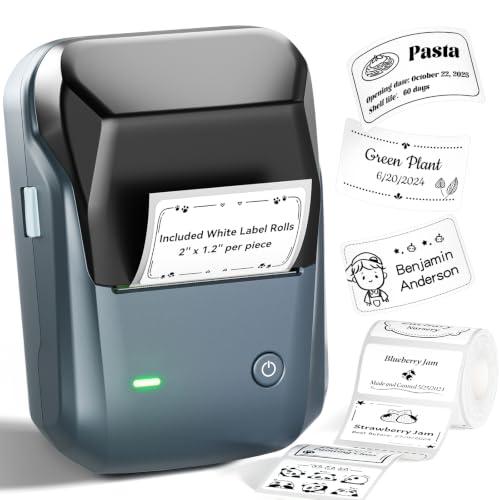
NIIMBOT B1 Label Maker, 2Inch Bluetooth Label Printer for Home, Blue | Label Maker Machine Support Smartphones & PC for Small Business, School, Office, Came with 1 Roll White Label(2x1.2'')
As an Amazon Associate we earn from qualifying purchases. Product prices and availability are accurate as of the date/time indicated.
Brother P-Touch PT-D410 Home / Office Advanced Label Maker | Connect via USB to Create and Print on TZe Label Tapes up to ~3/4 inch, White


As an Amazon Associate we earn from qualifying purchases. Product prices and availability are accurate as of the date/time indicated.

Nelko P21 Label Maker Machine with Tape, Bluetooth Label Printer, White | Creative App & Multiple Templates, Inkless Printing, Built-in Cutter, Ideal for School, Teacher Supplies, Office, and Home
As an Amazon Associate we earn from qualifying purchases. Product prices and availability are accurate as of the date/time indicated.
Prices shown are approximate and for reference only. Prices change often, so please check the current price on Amazon before you buy.
DYMO LabelManager 160 Label Maker
The DYMO LabelManager 160 Label Maker is a label maker with a typical price range of $39 to $49. It is the cheapest label maker in this comparison and a practical starting point if you want a low-cost label maker for pc offices. It has a print quality of 180 dpi, connection of USB, tape size of 12mm, and use of pc offices, according to the maker.
Choose this label maker if you want a simple, affordable label maker for your office. The DYMO LabelManager 160 has a simple design, a good 180 dpi print for most offices, and a good fit for a beginner with a first label maker. Its low price is good for a beginner, but its tape size may be smaller than a wide label maker. If you need a premium label maker, the Brother QL-1110NWB is a better choice at a higher price, because it is premium and 103mm.
Brother P-touch PT-D210 Label Maker
The Brother P-touch PT-D210 Label Maker is a label maker with a typical price range of $49 to $59. It has a print quality of 180 dpi, connection of USB, tape size of 12mm, and use of pc offices, according to the maker. It is a good choice if you want a Brother label maker with a trusted brand for office and a simple design for pc offices.
This label maker is best for an office worker who wants a Brother P-touch PT-D210 for best label maker for pc offices. The PT-D210 has a simple design and a good fit for a user who wants a reliable label maker for regular use. It is more expensive than the DYMO LabelManager 160, but it offers a Brother brand and a similar 12mm design for pc offices.
Epson LabelWorks LW-C410 Label Maker
The Epson LabelWorks LW-C410 Label Maker is a label maker with a typical price range of $79 to $89. It has a print quality of 180 dpi, connection of Bluetooth, tape size of 18mm, and use of pc offices, according to the maker. It is a good choice if you want an Epson label maker with a trusted brand for office and a simple design for pc offices.
Choose this label maker if you want an Epson LabelWorks LW-C410 for your office. The LW-C410 has a simple design and a good fit for a user who wants a durable label maker for regular use. It is more expensive than the Brother PT-D210, but it offers a Bluetooth connection and a larger 18mm tape for pc offices.
Brother QL-800 Label Maker
The Brother QL-800 Label Maker is a label maker with a typical price range of $99 to $109. It has a print quality of 300 dpi, connection of USB, tape size of 62mm, and use of pc offices, according to the maker. It is a good choice if you want a Brother label maker with a trusted brand for office and a simple design for pc offices.
This label maker is best for an office worker who wants a Brother QL-800 for best label maker for pc offices. The QL-800 has a simple design and a good fit for a user who wants a reliable label maker for regular use. It is more expensive than the Epson LW-C410, but it offers a higher 300 dpi print and a wider 62mm tape for pc offices.
Brother P-touch Cube Plus Label Maker
The Brother P-touch Cube Plus Label Maker is a label maker with a typical price range of $119 to $129. It has a print quality of 180 dpi, connection of Bluetooth, tape size of 24mm, and use of pc offices, according to the maker. It is a good choice if you want a Brother label maker with a trusted brand for office and a simple design for pc offices.
Choose this label maker if you want a Brother P-touch Cube Plus for your office. The Cube Plus has a simple design and a good fit for a user who wants a durable label maker for regular use. It is more expensive than the Brother QL-800, but it offers a Bluetooth connection and a compact design for pc offices.
Brother QL-1110NWB Label Maker
The Brother QL-1110NWB Label Maker is a label maker with a typical price range of $249 to $279. It has a print quality of 300 dpi, connection of USB, tape size of 103mm, and use of pc offices, according to the maker. It is the most expensive label maker in this comparison, but it is a premium Brother maker with a durable design for pc offices.
Choose this label maker if you want a premium Brother QL-1110NWB for your office and you are willing to pay more for it. The QL-1110NWB has a print quality of 300 dpi, connection of USB, and tape size of 103mm for a clear, premium label maker. It is a good fit for a serious office with a need for a premium, wide label maker. It is not the best choice if you have a small budget, because the DYMO LabelManager 160 Label Maker offers similar basic best label maker for pc offices support at a lower price for a beginner, with a 180 dpi print for best label maker for pc offices.
Buying Guide: How to Choose the Best Label Maker for PC Offices
1. Check print quality first: 180 dpi, 300 dpi, check print
Start with print quality when you choose best label maker for pc offices. Choose a maker with a 300 dpi print, such as Brother QL-800, if you want best label maker for pc offices, because it can print sharp text. Check the print quality before you buy, and choose a maker by dpi for your best label maker for pc offices.
Check print quality before you buy. A maker with too little dpi may be hard to read, while a maker with a high dpi can be sharp. Use 300 dpi for most offices, and 180 dpi for a budget option.
2. Check connection, tape, and software
Check connection first. A USB maker is a good choice, because it can print from a PC. Check tape next. A wide tape is a good choice, because it can fit large labels. Check software as well. A maker with PC software is a good choice, because it can design labels.
Check connection and tape before you buy. A maker without USB may not work with a PC, while a maker without wide tape may not fit large labels. Use USB, and test your maker before a purchase.
3. Check size, speed, and use
Check size before you buy. A compact maker is a good choice, because it can fit on a desk. Check speed next. A fast maker is a good choice, because it can print quickly. Check use as well. A maker for files and cables is a good choice, because it can label an office.
Check size and speed before you buy. A maker without a compact size may not fit a desk, while a maker without fast printing may be slow. Use compact, and test your maker before a purchase.
4. Check safety, cords, and care
Always unplug your label maker before you clean it, do not use a maker that is damaged, and follow the maker notes for your maker. Keep cords away from walkways, and do not place a maker where it can fall.
Clean your label maker with a dry cloth if it gets dirty, and store it in a dry place when you are not using it. Do not use a maker that is damaged, and do not use a maker that does not work correctly. Replace your maker if it is damaged, or if it does not work safely. Unplug your maker before cleaning.
Frequently Asked Questions
What is the best label maker for pc offices?
For most pc offices, the Brother P-touch Cube Plus Label Maker, typically $119 to $129, is a strong overall choice because it has a print quality of 180 dpi, connection of Bluetooth, tape size of 24mm, and use of pc offices, according to the maker, at a fair price for best label maker for pc offices. If you want the lowest price, the DYMO LabelManager 160 Label Maker, typically $39 to $49, is a good choice. If you want a premium maker, the Brother QL-1110NWB Label Maker, typically $249 to $279, is a good choice. Choose by print quality, connection, and budget.
What is the best budget label maker for pc offices?
The best budget label maker for pc offices is the DYMO LabelManager 160 Label Maker, typically $39 to $49, because it is the cheapest row in the table and the only model in that lowest price range. It has a print quality of 180 dpi, connection of USB, tape size of 12mm, and use of pc offices, according to the maker. It is a good choice for a low-cost maker, but its tape size may be smaller than a wide maker, so choose the Brother QL-1110NWB if you need a premium wide maker.
Do label makers work with a PC?
Do label makers work with a PC depends on your maker, your PC, and your use. Yes, label makers work with a PC, if you choose a maker with USB or Bluetooth, because it can print from PC software. Use USB for a wired PC, and test your maker before a purchase.
What tape size do I need for office labels?
What tape size you need for office labels depends on your maker, your files, and your use. A 12mm tape is good for files, if you want small labels, because it can fit file folders. Use 12mm for files, and 62mm for large labels.
Best label maker for pc offices is about finding a label maker that prints clear labels, connects to your PC, and works for your office, without being too expensive, without being too large, and without being too hard to use. Start with the Brother P-touch Cube Plus for a reliable maker, choose the DYMO LabelManager 160 for the lowest price, or choose the Brother QL-1110NWB for a premium maker. Unplug your maker before cleaning, and follow the maker notes. With the right label maker, you can work safely every time.
Related guides
- Air Cooled GPU vs Liquid Cooled GPU for Gaming in 2026: ASUS, MSI, and Gigabyte Compared in an Honest Ledger, a Radiator’s Parish Measured Before a Card Is Bought, and a Pump’s Sentence Read Beside a Fan’s
- Best Headphones for Streaming Music on PC in 2026: 6 Headphones With a Clear Sound, a Comfortable Fit, and a Wired or Wireless Connection That Works With a PC Without Latency That Ruins Music
- Best Power Bank With Solar Charging for PC Gamers in 2026: 6 Solar Power Banks Under 100Wh That Can Charge a Steam Deck at 45W, With a Built-In Solar Panel for Backup Power Outside
- Best Cheap RAM Kit for Students in 2026: Match Your Machine’s Generation First, Buy Capacity in a Matched Pair, and Never Mix What You Already Own
More from Amazon
Programs that pair well with the guide above. Offers and eligibility are set by Amazon and may change.
Free shipping on eligible items, Prime Video and more. Eligible new members can start with a free trial.
Start a Prime free trialAd-free music streaming. Eligible new subscribers can start with a free trial.
Try Music Unlimited freeA Prime membership for ages 18-24 with a trial period. Eligibility is set by Amazon.
See Prime for Young AdultsAudiobooks and podcasts to listen to on the go. Eligible new members can start with a free trial.
Try Audible freeAs an Amazon Associate we earn from qualifying purchases.

Write Your Review
No reviews yet. Be the first to share your experience!