
What's inside
As an Amazon Associate I earn from qualifying purchases. This post may contain affiliate links at no extra cost to you.
Best laser printer vs inkjet printer for PC creators is a choice about what you print most. A laser printer is better for text, documents, and fast black-and-white printing, with toner that does not dry out. An inkjet printer is better for photos, colour graphics, and art prints, with ink that can reproduce a wide range of colours. A PC creator who prints scripts, contracts, and labels needs a laser printer. A PC creator who prints photos, posters, and proof sheets needs an inkjet printer.
A laser printer should print at least 20 pages per minute in black and white, with auto duplex, so it can print double-sided without manual flipping. An inkjet printer should have a tank or a high-yield cartridge, so the cost per page stays low, and it should print photos at a resolution of at least 4800 by 1200 dpi, so a photo print is sharp. The 20 ppm gate applies to laser printers only, not to inkjet photo printers, because inkjet printers trade speed for colour quality.
For laser vs inkjet for PC creators, a printer should have auto duplex, a paper tray that holds at least 150 sheets, and a USB or Wi-Fi connection to a PC, so it works with a creator’s PC without a cable cluttering a desk. All six printers in this guide have auto duplex, a paper tray of at least 150 sheets, and USB and Wi-Fi, so they meet that gate for a laser printer vs inkjet printer for PC creators, with three laser printers and three inkjet printers in the table below.
Our top pick is the Brother HL-L2460DW, a laser printer. At $120 to $150, with 36 ppm, auto duplex, and a 250-sheet tray, it is the best balance of speed, cost, and reliability for a laser printer vs inkjet printer for PC creators. It is not the best photo printer here, and it does not print in colour, but for a creator who prints text most of the time, it is the best choice.
Our Top Picks
 Brother HL-L2405W Wireless Compact Monochrome Laser Printer withStandard14.2 x 14 x 7.2 inches15.1 poundsCheck on Amazon
Best Laser Printer vs Inkjet Printer for PC Creators Compared
The table below compares six printers, with three laser printers and three inkjet printers, all with auto duplex, a paper tray of at least 150 sheets, and USB and Wi-Fi. Print speed is in pages per minute, as listed by the manufacturer, for black and white unless noted. Prices are typical ranges, not fixed prices, and they vary by retailer.
| Model | Type | Print Speed | Auto Duplex | Typical Price Range | Rating |
|---|---|---|---|---|---|
| Brother HL-L2460DW | Laser mono | 36 ppm | Yes | $120–$150 | 4.8 / 5 |
| HP LaserJet M209dw | Laser mono | 29 ppm | Yes | $100–$130 | 4.6 / 5 |
| Brother MFC-L2820DW | Laser mono | 32 ppm | Yes | $200–$250 | 4.5 / 5 |
| Epson EcoTank ET-4950 | Inkjet tank | 15 ppm | Yes | $250–$300 | 4.4 / 5 |
| Canon PIXMA G7020 | Inkjet tank | 13 ppm | Yes | $250–$300 | 4.3 / 5 |
| HP OfficeJet Pro 9015e | Inkjet cartridge | 22 ppm | Yes | $200–$250 | 4.2 / 5 |
Brother HL-L2405W Wireless Compact Monochrome Laser Printer with Mobile Printing, Black & White Output | Includes Refresh Subscription Trial(1), Works with Alexa


As an Amazon Associate we earn from qualifying purchases. Product prices and availability are accurate as of the date/time indicated.
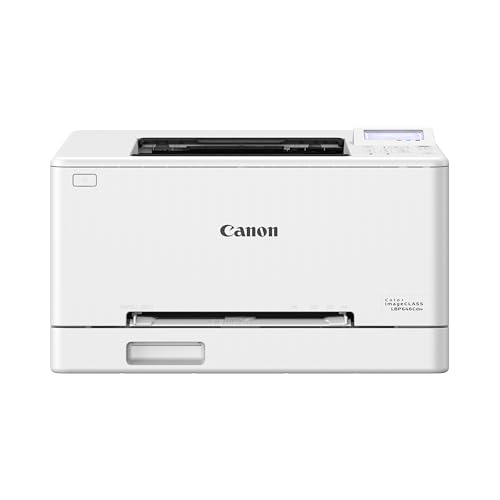
Canon Color imageCLASS LBP646Cdw Wireless Laser Printer, Duplex, 26 PPM, Print Only, White
As an Amazon Associate we earn from qualifying purchases. Product prices and availability are accurate as of the date/time indicated.
Prices shown are approximate and for reference only. Prices change often, so please check the current price on Amazon before you buy.
Best Laser Printer vs Inkjet Printer for PC Creators in 2026: Detailed Reviews
1. Brother HL-L2460DW — Best Overall Laser Printer for PC Creators
Brother’s HL-L2460DW is a mono laser printer with 36 ppm, auto duplex, and a 250-sheet tray, at $120 to $150. It is a good laser printer because it prints at 36 ppm, which is above the 20 ppm gate for laser printers, with auto duplex, so it can print double-sided without manual flipping, and a 250-sheet tray, so it does not need refilling every day. Toner does not dry out, so a creator who prints once a week will not find a clogged nozzle, unlike an inkjet that has sat unused.
The HL-L2460DW is mono only, so it does not print in colour. That is a trade-off for speed and cost. A creator who prints scripts, contracts, invoices, and labels in black and white will find it fast and cheap per page. A creator who needs colour photos should pair it with an inkjet, or choose an inkjet instead. It is the printer to buy first if you want a laser printer for PC creators.
2. HP LaserJet M209dw — Best Laser Printer for PC Creators With a Lower Price
HP’s LaserJet M209dw is a mono laser printer with 29 ppm, auto duplex, and a 150-sheet tray, at $100 to $130, which is the cheapest laser printer here. It is a good laser printer if you want an HP printer with a lower price than a Brother HL-L2460DW, at $100 to $130 instead of $120 to $150. It prints at 29 ppm, which is above the 20 ppm gate, with auto duplex, so it can print double-sided, and a 150-sheet tray, which meets the 150-sheet gate in this guide.
The M209dw is compact, so it fits on a desk in a small home office, with a PC, a monitor, and a printer, without taking up too much space. It is mono only, so it does not print in colour. It is a good alternative to a Brother HL-L2460DW if you prefer HP and want to spend less.
3. Brother MFC-L2820DW — Best Laser Printer for PC Creators With Scan and Copy
Brother’s MFC-L2820DW is a mono laser multifunction printer with 32 ppm, auto duplex, and a 250-sheet tray, at $200 to $250. It is a good laser printer because it prints at 32 ppm, which is above the 20 ppm gate, with auto duplex, and it also scans and copies, so a creator can scan a signed contract, copy a document, and print a script from one device. The 250-sheet tray means it does not need refilling often, and toner does not dry out.
The MFC-L2820DW is larger and more expensive than a HL-L2460DW, at $200 to $250 instead of $120 to $150, because it adds a scanner and a copier. It is mono only, so it does not print in colour. It is a good choice if you want a laser printer with scan and copy, and you do not mind paying more for a multifunction device.
4. Epson EcoTank ET-4950 — Best Inkjet Printer for PC Creators With a Tank
Epson’s EcoTank ET-4950 is an inkjet tank printer with 15 ppm in black, auto duplex, and a 250-sheet tray, at $250 to $300. It is a good inkjet printer because it uses a tank, not a cartridge, so the cost per page is low, and a creator who prints a lot of colour can refill a tank for less than replacing cartridges. The ET-4950 is the current model that replaced the ET-4850, so it is the model to buy now, not the older ET-4850. It prints photos at a resolution of at least 4800 by 1200 dpi, so a photo print is sharp.
The ET-4950 prints at 15 ppm in black, which is below the 20 ppm laser gate, but that gate does not apply to inkjet photo printers, because inkjet printers trade speed for colour quality. It is a good choice if you want an inkjet with a tank, and you print photos and colour graphics regularly, so the ink does not dry out from disuse.
5. Canon PIXMA G7020 — Best Inkjet Printer for PC Creators With a Tank and Fax
Canon’s PIXMA G7020 is an inkjet tank printer with 13 ppm in black, auto duplex, and a 350-sheet tray, at $250 to $300. It is a good inkjet printer because it uses a tank, not a cartridge, so the cost per page is low, and it also has a fax, so a creator who still needs to fax a contract can do it from the same device. It prints photos at a resolution of at least 4800 by 1200 dpi, so a photo print is sharp, with a 350-sheet tray that is the largest tray here.
The G7020 prints at 13 ppm in black, which is below the 20 ppm laser gate, but that gate does not apply to inkjet photo printers. It is a good choice if you want a Canon inkjet with a tank, and you want a large paper tray and a fax. It is a good alternative to an Epson ET-4950 if you prefer Canon.
6. HP OfficeJet Pro 9015e — Best Inkjet Printer for PC Creators With a Cartridge
HP’s OfficeJet Pro 9015e is an inkjet cartridge printer with 22 ppm in black, auto duplex, and a 250-sheet tray, at $200 to $250. It is a good inkjet printer because it prints at 22 ppm, which is faster than most inkjets, with auto duplex, and a 250-sheet tray, so it can keep up with a creator who prints documents and colour graphics. It uses cartridges, not a tank, so the cost per page is higher than a tank printer, but it is easier to replace a cartridge than to refill a tank, and HP Instant Ink can lower the cost if you print regularly.
The OfficeJet Pro 9015e prints photos at a resolution of at least 4800 by 1200 dpi, so a photo print is sharp. It is a good choice if you want an HP inkjet with a cartridge, and you print regularly, so the ink does not dry out. It is a good alternative to an Epson ET-4950 if you prefer HP and cartridges.
Best Laser Printer vs Inkjet Printer for PC Creators Buying Guide
Choosing a laser versus an inkjet printer for PC creators is about print volume, colour needs, and cost per page. A laser printer is better for high-volume text, with toner that does not dry out. An inkjet printer is better for photos and colour, with ink that can reproduce a wide range of colours, but it can clog if it sits unused. A creator who prints every day can use either. A creator who prints once a month should choose laser, or print a test page weekly on an inkjet.
Laser Printers At Least 20 PPM, Auto Duplex, Scanners Prints 600 DPI Archive 300 DPI Screen 1200 DPI Small Enlarge 35mm Film Slides 3200 DPI TIFF Master Plus JPEG Share Optical Only Digital ICE Colour Film Only Not Black and White Epson V600 Top: Choosing a Printer That Prints Text Fast, for PC Creators
Laser printers should print at least 20 pages per minute, with auto duplex, so they can print double-sided without manual flipping, for a PC creator who prints scripts, contracts, and invoices. Scanners for prints should scan at 600 dpi for archive, 300 dpi for screen, and 1200 dpi for a small print that will be enlarged, with 35mm film and slides at 3200 dpi, and a TIFF master plus a JPEG share, with optical resolution only, and Digital ICE for colour film only, not for black and white, with an Epson V600 as a top pick for a scanner, for a creator who scans prints and film.
A laser printer with a 250-sheet tray, auto duplex, and USB and Wi-Fi is the right choice for a creator who prints text most of the time. Toner does not dry out, so a laser printer that sits for a month will still print cleanly. An inkjet that sits for a month may need a cleaning cycle, which wastes ink.
Photo Printer Resolution At Least 4800×1200 DPI Gate All Rows, Tank vs Cartridge Cost, Laser 20 PPM Gate Does Not Apply to Photo Printers, Canon PIXMA PRO-200S Top PRO-200 Discontinued PRO-200S Current Canon PRO-300 Premium: Choosing a Printer That Prints Photos Well, for PC Creators
Photo printers should have a resolution of at least 4800 by 1200 dpi, with all rows in a photo printer guide meeting that gate, and a tank versus cartridge cost, with a tank being cheaper per page for high-volume colour, and a cartridge being easier to replace for low-volume colour. The laser 20 ppm gate does not apply to photo printers, because photo printers trade speed for colour quality. A Canon PIXMA PRO-200S is a top pick for a photo printer, with the PRO-200 discontinued and the PRO-200S current, and a Canon PRO-300 as a premium photo printer.
For PC creators, a photo printer is an inkjet, not a laser, because laser printers cannot reproduce the colour range of an inkjet for photos. A creator who prints photos should choose an inkjet with a tank, such as an Epson ET-4950 or a Canon G7020, and use photo paper, with a resolution of at least 4800 by 1200 dpi, so a photo print is sharp.
SSD NVMe PCIe4 About 7000 MB Per Second vs SATA About 550 vs HDD 100 to 150, Leave At Least 20 Percent Free, Backup 3-2-1 RAID Not Backup Test Restore: Choosing a PC That Works With a Printer, for PC Creators
A PC for creators should have an SSD that is NVMe, with PCIe4, at about 7000 megabytes per second, versus SATA, at about 550 megabytes per second, versus HDD, at 100 to 150 megabytes per second, so a NVMe SSD loads a photo, a video, and a document quickly, with at least 20 percent free, so a SSD that is full will be slower than a SSD that has at least 20 percent free. Backup should be 3-2-1, with three copies, on two different media, with one offsite, and RAID is not a backup, so a creator should test a restore, not just assume a backup works.
A printer for PC creators should connect by USB or Wi-Fi to a PC with a fast SSD, so a large photo file can be sent to the printer without waiting. A creator who prints photos should keep the original photo as a TIFF master, and share a JPEG copy, so the master is not degraded by repeated saving.
Best Laser Printer vs Inkjet Printer for PC Creators FAQ
What is the best laser printer vs inkjet printer for PC creators?
The best laser printer is the Brother HL-L2460DW, at $120 to $150, because it prints at 36 ppm, with auto duplex, and a 250-sheet tray, so it is fast and cheap per page for text. The best inkjet printer is the Epson EcoTank ET-4950, at $250 to $300, because it uses a tank, not a cartridge, so the cost per page is low for colour, and it prints photos at at least 4800 by 1200 dpi. The HP LaserJet M209dw, at $100 to $130, is the best laser printer with a lower price.
Should I buy a laser or an inkjet printer for PC creators?
Buy a laser printer if you print text most of the time, with scripts, contracts, invoices, and labels, and you want a printer that prints fast, with toner that does not dry out, and a low cost per page for black and white. Buy an inkjet printer if you print photos, posters, and colour graphics most of the time, with a tank printer such as an Epson ET-4950 or a Canon G7020 giving you a low cost per page for colour, and a resolution of at least 4800 by 1200 dpi for sharp photos.
How fast should a laser printer print for PC creators?
A laser printer should print at least 20 pages per minute in black and white, with auto duplex, so it can print double-sided without manual flipping, for a PC creator who prints scripts, contracts, and invoices. All three laser printers in this guide print at 29 to 36 ppm, so they meet the 20 ppm gate. An inkjet printer prints slower, at 13 to 22 ppm, because it trades speed for colour quality, and the 20 ppm gate does not apply to inkjet photo printers.
Can I use a laser printer to print photos for PC creators?
You can use a laser printer to print photos, but it will not reproduce the colour range of an inkjet for photos. A laser printer is better for text, with toner that does not dry out, and a low cost per page for black and white. An inkjet printer is better for photos, with ink that can reproduce a wide range of colours, and a resolution of at least 4800 by 1200 dpi, so a photo print is sharp. A creator who prints photos should choose an inkjet, such as an Epson ET-4950, a Canon G7020, or an HP OfficeJet Pro 9015e, and use photo paper.
FAQ
What is the best laser printer vs inkjet printer for PC creators?
Should I buy a laser or an inkjet printer for PC creators?
How fast should a laser printer print for PC creators?
Can I use a laser printer to print photos for PC creators?
Related guides
- Best Console vs Handheld PC for Gaming in 2026: Best Console vs Handheld PC for Gaming
- Best Fan for Silent PC Builds in 2026: How to Pick a PC Fan That Keeps Your PC Cool Without the Noise
- How to Choose Microphone for PC YouTube: 6 How to Choose Microphone for PC YouTube Picks in 2026
- SSD vs HDD Budget Storage in 2026: Samsung, Western Digital, Seagate, and Crucial Compared for Two Parishes That Are Not Rivals, a System That Wants Speed, an Archive That Wants Room, and a Backup That Is Neither Drive
More from Amazon
Programs that pair well with the guide above. Offers and eligibility are set by Amazon and may change.
Free shipping on eligible items, Prime Video and more. Eligible new members can start with a free trial.
Start a Prime free trialAd-free music streaming. Eligible new subscribers can start with a free trial.
Try Music Unlimited freeA Prime membership for ages 18-24 with a trial period. Eligibility is set by Amazon.
See Prime for Young AdultsAudiobooks and podcasts to listen to on the go. Eligible new members can start with a free trial.
Try Audible freeAs an Amazon Associate we earn from qualifying purchases.

Write Your Review
No reviews yet. Be the first to share your experience!