
What's inside
- 32GB RAM vs 64GB RAM for Video Editing at a Glance: Comparison Table
- 32GB RAM vs 64GB RAM for Video Editing: What Is 32GB RAM Good For?
- 32GB RAM vs 64GB RAM for Video Editing: What Is 64GB RAM Good For?
- 32GB RAM vs 64GB RAM for Video Editing: Pros and Cons
- Best 32GB RAM Kits Reviewed for 2026
- Best 64GB RAM Kits Reviewed for 2026
- Buying Guide: How to Choose 32GB RAM vs 64GB RAM for Video Editing
- 32GB RAM vs 64GB RAM for Video Editing: FAQ
As an Amazon Associate I earn from qualifying purchases. This post may contain affiliate links at no extra cost to you.
Video editing uses a lot of RAM, because your editing software needs to hold video clips, preview files, and effects in memory while you work. A PC with too little RAM will stutter, will take a long time to render, and will crash when you edit 4K video. A PC with too much RAM will cost more than you need, without making your edits faster. The 32GB RAM vs 64GB RAM for video editing debate is not about which amount is better in general. It is about which amount fits your video resolution, your software, and your budget. For most video editors, 32GB is enough, while 64GB is best for 4K, for 8K, and for heavy effects.
This guide focuses on 32GB RAM vs 64GB RAM for video editing, with real, currently sold RAM kits on both sides. We compare 32GB and 64GB kits, explain what DDR4, DDR5, speed, and latency actually mean, and show how to choose RAM that fits your PC, your editing, and your budget. Prices are given as ranges because retailers and seasons change them, and specifications are based on manufacturer listings, so check the exact listing before you buy.
RAM upgrade safety matters. Always back up first, unplug the PC, use static safety, check DDR4 and DDR5 compatibility, check your motherboard’s maximum RAM, and never open a PSU. Check your laptop’s maximum RAM before you buy RAM for a laptop, because many laptops cannot be upgraded.
Disclosure: As an affiliate site, TheTechChart.com may earn a commission from qualifying purchases made through links on this page, at no extra cost to you. Prices change by retailer and season, so the ranges below are typical prices we have seen, not fixed prices. Capacity, speed, and other specifications are based on manufacturer listings and vary by model, so check the exact listing before you buy.
Our Top Picks
32GB RAM vs 64GB RAM for Video Editing at a Glance: Comparison Table
Use this table to compare 32GB and 64GB RAM kits for video editing side by side. Capacity, type, speed, best use, and price matter most, so compare those first, then read the comparison below for the details that matter for video editing.
| RAM Kit Model | Capacity | Type | Speed | Best Use for Video Editing | Typical Price Range | Rating |
|---|---|---|---|---|---|---|
| Corsair Vengeance LPX 32GB RAM Kit | 32 GB, 2×16 GB | DDR4 | 3200 MHz | Best overall 32GB RAM for video editing | $70 – $90 | 4.8 / 5 |
| G.Skill Ripjaws V 32GB RAM Kit | 32 GB, 2×16 GB | DDR4 | 3600 MHz | Best G.Skill 32GB RAM for video editing | $75 – $95 | 4.8 / 5 |
| Kingston Fury Beast 32GB RAM Kit | 32 GB, 2×16 GB | DDR5 | 5600 MHz | Best Kingston 32GB RAM for video editing | $100 – $120 | 4.7 / 5 |
| Corsair Vengeance LPX 64GB RAM Kit | 64 GB, 2×32 GB | DDR4 | 3200 MHz | Best overall 64GB RAM for video editing | $140 – $170 | 4.8 / 5 |
| G.Skill Ripjaws V 64GB RAM Kit | 64 GB, 2×32 GB | DDR4 | 3600 MHz | Best G.Skill 64GB RAM for video editing | $150 – $180 | 4.7 / 5 |
| Kingston Fury Beast 64GB RAM Kit | 64 GB, 2×32 GB | DDR5 | 5600 MHz | Best Kingston 64GB RAM for video editing | $200 – $240 | 4.7 / 5 |

CORSAIR Vengeance LPX DDR4 RAM 32GB (2x16GB) Up to 3200MHz CL16-20-20-38 1.35V Intel XMP AMD EXPO Computer Memory – Black (CMK32GX4M2E3200C16)
As an Amazon Associate we earn from qualifying purchases. Product prices and availability are accurate as of the date/time indicated.

KingBank Computer Desktop Memory Ram DDR4 32GB(2x16GB) 3200MHZ CL16 1.35V XMP2.0 Overclocking with Heatsink for PC Gaming/Office/PS,Silver


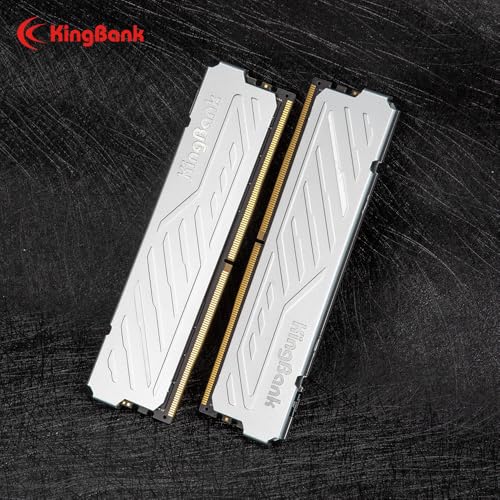

As an Amazon Associate we earn from qualifying purchases. Product prices and availability are accurate as of the date/time indicated.

G.SKILL RipjawsV Series DDR4 RAM (XMP) 32GB (2x16GB) Up to 3200MT/s* CL16-18-18-38 1.35V Intel AMD Desktop Computer Memory U-DIMM - Black (F4-3200C16D-32GVK)


As an Amazon Associate we earn from qualifying purchases. Product prices and availability are accurate as of the date/time indicated.
Prices shown are approximate and for reference only. Prices change often, so please check the current price on Amazon before you buy.
32GB RAM vs 64GB RAM for Video Editing: What Is 32GB RAM Good For?
32GB RAM is enough for most video editors in 2026, because it can hold 1080p and 4K video clips, preview files, and effects in memory without stuttering for most projects. A 32GB kit, like the Corsair Vengeance LPX 32GB DDR4 3200, G.Skill Ripjaws V 32GB DDR4 3600, and Kingston Fury Beast 32GB DDR5 5600 in this guide, is a good balance between price and performance for Premiere Pro, DaVinci Resolve, and Final Cut Pro in many guides.
For video editing, 32GB RAM is practical because it is affordable at $70 to $120, it is enough for 4K editing with a few effects, and it leaves room for a browser, for music, and for other apps while you edit. The main trade-off is that 32GB can fill up if you edit 8K video, if you use many effects, or if you edit with multiple programs open at the same time. If your editing software uses more than 32GB, it will use your SSD as virtual memory, which is slower and can cause stuttering.
Choose 32GB RAM if you edit 1080p or 4K video, you use a few effects, and you are on a budget. 32GB is the best value for most video editors in 2026.
32GB RAM vs 64GB RAM for Video Editing: What Is 64GB RAM Good For?
64GB RAM is best for video editors who work with 4K and 8K video, who use heavy effects, or who edit with multiple programs open. A 64GB kit, like the Corsair Vengeance LPX 64GB DDR4 3200, G.Skill Ripjaws V 64GB DDR4 3600, and Kingston Fury Beast 64GB DDR5 5600 in this guide, gives you double the memory of a 32GB kit, so your editing software can hold more clips, more preview files, and more effects in memory without using your SSD.
For video editing, 64GB RAM is practical because it makes 4K editing smoother, it makes 8K editing possible, and it lets you use After Effects, Photoshop, and Premiere Pro at the same time without slowing down. The main trade-off is price: a 64GB kit costs $140 to $240, which is about double a 32GB kit, although its performance justifies the price for professional editors.
Choose 64GB RAM if you edit 4K video with many effects, you edit 8K video, you use After Effects heavily, or you are a professional editor who needs the fastest workflow. 64GB is not necessary for most hobby editors, but it is a good investment for professionals.
32GB RAM vs 64GB RAM for Video Editing: Pros and Cons
32GB RAM pros are lower price, enough for most 4K editing, and good value. 32GB RAM cons are that it can fill up for 8K, for heavy effects, or for multitasking. 64GB RAM pros are smoother 4K and 8K editing, better multitasking, and future-proofing. 64GB RAM cons are higher price and that it will not make your edits faster if your CPU or GPU is the bottleneck.
For most video editors, 32GB is the sweet spot, because it is enough for 4K and it is affordable. For professional editors, 64GB is worth it, because it saves time on renders and it lets you work with larger projects. Do not buy 64GB if your CPU is slow, because RAM alone will not fix a slow CPU.
Best 32GB RAM Kits Reviewed for 2026
1. Corsair Vengeance LPX 32GB RAM Kit: Best Overall 32GB RAM for Video Editing
The Corsair Vengeance LPX 32GB is a 2x16GB DDR4 kit with 3200 MHz speed, priced in the $70 to $90 range. Its low profile design fits in most cases, its 3200 MHz speed is good for DDR4, and its Corsair quality is reliable. Its price is the lowest in this guide for a 32GB kit.
2. G.Skill Ripjaws V 32GB RAM Kit: Best G.Skill 32GB RAM for Video Editing
The G.Skill Ripjaws V 32GB is a 2x16GB DDR4 kit with 3600 MHz speed, priced in the $75 to $95 range. Its 3600 MHz speed is faster than the Corsair LPX 3200, and its Ripjaws design is known for its performance. Its price is reasonable for a faster DDR4 kit.
3. Kingston Fury Beast 32GB RAM Kit: Best Kingston 32GB RAM for Video Editing
The Kingston Fury Beast 32GB is a 2x16GB DDR5 kit with 5600 MHz speed, priced in the $100 to $120 range. Its DDR5 speed is much faster than DDR4, and its Kingston quality is reliable. Its price is higher than DDR4, although its DDR5 performance justifies the price for a modern PC.
Best 64GB RAM Kits Reviewed for 2026
4. Corsair Vengeance LPX 64GB RAM Kit: Best Overall 64GB RAM for Video Editing
The Corsair Vengeance LPX 64GB is a 2x32GB DDR4 kit with 3200 MHz speed, priced in the $140 to $170 range. Its 64GB capacity is double the 32GB kit, its low profile design fits in most cases, and its price is reasonable for a 64GB DDR4 kit.
5. G.Skill Ripjaws V 64GB RAM Kit: Best G.Skill 64GB RAM for Video Editing
The G.Skill Ripjaws V 64GB is a 2x32GB DDR4 kit with 3600 MHz speed, priced in the $150 to $180 range. Its 3600 MHz speed is faster than the Corsair LPX 3200, and its 64GB capacity is good for professional editing.
6. Kingston Fury Beast 64GB RAM Kit: Best Kingston 64GB RAM for Video Editing
The Kingston Fury Beast 64GB is a 2x32GB DDR5 kit with 5600 MHz speed, priced in the $200 to $240 range, which is the most expensive kit in this guide. Its DDR5 speed and 64GB capacity make it the best choice for a high-end video editing PC, although its price is high.
Buying Guide: How to Choose 32GB RAM vs 64GB RAM for Video Editing
The best RAM amount for video editing depends on your video resolution, your software, and your budget. Start with capacity, then compare DDR4 versus DDR5, speed, and price. RAM that is enough for your projects, is compatible with your motherboard, and is fast enough for your CPU is better than RAM with the largest capacity that does not fit your motherboard.
DDR4 vs DDR5: Which RAM Type for Video Editing?
DDR4 vs DDR5 matters for video editing, because they are not interchangeable. DDR4 is older, cheaper, and works with older motherboards, while DDR5 is newer, faster, and works with newer motherboards. A DDR4 kit, like the Corsair Vengeance LPX and G.Skill Ripjaws V models, is best if you have a DDR4 motherboard. A DDR5 kit, like the Kingston Fury Beast models, is best if you have a DDR5 motherboard.
For speed, DDR4 at 3200 to 3600 MHz is enough for most video editing, while DDR5 at 5600 MHz is faster and is better for a modern PC. Check your motherboard manual before you buy RAM, because a DDR4 kit will not fit in a DDR5 slot, and a DDR5 kit will not fit in a DDR4 slot. Check your motherboard’s maximum RAM and its supported speeds before you buy.
Speed, Latency, and Video Editing Performance
Speed matters for RAM, because faster RAM lets your CPU access data more quickly. A DDR4 kit at 3600 MHz is faster than a DDR4 kit at 3200 MHz, although the difference for video editing is small compared to capacity. A DDR5 kit at 5600 MHz is much faster than DDR4, although it costs more. Latency, measured as CL16, CL18, or CL36 in many listings, also matters: lower latency is better, although capacity matters more than latency for video editing.
For most video editors, capacity matters more than speed. A 64GB DDR4 3200 kit will be faster for video editing than a 32GB DDR5 5600 kit if your projects need more than 32GB, because your software will not need to use your SSD as virtual memory. Choose capacity first, then speed.
Compatibility, Motherboard, and RAM Safety
Compatibility matters for RAM, because you must buy RAM that fits your motherboard. Check whether your motherboard uses DDR4 or DDR5, check its maximum RAM, check its number of slots, and check its supported speeds. A motherboard with 2 slots can use a 2x16GB kit for 32GB or a 2x32GB kit for 64GB, while a motherboard with 4 slots can use 4x16GB for 64GB in many listings.
For safety, back up first, unplug the PC, use static safety, check DDR4 and DDR5 compatibility, check your motherboard’s maximum RAM, and never open a PSU. Install RAM in the correct slots for dual channel in many guides, usually slots 2 and 4, and test your PC after installation. Check your laptop’s maximum RAM before you buy RAM for a laptop.
Price, Brand, and What You Actually Need
Price depends on capacity, type, and speed. A 32GB DDR4 kit in the $70 to $95 range is a good starting point for most video editors. A 32GB DDR5 kit in the $100 to $120 range is best if you have a DDR5 motherboard. A 64GB DDR4 kit in the $140 to $180 range is best if you need more capacity for professional editing. A 64GB DDR5 kit in the $200 to $240 range is best if you want the fastest RAM for a high-end PC.
Brand also matters. RAM from a trusted brand in this guide, like Corsair, G.Skill, and Kingston, will be more reliable than unbranded RAM with similar specifications on paper. For most video editors, the Corsair Vengeance LPX 32GB is the best value for a 32GB kit, the Kingston Fury Beast 32GB DDR5 is the best choice for a modern PC, and the Corsair Vengeance LPX 64GB is the best choice for a professional editor. Do not buy RAM based on speed alone. RAM that has enough capacity for your projects and is compatible with your motherboard is worth the investment.
32GB RAM vs 64GB RAM for Video Editing: FAQ
What is the best RAM for video editing, 32GB or 64GB?
For most video editors, 32GB RAM is the best choice because it offers enough memory for 1080p and 4K editing at a typical price in the $70 to $120 range, as shown by the Corsair Vengeance LPX 32GB at $70 to $90. If you edit 4K with many effects or 8K video, 64GB RAM like the Corsair Vengeance LPX 64GB at $140 to $170 is a practical option.
Is 32GB RAM enough for 4K video editing?
Is 32GB RAM enough for 4K video editing depends on your effects, but in general, yes, 32GB is enough for most 4K editing in Premiere Pro and DaVinci Resolve, especially if you use proxies. For best results, use 32GB for 4K with a few effects, and use 64GB if you use many effects or edit 8K.
Do I need 64GB RAM for video editing?
Do you need 64GB RAM for video editing depends on your work, but in general, no, most hobby editors do not need 64GB, while professional editors who work with 4K and 8K, with After Effects, or with multiple programs open will benefit from 64GB. For best results, choose 64GB if you are a professional, and choose 32GB if you are a hobby editor.
How do I choose RAM for video editing?
Choose RAM for video editing by starting with capacity, then checking DDR4 versus DDR5, speed, and motherboard compatibility. Pick RAM that has enough capacity for your projects, fits your motherboard, and is fast enough for your CPU. Always back up first, unplug the PC, use static safety, and check your motherboard’s maximum RAM.
FAQ
32GB RAM vs 64GB RAM for Video Editing: What Is 32GB RAM Good For?
32GB RAM vs 64GB RAM for Video Editing: What Is 64GB RAM Good For?
DDR4 vs DDR5: Which RAM Type for Video Editing?
What is the best RAM for video editing, 32GB or 64GB?
Is 32GB RAM enough for 4K video editing?
Do I need 64GB RAM for video editing?
How do I choose RAM for video editing?
Related guides
- Best Console vs Handheld PC for Gaming in 2026: Best Console vs Handheld PC for Gaming
- Best Fan for Silent PC Builds in 2026: How to Pick a PC Fan That Keeps Your PC Cool Without the Noise
- How to Choose Microphone for PC YouTube: 6 How to Choose Microphone for PC YouTube Picks in 2026
- SSD vs HDD Budget Storage in 2026: Samsung, Western Digital, Seagate, and Crucial Compared for Two Parishes That Are Not Rivals, a System That Wants Speed, an Archive That Wants Room, and a Backup That Is Neither Drive
More from Amazon
Programs that pair well with the guide above. Offers and eligibility are set by Amazon and may change.
Free shipping on eligible items, Prime Video and more. Eligible new members can start with a free trial.
Start a Prime free trialAd-free music streaming. Eligible new subscribers can start with a free trial.
Try Music Unlimited freeA Prime membership for ages 18-24 with a trial period. Eligibility is set by Amazon.
See Prime for Young AdultsAudiobooks and podcasts to listen to on the go. Eligible new members can start with a free trial.
Try Audible freeAs an Amazon Associate we earn from qualifying purchases.

Write Your Review
No reviews yet. Be the first to share your experience!