
What's inside
As an Amazon Associate I earn from qualifying purchases. This post may contain affiliate links at no extra cost to you.
The best sd card vs ssd for camera storage debate sounds like a contest and is actually a division of labor, because the two media work at different stations of a photographer’s day: the SD card lives in the camera, where its speed class decides burst depth, video bitrates, and how long the buffer holds you hostage, while the SSD lives in the bag and at the desk, where its capacity and transfer speed decide how fast a day’s shoot becomes backed up and editable. Asking which is better overall is asking whether a camera needs a lens or a bag; the useful question, and the one this guide answers with six real, currently sold products in one table, is how much speed to buy at each station for the camera and the codec you actually shoot. The short version, defended at length below: buy the fastest card your camera can exploit and no faster, buy two of them rather than one giant, and put the money saved into a fast portable SSD, because storage fails and workflows crawl at the transfer, not at the spec sheet, and the hybrid kit beats the maximalist one at a third of the price.
Frame the two stations’ physics before the table, because their numbers are quoted in different dialects and the confusion is the industry’s business model. In-camera, the card’s sustained write speed is the whole story: a UHS-I card writes in the neighborhood of a hundred megabytes per second at best, a UHS-II card roughly triples the ceiling, and CFexpress, the card some cameras take instead, leaves both behind, but the camera is the ceiling’s landlord, a UHS-I-slot camera writes at UHS-I speed whatever card is inside, and a camera’s video modes publish their required card class, V30, V60, V90, as plainly as a lens mount. Out of camera, the SSD plays a different game, a portable NVMe drive on USB or Thunderbolt moving files at many hundreds of megabytes per second into the computer, where its real product is time, the wedding’s two thousand frames ingested in minutes, the day’s video editable straight off the drive. The card is a performance part; the SSD is a capacity and velocity part; and the budget that confuses them overspends on the card’s unused headroom while starving the station where the hours actually go.
Our Top Picks
Best SD Card vs SSD for Camera Storage: The Two Stations and Their Speeds
In the Camera: Write Speed, Video Classes, and the Slot You Own
Start at the slot, because it is destiny: read your camera’s specification for its card type and bus, UHS-I or UHS-II in the SD world, and buy to that ceiling, a UHS-II card in a UHS-I camera being a donation to the next camera you do not yet own. Within the ceiling, the video speed class is the honest number, the V-rating guaranteeing a minimum sustained write, V30 for thirty megabytes per second and upward through V60 and V90, and your camera’s highest video mode names the class it requires, with high-bitrate 4K and high-frame-rate modes living at V60 and V90 and ordinary 4K and all stills living comfortably at V30 in most bodies. Stills shooters should grade by the burst test that matters to them, the sports and wildlife shooter’s long bursts at full resolution being the one stills case where the fastest card class visibly deepens the buffer’s patience, while the landscape and portrait shooter’s single frames cannot tell a V30 from a V90 in the field. Capacity in-camera follows the day’s arithmetic and the failure doctrine below, with the working standard being pairs of mid-size cards rotated, rather than one enormous card holding a whole trip’s unbacked-up life.
Out of the Camera: The SSD as Ingest, Working Drive, and Backup
The portable SSD’s three jobs each pay for it separately. As ingest, it is the field dump, receiving card after card through a reader at speeds that turn the hotel-room backup from an hour’s chore into a coffee’s, and on the multi-day shoot that speed is sleep. As a working drive, a fast SSD edits directly, modern USB and Thunderbolt drives sustaining the throughput that photo libraries and 4K timelines actually draw, so the archive and the working copy stop being different places. As backup, it is the second copy in the field, the drive that rides in a different bag from the cards, completing the rule this guide will repeat in its steps: no shoot exists once until the cards are the only copy, and it exists properly when it lives in two places, with the home archive and the cloud making three on the desk’s schedule. Size it by the trip’s arithmetic with headroom, the video shooter’s day being measured in hundreds of gigabytes where the stills shooter’s is in tens, and prefer the ruggedized, pocketable class of drive whose build assumes the bag’s life rather than the desk’s.
The Failure Doctrine: Why Two Cards Beat One, and Nothing Replaces Backup
Cards fail rarely and memorably, and the doctrine that manages them is cheap: buy cards from the established makers through authorized sellers, because the counterfeit card is this category’s endemic fraud, its printed capacity a lie its controller tells the camera until the shoot is gone; format cards in the camera that will shoot them, never delete in the field to make room, and retire a card at its first corruption rather than its third. Rotate pairs so no single card ever holds an entire irreplaceable day, and treat the dual-slot camera’s mirrored mode as the professional’s insurance where the work is unrepeatable, weddings and wildlife’s one dawn being worth more than the capacity mirroring costs. Then complete the doctrine at the SSD station: ingest nightly on any shoot that matters, cards back in the case as the third copy until the desk confirms the archive, and the SSD itself backed up at home, because a portable drive is a single point of failure with excellent transfer speeds. The products below are graded inside this doctrine, their ratings assuming the shooter works this way, since no card or drive, at any price, is a substitute for the copies.
Best SD Card vs SSD for Camera Storage: Quick Comparison
| Storage Model | Key Specs | Best For | Typical Price Range | Rating |
|---|---|---|---|---|
| SanDisk Extreme PRO SDXC UHS-I (V30 class) | UHS-I, V30, capacities to the large class in line, the mainstream standard | Best SD card for most cameras | $20 – $60 by capacity | 4.6 / 5 |
| Sony TOUGH SF-G Series SDXC UHS-II (V90 class) | UHS-II, V90, rugged one-piece design positioning in line | Best SD card vs SSD for camera storage: high-end video and bursts | $80 – $200 by capacity | 4.7 / 5 |
| Lexar Professional 2000x SDXC UHS-II (V90 class) | UHS-II, V90 class positioning, established pro line | Best UHS-II value alternative | $60 – $160 by capacity | 4.5 / 5 |
| Samsung T7 Shield Portable SSD | USB 3.2 Gen 2 class, ruggedized, capacities in the terabyte class in line | Best portable SSD for field backup | $90 – $200 by capacity | 4.7 / 5 |
| SanDisk Extreme Portable SSD V2 class | USB 3.2 Gen 2 class, compact rugged design in line, terabyte capacities | Best travel SSD alternative | $85 – $190 by capacity | 4.6 / 5 |
| Crucial X9 Pro / X10 Pro Portable SSD class | USB 3.2 Gen 2 class and above in line, compact metal body positioning | Best SSD value per terabyte | $80 – $180 by capacity | 4.5 / 5 |

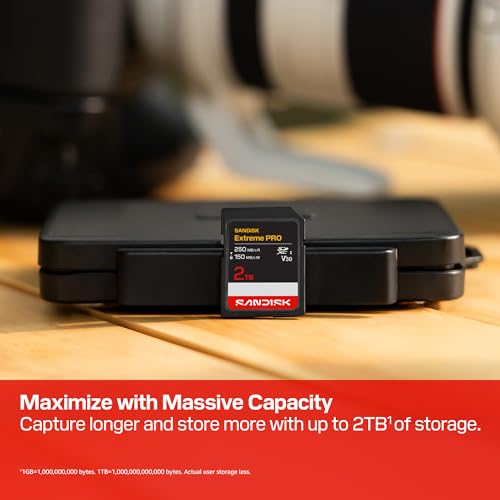
SANDISK 128GB Extreme PRO SD Memory Card, Up to 250MB/s Read Speeds, UHS-I | V30, U3, C10, 4K UHD, Full HD, Up to 120MB/s Write Speeds, Backup + Transfer with SANDISK App - SDSDXXJ-128G-GSCIN




As an Amazon Associate we earn from qualifying purchases. Product prices and availability are accurate as of the date/time indicated.

2 Pack TF Card 128GB with Adapter, High Speed Memory Card, UHS-I C10 A1 Memory TF Card for Tablet/Mobile Phone/Camera/Car Audio/Game Console (TF162 Red Gold 128GB)
As an Amazon Associate we earn from qualifying purchases. Product prices and availability are accurate as of the date/time indicated.

Amazon Basics microSDXC Memory Card with Full Size Adapter, A2, U3, Read Speed up to 100 MB/s, 128GB, Black
As an Amazon Associate we earn from qualifying purchases. Product prices and availability are accurate as of the date/time indicated.
Prices shown are approximate and for reference only. Prices change often, so please check the current price on Amazon before you buy.
Speed classes and capacities summarize manufacturers’ published information for current versions; verify your camera’s slot type and required video class before buying. Ratings are editorial, weighing sustained-write honesty, build and reliability reputation, ecosystem fit, and value per role.
The Six Storage Picks Reviewed
1. SanDisk Extreme PRO UHS-I: Best Card for Most Cameras
The Extreme PRO UHS-I is the card the majority of cameras are actually waiting for: a V30 guarantee that covers ordinary 4K video and all ordinary stills, sustained writes at the top of what a UHS-I slot accepts, capacities across the working range, and a price that makes the two-card rotation this guide prescribes an easy purchase rather than a strategy. Its ubiquity is itself a feature, replaceable in any camera town on earth, and its reliability record across a decade of iterations is the class’s reference. For the shooter whose camera’s slot is UHS-I, which is most cameras below the flagship tier, it is not the compromise choice but the correct one, and the money it saves against UHS-II buys the SSD below, which is the hybrid doctrine expressed as a shopping list.
2. Sony TOUGH SF-G UHS-II: Best High-End Card
Sony’s TOUGH cards answer the flagship camera’s demands and the field’s abuses together: V90 sustained writes for the highest-bitrate video modes and the deepest bursts, in a one-piece molded body without the fragile write-protect switch and ribbon contacts of the standard card, rated by its maker for bending, drops, dust, and water beyond the class’s norms. Their price is the table’s card summit and their constituency is precise, the UHS-II-slot shooter whose codec or burst actually draws the speed, for whom the card is not a luxury but the difference between the camera’s promise and its delivery. For everyone else it is a magnificent overbuy, which its rating, the table’s joint highest, should not be read as denying: it is the best card here, for the cameras that can use it.
3. Lexar Professional 2000x UHS-II: Best UHS-II Alternative
Lexar’s professional line gives the UHS-II shooter a second house to buy from, V90-class performance in the established series, at prices that commonly undercut the leader’s by a margin worth having when cards are bought in pairs. Its build is the conventional card’s rather than the TOUGH’s armor, and its readers and ecosystem are its own, and within those ordinary terms it delivers the speed class’s full working value. For the hybrid shooter equipping a flagship body, it is the pair-buyer’s row, two of these frequently costing what one and a half of the summit card does, with the doctrine’s redundancy worth more than the difference in armor for most field lives.
4. Samsung T7 Shield: Best Portable SSD
The T7 Shield is the field SSD perfected by iteration: USB 3.2 Gen 2 throughput that ingests a card in the minutes this guide promises, a rubber-armored body rated for drops and weather in its maker’s testing, capacities in the terabyte class that swallow a video trip, and a size that disappears into the bag’s smallest pocket. It edits directly without complaint, it draws its power from the port, and its price per terabyte has fallen to where the backup doctrine costs less than a single large card. For the hybrid kit, it is the second station’s default, and its rating shares the table’s lead because the SSD, in the real workflow, is where the hours and the safety both live.
5. SanDisk Extreme Portable SSD: Best Travel Alternative
SanDisk’s Extreme Portable line matches the leader’s formula with its own accents: fast Gen 2 transfers, a compact loop-holed body made to clip inside a bag, water and dust resistance in its class, and capacities and prices in direct competition, which is a compliment to the buyer. Its carabiner-friendly design suits the run-and-gun kit, and its performance in ingest and editing duty is the class’s standard. Choosing between it and the Samsung is a matter of price on the day and loyalty in the drawer, and this guide grades it a hair behind on the Shield’s armor while recommending either without reservation as the kit’s backup station.
6. Crucial X9 Pro / X10 Pro: Best SSD Value
Crucial’s portable drives bring the value house’s discipline to the category: compact metal bodies, Gen 2 and faster class interfaces by model, and per-terabyte prices that regularly lead the table’s SSD rows, making the two-terabyte field drive, the video shooter’s comfortable size, a rational purchase rather than a production expense. Their ruggedness claims sit a class below the armored leaders’, and their speeds, honestly stated by model, should be matched to the port they will actually use, since a faster drive on a slower port is the card fallacy repeated at the desk. For the budget-conscious hybrid kit, and especially for the second SSD, the home archive’s mirror, they are the arithmetic’s answer.
Buying Guide: How to Split Your Budget Between SD Card and SSD
Step One: Spec the Card From the Camera, Not the Shelf
Open the camera’s manual or its maker’s page and copy two facts into the shopping list: the slot’s bus, UHS-I or UHS-II, and the highest video mode’s required class, V30, V60, or V90. Buy exactly that class from an established maker through an authorized seller, in a pair of mid-size capacities sized by your day’s arithmetic, a stills day in the tens of gigabytes, a video day in the hundreds, with the pair rotated so neither holds a whole irreplaceable shoot. Resist the three upsells the shelf will offer: the faster class your slot cannot use, the single enormous capacity that concentrates a trip into one failure point, and the no-name card whose price is its fraud’s budget. Format the new cards in the camera, shoot a test burst and a test clip at your highest mode before any work that matters, and the in-camera station is finished, permanently, until the camera changes.
Step Two: Spec the SSD From the Trip, and Build the Backup Habit
Size the portable SSD by the longest stretch you shoot away from home, multiplied honestly, plus half again for headroom, and choose the rugged pocket class from this table’s SSD rows, with the interface matched to your computer’s fastest port. Then build the habit that makes it a backup rather than a bigger card: every night of a shoot that matters, ingest the day’s cards to the SSD through a reader that matches the cards’ class, verify the copy by count and by opening files, and keep the cards unformatted as the second copy until the desk archive confirms the third. At home, the SSD’s contents mirror to the archive drive or the cloud on the week’s schedule, and the SSD is wiped for the next trip only after that confirmation, a discipline that costs four minutes a day and has saved more bodies of work than every other practice in photography combined. Buy the second, value-class SSD for the home mirror when the archive matters, since a backup of the backup is where the doctrine completes.
Step Three: Spend the Remainder Where It Shows
Price the hybrid kit whole and notice what the doctrine has saved: the correctly classed card pair and the terabyte SSD together commonly cost less than the maximalist’s single fastest huge card, and the remainder belongs to the parts of the workflow the shooter touches daily, a reader as fast as the cards, since a UHS-I reader throttles a UHS-II card’s ingest to a third of its promise; a case that keeps cards organized and findable in the dark; and the home archive’s capacity, the unglamorous terabytes where the work will live for decades. Revisit the split only when the camera changes, a new body with a faster slot or a hungrier codec being the one event that reopens the card question, while the SSD station serves across cameras untouched. That stability is the hybrid kit’s final virtue: it converts storage from a recurring anxiety into a solved problem, which is what every piece of infrastructure in a creative life is for.
Frequently Asked Questions About SD Cards vs SSDs for Cameras
Can I record directly to an SSD instead of an SD card?
On some cameras and many cinema and hybrid bodies, yes, through USB-C recording to an external SSD, a feature whose support is model-specific and must be confirmed in your camera’s specification and firmware, with the drive itself on the maker’s tested list where one is published. Where supported, it is a genuinely useful mode for long-form video, trading the card’s capacity limits for the drive’s terabytes and simplifying ingest to unplugging the archive itself. Its cautions are practical: the rig gains a cable and a mounted drive that must be secured against knocks and disconnection, the camera’s weather sealing is compromised at the open port, and stills workflows rarely benefit, since bursts and mobility favor the internal card. Treat it as a third station for the video work that wants it, not as a replacement for the card-and-backup doctrine, and note that a drive recording the only copy of a day is a single point of failure with a cable, so the nightly copy remains the rule even here.
Is a UHS-II card worth it if my camera supports it?
It is worth it precisely to the extent that your shooting draws the speed, and the two draws are knowable before you spend: your highest video mode’s required class, where a V90 requirement makes the fast card mandatory rather than optional, and your burst habit, where the long, full-resolution sequences of sports and wildlife work visibly deepen on the faster card’s sustained write, the buffer clearing sooner and the next sequence starting earlier. The stills shooter in single frames and the 4K shooter at ordinary bitrates will not feel the difference in the field, their money working harder at the SSD station, and the honest test is your own: rent or borrow the fast card for one representative day, shoot your worst case, and count the moments the buffer stopped you. Buy the class your evidence names, in a pair, from the authorized shelf, and the question closes for the life of the camera, which is the correct lifespan for a storage decision.
How long do SD cards and SSDs last for photo storage?
Both are working media rather than archives, and their honest lifespans are measured in duty: a quality SD card endures years of regular shooting, its flash rated for write cycles a stills shooter will not approach and a heavy video shooter should respect by rotating pairs and retiring any card at its first error, while a portable SSD, written mostly in nightly ingests, serves many years as the field station before its own wear or its interface’s obsolescence retires it to desk duty. Neither belongs in the archive’s foundation, since flash storage left unpowered for very long periods is not the medium for decade-scale keeping, and both can fail without the courtesy of warning. The archive itself belongs on the home system, spinning drives or a maintained library with its own redundancy and a cloud copy, refreshed on the years’ schedule, with the cards and the field SSD understood as what they are: the transport layer of a system whose permanence lives elsewhere. Shooters who internalize that distinction stop asking media to be immortal and start keeping copies, which is the only immortality photography has ever actually had.
SD card vs SSD: which should I upgrade first?
Whichever station is currently failing your work, diagnosed by symptom: if the camera stops mid-burst, refuses a video mode, or reports card errors, the card is the bottleneck and the upgrade, bought to the slot’s and codec’s specification in this guide; if the camera performs and the pain lives at the desk, the ingest that eats the evening, the library that stutters off a slow drive, the trip that came home in a single copy, the SSD is the upgrade, and it is the one most photographers feel most, because it returns time on every shoot rather than headroom on some. If neither is failing, upgrade the backup before either, the second copy being the only purchase in this entire category that protects work already made rather than enabling work imagined. And if the budget forces a single choice for a new kit, take the correctly classed card pair first, since without cards there is no shoot, and the SSD next payday, since without backup there is eventually no archive; the order is the doctrine, and the doctrine is the article, in one sentence at last.
Related guides
- How to Choose SSD for Slow Boot in 2026: A 7-Step Guide to Choosing an SSD That Fixes a Slow Boot, With NVMe and SATA SSDs Compared
- Best Budget SSD for Laptop Under 100 in 2026: How to Pick a Budget SSD for Laptop Under 100 That Is Fast, Reliable, and Fits Your Laptop
- Best PC Case for Beach House Use in 2026: Fractal Design, Corsair, Lian Li, and be quiet! Compared for a Salt Parish That Rusts an Idle Machine, Filters Read as a Cleaning Calendar, and a House That Stands Empty Between Visits
- Best Handheld Console Stand for PC Streaming in 2026: Docks With Video Out, Cooling Stands, and Desktop Rigs for the Deck, ROG Ally, and Legion Go
More from Amazon
Programs that pair well with the guide above. Offers and eligibility are set by Amazon and may change.
Free shipping on eligible items, Prime Video and more. Eligible new members can start with a free trial.
Start a Prime free trialAd-free music streaming. Eligible new subscribers can start with a free trial.
Try Music Unlimited freeA Prime membership for ages 18-24 with a trial period. Eligibility is set by Amazon.
See Prime for Young AdultsAudiobooks and podcasts to listen to on the go. Eligible new members can start with a free trial.
Try Audible freeAs an Amazon Associate we earn from qualifying purchases.

Write Your Review
No reviews yet. Be the first to share your experience!