
What's inside
- Why a Cheap PSU Under 50 Can Be Risky – and How to Choose Safely
- Best Cheap PSU Under 50: What Wattage Do You Need?
- Best Cheap PSU Under 50 Comparison Table
- Top Cheap PSUs Under 50 Reviewed
- Buying Guide: How to Choose the Best Cheap PSU Under 50
- How to Install a Cheap PSU Safely
- Other Budget Power Supplies to Consider
- Frequently Asked Questions
As an Amazon Associate I earn from qualifying purchases. This post may contain affiliate links at no extra cost to you.
Finding the best cheap PSU under 50 is about choosing a power supply that is affordable, safe, and reliable enough for a basic PC, without risking your components with a low-quality, unbranded unit. A cheap PSU can be a good choice if you build a basic office PC, a home server, or a budget gaming PC with integrated graphics, but it is not a good choice for a high-end gaming PC with a powerful graphics card, because a cheap PSU may not have enough power, protection, or efficiency to handle a heavy load.
This guide explains what to look for in a cheap PSU under 50, how to compare wattage, efficiency, and safety protections, and which models work well in 2026. We focus on practical use for budget builders, students, and office users who want a PSU that costs less than $50, with a design that is safe and reliable for a basic build. Whether you build a PC with a Ryzen 5, an Intel i3, or an older graphics card, the same principles apply: choose a PSU from a reputable brand, with an 80 Plus rating, with over-voltage protection, and with the right wattage for your components.
Why a Cheap PSU Under 50 Can Be Risky – and How to Choose Safely
A cheap PSU under 50 can be risky because many very cheap power supplies, especially unbranded units that cost $20 to $30, use low-quality capacitors, thin wires, and no safety protections, which can cause them to fail, damage your motherboard, or in rare cases, catch fire. A PSU is the most important component for safety in your PC, because it supplies power to every other component, and a bad PSU can destroy your CPU, GPU, and storage in seconds. A good cheap PSU, from a reputable brand such as Thermaltake, EVGA, Corsair, or Cooler Master, costs $35 to $50, with an 80 Plus rating and with protections, and it is a much safer choice than an unbranded PSU.
A cheap PSU under 50 is a good choice for a basic PC with a power draw of less than 300W, such as an office PC with integrated graphics, or a budget gaming PC with a GTX 1650 or RX 6400, which uses less than 75W. A cheap PSU is not a good choice for a gaming PC with a RTX 4060 or higher, which needs at least 550W and a high-quality PSU with an 80 Plus Gold rating. Always calculate your PC power needs before you buy a cheap PSU, and do not buy a PSU based only on price.
Best Cheap PSU Under 50: What Wattage Do You Need?
For a basic office PC with an Intel i3 or Ryzen 3, with integrated graphics, a 400W to 450W PSU is enough, with a power draw of about 150W to 200W. For a budget gaming PC with a Ryzen 5 and a GTX 1650, a 450W to 500W PSU is a good choice, with a power draw of about 250W to 300W. For a PC with a Ryzen 5 and a RTX 3050, a 500W to 550W PSU is better, although it may cost more than $50, and you should consider spending $60 to $70 for a better PSU.
A cheap PSU under 50 usually has a wattage of 400W to 600W, with an 80 Plus White or 80 Plus Bronze rating, which is about 80 to 85 percent efficient. An 80 Plus White PSU is the lowest efficiency rating, but it is still better than a PSU with no rating at all, which may be only 70 percent efficient and may waste power as heat. An 80 Plus Bronze PSU is better, with about 85 percent efficiency, and it is worth paying $5 to $10 more for, if you can find one under $50 on sale. Always check the wattage on the 12V rail, not just the total wattage, because your CPU and GPU use 12V power, and a cheap PSU may have a low 12V wattage even if its total wattage is high.
Best Cheap PSU Under 50 Comparison Table
| Model | Wattage | Efficiency | Modular Type | Fan | Typical Price Range | Rating |
|---|---|---|---|---|---|---|
| Thermaltake Smart 500W | 500W | 80 Plus | Non-modular | 120mm | $35-$50 | 4.5/5 |
| EVGA 500 W1 500W | 500W | 80 Plus | Non-modular | 120mm | $35-$50 | 4.5/5 |
| Corsair CX450 450W | 450W | 80 Plus Bronze | Non-modular | 120mm | $40-$50 | 4.6/5 |
| Cooler Master MWE 450 White | 450W | 80 Plus | Non-modular | 120mm | $35-$50 | 4.5/5 |
| Thermaltake Smart 600W | 600W | 80 Plus | Non-modular | 120mm | $40-$50 | 4.5/5 |
| ARESGAME AGV500 500W | 500W | 80 Plus Bronze | Non-modular | 120mm | $30-$45 | 4.4/5 |
Top Cheap PSUs Under 50 Reviewed
Thermaltake Smart 500W
The Thermaltake Smart 500W is a non-modular power supply with 500W, an 80 Plus rating, and a 120mm fan. It has a single 12V rail, with over-voltage and short-circuit protection, and it is a good choice if you want a reliable, affordable PSU for a basic PC, with a design that is easy to install. It is popular with budget builders who want a PSU from a reputable brand, with a price of $35 to $50, and with a 5-year warranty.
EVGA 500 W1 500W
The EVGA 500 W1 500W is a non-modular power supply with 500W, an 80 Plus rating, and a 120mm fan. It has a single 12V rail, with heavy-duty protections, and it is a good choice if you want a cheap PSU for a budget gaming PC, with a GTX 1650 or similar graphics card. It is a practical option for builders who want a PSU that is reliable and easy to find, with a price of $35 to $50, and with a 3-year warranty.
Corsair CX450 450W
The Corsair CX450 450W is a non-modular power supply with 450W, an 80 Plus Bronze rating, and a 120mm fan. It has a higher efficiency than an 80 Plus White PSU, with about 85 percent efficiency, and it is a good choice if you want a cheap PSU with better efficiency, for an office PC or a basic gaming PC. It is a practical option for builders who want a Corsair PSU, with a price of $40 to $50 on sale, and with a 5-year warranty.
Cooler Master MWE 450 White
The Cooler Master MWE 450 White is a non-modular power supply with 450W, an 80 Plus rating, and a 120mm fan. It has a quiet fan, with a design that is optimised for low noise, and it is a good choice if you want a cheap PSU for a quiet office PC, with a design that is reliable and easy to install. It is a practical option for builders who want a Cooler Master PSU, with a price of $35 to $50, and with a 3-year warranty.
Thermaltake Smart 600W
The Thermaltake Smart 600W is a non-modular power supply with 600W, an 80 Plus rating, and a 120mm fan. It has more wattage than a 500W PSU, with a design that is good for a PC with a mid-range graphics card, such as a RTX 3050, although it is still a budget PSU and it is not ideal for a high-end GPU. It is a good choice if you want more headroom for future upgrades, with a price of $40 to $50, and with a 5-year warranty. It is a practical option for builders who want a 600W PSU under $50.
ARESGAME AGV500 500W
The ARESGAME AGV500 500W is a non-modular power supply with 500W, an 80 Plus Bronze rating, and a 120mm fan. It has a higher efficiency than many cheap PSUs, with a design that is popular with budget builders, and it is a good choice if you want a cheap PSU with Bronze efficiency, for a basic gaming PC. It has a price of $30 to $45, which is lower than many other brands, and it is a practical option if you are on a very tight budget, although you should check reviews and make sure it has protections before you buy it.
Buying Guide: How to Choose the Best Cheap PSU Under 50
Start with brand, safety, and protections. Choose a PSU from a reputable brand, such as Thermaltake, EVGA, Corsair, Cooler Master, or Seasonic, with a clear model name and a warranty of at least 3 years. Avoid unbranded PSUs, PSUs with no 80 Plus rating, and PSUs that are sold for $20 or less, because they often have no protections, low-quality capacitors, and thin wires. Look for a PSU with over-voltage protection, under-voltage protection, over-current protection, and short-circuit protection, with a statement in the specifications that it has these protections. A PSU with a 5-year warranty, such as Thermaltake Smart or Corsair CX, is a better sign than a PSU with a 1-year warranty.
Next, check wattage, 12V rail, and efficiency. Calculate your PC power needs, using a PSU calculator from PCPartPicker, Corsair, or Seasonic, and choose a PSU with at least 100W headroom above your calculated needs. For a basic office PC, 400W to 450W is enough, while for a budget gaming PC with a GTX 1650, 500W is a good choice. Check the wattage on the 12V rail, which should be at least 80 percent of the total wattage, because your CPU and GPU use 12V power. A PSU with an 80 Plus Bronze rating is better than an 80 Plus White rating, with about 85 percent efficiency, and it will save power and run cooler. A PSU with an 80 Plus rating is a minimum requirement for a cheap PSU under 50.
Check cables, connectors, and size. Look for a PSU with the cables you need: a 24-pin motherboard cable, an 8-pin CPU cable, and at least one 6+2 pin PCIe cable for your graphics card, if you have one. A cheap PSU under 50 is usually non-modular, with all cables permanently attached, which is fine for a basic build, but it will have extra cables that you need to hide. Check PSU length, usually 140mm to 150mm for an ATX PSU, to make sure it fits in your case, especially if you have a small case. A PSU with a 120mm fan is quieter than a PSU with an 80mm fan, and it is a good choice for a quiet PC.
Consider your components, future upgrades, and when to spend more. If you have a high-end graphics card, such as a RTX 4060 or higher, do not buy a cheap PSU under 50, because you need at least a 550W to 650W PSU with an 80 Plus Gold rating, which costs $70 to $100, and which is safer for your components. If you plan to upgrade your GPU in the future, buy a PSU with more wattage now, such as 600W, so you do not need to replace it later. A cheap PSU is a good choice for a basic PC that you will not upgrade, but it is not a good long-term investment for a gaming PC that you will upgrade. If your budget is $50, consider buying a used PSU from a reputable brand, or waiting for a sale on a better PSU, such as a Corsair CX550M, which often goes on sale for $50 to $60.
Finally, set a realistic budget and check for sales. Cheap PSUs under 50 typically cost $35 to $50, with prices varying by sale. A 500W PSU from $35 to $50, such as the Thermaltake Smart 500W or EVGA 500 W1, offers excellent value for a basic PC, with a reliable design and a 3 to 5 year warranty. A 450W Bronze PSU from $40 to $50, such as the Corsair CX450, offers better efficiency, and it is worth paying $5 to $10 more for. A 600W PSU from $40 to $50, such as the Thermaltake Smart 600W, offers more headroom for upgrades. Do not buy a PSU based only on price or wattage. Choose one from a reputable brand, with an 80 Plus rating, with safety protections, and with the right wattage for your PC, so your basic build is safe, reliable, and quiet.
How to Install a Cheap PSU Safely
To install a cheap PSU safely, turn off your PC, unplug it from the wall, and discharge static by touching a metal part of your case. Remove your old PSU, if you have one, and install your new PSU in the bottom of your case, with the fan facing down if your case has a bottom vent, or facing up if it does not. Connect the 24-pin motherboard cable, the 8-pin CPU cable, and the PCIe cable for your GPU, making sure they click into place, and connect SATA cables for your storage. Tuck extra cables behind your motherboard tray, with cable ties, so they do not block airflow. Plug in your PC, turn it on, and check that your fans spin and your PC boots. If your PC does not boot, or if you smell burning, turn it off immediately and check your connections. Do not open your PSU, because it contains high-voltage capacitors that can shock you even when unplugged.
Other Budget Power Supplies to Consider
A cheap PSU still needs enough wattage, the right connectors, and a sensible warranty. These four cover basic office builds and light gaming machines.
EVGA 500 W1
A basic 500W unit with an 80 Plus White rating and a straightforward fixed-cable design. It fits an entry-level build with a modest graphics card or integrated graphics.
As an Amazon Associate we earn from qualifying purchases at no extra cost to you.

Thermaltake Smart 500W
A long-running budget unit with a 120mm fan and 80 Plus certification. It is a simple choice for a plain desktop where you do not need modular cables.

Corsair CX650
A 650W unit that gives extra headroom for a mid-range graphics card. It is a step up from the cheapest models in rated output and brand support.

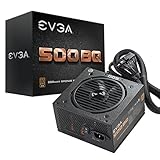
EVGA 500 BQ
A semi-modular 500W unit with an 80 Plus Bronze rating. The semi-modular layout makes cable routing easier in a small case.
Frequently Asked Questions
Is a cheap PSU under 50 safe?
A cheap PSU under 50 can be safe if it is from a reputable brand, such as Thermaltake, EVGA, Corsair, or Cooler Master, with an 80 Plus rating and with safety protections, such as over-voltage, under-voltage, over-current, and short-circuit protection. A cheap PSU from an unbranded manufacturer, with no 80 Plus rating and no protections, is not safe, and it can damage your components or cause a fire. Always buy a PSU from a reputable brand, with a warranty of at least 3 years, and check reviews from reputable sites before you buy it. A cheap PSU is safe for a basic PC with a low power draw, but it is not safe for a high-end gaming PC with a powerful GPU.
What wattage PSU do I need for a budget gaming PC?
For a budget gaming PC with a Ryzen 5 and a GTX 1650, a 450W to 500W PSU is enough, with a power draw of about 250W to 300W. For a PC with a Ryzen 5 and a RTX 3050, a 500W to 550W PSU is better, with a power draw of about 350W. Use a PSU calculator from PCPartPicker, Corsair, or Seasonic to estimate your exact needs, and choose a PSU with at least 100W headroom above your calculated needs, so it runs efficiently and quietly. A 500W PSU, such as the Thermaltake Smart 500W or EVGA 500 W1, is a good choice for most budget gaming PCs, with a price under $50.
Is 80 Plus Bronze better than 80 Plus White?
Yes, 80 Plus Bronze is better than 80 Plus White, because it is more efficient, with about 85 percent efficiency at 50 percent load, compared to about 80 percent for 80 Plus White. An 80 Plus Bronze PSU wastes less power as heat, runs cooler, and is quieter than an 80 Plus White PSU. An 80 Plus Bronze PSU, such as the Corsair CX450 or ARESGAME AGV500, costs $5 to $10 more than an 80 Plus White PSU, but it is worth it if you can find one under $50 on sale. An 80 Plus Gold PSU is even better, with about 90 percent efficiency, but it usually costs $70 to $100, and it is not available under $50 for a new, reputable model.
Can I use a 500W PSU for a RTX 4060?
A 500W PSU is not recommended for a RTX 4060, because NVIDIA recommends a 550W PSU for a RTX 4060, with a power draw of about 115W for the GPU, plus 100W to 150W for the CPU, and 50W for other components, for a total of about 300W to 350W, with headroom needed for peaks. A 500W cheap PSU under 50 may work for a RTX 4060 in a basic build, but it will run close to its limit, with less efficiency and more noise, and it may not have the protections needed for a modern GPU. It is better to buy a 550W to 650W PSU with an 80 Plus Gold rating, such as a Corsair RM550e or Seasonic Focus GX-550, which costs $70 to $90, for a RTX 4060. Do not risk a high-end GPU with a cheap PSU.
Related guides
- Best Cheap RAM for Desktop Under 100 in 2026: 7 RAM Kits That Are Fast, Reliable, and Built for Desktops Under $100 Without RAM That Is Too Slow, Too Incompatible, or Too Tall
- Best Budget GPU for Students in 2026: NVIDIA GeForce RTX, AMD Radeon RX, and Intel Arc Cards Chosen by Your Course, Your Power Supply, and a Degree’s Whole Four Years
- Best Webcam for Dark Gaming Rooms in 2026: Low-Light Webcams for Streaming and Gaming
- How to Choose Scanner for PC Photo Scanning in 2026: 6 Top Scanners for PC Photo Scanning, Sharp Photos, and Easy Use
More from Amazon
Programs that pair well with the guide above. Offers and eligibility are set by Amazon and may change.
Free shipping on eligible items, Prime Video and more. Eligible new members can start with a free trial.
Start a Prime free trialAd-free music streaming. Eligible new subscribers can start with a free trial.
Try Music Unlimited freeA Prime membership for ages 18-24 with a trial period. Eligibility is set by Amazon.
See Prime for Young AdultsAudiobooks and podcasts to listen to on the go. Eligible new members can start with a free trial.
Try Audible freeAs an Amazon Associate we earn from qualifying purchases.

Write Your Review
No reviews yet. Be the first to share your experience!