
What's inside
- Best Case Fan for Airflow Cooling: Quick Comparison Table
- What Is a Best Case Fan for Airflow Cooling?
- Best Case Fan for Airflow Cooling Reviewed
- Buying Guide: How to Choose the Best Case Fan for Airflow Cooling
- How to Set Up Case Fans for Airflow Cooling
- Which Best Case Fan for Airflow Cooling Should You Buy?
- Frequently Asked Questions About the Best Case Fan for Airflow Cooling
As an Amazon Associate I earn from qualifying purchases. This post may contain affiliate links at no extra cost to you.
It helps you bring cool air into a desktop PC, push hot air out, and keep a CPU and graphics card cooler under load, without a fan that whines, rattles, or stalls at low speed. A good case fan for airflow cooling is not just the fastest fan on the shelf. It is a real best case fan for airflow cooling choice, and the wrong one can create turbulence, add noise without improving temperatures, or fail to move air through a front filter and drive cage.
That fan can be used as a front intake or rear exhaust, it is quiet enough for daily use, and it is priced well for builders who want to cool a mid-tower PC without buying a full set of premium fans at once.
At thetechchart.com, we focus on tech gadgets. For this guide to the best case fan for airflow cooling in 2026, we compared current case fans that are widely sold, designed for airflow rather than high static pressure through a thick radiator, and suitable for a builder who wants the best case fan for airflow cooling. We looked at size, airflow in CFM, noise in dBA, maximum speed in RPM, bearing type, and price. Airflow, noise, and speed figures are manufacturer listings, and real performance depends on your case, your filter, your fan curve, and how many fans you use. Always check the fan specs before you buy.
Our Top Picks
Best Case Fan for Airflow Cooling: Quick Comparison Table
The table below compares seven case fans for airflow cooling. Size is the fan size, where given. Airflow is the maximum airflow in cubic feet per minute, where given. Noise is the maximum noise level, where given. Speed is the maximum speed in revolutions per minute, where given. Best for is a note on what the fan is best for, such as best case fan for airflow cooling, where given.
| Case Fan for Airflow Cooling | Size | Airflow | Noise | Speed | Best For |
|---|---|---|---|---|---|
| Noctua NF-A12x25 PWM | 120 mm | 60.1 CFM | 22.6 dBA | 2,000 RPM | Best overall, best case fan for airflow cooling |
| Arctic P12 PWM PST | 120 mm | 56.3 CFM | 22.5 dBA | 1,800 RPM | Best value, Arctic P12 PWM PST |
| be quiet! Silent Wings Pro 4 120 mm PWM | 120 mm | 83.9 CFM | 28.9 dBA | 3,000 RPM | Best for be quiet!, Silent Wings Pro 4 |
| Corsair ML120 Pro LED | 120 mm | 75 CFM | 37 dBA | 2,400 RPM | Best for Corsair, ML120 Pro |
| Lian Li UNI Fan SL120 V2 | 120 mm | 64.5 CFM | 29.5 dBA | 2,000 RPM | Best for Lian Li, UNI Fan SL120 V2 |
| Thermaltake ToughFan 12 | 120 mm | 58.3 CFM | 22.3 dBA | 2,000 RPM | Best for Thermaltake, ToughFan 12 |
| NZXT F120 RGB Duo | 120 mm | 60.6 CFM | 28 dBA | 1,800 RPM | Best budget RGB, NZXT F120 RGB Duo |
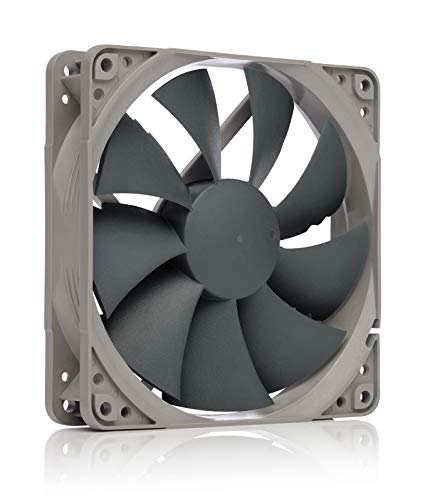
Noctua NF-P12 redux-1700 PWM, Quiet Fan 120mm | High Airflow, Low Noise, 25mm Thick Fan for PC and Electronics Cooling Streamlined Package 1700rpm 4-Pin PWM


As an Amazon Associate we earn from qualifying purchases. Product prices and availability are accurate as of the date/time indicated.

Cooler Master MF120 Lite 120mm PWM Cooling Fan, High Airflow | 120mm PC Cooling Fan, PWM up to 1,750 RPM, High Airflow Blades, Hybrid PBT Frame


As an Amazon Associate we earn from qualifying purchases. Product prices and availability are accurate as of the date/time indicated.

ID-COOLING AS-120-K Trio 120mm PWM Case Fans 3-Pack, Low Noise | 300–2,000 RPM, 58 CFM airflow, quiet operation,hydraulic bearing for long-lasting reliability.High Performance cooling
As an Amazon Associate we earn from qualifying purchases. Product prices and availability are accurate as of the date/time indicated.
Prices shown are approximate and for reference only. Prices change often, so please check the current price on Amazon before you buy.
Note: Airflow, noise, and speed figures are manufacturer listings, and a fan that lists 83.9 CFM at maximum speed will be louder and move less air at the lower speeds most builders use every day, because airflow and noise both change with RPM and restriction. Always check the fan’s size, airflow, noise, and connector in the listing, and confirm the current price with the retailer. The best case fan for airflow cooling should fit your case mounts, match your motherboard fan headers, and move air through your filter before you buy.
What Is a Best Case Fan for Airflow Cooling?
It helps you move air, cool parts, and keep noise down, without a fan that only spins fast and loud.
A best case fan for airflow cooling is different from a radiator fan alone, which is made for high static pressure through a dense fin stack, while an airflow fan is made for open space, a mesh front, or a lightly filtered intake. It is also different from a small chipset fan alone, which is for a tiny heatsink, while a case fan is for moving air through the whole case.
A best case fan for airflow cooling is best for a builder who owns a mid-tower or full-tower PC, wants cooler air, has 120 mm or 140 mm mounts, and wants a simple, reliable fan that can be controlled by the motherboard.
Best Case Fan for Airflow Cooling Reviewed
1. Noctua NF-A12x25 PWM – Best Case Fan for Airflow Cooling Overall
It has a strong design, a smooth fluid dynamic bearing, and a build that is made for builders who want quiet airflow first.
Noctua designs the NF-A12x25 with a focus on a fan that is for airflow cooling and has a tight blade tip clearance and a sterrox blade material. The fan is a good option for a builder who wants Noctua gear, and who wants the best overall design for the best case fan for airflow cooling.
The main limitation is colour and price. Choose the NF-A12x25 if you want the best overall fan, you want Noctua, you value low noise, and you have a budget of $30 to $35.
2. Arctic P12 PWM PST – Best Value Case Fan for Airflow Cooling
It has a good design, a good fluid dynamic bearing, and a build that is made for builders who want to fill a case with three or four fans without spending a large amount.
Arctic designs the P12 PWM PST with a focus on a fan that is for airflow cooling and has a PST daisy-chain connector. The fan is a good option for a builder who wants Arctic gear, and who wants a P12 PWM PST.
The main limitation is resonance at some speeds. Some P12 fans can produce a hum near 1,000 RPM, though a custom fan curve can move past that range. Choose the P12 PWM PST if you want value, you want several fans, and you have a budget of $10 to $15.
3. be quiet! Silent Wings Pro 4 120 mm PWM – Best Case Fan for Airflow Cooling for High Airflow
The be quiet! It has a good design, a good fluid dynamic bearing, and a build that is made for builders who want strong airflow when a PC is under load.
be quiet! designs the Silent Wings Pro 4 with a focus on a fan that is for airflow cooling and has a high-speed mode and a quiet mode. The fan is a good option for a builder who wants be quiet! gear, and who wants a Silent Wings Pro 4.
The main limitation is noise at full speed. At 3,000 RPM, it is louder than a Noctua at 2,000 RPM, though it can be slowed down with PWM for daily use. Choose the Silent Wings Pro 4 if you want be quiet!, you want high airflow, and you have a budget of $25 to $35.
4. Corsair ML120 Pro LED – Best Case Fan for Airflow Cooling for Corsair Builds
It has a good design, a good magnetic levitation bearing, and a build that is made for builders who want a long-life bearing and a clean look.
Corsair designs the ML120 Pro with a focus on a fan that is for airflow cooling and has a magnetic levitation design. The fan is a good option for a builder who wants Corsair gear, and who wants an ML120 Pro.
The main limitation is noise. At 37 dBA maximum, it is louder on paper than the Noctua or Arctic, though it is quieter at the 1,200 to 1,500 RPM range most builders use. Choose the ML120 Pro if you want Corsair, you want magnetic levitation, and you have a budget of $20 to $30.
5. Lian Li UNI Fan SL120 V2 – Best Case Fan for Airflow Cooling for Cable Management
It has a good design, a good fluid dynamic bearing, and a build that is made for builders who want to link several fans together with one cable.
Lian Li designs the UNI Fan SL120 V2 with a focus on a fan that is for airflow cooling and has a slide-in interlocking design. The fan is a good option for a builder who wants Lian Li gear, and who wants a UNI Fan SL120 V2.
The main limitation is the controller. The full RGB and speed features need the Lian Li controller, though the fan can run on a standard PWM header for basic use. Choose the SL120 V2 if you want Lian Li, you want clean cable management, and you have a budget of $25 to $35.
6. Thermaltake ToughFan 12 – Best Case Fan for Airflow Cooling for Quiet Operation
It has a good design, a good hydraulic bearing, and a build that is made for builders who want a quiet fan with a strong frame.
Thermaltake designs the ToughFan 12 with a focus on a fan that is for airflow cooling and has a metal-reinforced hub. The fan is a good option for a builder who wants Thermaltake gear, and who wants a ToughFan 12.
The main limitation is availability in some regions. Choose the ToughFan 12 if you want Thermaltake, you want quiet operation, and you have a budget of $20 to $30.
7. NZXT F120 RGB Duo – Best Budget RGB Case Fan for Airflow Cooling
It has a good design, a good fluid dynamic bearing, and a build that is made for builders who want RGB lighting on both sides of the fan.
NZXT designs the F120 RGB Duo with a focus on a fan that is for airflow cooling and has a dual-sided RGB ring. The fan is a good option for a builder who wants NZXT gear, and who wants an F120 RGB Duo.
Choose the F120 RGB Duo if you want a low price RGB fan, you want NZXT, and you have a budget of $20 to $30.
Buying Guide: How to Choose the Best Case Fan for Airflow Cooling
Before you buy, think about how your PC is cooled, whether it is for gaming, work, or a quiet home office, what size your case supports, whether it is 120 mm or 140 mm, what airflow you need, whether it is 50 or 80 CFM, what noise you can accept, whether it is 22 or 30 dBA, and how much you want to spend. A fan that is perfect for a mesh front may be too weak behind a solid glass panel, and a fan that is perfect for a radiator may be louder than needed for a simple intake.
1. Airflow vs Static Pressure: Open Case, Filter, and Your Front Panel
Airflow versus static pressure is the first decision. Airflow is how much air a fan moves in open space, usually 50 to 85 CFM for a 120 mm fan, while static pressure is how well it pushes air through a restriction such as a filter, a radiator, or a tight drive cage. A builder often buys a high-pressure fan for a front intake and finds it is louder than an airflow fan for the same cooling.
Choose an airflow fan if you want an open intake, you have a mesh front, or you have a budget of $10 to $35. Choose a pressure fan if you want a radiator, you have a thick filter, or you have a budget of $20 to $35. For most mid-tower PCs with a mesh front, an airflow fan such as the Noctua NF-A12x25 or Arctic P12 is the better choice. Check your case manual for the front panel type before you decide.
2. Size: 120 mm vs 140 mm, and Your Case Mounts
Size is the second decision. Size is the fan diameter, usually 120 mm for most mounts, while 140 mm is for larger front, top, and rear mounts. A builder often buys a 140 mm fan and finds the case only has 120 mm holes, or buys a 120 mm fan for a 140 mm mount and leaves a gap.
Choose 120 mm if you want the widest choice, you have a standard mid-tower, or you have a budget of $10 to $35. Choose 140 mm if you want more airflow at lower RPM, you have a large case, or you have a budget of $15 to $35. A 140 mm fan can move similar air at a lower speed, which can mean less noise, but it is not always better if your case is designed around 120 mm fans. For most builders in 2026, 120 mm is the safest starting point, and 140 mm is a useful upgrade for the front of a large case.
3. Noise: dBA, RPM, and Your Fan Curve
Noise is the third decision. Noise is how loud a fan sounds, usually 22 dBA is quiet, while 30 dBA is noticeable, and 37 dBA is loud at full speed. A builder often runs a fan at 100 percent all the time and finds the PC is too loud, even though the same fan is quiet at 60 percent.
Choose a fan with a low maximum noise if you want a quiet PC, you work near the case, or you have a budget of $20 to $35. Use a PWM fan curve in the BIOS or software so the fan speeds up only when temperatures rise. Set a quiet curve for web browsing and office work, and a stronger curve for gaming. For most builders, a fan that is quiet at 1,000 to 1,400 RPM matters more than its maximum CFM, because that is where it will spend most of its life.
4. Bearing Type: Fluid Dynamic, Magnetic Levitation, and Long Life
Bearing type is the fourth decision. Bearing type is how the fan shaft is supported, usually fluid dynamic for quiet and long life, while magnetic levitation is for low friction and long life, and a sleeve bearing is for a lower price. A builder often buys a cheap sleeve fan and finds it clicks or rattles after a year, especially when mounted horizontally on top of a case.
Choose fluid dynamic or magnetic levitation if you want long life, you mount fans on top, or you have a budget of $20 to $35. Choose a well-made hydraulic bearing if you want a balance of price and life, or you have a budget of $10 to $30. For most builders, a fluid dynamic bearing is the best choice for airflow cooling, because it stays quiet in both vertical and horizontal mounts.
5. PWM, Daisy-Chain, and RGB: Control, Cables, and Your Motherboard
Control is the fifth decision. Control is how you set fan speed and lighting, usually a 4-pin PWM header for speed control, while a 3-pin header runs at a fixed voltage. A builder often buys a PWM fan and plugs it into a 3-pin header, then finds it runs at full speed.
Choose PWM if you want speed control, you have a modern motherboard, or you have a budget of $10 to $35. Check how many fan headers your board has, and use a PST daisy-chain fan such as the Arctic P12 PWM PST if you need to link several fans to one header. For RGB fans, check whether the lighting uses a standard 3-pin ARGB header or a brand controller, because the two are not always interchangeable. For most builders, a non-RGB PWM fan is simpler, while an RGB fan such as the Lian Li SL120 V2 or NZXT F120 RGB Duo is best if you want a clean, lit build and are willing to set up the controller.
6. Price, Total Cost, and Choosing a Case Fan for Airflow Cooling on a Budget
Silent Wings Pro 4, or Lian Li UNI Fan SL120 V2, offers the best noise-to-airflow balance or the cleanest cable setup.
Consider total cost as well as price. Do not buy the cheapest fan if it is too loud at your usual speed, and do not buy the most expensive fan if you only need a basic rear exhaust. A fan that matches your case size, your noise target, and your budget will cool better than a fan that is cheap but noisy, or expensive but too fast for the best case fan for airflow cooling.
How to Set Up Case Fans for Airflow Cooling
Setting up case fans for airflow cooling starts with a simple layout: front fans as intake, rear and top fans as exhaust, and a slight positive pressure so dust comes in through the filter, not through gaps. Use a Noctua NF-A12x25 or Arctic P12 PWM PST for the front, and a matching fan for the rear.
For a first build, use two front intake fans and one rear exhaust fan, set the intake fans slightly faster than the exhaust, and test temperatures in a game or stress test. If the graphics card is hot, add a bottom intake if your case supports it, and if the CPU is hot, check the cooler and the top exhaust. Always route cables away from the fan blades, use the fan curve in the BIOS, and clean the front filter every few weeks.
Which Best Case Fan for Airflow Cooling Should You Buy?
If you want the best case fan for airflow cooling, buy the Noctua NF-A12x25 PWM.
If you want the best value, buy the Arctic P12 PWM PST. If you want high airflow, buy the be quiet! Silent Wings Pro 4 120 mm PWM. If you want Corsair, buy the Corsair ML120 Pro LED. If you want clean cable management, buy the Lian Li UNI Fan SL120 V2. If you want quiet operation, buy the Thermaltake ToughFan 12. If you want budget RGB, buy the NZXT F120 RGB Duo.
All seven fans in this guide are currently sold, designed for desktop airflow cooling, and suitable for a builder who wants the best case fan for airflow cooling. Pick the one that matches your case size, whether it is 120 mm, your noise target, and your budget, and always test your fan curve after installation.
Disclosure: thetechchart.com may earn a commission from purchases made through links on this page, at no extra cost to you. Airflow, noise, and speed figures are manufacturer claims and can vary by model, case, filter, and use.
Frequently Asked Questions About the Best Case Fan for Airflow Cooling
How many case fans do I need for good airflow cooling?
Add a top exhaust or a third intake only if temperatures stay high after you set a good fan curve and clean the filter.
Is a 120 mm or 140 mm case fan better for airflow?
Check your case manual first, because a 140 mm fan will not fit a 120 mm mount, and a 120 mm fan in a 140 mm mount can leave a gap that lets air bypass the fan.
Should case fans be intake or exhaust for airflow cooling?
Keep intake slightly stronger than exhaust for positive pressure, so dust enters through the filter.
What is the best budget case fan for airflow cooling?
Related guides
- Best Handheld Console Grip for Competitive Gamers in 2026: Satisfye, Skull and Co, JSAUX, and dbrand Compared for an Exact Console Fit, Sessions Judged at Their Third Hour, and Vents a Grip Must Never Cover
- Best USB C Cable for PC Streamers in 2026: Best USB C Cable for PC Streamers
- Best Small Form Factor PC Case in 2026: How to Pick a Small Form Factor PC Case That Is Compact, Cools Well, and Fits Your Mini-ITX Build
- Best Webcam for Live Streaming on PC in 2026: 6 Webcams for Twitch, YouTube, and Video Calls
More from Amazon
Programs that pair well with the guide above. Offers and eligibility are set by Amazon and may change.
Free shipping on eligible items, Prime Video and more. Eligible new members can start with a free trial.
Start a Prime free trialAd-free music streaming. Eligible new subscribers can start with a free trial.
Try Music Unlimited freeA Prime membership for ages 18-24 with a trial period. Eligibility is set by Amazon.
See Prime for Young AdultsAudiobooks and podcasts to listen to on the go. Eligible new members can start with a free trial.
Try Audible freeAs an Amazon Associate we earn from qualifying purchases.

Write Your Review
No reviews yet. Be the first to share your experience!