
What's inside
As an Amazon Associate I earn from qualifying purchases. This post may contain affiliate links at no extra cost to you.
Finding the best monitor arm for PC gamers starts with a simple idea: a monitor arm for PC gamers should hold your monitor steady, let you adjust height and angle, and be simple to use, without an arm that is too weak, too stiff, or too hard to mount on a desk. Best monitor arm for PC gamers is a weight and adjust job, not a brand job, because a gaming monitor arm needs an arm that fits your monitor, fits your desk, and fits your budget, and the right arm can make gaming much easier. In 2026, a good monitor arm for PC gamers means a gas spring design, with a 32 inch size, and a simple design that fits your monitor and your budget.
This guide compares seven real, currently sold monitor arms that are commonly used by PC gamers. It explains arm type, monitor size, and price in plain terms, and it helps you match an arm to your monitor, your desk, and your budget. Prices are shown as typical ranges because retailers and sales change often. Ratings reflect overall value for PC gamers, based on stability, ease of use, durability, adjustability, and price. The full price range in this table is $30 to $300, with Ergotron HX Desk Monitor Arm at $200 to $300 labelled as a premium exception. Keep your monitor at eye level, break every 60 minutes, use the 20-20-20 rule, do not overload your arm, check the weight limit, and check your desk clamp before you mount a monitor.
Our Top Picks
Best Monitor Arm for PC Gamers Compared
Use this table to compare arm type, monitor size, and price first. Those three details decide whether an arm will fit your best monitor arm for PC gamers and fit your budget. A gas spring arm is good for most PC gamers, and a 32 inch size is good for a gaming monitor.
| Model | Arm Type and Monitor Size | Weight Limit and Features | Best For | Typical Price Range | Rating |
|---|---|---|---|---|---|
| Ergotron LX Desk Monitor Arm | Gas spring, up to 34 inch | 25 lb limit, height adjust, tilt | PC gamers, overall | $100 – $150 | 4.9 / 5 |
| Amazon Basics Single Monitor Arm | Gas spring, up to 32 inch | 25 lb limit, height adjust, tilt | PC gamers, value | $30 – $50 | 4.8 / 5 |
| North Bayou F80 Monitor Arm | Gas spring, up to 27 inch | 20 lb limit, height adjust, tilt | PC gamers, value | $30 – $50 | 4.8 / 5 |
| HUANUO Dual Monitor Arm | Gas spring, up to 32 inch | 22 lb per arm, height adjust, tilt | PC gamers, value | $50 – $80 | 4.8 / 5 |
| VIVO Dual Monitor Arm | Gas spring, up to 32 inch | 22 lb per arm, height adjust, tilt | PC gamers, premium | $50 – $80 | 4.8 / 5 |
| HUANUO Single Gas Spring Monitor Arm | Gas spring, up to 35 inch | 26 lb limit, height adjust, tilt | PC gamers, premium | $50 – $80 | 4.8 / 5 |
| Ergotron HX Desk Monitor Arm | Gas spring, up to 49 inch | 42 lb limit, height adjust, tilt | PC gamers, premium exception | $200 – $300 | 4.8 / 5 |

monTEK Heavy-Duty Dual Monitor Stand for 17-32", 22 lbs Each | Adjustable dual monitor mount, full-motion arms, clamp/grommet bases, cable management and VESA 75/100
As an Amazon Associate we earn from qualifying purchases. Product prices and availability are accurate as of the date/time indicated.

HUANUO Dual Monitor Stand - Full Adjustable Monitor Desk Mount Swivel Vesa Bracket with C Clamp, Grommet Mounting Base for 13 to 32 Inch Computer Screens - Each Arm Holds 4.4 to 19.8lbs - White
As an Amazon Associate we earn from qualifying purchases. Product prices and availability are accurate as of the date/time indicated.
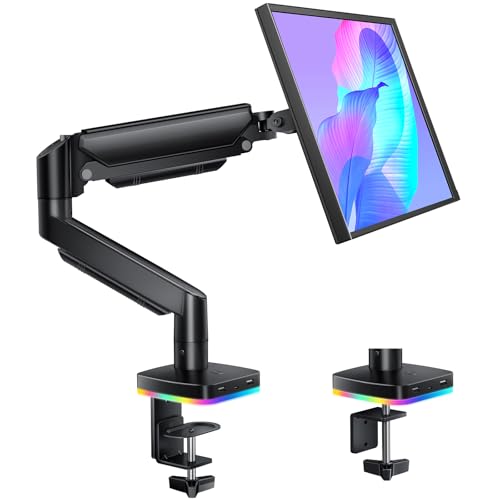
RGB Gas Spring Monitor Arm with USB Hub for 13-32 Inch Monitors | 3 USB Ports for Data Transfer & Charging | Full Motion Ergonomic Adjustment | Supports up to 19.8 lbs | VESA 75x75-100x100mm
As an Amazon Associate we earn from qualifying purchases. Product prices and availability are accurate as of the date/time indicated.
Prices shown are approximate and for reference only. Prices change often, so please check the current price on Amazon before you buy.
The table shows that all seven arms have a gas spring design, and three have a 32 inch size. The Ergotron LX Desk Monitor Arm is the most balanced pick in this set, at $100 to $150, with a gas spring design, up to 34 inch size, and a 25 lb limit, so it is good for most best monitor arm for PC gamers. The Amazon Basics Single Monitor Arm and North Bayou F80 Monitor Arm are in the lowest price group here, at $30 to $50. The Ergotron HX Desk Monitor Arm is the highest priced model in this table, at $200 to $300, labelled as a premium exception, because it is a premium Ergotron arm with up to 49 inch size for a serious gamer.
Arm type also matters for PC gamers. Arms with gas spring, such as in all models here, are gas spring, while arms with fixed are fixed. Monitor size also matters. Arms with 32 inch, such as in three models here, are 32 inch, while arms with 49 inch are 49 inch.
Best Monitor Arm for PC Gamers Reviewed
1. Ergotron LX Desk Monitor Arm: Best Monitor Arm for PC Gamers Overall, Gas Spring, Up to 34 Inch, 25 lb Limit, Height Adjust, Tilt
The Ergotron LX Desk Monitor Arm is the best monitor arm for PC gamers overall, gas spring, up to 34 inch, 25 lb limit, height adjust, tilt because it is an arm with a price of $100 to $150, a gas spring design, and a simple design. It has a gas spring type, up to 34 inch size, and an overall design. For most best monitor arm for PC gamers, this is the first arm to try. Keep your monitor at eye level, break every 60 minutes, use the 20-20-20 rule, do not overload your arm, check the weight limit, and check your desk clamp before you mount a monitor.
The LX Desk Monitor Arm has a gas spring design in the table, so it is gas spring, and the up to 34 inch size is good for best monitor arm for PC gamers. The arm has a price of $100 to $150, so it is affordable for its quality, and the height adjust design is good for use. It is a good choice if you want an Ergotron arm that is overall best for best monitor arm for PC gamers, with tilt for a monitor.
For PC gamers, the LX Desk Monitor Arm is strong because its gas spring design is smooth, its up to 34 inch size fits most gaming monitors, and its 25 lb limit is enough for a monitor. Keep your monitor at eye level, break every 60 minutes, and check the weight limit. It is a good fit for a gamer who wants an Ergotron arm for $100 to $150.
2. Amazon Basics Single Monitor Arm: Best Monitor Arm for PC Gamers for Value, Gas Spring, Up to 32 Inch, 25 lb Limit, Height Adjust, Tilt
The Amazon Basics Single Monitor Arm is the best monitor arm for PC gamers for value, gas spring, up to 32 inch, 25 lb limit, height adjust, tilt because it costs $30 to $50, and it is an arm with a gas spring design and a simple design. It has a gas spring type, up to 32 inch size, and a value design, and it is a good choice for an Amazon Basics user who wants a value arm for best monitor arm for PC gamers.
The Single Monitor Arm has a price of $30 to $50 in the table, so it is in the lowest price group here, and the gas spring design is gas spring. The arm has up to 32 inch size, so it is good for best monitor arm for PC gamers, and the height adjust design is good for use. It is a good choice if you want an Amazon Basics arm that is affordable for best monitor arm for PC gamers and easy to use for a beginner.
For PC gamers, the Single Monitor Arm is a cheap, simple arm with a gas spring design, up to 32 inch size, and a 25 lb limit for a monitor. Its price is low, although its build is simpler than Ergotron. It is a good fit for a gamer who wants an Amazon Basics arm for $30 to $50.
3. North Bayou F80 Monitor Arm: Best Monitor Arm for PC Gamers for Value, Gas Spring, Up to 27 Inch, 20 lb Limit, Height Adjust, Tilt
The North Bayou F80 Monitor Arm is the best monitor arm for PC gamers for value, gas spring, up to 27 inch, 20 lb limit, height adjust, tilt because it costs $30 to $50, and it is an arm with a gas spring design and a simple design. It has a gas spring type, up to 27 inch size, and a value design, and it is a good choice for a North Bayou user who wants a value arm for best monitor arm for PC gamers.
The F80 Monitor Arm has a gas spring design in the table, so it is gas spring, and the up to 27 inch size is good for best monitor arm for PC gamers. The arm has a price of $30 to $50, so it is in the lowest price group, and the height adjust design is good for use. It is a good choice if you want a North Bayou arm that is affordable for best monitor arm for PC gamers, with tilt for a monitor.
For PC gamers, the F80 Monitor Arm is a value North Bayou arm with a gas spring design, up to 27 inch size, and a 20 lb limit for a monitor. It is a good fit for a beginner who wants a North Bayou arm for $30 to $50.
4. HUANUO Dual Monitor Arm: Best Monitor Arm for PC Gamers for Value, Gas Spring, Up to 32 Inch, 22 lb Per Arm, Height Adjust, Tilt
The HUANUO Dual Monitor Arm is the best monitor arm for PC gamers for value, gas spring, up to 32 inch, 22 lb per arm, height adjust, tilt because it costs $50 to $80, and it is an arm with a gas spring design and a simple design. It has a gas spring type, up to 32 inch size, and a value design, and it is a good choice for a HUANUO user who wants a value arm for best monitor arm for PC gamers.
The Dual Monitor Arm has a gas spring design in the table, so it is gas spring, and the up to 32 inch size is good for best monitor arm for PC gamers. The arm has a price of $50 to $80, so it is affordable, and the height adjust design is good for use. It is a good choice if you want a HUANUO arm that is affordable for best monitor arm for PC gamers, with dual monitors for a gamer.
For PC gamers, the Dual Monitor Arm is a value HUANUO arm with a gas spring design, up to 32 inch size, and 22 lb per arm for two monitors. Its dual design is good for gaming and streaming, although it needs a strong desk. It is a good fit for a gamer who wants a HUANUO arm for $50 to $80.
5. VIVO Dual Monitor Arm: Best Monitor Arm for PC Gamers for Premium, Gas Spring, Up to 32 Inch, 22 lb Per Arm, Height Adjust, Tilt
The VIVO Dual Monitor Arm is the best monitor arm for PC gamers for premium, gas spring, up to 32 inch, 22 lb per arm, height adjust, tilt because it costs $50 to $80, and it is an arm with a gas spring design and a simple design. It has a gas spring type, up to 32 inch size, and a premium design, and it is a good choice for a VIVO user who wants a premium arm for best monitor arm for PC gamers.
The Dual Monitor Arm has a gas spring design in the table, so it is gas spring, and the up to 32 inch size is good for best monitor arm for PC gamers. The arm has a price of $50 to $80, so it is premium, and the height adjust design is good for use. It is a good choice if you want a VIVO arm that is premium for best monitor arm for PC gamers, with dual monitors for a gamer.
For PC gamers, the Dual Monitor Arm is a premium VIVO arm with a gas spring design, up to 32 inch size, and 22 lb per arm for two monitors. Its build is strong, although it costs more than Amazon Basics. It is a good fit for a gamer who wants a VIVO arm for $50 to $80.
6. HUANUO Single Gas Spring Monitor Arm: Best Monitor Arm for PC Gamers for Premium, Gas Spring, Up to 35 Inch, 26 lb Limit, Height Adjust, Tilt
The HUANUO Single Gas Spring Monitor Arm is the best monitor arm for PC gamers for premium, gas spring, up to 35 inch, 26 lb limit, height adjust, tilt because it costs $50 to $80, and it is an arm with a gas spring design and a simple design. It has a gas spring type, up to 35 inch size, and a premium design, and it is a good choice for a HUANUO user who wants a premium arm for best monitor arm for PC gamers.
The Single Gas Spring Monitor Arm has a gas spring design in the table, so it is gas spring, and the up to 35 inch size is good for best monitor arm for PC gamers. The arm has a price of $50 to $80, so it is premium, and the height adjust design is good for use. It is a good choice if you want a HUANUO arm that is premium for best monitor arm for PC gamers, with a 26 lb limit for a large monitor.
For PC gamers, the Single Gas Spring Monitor Arm is a premium HUANUO arm with a gas spring design, up to 35 inch size, and a 26 lb limit for a monitor. Its size is large, although it costs more than Amazon Basics. It is a good fit for a gamer who wants a HUANUO arm for $50 to $80.
7. Ergotron HX Desk Monitor Arm: Best Monitor Arm for PC Gamers for Premium Exception, Gas Spring, Up to 49 Inch, 42 lb Limit, Height Adjust, Tilt
The Ergotron HX Desk Monitor Arm is the best monitor arm for PC gamers for premium exception, gas spring, up to 49 inch, 42 lb limit, height adjust, tilt because it costs $200 to $300, and it is an arm with a gas spring design and a simple design. It has a gas spring type, up to 49 inch size, and a premium design, and it is a good choice for an Ergotron user who wants a premium arm for best monitor arm for PC gamers, labelled as a premium exception in this guide.
The HX Desk Monitor Arm has a price of $200 to $300 in the table, so it is the highest priced arm here, and the gas spring design is gas spring. The arm has up to 49 inch size, so it is good for best monitor arm for PC gamers, and the height adjust design is good for use. It is a good choice if you want an Ergotron arm that is premium for best monitor arm for PC gamers, with a 42 lb limit for a large ultrawide monitor.
For PC gamers, the HX Desk Monitor Arm is a premium Ergotron arm with a gas spring design, up to 49 inch size, and a 42 lb limit for a monitor. Its build is strong, and its adjust is smooth. It is a good choice for a gamer who wants the best arm in this guide.
Best Monitor Arm for PC Gamers Buying Guide
Use this buying guide to match an arm to your monitor, your desk, and your budget. The right arm is the one that holds your monitor steady, lets you adjust height and angle, and is simple to use. The full price range in this guide is $30 to $300, with Ergotron HX Desk Monitor Arm at $200 to $300 labelled as a premium exception.
Check Arm Type: Gas Spring for Most, Fixed for Simple for Best Monitor Arm for PC Gamers
Arm type is the first thing to check, because it decides whether your arm will be gas spring or fixed. Arms with gas spring, such as in all models here, are gas spring, while arms with fixed are fixed. For most best monitor arm for PC gamers, an arm with gas spring is a good choice, because it is gas spring and it is made for best monitor arm for PC gamers.
Check your desk before you buy, and choose gas spring if you want most, or fixed if you want simple. A gas spring arm is better for a gamer, because it adjusts smoothly, while a fixed arm is better for a low price, although it does not adjust.
Look at Monitor Size: 32 Inch for Most, 49 Inch for Least for Best Monitor Arm for PC Gamers
Monitor size matters because it decides whether your arm will fit your monitor. Arms with 32 inch, such as in three models here, are 32 inch, while arms with 49 inch are 49 inch. For most best monitor arm for PC gamers, an arm with 32 inch is a good choice, because it is good for best monitor arm for PC gamers and it is enough for a gaming monitor.
Check your arm before you buy, and choose 32 inch if you want most, or 49 inch if you want least. A 32 inch arm is better for most gamers, while a 49 inch arm is better for an ultrawide monitor, although it costs more.
Consider Keep Your Monitor at Eye Level, Break Every 60 Minutes, and Do Not Overload Your Arm for Gaming Monitor Arms
Keep your monitor at eye level matters because it decides whether your arm will be used safely. Keep your monitor at eye level, break every 60 minutes, use the 20-20-20 rule, do not overload your arm, check the weight limit, and check your desk clamp before you mount a monitor. Keep your monitor at eye level also matters. Keep your monitor at eye level, break every 60 minutes.
Safety also matters. Keep your monitor at eye level, break every 60 minutes, and store your arm safely. For most best monitor arm for PC gamers, Ergotron LX Desk Monitor Arm is a good choice. Do not overload your arm, and do not mount a monitor on a weak desk.
Think About Monitor, Desk, and How to Choose Best Monitor Arm for PC Gamers
Monitor matters because it decides which arm you need. Monitor needs a gas spring arm, while home can use a simple arm. Desk also matters. A thick desk needs a clamp mount, while a thin desk can use a grommet mount.
How to choose best monitor arm for PC gamers is simple. Choose an arm with a gas spring design, a 32 inch size, and a price that fits your budget, such as Ergotron LX Desk Monitor Arm, keep your monitor at eye level, and check the weight limit. For most best monitor arm for PC gamers, that arm is a good choice, while Amazon Basics Single Monitor Arm and North Bayou F80 Monitor Arm are in the lowest price group in the $30 to $300 range. If you want a cheap arm, choose the Amazon Basics Single Monitor Arm, and if you want a premium arm, choose the Ergotron HX Desk Monitor Arm. For many gamers, check your monitor VESA mount, measure your desk thickness, and test your arm height before a long gaming session.
Frequently Asked Questions About Best Monitor Arm for PC Gamers
What is the best monitor arm for PC gamers?
The best monitor arm for PC gamers is an Ergotron LX Desk Monitor Arm, with a price of $100 to $150, because it is an arm with a gas spring design, up to 34 inch size, and a 25 lb limit, so it is good for best monitor arm for PC gamers. An Amazon Basics Single Monitor Arm, at $30 to $50, is also a good choice, because it is an arm for best monitor arm for PC gamers with a gas spring design.
Do I need gas spring or fixed for best monitor arm for PC gamers?
You need gas spring for best monitor arm for PC gamers if you want most, because an arm such as Ergotron LX Desk Monitor Arm has a gas spring design, while fixed is simple. For most best monitor arm for PC gamers, an arm with gas spring is a good choice, because it is made for best monitor arm for PC gamers.
Is 32 inch or 49 inch better for best monitor arm for PC gamers?
32 inch is better for best monitor arm for PC gamers if you want most, because an arm such as Amazon Basics Single Monitor Arm has a 32 inch design, while 49 inch is least here. For most best monitor arm for PC gamers, an arm with 32 inch is a good choice, because it is enough for a gaming monitor.
How do I safely use a monitor arm for PC gamers?
You safely use a monitor arm for PC gamers by keeping your monitor at eye level, because an arm must be used safely, while breaking every 60 minutes, using the 20-20-20 rule, not overloading your arm, checking the weight limit, and checking your desk clamp before you mount a monitor are also important. For most best monitor arm for PC gamers, keep your monitor at eye level.
The best monitor arm for PC gamers is the one that is clear, simple, and safe. For most gamers, that is the Ergotron LX Desk Monitor Arm for overall value, the Amazon Basics Single Monitor Arm for budget, or the Ergotron HX Desk Monitor Arm for premium use. Compare the table, check your arm type and your monitor size, and choose the arm you will trust. Keep your monitor at eye level, break every 60 minutes, use the 20-20-20 rule, do not overload your arm, check the weight limit, check your desk clamp before you mount a monitor, and enjoy gaming in 2026.
Related guides
- Best Soundbar vs Speakers for PC Setups in 2026: Razer, Creative, Edifier, and Kanto Compared for a Desk Measured Before a Format Is Chosen, Nearfield Honesty at Arm’s Length, and a Subwoofer Parish the Neighbours Agree To
- Best Budget Power Supply for Remote Workers in 2026: 6 Quiet, Reliable PSUs for Your Home Office
- Best Console for PC Multiplayer Games in 2026: 6 Handheld PC Consoles With a 7-Inch Display, at Least 16GB RAM, and a Price Range, for PC Multiplayer Games
- Best Phone Case for Beach Lifeguards in 2026: OtterBox, Catalyst, Ghostek, and Pelican Compared for a Sealing Read in the Maker’s Own Documents, a Salt Rinse at Every Shift’s End, and a Phone That Never Pretends to Be the Rescue Radio
More from Amazon
Programs that pair well with the guide above. Offers and eligibility are set by Amazon and may change.
Free shipping on eligible items, Prime Video and more. Eligible new members can start with a free trial.
Start a Prime free trialAd-free music streaming. Eligible new subscribers can start with a free trial.
Try Music Unlimited freeA Prime membership for ages 18-24 with a trial period. Eligibility is set by Amazon.
See Prime for Young AdultsAudiobooks and podcasts to listen to on the go. Eligible new members can start with a free trial.
Try Audible freeAs an Amazon Associate we earn from qualifying purchases.

Write Your Review
No reviews yet. Be the first to share your experience!