
What's inside
As an Amazon Associate I earn from qualifying purchases. This post may contain affiliate links at no extra cost to you.
The best ram for streaming and gaming is the upgrade that removes a specific kind of stutter, the one that arrives not from the game or the encoder but from the system running out of room to think. A gaming PC that also streams is two workloads wearing one headset: the game wants memory bandwidth and low latency for its frame times, the encoder, the browser with the dashboard and chat, the voice app, and the capture software want capacity, plain gigabytes in which to live without evicting the game into the page file, where a frame’s data arriving late is a hitch the viewers see as clearly as the player feels it. This guide compares six real, currently sold RAM kits graded for the combined workload, DDR5 for the current platforms and one DDR4 champion for the millions of strong systems still running it, and teaches the three decisions that matter, capacity first, platform-correct speed second, timings third, in the order the stream notices them, because RAM is the component where the internet’s arguments are loudest and the correct answers are, refreshingly, the most settled.
Start with the settled answers so the table can be read properly. Capacity: 32 gigabytes is the streaming and gaming standard in 2026, two 16 gigabyte sticks in dual channel; 16 gigabytes games respectably and streams apologetically, evicting something every busy moment; 64 is the multitasker’s luxury, for the streamer who also edits the video on the same machine, and it costs little performance to carry. Speed: each platform has a sweet spot where the memory controller runs in its happiest ratio, DDR5-6000 for AMD’s current Ryzen systems, a broader 6000 to 7200 range for Intel’s, DDR4-3600 for the older generation’s, and beyond the sweet spot the returns shrink to benchmark poetry while the stability risks grow into troubleshooting prose. Timings: lower CAS latency at a given speed is genuinely faster and genuinely worth a modest premium, and it is the third decision, not the first, whatever the forum’s volume suggests. Buy capacity, then the sweet spot, then the timings, in that order, and the stream will never know what RAM anxiety was.
Our Top Picks
Best RAM for Streaming and Gaming: Capacity, Speed, and the Dual Channel Law
Why 32GB in Two Sticks Is the Whole First Answer
Dual channel is not a suggestion: two matched sticks let the memory controller move data on both channels at once, and a single stick, however large, halves the highway the game and the encoder share. This is why every kit in this table is a matched pair sold in one package, their chips binned to work together at their rated profile, and why mixing loose sticks from different kits at aggressive profiles is the leading cause of the instability that gives fast RAM its undeserved reputation. The two-stick configuration has a second, quieter virtue on current platforms: it is easier for the memory controller to drive at the sweet spot speeds than a four-stick load, which often must slow down to stay stable, so the streamer tempted to fill every slot for the look should know the four-stick aesthetic can cost the very performance it photographs. Capacity per stick matters at the upgrade horizon too: two 16s today leave two slots for a future 64, while four 8s are a dead end with RGB. Buy the pair, in the capacity the workload’s future wants, and the motherboard’s remaining slots become an option rather than an apology.
Speed Sweet Spots and What XMP and EXPO Actually Do
A RAM kit’s advertised speed is a profile, not a default: out of the box, the sticks boot at a safe JEDEC speed, and the rated 6000 or 7200 exists only when the motherboard’s overclocking profile, XMP on Intel, EXPO on AMD, is switched on in the BIOS, a ten-second errand that a remarkable share of owners never run, leaving their premium kit performing as a budget one for its entire life. Check yours after building, in the BIOS or a system monitor, because this paragraph is the cheapest performance in the entire article. The sweet spots themselves are controller physics: AMD’s current chips run their internal fabric in step with memory up to around DDR5-6000, beyond which the ratios change and the latency cost eats the bandwidth gain for gaming; Intel’s controllers scale higher happily, with 6400 to 7200 a reasonable ambition on the right board. Streaming adds no special speed demand of its own, the encoder sips bandwidth compared to the game’s gulp, which is why this guide spends the streamer’s speed money at the sweet spot and the rest on capacity and timings.
Timings, Latency, and the RGB Question
Timings are the delays inside the memory’s work, printed as the CL number and its train of companions, and their honest weight is this: at the same speed, a CL30 kit is measurably quicker to respond than a CL36, the difference shows in the frame time consistency that streaming punishes, and it is worth a modest premium and never worth a capacity cut to afford. The arithmetic that compares across speeds divides the CAS by the frequency to get true latency in nanoseconds, a trick the buying guide teaches for the shortlist stage. RGB is the category’s glitter tax: it costs a few dollars, a software ecosystem, and nothing in performance on the kits here, whose lighting and non-lighting versions share their silicon, so buy it for the glass panel’s sake or skip it for the sleeper build’s, with this guide’s blessing either way. What is not optional is the heat spreader on a fast kit run at its profile for a stream’s duration, and every row in this table wears one sized to its ambitions.
Best RAM for Streaming and Gaming: Quick Comparison
| RAM Kit Model | Key Specs | Best For | Typical Price Range | Rating |
|---|---|---|---|---|
| G.Skill Trident Z5 RGB 32GB DDR5-6000 CL30 | 2x16GB, DDR5-6000, CL30 class timings, XMP and EXPO variants in line, premium heat spreaders | Best ram for streaming and gaming overall | $130 – $180 | 4.8 / 5 |
| Corsair Vengeance RGB 32GB DDR5-6000 CL30 | 2x16GB, DDR5-6000, CL30 class, iCUE ecosystem, XMP and EXPO variants in line | Best for Corsair ecosystem builds | $135 – $185 | 4.6 / 5 |
| Kingston FURY Beast 32GB DDR5-6000 CL30 | 2x16GB, DDR5-6000, CL30 class, low-profile spreaders, XMP and EXPO variants in line | Best low-profile value | $115 – $160 | 4.6 / 5 |
| TeamGroup T-Force Delta RGB 32GB DDR5-6400 CL40 class | 2x16GB, DDR5-6400, higher speed class, bold RGB design, Intel-leaning profiles | Best for Intel high-speed builds | $120 – $165 | 4.4 / 5 |
| G.Skill Ripjaws S5 32GB DDR5-6000 CL30 | 2x16GB, DDR5-6000, CL30 class, low-profile no-RGB design, cooler clearance friendly | Best for air-cooled compact builds | $115 – $155 | 4.5 / 5 |
| Corsair Vengeance LPX 32GB DDR4-3600 CL18 | 2x16GB, DDR4-3600, CL18 class, low profile, the mature platform’s standard | Best for DDR4 platforms | $70 – $100 | 4.5 / 5 |

ZYNEEX Prebuilt Gaming Desktop PC, AMD Ryzen 5 5500, GeForce RTX 3050 6GB,16GB DDR4 3200MHz RAM, 1TB NVMe SSD, ARGB Air Cooling, Wi-Fi,Tower Computer for Gaming, Streaming, Editing
As an Amazon Associate we earn from qualifying purchases. Product prices and availability are accurate as of the date/time indicated.

LXZ Gaming PC Desktop Computer, GeForce RTX 3050 8GB GDDR6, Ryzen 7 4700LE | 16GB DDR4 RAM, 1TB NVMe SSD, WiFi 6 Prebuilt Tower for Gaming, Streaming, Content Creation, Home Office & Students
As an Amazon Associate we earn from qualifying purchases. Product prices and availability are accurate as of the date/time indicated.
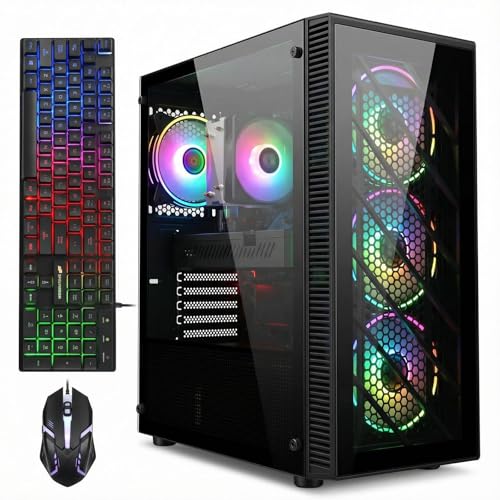
STGAubron Gaming PC Desktop,Core I7,RX 590 8G,32G RAM,1TB SSD | Gaming Computer Tower for Streaming,Video Editing,Home,School,I7 up to 3.9GHz,ARGB Fan,WiFi 6,BT 5.0,4K DP,HDMI,Win11 Home


As an Amazon Associate we earn from qualifying purchases. Product prices and availability are accurate as of the date/time indicated.
Prices shown are approximate and for reference only. Prices change often, so please check the current price on Amazon before you buy.
Verify the exact kit’s profile support, XMP or EXPO, against your motherboard’s memory qualification list before ordering, as the guide insists. Prices move with the memory market’s cycles. Ratings are editorial, weighing sweet-spot fit, timings, stability record, cooler clearance, and value for the combined workload.
The Six RAM Kits Reviewed
1. G.Skill Trident Z5: Best Overall
The Trident Z5 at DDR5-6000 CL30 is the kit the current generation converged on: the AMD sweet spot’s exact address with the timings tightened to the class’s standard of excellence, EXPO and XMP variants binned for their platforms, heat spreaders that make its rated profile a set-and-forget proposition across a stream’s longest day, and a stability record across the major motherboard lines that lets this guide recommend it without a compatibility sermon. Its RGB is the line’s signature and its height is the tall class’s, which the air-cooling buyer should check against a big tower cooler’s overhang, the one homework item on its row. For the streamer building or upgrading on a current platform, it is the default this table defends, because it is the kit whose owners are in the chat playing rather than in the forums troubleshooting.
2. Corsair Vengeance RGB DDR5: Best Ecosystem Kit
Corsair’s Vengeance brings the same sweet-spot specification into the iCUE household: 6000 CL30 class performance with profiles for both platforms’ current lines, spreaders and lighting that synchronize with the fans and coolers its owners already run, and a support and retail presence that makes a warranty conversation a short one. Its premium over the Kingston is the ecosystem’s rent, gladly paid by the build it completes and reasonably skipped by the one it does not. Performance between the top three rows here is a photo finish decided by timings’ last digit and the week’s prices, so the Corsair buyer is purchasing coherence, a legitimate good in a glass-sided machine that streams its owner’s taste along with their gameplay.
3. Kingston FURY Beast: Best Low-Profile Value
The FURY Beast is the sweet spot without the surcharge: DDR5-6000 CL30 class silicon under low-profile spreaders that clear the big air coolers the Trident’s height argues with, profiles for both platforms, and Kingston’s memory pedigree, a company that has made RAM since before some of its buyers’ platforms had inventors. It lights nothing, photographs plainly, and performs in the leaders’ class for a bill that leaves the streamer’s budget its share for the microphone. For the performance-per-dollar buyer and the compact build, it is the table’s most rational row, and its plainness is the kind that ages well in a machine opened twice a year.
4. TeamGroup T-Force Delta RGB DDR5-6400: Best for Intel Speed
The Delta’s 6400 class addresses the Intel platforms whose controllers scale past the AMD sweet spot with profit, wrapped in the boldest lighting design in the table and priced, as TeamGroup’s habit is, a step under the famous names for its specification. Its timings at that speed are the looser class’s, which the latency arithmetic in the buying guide will let you weigh honestly against the 6000 CL30 rows, and its natural home is the Intel build whose owner has confirmed the board’s appetite for the speed on the qualification list. AMD buyers should take the 6000 rows and the sweet spot’s blessing; Intel buyers chasing the platform’s headroom will find this the value route to it, with a light show included.
5. G.Skill Ripjaws S5: Best for Air-Cooled and Compact Builds
The Ripjaws S5 is the Trident’s silicon philosophy in a low, dark, cooler-friendly suit: DDR5-6000 CL30 class performance, no lighting, a profile height that slides under the largest tower coolers and into the small form factor cases where the streaming rig increasingly lives. Its existence in this table is the guide’s reminder that the best kit is the one that fits the machine as built, and that G.Skill’s binning at the sweet spot is available without the flagship’s silhouette. For the sleeper build, the workstation that streams, and any owner whose cooler was chosen before their RAM, it is the same performance with the homework already done.
6. Corsair Vengeance LPX DDR4-3600: Best for DDR4 Platforms
Millions of excellent streaming PCs run DDR4, Ryzen 5000 and Intel’s middle generations, and for them this is the kit: 32 gigabytes at the platform’s own sweet spot, 3600 with CL18 class timings, in a low-profile package that has been the mature market’s default for years, at a price that has fallen to the upgrade impulse’s level. Its review is a boundary as much as a praise: DDR4 and DDR5 are different physical standards that share no slot, so this kit serves only the boards built for it, and no adapter or optimism changes that. For the DDR4 streamer whose 16 gigabytes is the stream’s ceiling, it is the single best value upgrade in this entire article, the one that turns an apologetic stream into a comfortable one for the price of a game and a skin.
Buying Guide: How to Choose the Best RAM for Your Streaming and Gaming PC
Step One: Identify Your Platform’s Standard and Sweet Spot
Read your motherboard’s memory standard before any product page, DDR4 or DDR5, a fact printed on the board’s specification and not negotiable by any kit, then name your processor’s sweet spot from this guide: DDR5-6000 for current Ryzen, 6000 to 7200 for current Intel with the board’s qualification list as the referee, DDR4-3600 for the previous generation’s mainstream. Check the exact kit, by its full model number, against the motherboard maker’s memory qualification list, the QVL, because a kit on that list has been tested in your board at its rated profile, which converts the purchase from a hope into a record. Note your cooler and case clearances against the kit’s height while you are there, the tall RGB kits and the big air coolers being the build’s classic collision, and let the low-profile rows answer it where it appears.
Step Two: Spend in the Workload’s Order: Capacity, Speed, Timings
Allocate by the stream’s priorities. Capacity first: 32 gigabytes for the gaming and streaming standard, 64 only where editing or heavy multitasking shares the machine, 16 only where the budget is a wall and the stream is casual, with the understanding that it is the first upgrade the machine will ask for. Speed second: the sweet spot exactly, since beyond it the gaming returns shrink and the stability homework grows, and below it you have bought a sports car in a low gear. Timings third: CL30 class at 6000 over CL36 with the difference priced honestly, using the latency division, CAS divided by frequency, to compare across speeds when a 6400 kit tempts. Refuse the two classic misallocations, the 16 gigabyte kit at an exotic speed, which optimizes the wrong scarcity, and the four-stick fill at an aggressive profile, which trades the controller’s stability for a photograph.
Step Three: Install, Enable the Profile, and Verify the Stream
Seat the pair in the motherboard’s designated dual channel slots, the second and fourth from the processor in the common layout, per the board’s manual rather than by symmetry, because the wrong pair of slots is the silent single-channel build that forums diagnose weekly. Boot into the BIOS and enable XMP or EXPO, the step that delivers the speed on the box, then verify in the operating system that the kit runs at its rated frequency and in dual channel, with a memory tab of any system monitor as the witness. Stress the result before the stream depends on it, a memory test across an hour and a gaming session with the stream’s full stack open, encoder, browser, chat, and voice, watching for the crashes and corruptions that an unstable profile announces early and politely at home rather than rudely at a thousand viewers. Keep the kit’s packaging and the board’s QVL page bookmarked until the first month is clean. A RAM upgrade verified this way disappears into the machine’s competence, which is the highest praise this component ever earns: the stream simply stops having that kind of problem.
Frequently Asked Questions About RAM for Streaming and Gaming
Is 16GB of RAM enough for streaming and gaming?
For gaming alone at mainstream settings, it remains workable; for gaming and streaming together, it is the ceiling you will feel. The game takes its share, the encoder and capture stack take theirs, the browser hosting the dashboard, chat, and the stream’s own preview takes a share that grows with every tab, and what remains is where the operating system starts evicting things into the page file, which is the mechanical origin of the mid-fight hitch that neither the game’s settings nor the encoder’s bitrate explains. Streamers on 16 gigabytes manage by closing everything, lowering the game’s footprint, and accepting the ceiling, and many do, creditably. But as an upgrade decision in 2026, 32 gigabytes is the standard this guide buys without deliberation, because it removes the entire category of problem for the price difference of a modest dinner, and it is the rare upgrade whose absence is felt in every session and whose presence is never thought of again.
Does RAM speed really affect gaming performance?
Yes, within the honest bounds this guide has drawn around it. Moving from a slow, loose kit to the platform’s sweet spot with tight timings improves frame rates modestly and frame time consistency, the smoothness the eye and the stream actually judge, more noticeably, with the largest gains in the processor-bound titles, the competitive and simulation games, where the memory system is a real bottleneck. Beyond the sweet spot, the returns flatten into single digits and then into noise, while the stability cost climbs, which is why the guide’s money stops there. The two places speed folklore becomes expensive are the exotic kit bought instead of capacity, which optimizes the smaller half of the problem, and the rated speed never enabled in the BIOS, which optimizes nothing at all for the kit’s entire life. Buy the sweet spot, switch on the profile, and you have collected essentially all the performance this component holds for a gaming stream.
Can I mix RAM sticks or add two more later?
You can, and this guide advises you to do it with your eyes open and your expectations set to the slowest participant. Memory controllers run the whole installation at one speed and one set of timings, so a mixed kit performs at its weakest member’s comfort, and the aggressive profiles that matched pairs are binned for become a negotiation that four sticks, even matched ones, often settle by slowing down. The clean paths are the ones in this table: buy the capacity you need as one matched pair now, or, when upgrading, replace with a larger matched pair rather than marrying strangers in the slots. If you do mix, buy the closest specification from the same maker, set the profile conservatively, and stress-test by this guide’s protocol before the stream depends on it. RAM is inexpensive enough, and instability is corrosive enough, that the matched pair is not a luxury preference but the engineering answer, and the forums’ thousand threads on the subject are its footnotes.
DDR4 or DDR5: should I upgrade my whole platform for streaming?
Not for RAM’s sake alone, because the memory standard is a passenger of the platform decision, not its driver. A DDR4 system on a strong processor, Ryzen 5000 or a recent Intel generation, with 32 gigabytes at its sweet spot, streams modern games excellently, and its correct RAM purchase is this table’s DDR4 row at its now-gentle price. The platform upgrade to DDR5 is justified when the processor itself is the stream’s bottleneck, when the motherboard’s features, storage, connectivity, have fallen behind the work, or when a new build makes the question moot, and in those cases the DDR5 kit is bought as part of the new foundation at its sweet spot. What no one should do is buy DDR5 sticks for a DDR4 board in a burst of future-proofing, since the standards share no slot and the sticks will wait in a drawer for a platform that deserves a deliberate decision. Let the processor choose the generation, let the generation choose the RAM, and spend the difference on the microphone.
Related guides
- How to Choose SSD for Slow Boot in 2026: A 7-Step Guide to Choosing an SSD That Fixes a Slow Boot, With NVMe and SATA SSDs Compared
- Best Budget SSD for Laptop Under 100 in 2026: How to Pick a Budget SSD for Laptop Under 100 That Is Fast, Reliable, and Fits Your Laptop
- Best PC Case for Beach House Use in 2026: Fractal Design, Corsair, Lian Li, and be quiet! Compared for a Salt Parish That Rusts an Idle Machine, Filters Read as a Cleaning Calendar, and a House That Stands Empty Between Visits
- Best Handheld Console Stand for PC Streaming in 2026: Docks With Video Out, Cooling Stands, and Desktop Rigs for the Deck, ROG Ally, and Legion Go
More from Amazon
Programs that pair well with the guide above. Offers and eligibility are set by Amazon and may change.
Free shipping on eligible items, Prime Video and more. Eligible new members can start with a free trial.
Start a Prime free trialAd-free music streaming. Eligible new subscribers can start with a free trial.
Try Music Unlimited freeA Prime membership for ages 18-24 with a trial period. Eligibility is set by Amazon.
See Prime for Young AdultsAudiobooks and podcasts to listen to on the go. Eligible new members can start with a free trial.
Try Audible freeAs an Amazon Associate we earn from qualifying purchases.

Write Your Review
No reviews yet. Be the first to share your experience!