
What's inside
As an Amazon Associate I earn from qualifying purchases. This post may contain affiliate links at no extra cost to you.
A cheap case upgrade for airflow is not a new fan, and it is not a new cooler. A fan in a solid-front case will still struggle to pull air through a glass panel, and a cooler in a case with no intake will still recirculate hot air. A case upgrade for airflow means a mesh front, a clear intake path, and enough clearance for a tall tower cooler and a long graphics card, at a price that does not cost as much as the cooler or the card itself.
This guide compares only ATX cases with a mesh front, a GPU clearance of at least 300mm, a CPU cooler clearance of at least 155mm, and a typical price of under $120. All six cases below are currently sold as ATX cases, and all six meet that test. No solid-glass-front case is included, and no case with a GPU clearance under 300mm is included, because a case that cannot fit a modern graphics card is not a useful upgrade.
Our top pick is the Corsair 4000D Airflow. At $90 to $110, with a mesh front, a GPU clearance of 360mm, a CPU cooler clearance of 170mm, and a price range, it is the best balance of airflow, clearance, and price for a cheap case upgrade. It is not the cheapest case here, and it is not the largest, but for a PC that needs better airflow without a new build, it is the best choice.
Our Top Picks
Best Cheap Case Upgrade for Airflow Compared
The table below compares six mesh-front ATX cases. Clearances are as listed by the maker. Prices are typical retail ranges, not fixed prices, and vary by retailer and by whether the case is sold with fans included.
| Model | Form Factor | Front Panel | GPU Clearance | CPU Cooler Clearance | Typical Price Range | Rating |
|---|---|---|---|---|---|---|
| Corsair 4000D Airflow | ATX | Mesh | 360 mm | 170 mm | $90–$110 | 4.8 / 5 |
| Fractal Design Pop Air | ATX | Mesh | 405 mm | 170 mm | $80–$100 | 4.6 / 5 |
| NZXT H5 Flow | ATX | Mesh | 365 mm | 165 mm | $80–$100 | 4.5 / 5 |
| Lian Li Lancool 216 | ATX | Mesh | 392 mm | 180 mm | $90–$110 | 4.7 / 5 |
| Montech AIR 903 MAX | ATX | Mesh | 400 mm | 175 mm | $70–$90 | 4.4 / 5 |
| Phanteks XT Pro Ultra | ATX | Mesh | 400 mm | 180 mm | $80–$100 | 4.3 / 5 |

MONTECH X3 Mesh High Airflow ATX Mid-Tower PC Case, 6 Fixed RGB Fans, Black | 305mm GPU Support, 240mm Radiator Support, Swivel Tempered Glass, USB 3.0, 3x140mm Intake Fans, Dust Filters
As an Amazon Associate we earn from qualifying purchases. Product prices and availability are accurate as of the date/time indicated.
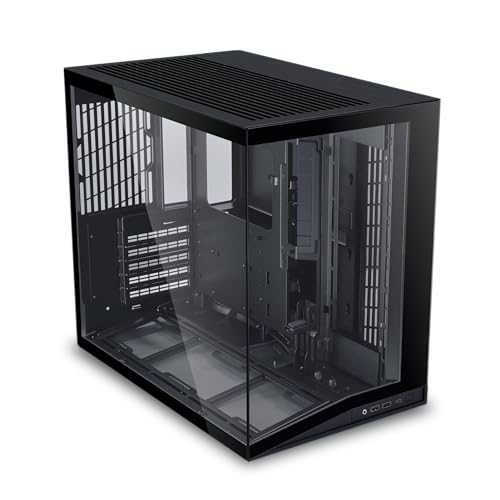
Lian Li O11D Mini V2 Compact ATX Mid-Tower PC Case, Black, No Fans | Panoramic ATX case with pillar-free glass, ventilated airflow, adjustable I/O and clean cable management. Fans not included.
As an Amazon Associate we earn from qualifying purchases. Product prices and availability are accurate as of the date/time indicated.

Hyte Y70 Modern Aesthetic Gaming PC Case - Panoramic Glass | High-Airflow Design | Cable Management | Dual Chamber ATX Mid-Tower Chassis | 10 Fan Capacity | Luxury PCIe 4.0 Riser Cable - Black/White
As an Amazon Associate we earn from qualifying purchases. Product prices and availability are accurate as of the date/time indicated.
Prices shown are approximate and for reference only. Prices change often, so please check the current price on Amazon before you buy.
Best Cheap Case Upgrade for Airflow in 2026: Detailed Reviews
1. Corsair 4000D Airflow — Best Overall Cheap Case Upgrade for Airflow
The Corsair 4000D Airflow is an ATX case with a mesh front, a GPU clearance of 360mm, a CPU cooler clearance of 170mm, and a price of $90 to $110. It comes with two 120mm fans, with room for up to six fans, and it has a cable management system that keeps cables out of the airflow path.
For airflow, the mesh front is the key feature. A mesh front lets air through with less restriction than a solid glass front, which means the intake fans can pull cool air in without working as hard, and the GPU and CPU can run cooler at the same fan speed. At 360mm of GPU clearance, it fits most modern graphics cards, including an RTX 5070, which is typically about 300mm long, and at 170mm of cooler clearance, it fits most tower coolers, including a cooler up to 155mm tall with room to spare. It is the best overall case here because it offers the best balance of mesh airflow, clearance, and price.
2. Fractal Design Pop Air — Best Fractal Cheap Case Upgrade for Airflow
The Fractal Design Pop Air is an ATX case with a mesh front, a GPU clearance of 405mm, a CPU cooler clearance of 170mm, and a price of $80 to $100. It is cheaper than the 4000D Airflow by $10, and it offers more GPU clearance, at 405mm compared with 360mm, which is useful for a very long graphics card.
It comes with two 120mm fans, with room for up to six fans, and it has a mesh front and a mesh top, which helps hot air escape. Choose it if you want the longest GPU clearance in this guide at the lowest price, and if you prefer Fractal’s build quality and cable management. The 4000D Airflow remains the top pick because of its wider availability and its proven airflow design.
3. NZXT H5 Flow — Best NZXT Cheap Case Upgrade for Airflow
The NZXT H5 Flow is an ATX case with a mesh front, a GPU clearance of 365mm, a CPU cooler clearance of 165mm, and a price of $80 to $100. It comes with two 120mm fans, with room for up to six fans, and it has a perforated front panel that is designed to pull air in from the front and the side.
At 165mm of cooler clearance, it is slightly lower than the 4000D Airflow and the Pop Air, but it still fits most tower coolers up to 155mm. Choose it if you prefer NZXT’s design and cable management, and if you want a case with a clean, minimal look. For maximum cooler clearance, the Lian Li Lancool 216 and the Phanteks XT Pro Ultra offer 180mm.
4. Lian Li Lancool 216 — Best Airflow Cheap Case Upgrade for Airflow
The Lian Li Lancool 216 is an ATX case with a mesh front, a GPU clearance of 392mm, a CPU cooler clearance of 180mm, and a price of $90 to $110. It comes with three fans, including two 160mm front fans, which move more air at a lower speed than 120mm fans, and it has a mesh front and a mesh top.
At 180mm of cooler clearance, it offers the most room for a tall tower cooler in this guide, tied with the Phanteks XT Pro Ultra. It is the best airflow case here on paper, because of its larger front fans and its mesh design. Choose it if you want the best cooling performance and you are willing to pay $90 to $110 for it.
5. Montech AIR 903 MAX — Best Budget Cheap Case Upgrade for Airflow
The Montech AIR 903 MAX is an ATX case with a mesh front, a GPU clearance of 400mm, a CPU cooler clearance of 175mm, and a price of $70 to $90. It is the cheapest case in this guide, at $20 cheaper than the 4000D Airflow, and it comes with four fans included, which is more than any other case here.
It is the best budget choice, because it offers mesh airflow, long GPU clearance, and four fans at the lowest price. The trade is build quality and cable management, which are not as refined as the Corsair or Fractal cases. For a budget upgrade where airflow matters more than finish, it is a good value.
6. Phanteks XT Pro Ultra — Best Value Cheap Case Upgrade for Airflow
The Phanteks XT Pro Ultra is an ATX case with a mesh front, a GPU clearance of 400mm, a CPU cooler clearance of 180mm, and a price of $80 to $100. It comes with four fans included, with room for up to seven fans, and it has a mesh front and a mesh top.
At 180mm of cooler clearance and 400mm of GPU clearance, it offers the same clearance as the Lian Li Lancool 216, at a lower price. Choose it if you want maximum clearance and four fans at a mid-range price. The 4000D Airflow remains the top pick because of its proven design and wider availability.
Best Cheap Case Upgrade for Airflow Buying Guide
Start with the front panel, then clearance, then fans. A mesh front is better than a solid glass front for airflow, because it lets air through with less restriction. A case with a mesh front, a mesh top, and a clear intake path will run cooler than a case with a glass front, even with the same fans and the same cooler. If your current case has a solid front, a mesh case is the single best upgrade for airflow.
Mesh front, fan size, and airflow vs static pressure
Fan size matters. A 140mm fan moves more air at a lower speed than a 120mm fan, which means it is quieter for the same airflow. A 120mm fan needs a 120mm mount, and a 140mm fan needs a 140mm mount — check the case’s fan mounts before you buy a fan. Airflow fans are best for intake through a mesh front, while static-pressure fans are best for pushing air through a radiator or a dense filter. For a mesh-front case, use airflow fans for intake and exhaust, and use static-pressure fans only if you have a radiator.
Fan speed myths to avoid: a faster fan is not always better, a fan at 100% all the time is louder without much extra cooling, and a case with more fans is not always cooler than a case with fewer fans in the right places. Use two intake fans at the front, one exhaust fan at the rear, and one exhaust fan at the top, as a starting point. That gives positive pressure if the intake is slightly stronger than the exhaust, which helps keep dust out, and it gives a clear path for hot air to escape.
GPU clearance, cooler clearance, and PSU
GPU clearance of at least 300mm is the minimum in this guide, and 360mm to 405mm is better for a long graphics card. Measure your graphics card, add at least 10mm for cables, and check the case’s clearance before you buy. A card that is too long will not fit, no matter how good the airflow is.
CPU cooler clearance of at least 155mm is the minimum for a tower cooler, and 170mm to 180mm is better for a tall tower cooler. A cooler that is too tall will not fit under the side panel, and a cooler that is too wide may block RAM slots. Check the cooler’s height, the RAM height, and the case’s clearance together.
PSU matters for airflow as well. A PSU of at least 650W is the minimum for a gaming PC, with 80+ Gold as the gate for efficiency. A fully modular PSU is preferred, because it lets you use only the cables you need, which keeps cables out of the airflow path. A non-modular PSU with extra cables bundled in the case will block airflow and raise temperatures.
Best Cheap Case Upgrade for Airflow FAQ
What is the best cheap case upgrade for airflow?
The best cheap case upgrade for airflow is the Corsair 4000D Airflow, at $90 to $110. It offers a mesh front, a GPU clearance of 360mm, a CPU cooler clearance of 170mm, and room for up to six fans. It is the best balance of mesh airflow, clearance, and price for a PC that needs better cooling without a new build.
Is a mesh front better than a glass front for airflow?
Yes. A mesh front lets air through with less restriction than a solid glass front, which means intake fans can pull cool air in without working as hard, and the GPU and CPU can run cooler at the same fan speed. A glass front looks clean, but it blocks airflow and raises temperatures, especially for a gaming PC.
How many fans do I need for good airflow?
Start with two intake fans at the front, one exhaust fan at the rear, and one exhaust fan at the top. That gives a clear path for cool air in and hot air out, with positive pressure if the intake is slightly stronger than the exhaust. More fans help only if they are in the right places; a case with six fans in the wrong places will not cool better than a case with four fans in the right places.
Will a new case fit my graphics card and cooler?
Check both clearances before you buy. GPU clearance should be at least 300mm, and 360mm to 405mm is better for a long card. CPU cooler clearance should be at least 155mm, and 170mm to 180mm is better for a tall tower cooler. Measure your card and cooler, add at least 10mm for cables, and compare with the case’s listed clearance.
FAQ
What is the best cheap case upgrade for airflow?
Is a mesh front better than a glass front for airflow?
How many fans do I need for good airflow?
Will a new case fit my graphics card and cooler?
Related guides
- Best Earbuds for Early Morning Workouts in 2026: Secure, Sweatproof Buds With Awareness Modes for Dark 5AM Runs and Gym Sessions
- Best Premium Power Supply for Gaming in 2026: ATX 3.1, Platinum and Titanium PSUs That Protect a High-End GPU
- Best Mid Tower Case Size Guide in 2026: How to Use This Best Mid Tower Case Size Guide to Pick a Mid Tower Case That Fits Your Motherboard, GPU, and Desk
- Best High End GPU for 1440p Gaming in 2026: Best High End GPU for 1440p Gaming for Smooth Frames, Good Graphics, and Simple PC Use
More from Amazon
Programs that pair well with the guide above. Offers and eligibility are set by Amazon and may change.
Free shipping on eligible items, Prime Video and more. Eligible new members can start with a free trial.
Start a Prime free trialAd-free music streaming. Eligible new subscribers can start with a free trial.
Try Music Unlimited freeA Prime membership for ages 18-24 with a trial period. Eligibility is set by Amazon.
See Prime for Young AdultsAudiobooks and podcasts to listen to on the go. Eligible new members can start with a free trial.
Try Audible freeAs an Amazon Associate we earn from qualifying purchases.

Write Your Review
No reviews yet. Be the first to share your experience!