
What's inside
- Why the Best Cheap Fan Controller for PC Needs PWM Control and Enough Channels
- Best Cheap Fan Controller for PC Comparison
- Best Cheap Fan Controller for PC Reviewed for 2026
- Buying Guide: How to Choose the Best Cheap Fan Controller for PC
- Frequently Asked Questions About the Best Cheap Fan Controller for PC
As an Amazon Associate I earn from qualifying purchases. This post may contain affiliate links at no extra cost to you.
Choosing the best cheap fan controller for PC is about more than finding the lowest price. The best cheap fan controller for PC needs to control your case fans quietly, let you change speed without opening your case, and work with the fans you already own. A controller that looks good in a shop can become frustrating at a desk if it only works with one fan type, it has no PWM control, or it is too complicated to set up for a first build.
PC fans are loud when they run at full speed all the time, and they are ineffective when they run too slowly. A fan controller lets you find the balance: low speed when you browse the web, medium speed when you play a game, and high speed when your CPU gets hot. Without a controller, many fans run at a fixed speed set by the motherboard, which may be too loud or too slow for your case. With a controller, you can adjust speed manually, or let the controller adjust it automatically based on temperature.
This guide explains the best cheap fan controller for PC, what to check before you buy, and how to match a controller to your fans, your case, and your budget. It compares six real, currently sold fan controllers and fan hubs, from an affordable Kingwin FPX-001 to a premium Corsair Commander Core XT, so you can see how price, channels, PWM support, and control type change as you move up the range. Prices are given as typical retail ranges, because prices change with sales and retailers, and ratings reflect typical retailer user feedback rather than a single review score.
Our Top Picks
Why the Best Cheap Fan Controller for PC Needs PWM Control and Enough Channels
The best cheap fan controller for PC needs PWM control because PWM, or pulse width modulation, is the standard way to control modern PC fans. A PWM fan has four pins, and it can change speed smoothly from about 20% to 100%, based on a PWM signal from a controller or a motherboard. A controller that only supports voltage control, for three-pin fans, will work, but it will be less precise, and it may not be able to run a PWM fan at a low speed without stalling. For most modern builds, a PWM controller is a better choice, because it works with the fans that come with most cases and coolers in 2026.
Channels matter just as much as PWM. A channel is a port for one fan, or for a group of fans that share the same speed. A controller with four channels can control four fans independently, while a hub with ten ports may control all ten fans at the same speed. For a typical PC with three case fans and one CPU fan, a controller with four to six channels is enough. For a larger case with six or more fans, a hub with eight to ten ports is better, because it lets you connect all your fans to one controller, rather than to several motherboard headers.
Control type also affects use. A manual controller, with knobs or buttons on the front of your case, lets you change speed quickly without software. A software controller, with a USB connection to your PC, lets you set fan curves, monitor temperature, and change speed from Windows. A simple hub, with no knobs and no software, just splits one motherboard PWM signal to several fans, which is cheap and simple, but it does not give you independent control. For a cheap build, a manual controller or a simple hub is often enough, while a software controller is better if you want detailed control.
Channels, PWM, and Power for Best Cheap Fan Controller for PC
Channels are typically 1 to 10 for cheap fan controllers, with a single-channel controller suitable for one fan, a four-channel controller suitable for a small case, and a ten-port hub suitable for a large case with many fans. PWM support is typically listed as PWM or DC, with PWM the best for modern four-pin fans, and DC for older three-pin fans. Some controllers support both, which is useful if you have a mix of fan types in your case.
Power matters because a fan controller needs to power all the fans connected to it. A controller powered by SATA, from your power supply, can deliver more power than a controller powered by a motherboard header, which is limited to about 1 amp per header. A SATA-powered hub can safely power six to ten fans, while a motherboard-powered hub may overload a header if you connect too many fans. Check the power source, and check the maximum wattage per channel, because a high-power fan, such as a 140mm fan that draws 0.3 amps, needs more power than a low-power 120mm fan.
Manual Knobs, Software, and Case Fit
Manual knobs are useful for a quick change. A controller with a knob for each channel lets you turn a fan up when you start a game, and down when you finish, without opening software. A controller that fits in a 5.25-inch drive bay is easy to reach, but many modern cases have no drive bays, so a small controller that sits inside the case, or a hub that is controlled by software, may be a better fit. Check your case before you buy, because a bay controller will not fit in a case with no bays.
Software control is useful for a detailed fan curve. A controller with USB software, such as the Corsair Commander Core XT, lets you set a fan to run at 30% when the CPU is below 50 degrees, and at 80% when it is above 70 degrees, which keeps the PC quiet when idle and cool when gaming. A manual controller cannot do that automatically, so you will need to adjust it yourself. For a cheap build, manual control is often enough, but software control is better if you want the PC to manage itself.
Best Cheap Fan Controller for PC Comparison
The table below compares six real, currently sold fan controllers and fan hubs for PC. Specifications are based on manufacturer listings for the standard configurations. Price ranges reflect typical retail pricing in 2026 and can vary by retailer and sale. Ratings summarize typical retailer user feedback for noise control, ease of setup, build quality, and value.
| Fan Controller | Channels | PWM Support | Control Type | Power Source | Typical Price Range | Rating |
|---|---|---|---|---|---|---|
| Kingwin FPX-001 | 4 channels | DC | Manual knobs | Molex | $10-$15 | 4.5 / 5 |
| DeepCool FH-10 | 10 ports | PWM | Hub, motherboard | SATA | $15-$20 | 4.7 / 5 |
| Noctua NA-FC1 | 1 channel | PWM | Manual knob | SATA | $20-$25 | 4.8 / 5 |
| Thermaltake Commander FP | 10 ports | PWM | Hub, motherboard | SATA | $25-$30 | 4.6 / 5 |
| NZXT Grid+ V3 | 6 channels | PWM | Software, USB | SATA | $30-$40 | 4.7 / 5 |
| Corsair Commander Core XT | 6 channels | PWM | Software, USB | SATA | $50-$60 | 4.8 / 5 |

ARCTIC Fan Controller – 10 Ports with Individual PWM Control, Windows & Linux (Kernel 7.2+) Support, 2 A per Port, 4.5 A Total, Magnetic or Adhesive mounting


As an Amazon Associate we earn from qualifying purchases. Product prices and availability are accurate as of the date/time indicated.

Thermalright ARGB and Fan HUB X12 IR Black Hub Controller Support 12 Groups of CPU Fans,3Pin PC ARGB Controller and 4Pin PWM Fan,SATA Power Cord Direct Input(12V 4pin RGB is Not Supported)
As an Amazon Associate we earn from qualifying purchases. Product prices and availability are accurate as of the date/time indicated.
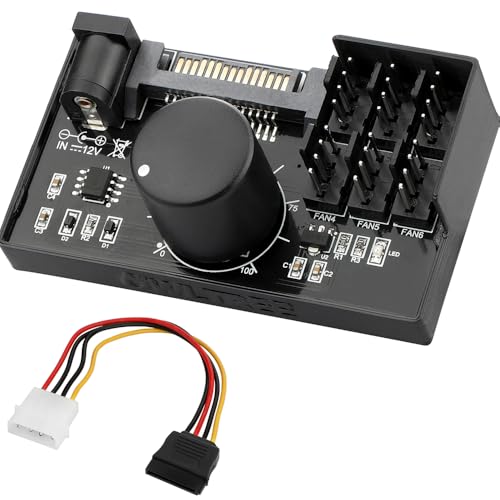
4 Pin 12V PWM Fan Controller 6 Fans Supported , PC Fan Adapter Hub Powered by SATA and DC 5525, Cooling Fan Speed Knob with Max Total 60W 5A Output
As an Amazon Associate we earn from qualifying purchases. Product prices and availability are accurate as of the date/time indicated.
Prices shown are approximate and for reference only. Prices change often, so please check the current price on Amazon before you buy.
Best Cheap Fan Controller for PC Reviewed for 2026
1. Kingwin FPX-001 Best Cheap Fan Controller for PC
The Kingwin FPX-001 is a controller with 4 channels, DC control, and manual knobs. It is powered by Molex and is priced in the range of $10 to $15. Its 4 channels let you control four fans independently, with a knob for each channel, and its manual knobs make it easy to change speed without software.
In use, the FPX-001 is practical because its 4 channels cover a small case, its manual knobs are simple to use, and its Molex power comes directly from the power supply. Its limitation is clear: it supports DC control, not PWM, so it is best for three-pin fans, and it will be less precise with four-pin PWM fans. It suits a user who wants the cheapest manual controller, for a small case with DC fans, and who does not need software control.
2. DeepCool FH-10 Best Cheap Fan Controller for PC
The DeepCool FH-10 is a hub with 10 ports, PWM support, and hub control from the motherboard. It is powered by SATA and is priced in the range of $15 to $20. Its 10 ports let you connect up to ten PWM fans to one hub, and its SATA power means it can power all of them safely, without overloading a motherboard header.
For a case with many fans, the FH-10 is useful because its 10 ports cover even a large case, its PWM support works with modern four-pin fans, and its SATA power is reliable. Its limitation is that it is a hub, not a controller, so all ten fans will run at the same speed, set by the motherboard, rather than independently. It is best for a user who wants a cheap way to connect many fans to one motherboard header, with PWM control from the BIOS or software.
3. Noctua NA-FC1 Best Cheap Fan Controller for PC
The Noctua NA-FC1 is a controller with 1 channel, PWM support, and a manual knob. It is powered by SATA and is priced in the range of $20 to $25. Its 1 channel is designed for one fan, or for a group of fans connected with a splitter, and its manual knob lets you change speed from 0% to 100%, with a smooth PWM signal.
In a small build, the NA-FC1 is a strong choice because its PWM support is precise, its SATA power is stable, and its Noctua build is known for quality. Its 1 channel is a limitation if you have many fans, but it is useful for a CPU fan, a single case fan, or a fan that you want to control separately from the rest. It suits a user who wants a high-quality, single-channel PWM controller, for one important fan, with manual control.
4. Thermaltake Commander FP Best Cheap Fan Controller for PC
The Thermaltake Commander FP is a hub with 10 ports, PWM support, and hub control from the motherboard. It is powered by SATA and is priced in the range of $25 to $30. Its 10 ports are the same as the DeepCool FH-10, but its Thermaltake design includes a more robust housing and a slightly different layout, with ports that are easier to access in a tight case.
For a large case, the Commander FP is useful because its 10 ports let you connect many fans, its PWM support works with modern fans, and its SATA power can handle the load. Its price is a step up from the DeepCool, which reflects its Thermaltake brand and its housing. It is best for a user who wants a 10-port PWM hub, with a durable design, for a case with six or more fans.
5. NZXT Grid+ V3 Best Cheap Fan Controller for PC
The NZXT Grid+ V3 is a controller with 6 channels, PWM support, and software control over USB. It is powered by SATA and is priced in the range of $30 to $40. Its 6 channels let you control six fans, either independently or in groups, and its software lets you set fan curves based on CPU or GPU temperature.
In a modern build, the Grid+ V3 is a solid choice because its 6 channels cover most cases, its PWM support is precise, and its software control means you do not need to open the case to change speed. Its SATA power is reliable, and its NZXT software is easy to use. It suits a user who wants software control, with fan curves, for a mid-range price, without paying for a premium RGB controller.
6. Corsair Commander Core XT Best Cheap Fan Controller for PC
The Corsair Commander Core XT is a controller with 6 channels, PWM support, and software control over USB. It is powered by SATA and is priced in the range of $50 to $60. Its 6 channels are the same as the NZXT, but its Corsair design also supports RGB lighting control, with two RGB channels, in addition to fan control, which makes it a combined fan and lighting controller.
For a premium cheap controller, the Commander Core XT is a top choice because its 6 PWM channels give you detailed fan control, its software lets you set curves and monitor temperature, and its RGB support means you can control both fans and lights from one device. Its price is the highest in this table, but its combined fan and RGB control makes it a good value if you also have RGB fans. It is best for a user who wants a software controller with RGB, for a Corsair build, and who is willing to pay a premium for it.
Buying Guide: How to Choose the Best Cheap Fan Controller for PC
Start with your fan type, your fan count, and how you want to control them, not with a single specification. If your fans are three-pin, choose a DC controller. If your fans are four-pin PWM, choose a PWM controller or hub. If you have three or four fans, choose a four to six channel controller. If you have six or more fans, choose a ten-port hub. Then check the practical details: power source, control type, and case fit.
Choose PWM for Modern Fans, DC for Older Fans
Choose a PWM controller if your fans have four pins, because PWM gives you smooth, precise speed control, from low to high, without stalling. A PWM hub, such as the DeepCool FH-10, is a good choice if you want all your fans to follow one motherboard curve. Choose a DC controller if your fans have three pins, because a DC controller changes speed by changing voltage, which works for three-pin fans. A controller that supports both PWM and DC is the most versatile, but it is less common at a cheap price.
Choose Channels for Your Case Size
Choose channels based on how many fans you have and whether you want to control them independently. A four-channel manual controller, such as the Kingwin FPX-001, is good for a small case with four fans. A six-channel software controller, such as the NZXT Grid+ V3, is good for a medium case with six fans. A ten-port hub is good for a large case with eight to ten fans, but it will control them all at the same speed. A fact not in the table is that you can use a PWM splitter cable with a single-channel controller, such as the Noctua NA-FC1, to control two or three fans at the same speed from one knob, which is a cheap way to add channels without buying a larger controller.
Check Power, Case Fit, and Software
Check power before you buy, because a SATA-powered controller can power more fans than a motherboard-powered controller. A SATA hub can safely power ten fans, while a motherboard header is limited to about 1 amp, which is enough for two or three fans. Check case fit, because a 5.25-inch bay controller will not fit in a modern case with no drive bays, while a small hub that mounts with adhesive or screws inside the case will fit almost anywhere. Check software, because a software controller needs a USB header on your motherboard, and it needs Windows software to work, while a manual controller works without any software.
Budget Guide for Best Cheap Fan Controller for PC
A controller in the $10-$20 range can provide good fan control if it is a manual controller or a simple PWM hub, while a controller in the $20-$40 range often provides PWM support, more channels, or software control. A controller in the $50-$60 range, such as the Corsair Commander Core XT, is for a user who wants software control plus RGB lighting control in one device. The budget pick in this comparison is the Kingwin FPX-001, at $10-$15, because it is the cheapest model in the table and still offers 4 channels, manual knobs, and Molex power that can control four fans independently without software. For most users with modern PWM fans, a PWM hub such as the DeepCool FH-10 at $15-$20 will help more than a DC manual controller, because it can control up to ten PWM fans from one motherboard signal, with SATA power, at a low price. Spend the saving on extra case fans, a PWM splitter, or a better CPU cooler, if you need them.
Frequently Asked Questions About the Best Cheap Fan Controller for PC
What is the best cheap fan controller for PC in 2026?
For the best cheap fan controller for PC in 2026, the Kingwin FPX-001 is often the best budget choice because it offers 4 channels, manual knobs, and a price of $10 to $15. A useful extra fact is that you should check your motherboard manual for how many fan headers it has and whether they are PWM or DC, because a motherboard with three PWM headers may already be enough for a small build, and you may only need a cheap hub, rather than a full controller, to add more fans. Choose based on your fan type, your fan count, and whether you want manual or software control.
Do I need a fan controller if my motherboard has fan headers?
You do not need a fan controller if your motherboard has enough fan headers for all your fans, because the motherboard BIOS can already control fan speed with a fan curve. A useful extra fact is that most motherboards have three to six fan headers, but each header is limited to about 1 amp, so if you connect three high-power fans to one header with a splitter, you can overload it and damage the header. A SATA-powered hub solves that problem, because it powers the fans from the power supply, not from the motherboard, while still letting the motherboard control speed.
Is PWM better than DC for PC fans?
PWM is better than DC for most modern PC fans, because PWM can run a fan at a lower speed without stalling, and it gives you more precise control. A useful extra fact is that a DC fan controlled by voltage may stop completely below 40% speed, while a PWM fan can run reliably at 20% speed, which makes a PC quieter when idle. If your fans are three-pin, they can only use DC, so choose a DC controller for them, but if you buy new fans, choose four-pin PWM fans for the best control.
How many fans can a cheap fan controller handle?
How many fans a cheap fan controller can handle depends on its power source and its channels. A useful extra fact is that a SATA-powered hub, such as the DeepCool FH-10, can handle up to ten fans because it draws power from the power supply, while a controller powered only by a motherboard header should handle no more than two or three fans per header. Always add up the current draw of your fans, which is usually listed in amps on the fan label, and make sure the total is below the controller rating, because an overloaded controller can shut down or damage a fan.
Related guides
- Best Soundbar vs Speakers for PC Setups in 2026: Razer, Creative, Edifier, and Kanto Compared for a Desk Measured Before a Format Is Chosen, Nearfield Honesty at Arm’s Length, and a Subwoofer Parish the Neighbours Agree To
- Best Budget Power Supply for Remote Workers in 2026: 6 Quiet, Reliable PSUs for Your Home Office
- Best Console for PC Multiplayer Games in 2026: 6 Handheld PC Consoles With a 7-Inch Display, at Least 16GB RAM, and a Price Range, for PC Multiplayer Games
- Best Phone Case for Beach Lifeguards in 2026: OtterBox, Catalyst, Ghostek, and Pelican Compared for a Sealing Read in the Maker’s Own Documents, a Salt Rinse at Every Shift’s End, and a Phone That Never Pretends to Be the Rescue Radio
More from Amazon
Programs that pair well with the guide above. Offers and eligibility are set by Amazon and may change.
Free shipping on eligible items, Prime Video and more. Eligible new members can start with a free trial.
Start a Prime free trialAd-free music streaming. Eligible new subscribers can start with a free trial.
Try Music Unlimited freeA Prime membership for ages 18-24 with a trial period. Eligibility is set by Amazon.
See Prime for Young AdultsAudiobooks and podcasts to listen to on the go. Eligible new members can start with a free trial.
Try Audible freeAs an Amazon Associate we earn from qualifying purchases.

Write Your Review
No reviews yet. Be the first to share your experience!