
What's inside
- Best Desk Setup for Beginners PCs: The Layers in Buying Order
- Quick Comparison: Anchor Products for the Best Desk Setup for Beginners PCs
- Detailed Reviews: Best Desk Setup for Beginners PCs Anchor Picks
- Buying Guide: How to Build the Best Desk Setup for Beginners PCs in Stages
- Frequently Asked Questions About the Best Desk Setup for Beginners PCs
As an Amazon Associate I earn from qualifying purchases. This post may contain affiliate links at no extra cost to you.
The best desk setup for beginners PCs is not a shopping list, it is a sequence, because a first desk built in the wrong order spends its budget on decoration while its owner sits in pain on a kitchen chair staring at a badly placed screen. This guide builds the starter setup the way an ergonomist with a budget would: the chair and the screen position first, because your body keeps the score of every shortcut there; the desk at the right height second; the computer’s own essentials, a monitor worth looking at and peripherals your hands will live on, third; and light, cable order, and the pleasant extras last, where they belong, after the fundamentals are true. It compares the anchor products that define each layer at beginner prices, graded on the specifications that decide daily comfort rather than unboxing day, and it prices the whole build in honest stages, so a beginner can buy the first stage this month, work in genuine comfort, and add the rest across a year without replacing anything, because the only unforgivable expense in a starter setup is buying the same layer twice.
Learn the geometry before the products, because the geometry is free and the products merely serve it. Your screen’s centre belongs slightly below eye level, roughly fifteen to twenty degrees down, at about an arm’s length, with its face square to yours. Your elbows belong near ninety degrees with your shoulders down, your wrists floating or resting lightly rather than bent, and your feet flat on the floor or a footrest, with the small of your back supported by the chair rather than by your determination. A desk at the standard height fits a statistical ghost; everyone else adjusts the chair, the screen, and if the budget allows, the desk itself, until the angles close. That is the entire science, and every product below is graded by how faithfully it helps a beginner achieve it: the monitor arm that places the screen where a stand cannot, the chair whose adjustments cover real bodies, the desk whose height range includes yours, and the light that lets your eyes work at the screen’s brightness without fighting the room’s. Buy in that order and a modest budget outperforms a lavish one spent backwards, every working day of the year.
Best Desk Setup for Beginners PCs: The Layers in Buying Order
Layer One and Two: Chair, Screen, and the Arm Between Them
The chair is the foundation because you will spend more hours in contact with it than with any other object you own, and a beginner’s chair needs three honest adjustments, height that puts your feet flat and your elbows at desk height, lumbar support that meets your back where your back actually curves, and armrests that support without shrugging your shoulders, in a seat your legs fit. The screen follows: for most beginners a single 27-inch monitor at 1440p is the sweet spot this site’s other guides keep reaching, large and sharp enough for work and play, driven happily by a mid-range PC, and kinder to a budget than the ultrawide dream. Between chair and screen sits the layer beginners skip and veterans swear by, the monitor arm, which lifts the panel off its fixed stand and places it at your eyes’ exact address, freeing the desk beneath it in the same gesture. If the budget forces a choice in month one, buy the chair and place the screen on a stable stack of books at the measured height without embarrassment, and let the arm be month two, because the position matters more than the furniture that achieves it, and a correct stack of books outperforms a beautiful arm set at the wrong height by an owner who never measured.
Layer Three and Four: Desk, Peripherals, Light, and Cables
The desk itself needs less than marketing claims: a surface at least 120 centimetres wide for a monitor, keyboard, and a notebook’s worth of life, depth enough, around 70 to 80 centimetres, to place the screen at arm’s length with the keyboard in front of it, and stability that does not translate typing into tremor. A height-adjustable desk earns its premium for the tall, the short, and the restless, and is a luxury for the statistically average and patient, which is why it sits third in this guide’s order rather than first. Peripherals are a hands-first purchase: a keyboard your fingers approve in a week’s typing, a mouse shaped for your grip and hand size rather than for a render, and audio you can wear for an hour without noticing, because these are the surfaces your body actually touches all day. Light closes the comfort system, a bias light behind the monitor or a desk lamp placed to kill glare and match the screen’s brightness to the room, because eye strain is usually a lighting failure wearing a monitor’s name. Cables finish the build as a discipline rather than a product: one quality surge-protected power strip mounted under the desk, every cable routed with the slack its device needs, modular PSU cables never interchanged inside the PC itself, and the whole installation photographed for the day something must be unplugged, which is the day cable order pays its dividend.
Quick Comparison: Anchor Products for the Best Desk Setup for Beginners PCs
| Product | Layer and Key Specs (Maker-Stated) | Best For | Typical Price Range | Rating |
|---|---|---|---|---|
| LG UltraGear 27GP850 / Dell S2722DC Class 27-Inch 1440p Monitors | 27-inch 1440p panels in the makers’ lines; refresh and connectivity as stated per model; the beginner sweet-spot class | Best starter monitor class | $250 – $400 by model | 4.6 / 5 |
| Ergotron LX Desk Monitor Arm | Single arm; stated capacity for most 24-34 inch panels; spring counterbalance; clamp and grommet options as listed | Best screen positioning upgrade | $180 – $220 | 4.7 / 5 |
| FlexiSpot E7 / EF1 Standing Desk Lines | Electric height-adjustable frames and complete desks in stated sizes; stated lift capacity and height range as the maker lists | Best adjustable desk | $300 – $550 by configuration | 4.5 / 5 |
| IKEA BEKANT / MICKE Desk Lines | Fixed-height desks in stated sizes; the mainstream furniture reference; sit-stand versions in the BEKANT line as listed | Best fixed desk value | $100 – $250 by model | 4.3 / 5 |
| Logitech MX Master 3S and MX Keys | Ergonomic mouse and low-profile keyboard in the maker’s line; multi-device wireless as stated; the mainstream professional pairing | Best beginner peripherals | $170 – $220 for the pair | 4.6 / 5 |
| BenQ ScreenBar / Halo Lines | Monitor light bars; stated glare-free desk illumination design; auto-dimming in stated versions | Best desk lighting upgrade | $110 – $180 by version | 4.5 / 5 |
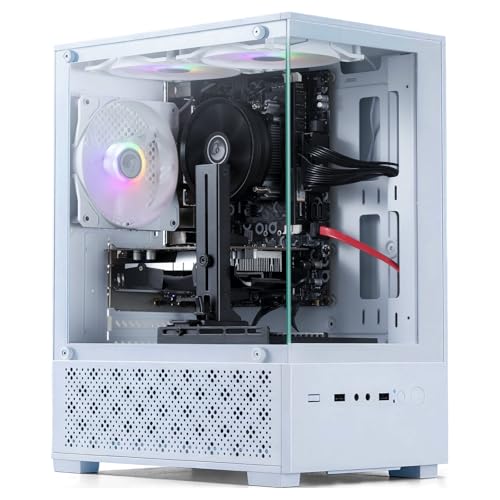
Tisukisu Prebuilt Gaming PC Desktop,Core i5 Tower Computer,R7 350 4G,Win11 | 16GB RAM and 512G SSD,WiFi,Fans×4,Windows 11 Home,Preinstalled for Gaming and Business Daily Office and Home.
As an Amazon Associate we earn from qualifying purchases. Product prices and availability are accurate as of the date/time indicated.
Prices shown are approximate and for reference only. Prices change often, so please check the current price on Amazon before you buy.
Specifications are each maker’s stated details for the current version; monitor and desk lines span versions, so confirm the exact model’s stated size, resolution, and dimensions before ordering. Prices are typical retail ranges and vary by configuration, retailer, region, and promotion. Ratings are editorial for a beginner’s first complete setup, with ergonomic effect, build longevity, and value weighted first.
Detailed Reviews: Best Desk Setup for Beginners PCs Anchor Picks
1. 27-Inch 1440p Monitor Class – The Screen to Start With
LG’s UltraGear line serves the beginner who games, Dell’s lines the beginner who works, and both meet at the specification that matters: 27 inches at 1440p, sharp at arm’s length, spacious without a second mortgage, and matched to the graphics cards beginners actually own. Buy the exact model by its stated panel type, refresh, and ports against your PC’s outputs. This is the layer where a starter budget should be brave, because you will look at it for every minute of every session for years.
2. Ergotron LX Arm – The Positioning Upgrade
The LX appears in this site’s monitor arm guide as the professional reference, and it anchors a beginner setup for the same reason: it places the screen at the measured position and keeps it there for a decade, through two or three monitors. On a strict budget its gas-spring rivals serve the first years honourably. Either way, some arm belongs in the plan from day one, even if it arrives in month two.
3. FlexiSpot Standing Desks – The Adjustable Foundation
FlexiSpot’s lines made electric height adjustment a mainstream purchase: stated lift capacities that cover real setups, frames that stay steady at standing height in their better tiers, and tops sized for a monitor arm’s clamp and a life’s clutter. Choose the frame tier by the weight you will actually load and the height range your body needs, both stated, and the desk becomes the setup’s quiet infrastructure for a decade.
4. IKEA Desks – The Fixed-Height Value
IKEA’s BEKANT and MICKE lines are the fixed-desk benchmark: honest surfaces at honest prices, in sizes that suit small rooms and first flats, available to sit on before buying in much of the world. Their fixed height is their one ergonomic fact, so pair them with a properly adjusted chair and the monitor arm, and measure your own seated elbow height against the stated desk height before the trip, not after the assembly.
5. Logitech MX Pairing – The Hands’ Layer
The MX Master mouse and MX Keys keyboard are the peripherals this guide hands a beginner who works: shapes refined over generations, multi-device switching for the laptop-and-PC household, and a typing and mousing feel that survives an eight-hour acquaintance. Gamers will choose from this site’s gaming lines instead, by grip and switch preference. Everyone else can stop researching peripherals here and spend the saved hours on the chair.
6. BenQ ScreenBar – The Lighting Finish
The ScreenBar lights the desk without lighting the screen, which is the whole trick of desk lighting, and its auto-dimming versions match the room as the evening changes. It is the last layer in this guide’s order and the one whose absence owners feel as eye strain they blame on everything else. Buy it when the fundamentals are true and it will feel, unfairly, like the upgrade that fixed the setup.
Buying Guide: How to Build the Best Desk Setup for Beginners PCs in Stages
Stage the Budget: Comfort, Then Picture, Then Polish
Stage one, the month-one desk: a chair fitted to your body, the monitor you already own or the 1440p class above, placed at the measured height by stand, stack, or arm, and a keyboard and mouse your hands accept. Work there for a month and let the setup tell you its own second stage, because a month of real use identifies the true bottleneck, glare at four o’clock, a desk an inch too high, a chair cushion with a grudge, more honestly than any pre-purchase simulation. Stage two answers that bottleneck and adds the arm or the desk adjustment it calls for. Stage three, across the year, adds light, audio, and the second screen if your work, not your feed, demands it. At every stage, keep the receipts and the boxes of the layers with moving parts, buy the layer above your instinct where the contact is bodily, chair above all, and never finance decoration with the ergonomics budget, because a setup is judged at hour six of a working day, not in its photograph.
Set It, Measure It, and Leave It Alone
Finish the build with the ritual that makes it a system: set the chair, then the desk height if it adjusts, then the screen by the angles in this guide’s opening, then the light, in that order, because each layer’s correct position depends on the one beneath it. Route the cables once, with the PC’s own modular cables kept as their supply’s matched set, the power strip mounted and surge-protected, and slack left for the arm’s travel and the desk’s lift. Photograph the result, note the chair and desk settings in the same phone album, and then work in the setup for a full week before adjusting anything but pain, because a body adapted to a bad old posture reports a good new one as strange for two days, and strange is a phase, not a verdict. The best desk setup for beginners PCs is the one that disappears by the second week, leaving only the work, the game, and an owner who cannot quite remember why their old desk hurt, which is the highest rating any furniture can earn.
Frequently Asked Questions About the Best Desk Setup for Beginners PCs
What do I need for a beginner PC desk setup?
In buying order: a chair adjusted to your body, a monitor placed at the correct height and distance, by an arm ideally, a desk wide and deep enough for the screen at arm’s length and stable under typing, a keyboard and mouse your hands approve, and then light and cable order. A 27-inch 1440p monitor, an arm such as the Ergotron LX class, and a desk from the FlexiSpot or IKEA lines cover the anchors for most beginners.
How much does a good beginner desk setup cost?
Excluding the PC itself, a complete and genuinely comfortable setup typically lands in the region of several hundred to around a thousand dollars or pounds depending on region and how much is bought new, with the chair and monitor taking the largest shares. Staging the purchase, chair and screen position first, desk and peripherals next, light and extras across the year, spreads the same total without compromising any layer, which is the budget method this guide recommends.
Is a standing desk worth it for a beginner?
It is worth it if you are tall, short, or restless, because its height range fits bodies the fixed desk’s single height does not, and the option to stand for part of the day suits some backs and some work. It is not a substitute for the chair, the screen position, or movement, and a fixed desk at your correct height with a good chair serves a beginner better than a standing desk bought instead of them. Buy it in stage two, by your body’s report from stage one.
One monitor or two for a beginner setup?
One good one to start: a single 27-inch 1440p screen, centred and correctly placed, teaches posture and focus that a premature pair undermines, and it matches a beginner PC’s outputs and a beginner desk’s width. Add the second screen when a real workflow, documents beside code, stream beside game, reference beside canvas, asks for it by name, and mount the pair with your primary screen dominant and centred, as this guide’s geometry describes.
Related guides
- GymCope Running Vest for Women and Men with 500ml Flask and 1.5L Bladder
- Twin Needle Sewing Machine, 39 Stitches, Portable Electric for Beginners
- Case PC MSI in 2026: Best MSI PC Cases for Airflow, Cable Management, and a Clean Gaming Build
- Nllosa 9D Electric Head Shaver for Bald Men, 6-in-1 Grooming Kit
More from Amazon
Programs that pair well with the guide above. Offers and eligibility are set by Amazon and may change.
Free shipping on eligible items, Prime Video and more. Eligible new members can start with a free trial.
Start a Prime free trialAd-free music streaming. Eligible new subscribers can start with a free trial.
Try Music Unlimited freeA Prime membership for ages 18-24 with a trial period. Eligibility is set by Amazon.
See Prime for Young AdultsAudiobooks and podcasts to listen to on the go. Eligible new members can start with a free trial.
Try Audible freeAs an Amazon Associate we earn from qualifying purchases.







Write Your Review
No reviews yet. Be the first to share your experience!