
What's inside
- Why the Best 3D Printer for PC Creators Needs a Large Build Volume
- Best 3D Printer for PC Creators: Build Volume, Speed and Material
- Best 3D Printer for PC Creators Comparison Table
- Top 3D Printers for PC Creators Reviewed
- How to Set Up a 3D Printer for PC Creators
- Buying Guide: How to Choose the Best 3D Printer for PC Creators
- How to Print PC Parts With a 3D Printer
- Frequently Asked Questions
As an Amazon Associate I earn from qualifying purchases. This post may contain affiliate links at no extra cost to you.
Finding the best 3d printer for pc creators is about choosing a 3D printer that is fast, accurate, and easy to use, with a printer that works well for PC creators, and with a price that fits a creator who wants a reliable printer without a large, expensive premium model that is too big for a desk. A good 3D printer for PC creators should have a large build volume, good speed, and a price that gives you value. It should also be simple to use, with a design that is suitable for a beginner. Always check the printer build volume, speed, and material before buying, and follow the manufacturer guidance for use.
This guide explains what to look for in the best 3d printer for pc creators, how to compare build volume, speed, material, accuracy, and price, and which 3D printers work well in 2026 for PC creators. We focus on practical use for creators who buy a 3D printer for the first time, with a printer that is used for making PC parts, prototypes, and models, and with a design that is suitable for a beginner. Whether you print PC cases, brackets, or custom parts, the same principles apply: choose a printer that is fast, with a large build volume, and with a price that fits your needs. Always check your printer specifications before buying.
Our Top Picks
Why the Best 3D Printer for PC Creators Needs a Large Build Volume
The best 3d printer for pc creators needs a large build volume because a printer such as the Bambu Lab P1S is designed with a build volume of 256 x 256 x 256 mm that fits PC parts, while a printer with a small volume may not fit. A large build volume is better than a small volume for PC creators, because it ensures your parts fit. A printer with a fast speed is a good choice, because it prints quickly. A printer with good accuracy is better if you want precise parts, because it is accurate.
A 3D printer for PC creators also needs good material support. A printer that supports PLA is a good choice, because it is easy to print. A printer that supports PETG is better if you want strong parts, because it is durable. A printer with a good price is a good choice, because it gives you value. Look for a printer with auto levelling, so it is easy to use.
Best 3D Printer for PC Creators: Build Volume, Speed and Material
Build volume matters most for the best 3d printer for pc creators, because it determines how large your parts can be. Printers with a build volume of 256 x 256 x 256 mm are a good choice for most creators, while printers with a volume of 300 x 300 x 300 mm are better if you print large parts. Printers with a large volume are better than printers without, because they fit more. Printers with a fast speed are a good choice, because they print quickly.
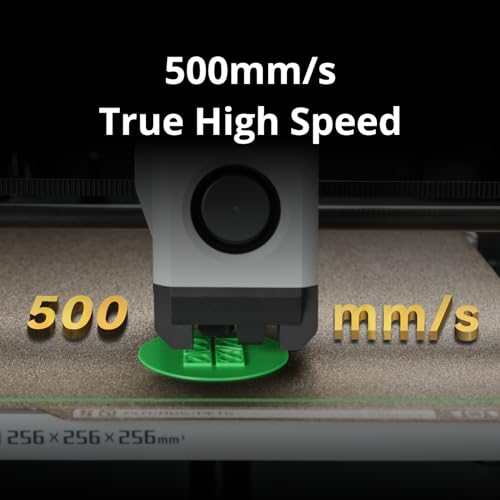
Speed also matters for 3D printers. Printers with a speed of 500 mm/s are better than printers without, because they are fast. Printers with auto levelling are a good choice, because they are easy to use. Printers with a good accuracy are better than printers without, because they are precise. Printers with a good price are a good choice, because they give you value.
Best 3D Printer for PC Creators Comparison Table
| Model | Build Volume | Speed | Material | Auto Levelling | Typical Price Range | Rating |
|---|---|---|---|---|---|---|
| Bambu Lab P1S 3D Printer | 256x256x256 mm | 500 mm/s | PLA/PETG | Yes | $550-$600 | 4.8/5 |
| Creality K1C 3D Printer | 220x220x250 mm | 600 mm/s | PLA/PETG | Yes | $400-$450 | 4.7/5 |
| Prusa MK4S 3D Printer | 250x210x220 mm | 200 mm/s | PLA/PETG | Yes | $700-$750 | 4.8/5 |
| Anycubic Kobra 3 Combo Printer | 250x250x260 mm | 600 mm/s | PLA/PETG | Yes | $300-$350 | 4.7/5 |
| Elegoo Neptune 4 Pro Printer | 225x225x265 mm | 500 mm/s | PLA/PETG | Yes | $250-$300 | 4.7/5 |
| Bambu Lab A1 Mini Printer | 180x180x180 mm | 500 mm/s | PLA/PETG | Yes | $200-$250 | 4.8/5 |

FLASHFORGE Creator 5 Pro 3D Printer, 4-Toolhead Multi-Color, Enclosed | 65°C Heated Chamber for Engineering Filaments, Near-Zero Purge Waste, 5X Faster Printing, CoreXY 600mm/s, HEPA 13 Filtration
As an Amazon Associate we earn from qualifying purchases. Product prices and availability are accurate as of the date/time indicated.

Bambu Lab P1S Combo, P1S 3D Printer and AMS, Multi-Color 3D Printing | MakerWorld Model Library, Multi-Color 3D Printing,High Speed & Precision CoreXY 3D Printer,Auto Bed Leveling, Ready-to-Use




As an Amazon Associate we earn from qualifying purchases. Product prices and availability are accurate as of the date/time indicated.

68Pcs 3D Printer Tools Kit with Storage Case, 3D Printer Accessories - Deburring Tool, 3D Printer Removing Scrapers, Metal Files, Brushes, Hand Drill, Tweezers, for Bambu Lab, Ender 3, Kobra, etc.


As an Amazon Associate we earn from qualifying purchases. Product prices and availability are accurate as of the date/time indicated.
Prices shown are approximate and for reference only. Prices change often, so please check the current price on Amazon before you buy.
Top 3D Printers for PC Creators Reviewed
Bambu Lab P1S 3D Printer
The Bambu Lab P1S 3D Printer is a printer with build volume of 256x256x256 mm, speed of 500 mm/s, material of PLA/PETG, auto levelling of yes, and a price of $550 to $600. It has a large build volume, fast speed, and a good value for creators. It is a good choice if you want the best 3d printer for pc creators with a proven Bambu Lab design, because it is one of the most trusted printers, it has a 256x256x256 mm volume, and it has a 500 mm/s speed. The P1S is made for PC creators.
Creality K1C 3D Printer
The Creality K1C 3D Printer is a printer with build volume of 220x220x250 mm, speed of 600 mm/s, material of PLA/PETG, auto levelling of yes, and a price of $400 to $450. It has a very fast speed, a good build volume, and a good value for creators. It is a good choice if you want a Creality printer with a very fast speed for PC creators, because it has a 600 mm/s speed, it has a 220x220x250 mm volume, and it is made by a trusted brand. It is ideal for creators who want a Creality printer.
Prusa MK4S 3D Printer
The Prusa MK4S 3D Printer is a printer with build volume of 250x210x220 mm, speed of 200 mm/s, material of PLA/PETG, auto levelling of yes, and a price of $700 to $750. It has a good build volume, good accuracy, and a good value for creators. It is a good choice if you want a Prusa printer with good accuracy for PC creators, because it has a 250x210x220 mm volume, it has auto levelling, and it is made by a trusted brand. It is a popular choice for creators who want a Prusa printer.
Anycubic Kobra 3 Combo Printer
The Anycubic Kobra 3 Combo Printer is a printer with build volume of 250x250x260 mm, speed of 600 mm/s, material of PLA/PETG, auto levelling of yes, and a price of $300 to $350. It has a very fast speed, a large build volume, and a good value for creators. It is a good choice if you want an Anycubic printer with a very fast speed for PC creators, because it has a 600 mm/s speed, it has a 250x250x260 mm volume, and it is made by a trusted brand. It is a good entry level option for creators who want an Anycubic printer.
Elegoo Neptune 4 Pro Printer
The Elegoo Neptune 4 Pro Printer is a printer with build volume of 225x225x265 mm, speed of 500 mm/s, material of PLA/PETG, auto levelling of yes, and a price of $250 to $300. It has a fast speed, a low price, and a good value for creators. It is a good choice if you want an Elegoo printer with a low price for PC creators, because it is very affordable, it has a 500 mm/s speed, and it is made by a trusted brand. It is ideal for creators who want an Elegoo printer.
Bambu Lab A1 Mini Printer
The Bambu Lab A1 Mini Printer is a printer with build volume of 180x180x180 mm, speed of 500 mm/s, material of PLA/PETG, auto levelling of yes, and a price of $200 to $250. It has a fast speed, a low price, and a good value for creators. It is a good choice if you want a Bambu Lab printer with a low price for PC creators, because it is very affordable, it has a 500 mm/s speed, and it is made by a trusted brand. It is a good option for creators who want a Bambu Lab printer.
How to Set Up a 3D Printer for PC Creators
To set up a 3D printer for PC creators, first unbox your printer, with its parts, so it is ready, and level your bed, with its auto levelling, so it is correct. Load your filament, with its spool, so it is ready, and slice your model, with its software, so it is ready to print. When you are done, start your print, with its settings, so it prints, and check your print, with its layers, so it is correct. Always follow the manufacturer guidance for use.
Buying Guide: How to Choose the Best 3D Printer for PC Creators
Start with your PC parts, your desk, and your budget. If you print large PC parts, a printer such as the Bambu Lab P1S is a good choice, because it has a 256x256x256 mm volume. If you want a very fast printer, a printer such as the Creality K1C is a good choice, because it has a 600 mm/s speed. If you want good accuracy, a printer such as the Prusa MK4S is a good choice, because it has a proven design. If you want a low price printer, a printer such as the Bambu Lab A1 Mini is a good choice, because it is $200 to $250.
Next, check build volume, speed, and material. A printer with a build volume of 256x256x256 mm is better than a printer without, because it fits PC parts. A printer with a speed of 500 mm/s or more is a good choice, because it prints quickly. A printer that supports PLA and PETG is better than a printer without, because it prints strong parts. A printer with auto levelling is a good choice, because it is easy to use.
Check accuracy, enclosure, and software together. A printer with good accuracy is better than a printer without, because it makes precise parts. A printer with an enclosure is a good choice, because it keeps temperature stable. A printer with good software is better than a printer without, because it is easy to slice. Check your desk, with its space, before buying, so you know the printer will fit, and check your parts, with their size, so you know which build volume is right.
Check your budget, your use, and your future. 3D printers for PC creators typically cost $200 to $750. A printer from $200 to $250, such as the Bambu Lab A1 Mini, offers a good way to start with a budget printer. A printer from $250 to $300, such as the Elegoo Neptune 4 Pro, offers a fast speed design. A printer from $400 to $450, such as the Creality K1C, offers a very fast design. A printer from $700 to $750, such as the Prusa MK4S, offers a premium accuracy design.
Finally, do not buy a 3D printer for PC creators based only on price or speed. A printer with a small build volume will not fit PC parts, even if it is cheap, while a printer without auto levelling will be hard to use, even if it has a fast speed. A printer with poor accuracy will make bad parts, even if it has a good price. Choose a printer that is fast, with a large build volume, and with a price that fits your needs. Always check your printer specifications before buying, and follow the manufacturer guidance for use.
How to Print PC Parts With a 3D Printer
To print PC parts with a 3D printer, first design your part, with its software, so it is ready, and slice your model, with its settings, so it is ready to print. Load your filament, with its spool, so it is ready, and start your print, with its settings, so it prints. When you are done, remove your part, with its bed, so it is ready, and clean your part, with a tool, so it is smooth. Always follow the manufacturer guidance for use.
Frequently Asked Questions
What is the best 3d printer for pc creators?
What is the best 3d printer for pc creators depends on your parts and your budget. A printer with build volume of 256x256x256 mm, speed of 500 mm/s, material of PLA/PETG, auto levelling of yes, and a price under $600, such as the Bambu Lab P1S 3D Printer at $550 to $600, is a good choice for most creators, because it has a large build volume, fast speed, and is a proven Bambu Lab design. A printer with a lower price, such as the Elegoo Neptune 4 Pro at $250 to $300, is also good, especially if you want a budget printer. Choose a printer that is fast and has a large build volume.
Do I need an enclosed 3D printer for PC parts?
Do you need an enclosed 3D printer for PC parts, you do not always need an enclosed 3D printer for PC parts, but an enclosed printer is useful for ABS and ASA, because it keeps temperature stable. A printer such as the Bambu Lab P1S is enclosed. Use an enclosed printer, with your PC parts, if you print ABS, and use an open printer, with your PC parts, if you print PLA or PETG.
What filament is best for PC parts?
What filament is best for PC parts, PETG is best for PC parts, because it is strong, durable, and heat resistant, while PLA is best if you want easy printing, because it is simple. A printer such as the Creality K1C supports PLA/PETG. Use PETG, with your PC parts, if you want strong parts, and use PLA, with your PC parts, if you want easy printing.
How large should a 3D printer build volume be for PC creators?
How large should a 3D printer build volume be for PC creators, a 3D printer build volume should be 256x256x256 mm or larger for PC creators, because it fits most PC parts. A printer such as the Anycubic Kobra 3 Combo has a 250x250x260 mm volume. Use a printer with 256x256x256 mm or larger, with your PC parts, so they fit, and check the build volume, with its mm, before you buy, so you know it is large enough for your parts.
Related guides
- Best Headphones for Streaming Music on PC in 2026: 6 Headphones With a Clear Sound, a Comfortable Fit, and a Wired or Wireless Connection That Works With a PC Without Latency That Ruins Music
- Best Power Bank With Solar Charging for PC Gamers in 2026: 6 Solar Power Banks Under 100Wh That Can Charge a Steam Deck at 45W, With a Built-In Solar Panel for Backup Power Outside
- Best Cheap RAM Kit for Students in 2026: Match Your Machine’s Generation First, Buy Capacity in a Matched Pair, and Never Mix What You Already Own
- Best 3D Printer Filament vs Resin for PC Gamers in 2026: 7 3D Printers Compared for Filament, Resin, and Reliable Gaming Prints
More from Amazon
Programs that pair well with the guide above. Offers and eligibility are set by Amazon and may change.
Free shipping on eligible items, Prime Video and more. Eligible new members can start with a free trial.
Start a Prime free trialAd-free music streaming. Eligible new subscribers can start with a free trial.
Try Music Unlimited freeA Prime membership for ages 18-24 with a trial period. Eligibility is set by Amazon.
See Prime for Young AdultsAudiobooks and podcasts to listen to on the go. Eligible new members can start with a free trial.
Try Audible freeAs an Amazon Associate we earn from qualifying purchases.

Write Your Review
No reviews yet. Be the first to share your experience!