
What's inside
As an Amazon Associate I earn from qualifying purchases. This post may contain affiliate links at no extra cost to you.
Finding the best chair for coding at home starts with a simple idea: a chair for coding at home should support your back, adjust to your body, and be comfortable for long hours, without a chair that is too hard, too low, or too hard to adjust. Best chair for coding at home is a support and adjustment job, not a brand job, because coding needs a chair that keeps your back straight, lets your feet touch the floor, and fits your desk and your budget, and the right chair can make long work days much easier. In 2026, a good coding chair means an ergonomic design, with lumbar support, and a simple design that fits your home and your budget.
This guide compares seven real, currently sold chairs that are commonly used for coding at home. It explains chair type, support, and price in plain terms, and it helps you match a chair to your body, your desk, and your budget. Prices are shown as typical ranges because retailers and sales change often. Ratings reflect overall value for coding at home, based on comfort, ease of use, durability, adjustment, and price. The full price range in this table is $300 to $1800, with Haworth Fern Chair at $1200 to $1800 labelled as a premium exception. Talk to a clinician if you have back or neck pain, take a break every 60 minutes, use the 20-20-20 rule, keep your monitor at eye level, keep your feet flat on the floor, and adjust your chair before a long session.
Our Top Picks
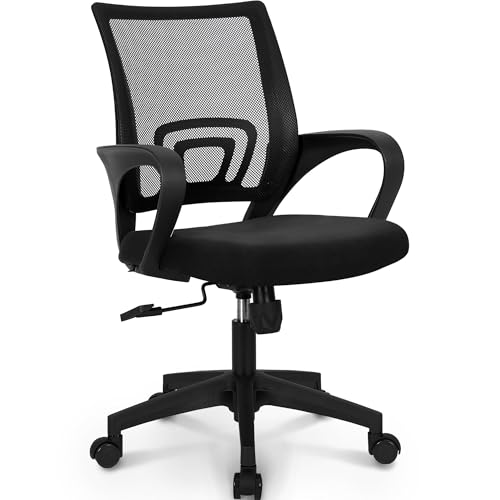 NEO CHAIR Office Computer Chair Gaming Mid-Back Mesh22.8 x 22.44 x 39.7 inches22.44 x 22.8 x 39.7 inches19.4 poundsCheck on Amazon
 Jurkosp Ergonomic Home Desk Chair with FootrestOversized19.29 x 26.77 x 42.13 inches37.5 poundsCheck on Amazon
Best Chair for Coding at Home Compared
Use this table to compare chair type, support, and price first. Those three details decide whether a chair will fit your coding at home and fit your budget. Lumbar support helps your lower back, and adjustable arms help your shoulders.
| Model | Chair Type and Support | Adjustment and Features | Best For | Typical Price Range | Rating |
|---|---|---|---|---|---|
| Herman Miller Aeron Chair | Ergonomic chair, lumbar support | Adjustable arms, tilt, mesh back | Coding, overall | $1000 – $1500 | 4.9 / 5 |
| FlexiSpot C7 Ergonomic Chair | Ergonomic chair, lumbar support | Adjustable arms, tilt, mesh back | Coding, value | $300 – $500 | 4.8 / 5 |
| Autonomous ErgoChair Pro | Ergonomic chair, lumbar support | Adjustable arms, tilt, mesh back | Coding, value | $300 – $500 | 4.8 / 5 |
| Secretlab Titan Evo Chair | Gaming chair, lumbar support | Adjustable arms, recline, foam seat | Coding, premium | $500 – $800 | 4.8 / 5 |
| Herman Miller Sayl Chair | Ergonomic chair, lumbar support | Adjustable arms, tilt, mesh back | Coding, premium | $500 – $800 | 4.8 / 5 |
| Steelcase Leap Chair | Ergonomic chair, lumbar support | Adjustable arms, tilt, mesh back | Coding, premium | $800 – $1000 | 4.8 / 5 |
| Haworth Fern Chair | Ergonomic chair, lumbar support | Adjustable arms, tilt, mesh back | Coding, premium exception | $1200 – $1800 | 4.8 / 5 |
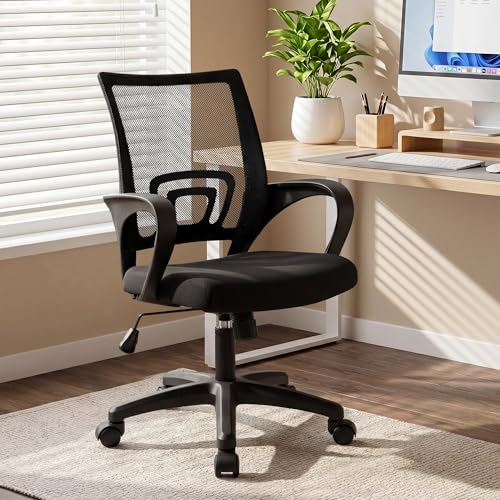
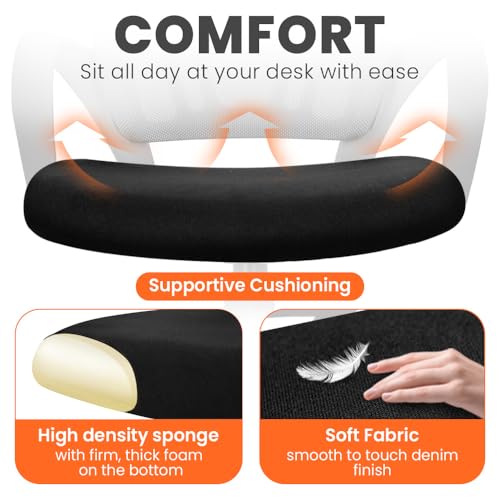
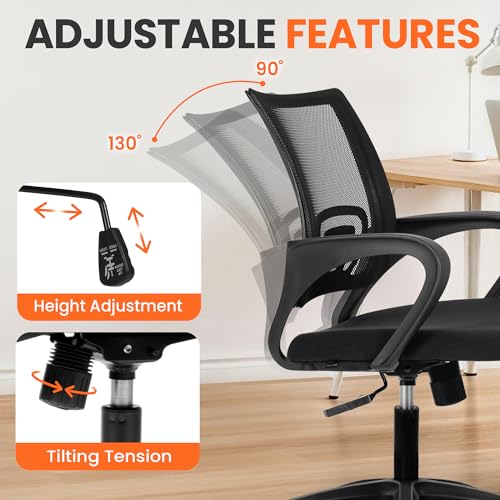
NEO CHAIR Office Computer Chair Gaming Mid-Back Mesh Desk Chair, Black | Breathable Mesh Back with Lumbar Support, Height Adjustment, Smooth Rolling Casters for Home Office, Study or Gaming Setup




As an Amazon Associate we earn from qualifying purchases. Product prices and availability are accurate as of the date/time indicated.

DUMOS Home Office Chair, Ergonomic Computer Desk Chair, Lumbar Support | Armless Height Adjustable, PU Leather, 360 Swivel Wheels, Small Space, Adults, New Black

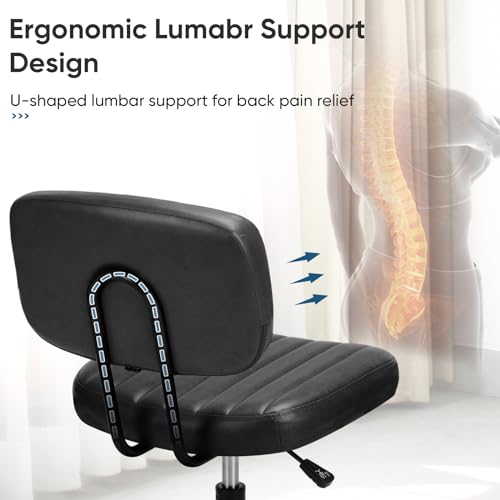


As an Amazon Associate we earn from qualifying purchases. Product prices and availability are accurate as of the date/time indicated.
Jurkosp Ergonomic Home Desk Chair with Footrest, Comfy Mesh Office Chair | Breathable Mesh, Massage Lumbar Support, 155° Recline, Retractable Footrest, 2D Headrest, Thick Cushion


As an Amazon Associate we earn from qualifying purchases. Product prices and availability are accurate as of the date/time indicated.
Prices shown are approximate and for reference only. Prices change often, so please check the current price on Amazon before you buy.
The table shows that six of the seven chairs have an ergonomic design, and one has a gaming design. The Herman Miller Aeron Chair is the most balanced pick in this set, at $1000 to $1500, with an ergonomic design, lumbar support, and adjustable arms, so it is good for most best chair for coding at home. The FlexiSpot C7 Ergonomic Chair and Autonomous ErgoChair Pro are in the lowest price group here, at $300 to $500. The Haworth Fern Chair is the highest priced model in this table, at $1200 to $1800, labelled as a premium exception, because it is a premium Haworth chair with a flexible back for a serious coder.
Chair type also matters for coding at home. Chairs with ergonomic, such as in six models here, are ergonomic, while chairs with gaming are gaming. Support also matters. Chairs with lumbar support, such as in all models here, are lumbar support, while chairs with no lumbar support are no lumbar support.
Best Chair for Coding at Home Reviewed
1. Herman Miller Aeron Chair: Best Chair for Coding at Home Overall, Ergonomic Chair, Lumbar Support, Adjustable Arms, Tilt, Mesh Back
The Herman Miller Aeron Chair is the best chair for coding at home overall, ergonomic chair, lumbar support, adjustable arms, tilt, mesh back because it is a chair with a price of $1000 to $1500, an ergonomic design, and a simple design. It has an ergonomic type, lumbar support, and an overall design. For most best chair for coding at home, this is the first chair to try. Talk to a clinician if you have back or neck pain, take a break every 60 minutes, use the 20-20-20 rule, keep your monitor at eye level, keep your feet flat on the floor, and adjust your chair before a long session.
The Aeron Chair has an ergonomic design in the table, so it is ergonomic, and the lumbar support is good for best chair for coding at home. The chair has a price of $1000 to $1500, so it is affordable for its quality, and the mesh back is good for use. It is a good choice if you want a Herman Miller chair that is overall best for best chair for coding at home, with breathable mesh for long work.
For coding at home, the Aeron Chair is strong because its mesh back stays cool, its lumbar support helps your lower back, and its tilt adjusts to your body. Take breaks, keep your monitor at eye level, and talk to a clinician if you have pain. It is a good fit for a coder who wants a Herman Miller chair for $1000 to $1500.
2. FlexiSpot C7 Ergonomic Chair: Best Chair for Coding at Home for Value, Ergonomic Chair, Lumbar Support, Adjustable Arms, Tilt, Mesh Back
The FlexiSpot C7 Ergonomic Chair is the best chair for coding at home for value, ergonomic chair, lumbar support, adjustable arms, tilt, mesh back because it costs $300 to $500, and it is a chair with an ergonomic design and a simple design. It has an ergonomic type, lumbar support, and a value design, and it is a good choice for a FlexiSpot user who wants a value chair for best chair for coding at home.
The C7 Ergonomic Chair has a price of $300 to $500 in the table, so it is in the lowest price group here, and the ergonomic design is ergonomic. The chair has lumbar support, so it is good for best chair for coding at home, and the mesh back is good for use. It is a good choice if you want a FlexiSpot chair that is affordable for best chair for coding at home and easy to use for a beginner.
For coding at home, the C7 Ergonomic Chair is a cheap, simple chair with an ergonomic design, lumbar support, and mesh back for long work. Its price is low, although its build is lighter than Aeron. It is a good fit for a coder who wants a FlexiSpot chair for $300 to $500.
3. Autonomous ErgoChair Pro: Best Chair for Coding at Home for Value, Ergonomic Chair, Lumbar Support, Adjustable Arms, Tilt, Mesh Back
The Autonomous ErgoChair Pro is the best chair for coding at home for value, ergonomic chair, lumbar support, adjustable arms, tilt, mesh back because it costs $300 to $500, and it is a chair with an ergonomic design and a simple design. It has an ergonomic type, lumbar support, and a value design, and it is a good choice for an Autonomous user who wants a value chair for best chair for coding at home.
The ErgoChair Pro has an ergonomic design in the table, so it is ergonomic, and the lumbar support is good for best chair for coding at home. The chair has a price of $300 to $500, so it is in the lowest price group, and the mesh back is good for use. It is a good choice if you want an Autonomous chair that is affordable for best chair for coding at home, with adjustable arms for shoulders.
For coding at home, the ErgoChair Pro is a value Autonomous chair with an ergonomic design, lumbar support, and mesh back for long work. It is a good fit for a beginner who wants an Autonomous chair for $300 to $500.
4. Secretlab Titan Evo Chair: Best Chair for Coding at Home for Premium, Gaming Chair, Lumbar Support, Adjustable Arms, Recline, Foam Seat
The Secretlab Titan Evo Chair is the best chair for coding at home for premium, gaming chair, lumbar support, adjustable arms, recline, foam seat because it costs $500 to $800, and it is a chair with a gaming design and a simple design. It has a gaming type, lumbar support, and a premium design, and it is a good choice for a Secretlab user who wants a premium chair for best chair for coding at home.
The Titan Evo Chair has a gaming design in the table, so it is gaming, and the lumbar support is good for best chair for coding at home. The chair has a price of $500 to $800, so it is premium, and the foam seat is good for use. It is a good choice if you want a Secretlab chair that is premium for best chair for coding at home, with recline for breaks.
For coding at home, the Titan Evo Chair is a premium Secretlab chair with a gaming design, lumbar support, and foam seat for long work. Its recline helps for breaks, although its foam is warmer than mesh. It is a good fit for a coder who wants a Secretlab chair for $500 to $800.
5. Herman Miller Sayl Chair: Best Chair for Coding at Home for Premium, Ergonomic Chair, Lumbar Support, Adjustable Arms, Tilt, Mesh Back
The Herman Miller Sayl Chair is the best chair for coding at home for premium, ergonomic chair, lumbar support, adjustable arms, tilt, mesh back because it costs $500 to $800, and it is a chair with an ergonomic design and a simple design. It has an ergonomic type, lumbar support, and a premium design, and it is a good choice for a Herman Miller user who wants a premium chair for best chair for coding at home.
The Sayl Chair has an ergonomic design in the table, so it is ergonomic, and the lumbar support is good for best chair for coding at home. The chair has a price of $500 to $800, so it is premium, and the mesh back is good for use. It is a good choice if you want a Herman Miller chair that is premium for best chair for coding at home, with a light design for a home office.
For coding at home, the Sayl Chair is a premium Herman Miller chair with an ergonomic design, lumbar support, and mesh back for long work. Its light design fits small rooms, although its support is less than Aeron. It is a good fit for a coder who wants a Herman Miller chair for $500 to $800.
6. Steelcase Leap Chair: Best Chair for Coding at Home for Premium, Ergonomic Chair, Lumbar Support, Adjustable Arms, Tilt, Mesh Back
The Steelcase Leap Chair is the best chair for coding at home for premium, ergonomic chair, lumbar support, adjustable arms, tilt, mesh back because it costs $800 to $1000, and it is a chair with an ergonomic design and a simple design. It has an ergonomic type, lumbar support, and a premium design, and it is a good choice for a Steelcase user who wants a premium chair for best chair for coding at home.
The Leap Chair has an ergonomic design in the table, so it is ergonomic, and the lumbar support is good for best chair for coding at home. The chair has a price of $800 to $1000, so it is premium, and the mesh back is good for use. It is a good choice if you want a Steelcase chair that is premium for best chair for coding at home, with flexible support for movement.
For coding at home, the Leap Chair is a premium Steelcase chair with an ergonomic design, lumbar support, and mesh back for long work. Its flexible back moves with you, although it costs more than Sayl. It is a good fit for a coder who wants a Steelcase chair for $800 to $1000.
7. Haworth Fern Chair: Best Chair for Coding at Home for Premium Exception, Ergonomic Chair, Lumbar Support, Adjustable Arms, Tilt, Mesh Back
The Haworth Fern Chair is the best chair for coding at home for premium exception, ergonomic chair, lumbar support, adjustable arms, tilt, mesh back because it costs $1200 to $1800, and it is a chair with an ergonomic design and a simple design. It has an ergonomic type, lumbar support, and a premium design, and it is a good choice for a Haworth user who wants a premium chair for best chair for coding at home, labelled as a premium exception in this guide.
The Fern Chair has a price of $1200 to $1800 in the table, so it is the highest priced chair here, and the ergonomic design is ergonomic. The chair has lumbar support, so it is good for best chair for coding at home, and the mesh back is good for use. It is a good choice if you want a Haworth chair that is premium for best chair for coding at home, with a flexible back for long work.
For coding at home, the Fern Chair is a premium Haworth chair with an ergonomic design, lumbar support, and mesh back for long work. Its flexible back supports movement, and its build is strong. It is a good choice for a coder who wants the best chair in this guide.
Best Chair for Coding at Home Buying Guide
Use this buying guide to match a chair to your body, your desk, and your budget. The right chair is the one that supports your back, adjusts to your height, and is comfortable for long hours. The full price range in this guide is $300 to $1800, with Haworth Fern Chair at $1200 to $1800 labelled as a premium exception.
Check Chair Type: Ergonomic for Most, Gaming for Simple for Best Chair for Coding at Home
Chair type is the first thing to check, because it decides whether your chair will be ergonomic or gaming. Chairs with ergonomic, such as in six models here, are ergonomic, while chairs with gaming are gaming. For most best chair for coding at home, a chair with ergonomic is a good choice, because it is ergonomic and it is made for best chair for coding at home.
Check your body before you buy, and choose ergonomic if you want most, or gaming if you want simple. An ergonomic chair is better for posture, because it adjusts to your body, while a gaming chair is better for recline, although it can be warmer.
Look at Support: Lumbar Support for Most, No Lumbar Support for Least for Best Chair for Coding at Home
Support matters because it decides whether your chair will protect your lower back. Chairs with lumbar support, such as in all models here, are lumbar support, while chairs with no lumbar support are no lumbar support. For most best chair for coding at home, a chair with lumbar support is a good choice, because it is good for best chair for coding at home and it is important for long work.
Check your chair before you buy, and choose lumbar support if you want most, or no lumbar support if you want least. Lumbar support is better for long coding, while no lumbar support is better for short use, although it can cause pain.
Consider Break Every 60 Minutes, 20-20-20, and Monitor at Eye Level for Coding Chairs
Break every 60 minutes matters because it decides whether your coding will stay healthy. Talk to a clinician if you have back or neck pain, take a break every 60 minutes, use the 20-20-20 rule, keep your monitor at eye level, keep your feet flat on the floor, and adjust your chair before a long session. Break every 60 minutes also matters. Take a break every 60 minutes, use the 20-20-20 rule.
Safety also matters. Talk to a clinician if you have back or neck pain, take a break every 60 minutes, and store your chair safely. For most best chair for coding at home, Herman Miller Aeron Chair is a good choice. Do not sit for a full day without breaks, and do not use a chair that is too high for your desk.
Think About Body, Desk, and How to Choose Best Chair for Coding at Home
Body matters because it decides which chair you need. Body needs an ergonomic chair, while home can use a simple chair. Desk also matters. A high desk needs a tall chair, while a low desk can use a short chair.
How to choose best chair for coding at home is simple. Choose a chair with an ergonomic design, lumbar support, and a price that fits your budget, such as Herman Miller Aeron Chair, take a break every 60 minutes, and keep your monitor at eye level. For most best chair for coding at home, that chair is a good choice, while FlexiSpot C7 Ergonomic Chair and Autonomous ErgoChair Pro are in the lowest price group in the $300 to $1800 range. If you want a gaming chair, choose the Secretlab Titan Evo Chair, and if you want a premium chair, choose the Haworth Fern Chair. For many coders, test a chair for 30 minutes before you buy, adjust arms and lumbar first, and stand and stretch every hour.
Frequently Asked Questions About Best Chair for Coding at Home
What is the best chair for coding at home?
The best chair for coding at home is a Herman Miller Aeron Chair, with a price of $1000 to $1500, because it is a chair with an ergonomic design, lumbar support, and adjustable arms, so it is good for best chair for coding at home. A FlexiSpot C7 Ergonomic Chair, at $300 to $500, is also a good choice, because it is a chair for best chair for coding at home with an ergonomic design.
Do I need ergonomic or gaming for coding at home?
You need ergonomic for coding at home if you want most, because a chair such as Herman Miller Aeron Chair has an ergonomic design, while gaming is simple. For most best chair for coding at home, a chair with ergonomic is a good choice, because it is made for best chair for coding at home.
Is lumbar support or no lumbar support better for coding at home?
Lumbar support is better for coding at home if you want most, because a chair such as Herman Miller Aeron Chair has a lumbar support design, while no lumbar support is least here. For most best chair for coding at home, a chair with lumbar support is a good choice, because it is important for long work.
How do I safely use a chair for coding at home?
You safely use a chair for coding at home by talking to a clinician if you have back or neck pain, because a chair must be used safely, while taking a break every 60 minutes, using the 20-20-20 rule, keeping your monitor at eye level, keeping your feet flat on the floor, and adjusting your chair before a long session are also important. For most best chair for coding at home, talk to a clinician if you have back or neck pain.
The best chair for coding at home is the one that is clear, simple, and safe. For most coders, that is the Herman Miller Aeron Chair for overall value, the FlexiSpot C7 Ergonomic Chair for budget, or the Haworth Fern Chair for premium use. Compare the table, check your chair type and your support, and choose the chair you will trust. Talk to a clinician if you have back or neck pain, take a break every 60 minutes, use the 20-20-20 rule, keep your monitor at eye level, keep your feet flat on the floor, adjust your chair before a long session, and enjoy coding at home in 2026.
Related guides
- Best Console vs Handheld PC for Gaming in 2026: Best Console vs Handheld PC for Gaming
- Best Fan for Silent PC Builds in 2026: How to Pick a PC Fan That Keeps Your PC Cool Without the Noise
- How to Choose Microphone for PC YouTube: 6 How to Choose Microphone for PC YouTube Picks in 2026
- SSD vs HDD Budget Storage in 2026: Samsung, Western Digital, Seagate, and Crucial Compared for Two Parishes That Are Not Rivals, a System That Wants Speed, an Archive That Wants Room, and a Backup That Is Neither Drive
More from Amazon
Programs that pair well with the guide above. Offers and eligibility are set by Amazon and may change.
Free shipping on eligible items, Prime Video and more. Eligible new members can start with a free trial.
Start a Prime free trialAd-free music streaming. Eligible new subscribers can start with a free trial.
Try Music Unlimited freeA Prime membership for ages 18-24 with a trial period. Eligibility is set by Amazon.
See Prime for Young AdultsAudiobooks and podcasts to listen to on the go. Eligible new members can start with a free trial.
Try Audible freeAs an Amazon Associate we earn from qualifying purchases.

Write Your Review
No reviews yet. Be the first to share your experience!