
What's inside
As an Amazon Associate I earn from qualifying purchases. This post may contain affiliate links at no extra cost to you.
The best cheap cable management kit for PC is not the kit with the most pieces. It is the kit that gives you the right pieces for your desk: a cable sleeve for the thick cables under your desk, clips for the cables that need to stay in place, ties for the cables inside your PC, and a raceway or tray for the cables that need to be hidden, all for under $25.
Cheap, in this guide, means under $25. Every kit below costs $10 to $25, which is the range where a beginner can get a complete cable management kit — not just a bag of zip ties — without spending $50 or more on a premium kit. A kit that costs $50 may have more pieces, but it will not clean up a desk any better than a $15 kit if you do not use the pieces correctly.
Cable management matters for a PC for two reasons. First, it makes your desk look better, because cables are hidden instead of hanging down. Second, it improves airflow inside your PC, because cables that are tied up and routed behind the motherboard tray do not block air from the fans. A 140mm fan needs a 140mm mount, and it needs clear airflow, so a cable that blocks a fan will make your PC hotter and louder.
Our top pick is the JOTO Cable Management Kit. At $15 to $20, with four cable sleeves, cable clips, cable ties, and a cable raceway, it is the best balance of price, pieces, and ease of use for a PC desk. It is not the cheapest kit here, and it is not the largest, but for a beginner who wants a complete kit that will clean up a desk in an afternoon, it is the best choice.
Our Top Picks
Best Cheap Cable Management Kit for PC Compared
The table below compares six cheap cable management kits, all under $25, with pieces, sleeve length, and price. Pieces is the number of pieces in the kit, or the main pieces. Sleeve length is in feet, for the main sleeve. Prices are typical ranges, not fixed prices, and they vary by retailer.
| Model | Main Pieces | Sleeve Length | Includes Raceway | Typical Price Range | Rating |
|---|---|---|---|---|---|
| JOTO Cable Management Kit | 4 sleeves, clips, ties, raceway | 4 x 20 in | Yes | $15–$20 | 4.8 / 5 |
| Cable Matters Cable Management Kit | 3 sleeves, clips, ties | 3 x 20 in | No | $15–$20 | 4.6 / 5 |
| N NOROCME Cable Management Kit | 4 sleeves, clips, ties, raceway | 4 x 20 in | Yes | $15–$20 | 4.5 / 5 |
| Alex Tech 25ft Cable Sleeve | 1 sleeve, 25 ft | 25 ft | No | $10–$15 | 4.4 / 5 |
| Yimobra Cable Management Kit | 3 sleeves, clips, ties, raceway | 3 x 20 in | Yes | $15–$20 | 4.3 / 5 |
| Delamu Cable Management Kit | 2 sleeves, clips, ties | 2 x 20 in | No | $10–$15 | 4.2 / 5 |
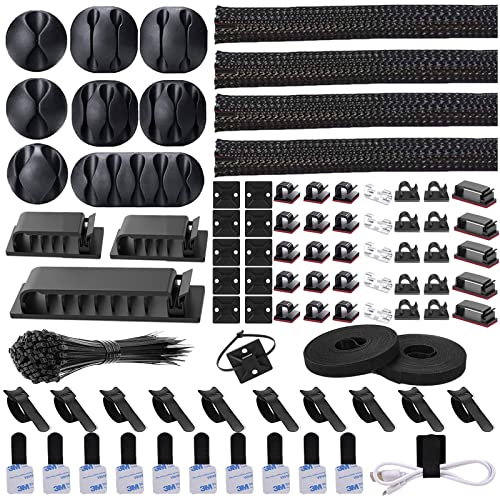
N NOROCME 192 PCS Cable Management Kit 4 Wire Organizer Sleeve | 11 Cable Holder,35Cord Clips 10+2 Roll Cable Organizer Straps,100 Fastening Cable Ties,for Computer TV Under Desk
As an Amazon Associate we earn from qualifying purchases. Product prices and availability are accurate as of the date/time indicated.

DRIVUU 311Pcs Cable Management Organizer Kit 4 Cable Sleeve Split | 53Cable Clips 12Cord Clips Holder,22 Cable Ties, 20 Adhesive Wall Cable Tie, 200Fasten Cable Ties for TV Office Home
As an Amazon Associate we earn from qualifying purchases. Product prices and availability are accurate as of the date/time indicated.

ELII 327 PCS Cable Management Kit 4 Cable Cable Sleeves,65 Cable Clips | 13Cord Holders,25 Roll Cable Organizer Straps,200 Fastening Cable Ties,20 Cable Zip Tie Mounts for Computer
As an Amazon Associate we earn from qualifying purchases. Product prices and availability are accurate as of the date/time indicated.
Prices shown are approximate and for reference only. Prices change often, so please check the current price on Amazon before you buy.
Best Cheap Cable Management Kit for PC in 2026: Detailed Reviews
1. JOTO Cable Management Kit — Best Overall Cheap Cable Management Kit for PC
JOTO’s Cable Management Kit is a complete kit with four cable sleeves, each 20 inches long, plus cable clips, cable ties, and a cable raceway, at $15 to $20. The sleeves are split, so you can add or remove cables without unplugging them, which is useful when you change a monitor or a peripheral.
The JOTO kit is the best choice if you want a complete kit that will clean up a desk in one afternoon. The raceway is a plastic channel that sticks to the underside of a desk, so you can hide the power strip and the thick cables inside it. The clips stick to the desk or to the wall, so you can route a cable from a monitor to a PC without it hanging down. The ties are reusable, so you can adjust them later.
At $15 to $20, the JOTO kit is at the top of the cheap range, but it is worth it for the raceway, which most cheaper kits do not include. It is the kit to buy first if you want a clean desk and you do not want to buy pieces separately.
2. Cable Matters Cable Management Kit — Best Cheap Cable Management Kit With Sleeves Only
Cable Matters’ Cable Management Kit is a kit with three cable sleeves, each 20 inches long, plus cable clips and cable ties, at $15 to $20. It does not include a raceway, so it is better for a desk where you do not need to hide a power strip, or for a PC where you need to manage cables inside the case.
The Cable Matters sleeves are neoprene, which is soft and flexible, so they are easy to use with thick cables. The clips are adhesive, so they stick to a desk or to a PC case. The kit is a good choice if you already have a raceway, or if you want a simple kit with sleeves and clips only.
3. N NOROCME Cable Management Kit — Best Cheap Cable Management Kit With a Raceway
N NOROCME’s Cable Management Kit is a kit with four cable sleeves, each 20 inches long, plus cable clips, cable ties, and a raceway, at $15 to $20, similar to the JOTO kit. It has a slightly different raceway design, with a longer channel, so it can hold more cables.
The N NOROCME kit is a good alternative to the JOTO kit if the JOTO kit is out of stock, or if you prefer its raceway design. It is the same price, with the same pieces, and it is a good value for a complete kit.
4. Alex Tech 25ft Cable Sleeve — Best Cheap Cable Sleeve for PC
Alex Tech’s 25-foot cable sleeve is a single sleeve, 25 feet long, at $10 to $15, with no clips, ties, or raceway. It is a split sleeve, so you can add cables without unplugging them, and you can cut it to length with scissors, so you can use it for a short cable or a long cable.
The Alex Tech sleeve is the cheapest option here, and it is the best choice if you only need a sleeve, not a complete kit. For a PC with many cables, a 25-foot sleeve will cover all of them, and you can use zip ties or Velcro ties to keep the sleeve closed. It is not a complete kit, but for $10 to $15, it is a good value.
5. Yimobra Cable Management Kit — Best Cheap Cable Management Kit With a Tray
Yimobra’s Cable Management Kit is a kit with three cable sleeves, each 20 inches long, plus cable clips, cable ties, and a raceway, at $15 to $20. It is similar to the JOTO and N NOROCME kits, with a raceway that can be used as a tray under a desk.
The Yimobra kit is a good choice if you want a tray under your desk, rather than a raceway on the wall. The tray holds a power strip, so the power strip is off the floor and out of sight, which is safer and cleaner. The kit is a good value for a complete kit, and it is a good alternative to the JOTO kit.
6. Delamu Cable Management Kit — Best Cheap Cable Management Kit for a Small Desk
Delamu’s Cable Management Kit is a kit with two cable sleeves, each 20 inches long, plus cable clips and cable ties, at $10 to $15, which is the cheapest complete kit here. It does not include a raceway, so it is better for a small desk with few cables, or for a PC where you need to manage cables inside the case.
The Delamu kit is a good choice if you have a small desk, a laptop, and a monitor, with only a few cables to manage. It is not enough for a large desk with a PC, a monitor, a printer, and a speaker, but for a small setup, it is enough, and it is the cheapest way to get started with cable management.
Best Cheap Cable Management Kit for PC Buying Guide
Choosing a cheap cable management kit for PC is about sleeves, clips, ties, raceway, and airflow. A kit that has the right pieces will clean up a desk faster than a kit that has many pieces you will never use.
Sleeves, Clips, Ties, and Raceway: What Pieces You Need for a PC Desk
A cable sleeve is for thick cables under a desk, like a power cable, a monitor cable, and a USB cable, bundled together. A split sleeve is better than a closed sleeve, because you can add or remove cables without unplugging them. A sleeve length of 20 inches is enough for most desk cables, and a 25-foot sleeve, like the Alex Tech sleeve, can be cut to length for longer runs.
A cable clip is for a cable that needs to stay in place, like a phone charging cable, a mouse cable, or a headphone cable. An adhesive clip sticks to a desk or to a wall, and it holds the cable so it does not fall to the floor. A cable tie is for cables inside a PC, or for cables that need to be bundled together. A reusable Velcro tie is better than a zip tie, because you can adjust it later without cutting it.
A raceway or tray is for hiding a power strip and thick cables under a desk. A raceway is a plastic channel that sticks to the underside of a desk, while a tray is a metal or plastic basket that holds a power strip. Both are good, and both are better than leaving a power strip on the floor.
Airflow, Fans, and Inside a PC: Cable Management Inside the Case
Inside a PC, cable management improves airflow. A 140mm fan needs a 140mm mount, and it needs clear airflow, so a cable that blocks a fan will make your PC hotter and louder. Route cables behind the motherboard tray, use ties to keep them out of the way, and leave at least 20 percent free space on an SSD, so it does not slow down.
For a PC, use a PSU with at least 650 watts for gaming, with 80+ Gold efficiency, and a fully modular design if possible, so you can remove cables you do not need. A surge protector for a PC should have at least 1,000 joules, a clamping voltage of 330 volts, at least 6 outlets, and an indicator light. Do not daisy chain surge protectors, and replace a surge protector after a surge or after 3 to 5 years.
Desk Size, Monitor, and Peripherals: Cable Management for a Desk Setup
A desk should be at least 40 inches wide for a laptop and books, and wider for a monitor, a keyboard, and a mouse. A monitor stand should support VESA 75×75 and 100×100, with a weight rating at least 2 pounds more than your monitor, and a clamp that fits a desk 0.4 to 3.1 inches thick.
For a desk setup, route cables from the monitor, the PC, the keyboard, and the mouse through a sleeve, then into a raceway under the desk, then to a power strip. Use clips to keep a charging cable on the desk, so it does not fall to the floor. Test the setup for at least 30 minutes before you keep it, the same as you would test a mouse, a keyboard, or a speaker, to make sure the cables are not too tight and the PC does not overheat.
Best Cheap Cable Management Kit for PC FAQ
What is the best cheap cable management kit for PC?
The best cheap cable management kit for PC is the JOTO Cable Management Kit, at $15 to $20, because it has four cable sleeves, cable clips, cable ties, and a raceway, so it is a complete kit that will clean up a desk in one afternoon. The Cable Matters Cable Management Kit, at $15 to $20, is the best alternative with sleeves only. The Alex Tech 25ft Cable Sleeve, at $10 to $15, is the best cheap sleeve if you only need a sleeve.
Do I need a raceway for cable management on a PC desk?
You do not need a raceway for cable management on a PC desk, but it helps to hide a power strip and thick cables under a desk. A raceway is a plastic channel that sticks to the underside of a desk, while a tray is a basket that holds a power strip. The JOTO, N NOROCME, and Yimobra kits all include a raceway, while the Cable Matters, Alex Tech, and Delamu kits do not. If you have a power strip on the floor, a raceway or tray is worth the extra cost.
How do I improve airflow inside a PC with cable management?
Improve airflow inside a PC with cable management by routing cables behind the motherboard tray, using ties to keep them out of the way, and leaving clear space for fans. A 140mm fan needs a 140mm mount and clear airflow, so a cable that blocks a fan will make your PC hotter and louder. Use a PSU with at least 650 watts for gaming, with 80+ Gold efficiency, and a fully modular design if possible, so you can remove cables you do not need.
Should I use zip ties or Velcro ties for PC cable management?
Use Velcro ties for PC cable management if you want to adjust cables later, because Velcro ties are reusable and you can open them without cutting them. Use zip ties if you want a permanent bundle, but do not pull them too tight, as they can damage cables. Most cheap kits include reusable ties, which are better for a beginner, as you can change your setup later without buying new ties.
FAQ
What is the best cheap cable management kit for PC?
Do I need a raceway for cable management on a PC desk?
How do I improve airflow inside a PC with cable management?
Should I use zip ties or Velcro ties for PC cable management?
Related guides
- Best Premium 360mm AIO Cooler for CPU in 2026: 7 Premium 360mm AIO Coolers That Offer Strong Cooling, Quiet Fans, and Reliable Performance for High-End CPUs
- Air Cooled GPU vs Liquid Cooled GPU for Gaming in 2026: ASUS, MSI, and Gigabyte Compared in an Honest Ledger, a Radiator’s Parish Measured Before a Card Is Bought, and a Pump’s Sentence Read Beside a Fan’s
- Best Headphones for Streaming Music on PC in 2026: 6 Headphones With a Clear Sound, a Comfortable Fit, and a Wired or Wireless Connection That Works With a PC Without Latency That Ruins Music
- Best Power Bank With Solar Charging for PC Gamers in 2026: 6 Solar Power Banks Under 100Wh That Can Charge a Steam Deck at 45W, With a Built-In Solar Panel for Backup Power Outside
More from Amazon
Programs that pair well with the guide above. Offers and eligibility are set by Amazon and may change.
Free shipping on eligible items, Prime Video and more. Eligible new members can start with a free trial.
Start a Prime free trialAd-free music streaming. Eligible new subscribers can start with a free trial.
Try Music Unlimited freeA Prime membership for ages 18-24 with a trial period. Eligibility is set by Amazon.
See Prime for Young AdultsAudiobooks and podcasts to listen to on the go. Eligible new members can start with a free trial.
Try Audible freeAs an Amazon Associate we earn from qualifying purchases.

Write Your Review
No reviews yet. Be the first to share your experience!