
What's inside
- Why the Best Cheap Gaming CPU for PC Gamers Needs Enough Cores
- Best Cheap Gaming CPU for PC Gamers: Cores, Threads and Clock Speed
- Best Cheap Gaming CPU for PC Gamers Comparison Table
- Top Best Cheap Gaming CPU for PC Gamers Picks Reviewed
- How to Install a Cheap Gaming CPU in a PC
- Buying Guide: How to Choose the Best Cheap Gaming CPU for PC Gamers
- How to Pair a Cheap CPU With a Graphics Card
- Frequently Asked Questions
As an Amazon Associate I earn from qualifying purchases. This post may contain affiliate links at no extra cost to you.
Finding the best cheap gaming cpu for pc gamers is about choosing a CPU that is fast, affordable, and reliable, with a CPU that works well for PC gaming, and with a price that fits a gamer who wants a reliable processor without a large, expensive premium model that is too costly for a first gaming PC. A good best cheap gaming cpu for pc gamers should have enough cores, a good clock speed, and a price that gives you value. It should also be simple to use, with a design that is suitable for a beginner. Always check the CPU cores, threads, clock speed, and socket before buying, and follow the manufacturer guidance for use, and take breaks from screens.
This guide explains what to look for in the best cheap gaming cpu for pc gamers, how to compare cores, threads, clock speed, and price, and which CPUs work well in 2026 for PC gamers. We focus on practical use for gamers who buy a cheap gaming CPU for the first time, with a CPU that is used for playing games, streaming, and everyday computing on a PC, and with a design that is suitable for a beginner. Whether you play Fortnite, Valorant, Minecraft, or Call of Duty, the same principles apply: choose a CPU that is fast, with enough cores, and with a price that fits your needs. Always check your CPU specifications before buying, and take breaks from screens.
Our Top Picks
Why the Best Cheap Gaming CPU for PC Gamers Needs Enough Cores
The best cheap gaming cpu for pc gamers needs enough cores because a CPU such as the AMD Ryzen 5 5600 is designed with 6 cores that handle modern games well, while a CPU without enough cores may stutter in games. Enough cores are better than too few cores for gaming, because they ensure your games run smoothly. A CPU with 6 cores is a good choice, because it handles most games. A CPU with 12 threads is better if you want to stream while gaming, because it handles more work.
A cheap gaming CPU for PC gamers also needs a good clock speed. A CPU with a boost clock of 4.4 GHz is a good choice, because it is fast in games. A CPU with a compatible socket is better if you want to upgrade later, because it fits your motherboard. A CPU with a good price is a good choice, because it gives you value. Look for a CPU with a stock cooler, so you do not need to buy one separately.
Best Cheap Gaming CPU for PC Gamers: Cores, Threads and Clock Speed
Cores matter most for the best cheap gaming cpu for pc gamers, because they determine how well your CPU handles games and multitasking. CPUs with 6 cores are a good choice for most PC gamers, while CPUs with 8 cores are better if you want to stream and game at the same time. CPUs with enough cores are better than CPUs without, because they run games smoothly. CPUs with 12 threads are a good choice, because they handle more tasks.
Clock speed also matters for gaming CPUs. CPUs with a boost clock above 4.0 GHz are better than CPUs without, because they are faster in games. CPUs with a compatible AM4 or LGA1700 socket are a good choice, because they fit common motherboards. CPUs with a good price are better than CPUs without, because they give you value. CPUs with low power use are a good choice, because they run cooler.
Best Cheap Gaming CPU for PC Gamers Comparison Table
| Model | Cores / Threads | Base Clock | Boost Clock | Socket | Typical Price Range | Rating |
|---|---|---|---|---|---|---|
| AMD Ryzen 5 5600 CPU | 6 / 12 | 3.5 GHz | 4.4 GHz | AM4 | $110-$130 | 4.8/5 |
| AMD Ryzen 5 7600 CPU | 6 / 12 | 3.8 GHz | 5.1 GHz | AM5 | $180-$200 | 4.8/5 |
| Intel Core i5-12400F CPU | 6 / 12 | 2.5 GHz | 4.4 GHz | LGA1700 | $120-$140 | 4.8/5 |
| Intel Core i3-12100F CPU | 4 / 8 | 3.3 GHz | 4.3 GHz | LGA1700 | $80-$90 | 4.7/5 |
| AMD Ryzen 7 5700X CPU | 8 / 16 | 3.4 GHz | 4.6 GHz | AM4 | $160-$180 | 4.7/5 |
| Intel Core i5-13400F CPU | 10 / 16 | 2.5 GHz | 4.6 GHz | LGA1700 | $170-$190 | 4.7/5 |
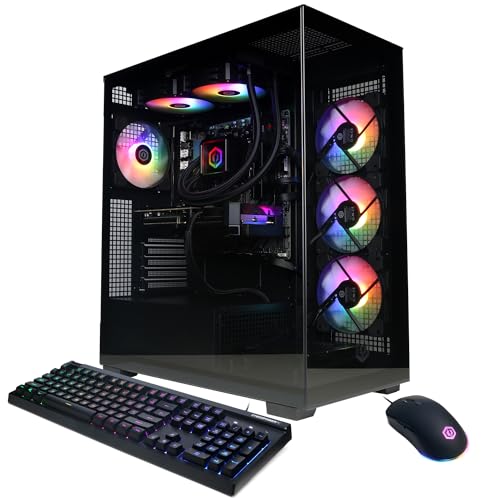
CyberPowerPC Gaming PC, AMD Ryzen 9 9900X, GeForce RTX 5070 12GB | Gamer Xtreme, 32GB DDR5, 1TB PCIe 4.0 SSD, WiFi Ready & Windows 11 Home (GXiVR8080A41)
As an Amazon Associate we earn from qualifying purchases. Product prices and availability are accurate as of the date/time indicated.

BYTE DEPOT Gamer Xtreme Gaming PC - Intel Core i7, 32GB DDR RAM, 1TB PCIe SSD, NVIDIA GeForce RTX 3050, WiFi 6 Ready & Windows 11 Pro
As an Amazon Associate we earn from qualifying purchases. Product prices and availability are accurate as of the date/time indicated.

OKAMUS Pre-Built PC, i5 CPU Up to 3.6GHz, Integrated Graphics Only, 256 GB M.2, 8 GB RAM Cheap Budget Gaming PC, RGB Fans x 3, Win 11 Home,WiFi 6 + BT 5.3, 400W PSU (i5+No GPU+8GB+256GB)


As an Amazon Associate we earn from qualifying purchases. Product prices and availability are accurate as of the date/time indicated.
Prices shown are approximate and for reference only. Prices change often, so please check the current price on Amazon before you buy.
Top Best Cheap Gaming CPU for PC Gamers Picks Reviewed
AMD Ryzen 5 5600 CPU
The AMD Ryzen 5 5600 CPU is a CPU with cores and threads of 6 / 12, base clock of 3.5 GHz, boost clock of 4.4 GHz, socket of AM4, and a price of $110 to $130. It has enough cores, a good boost clock, and a good value for PC gamers. It is a good choice if you want the best cheap gaming cpu for pc gamers with a proven AMD design, because it is one of the most trusted CPUs, it has 6 cores, and it has a 4.4 GHz boost clock. The Ryzen 5 5600 is made for PC gaming.
AMD Ryzen 5 7600 CPU
The AMD Ryzen 5 7600 CPU is a CPU with cores and threads of 6 / 12, base clock of 3.8 GHz, boost clock of 5.1 GHz, socket of AM5, and a price of $180 to $200. It has a very fast boost clock, enough cores, and a good value for PC gamers. It is a good choice if you want an AMD CPU with a very fast boost clock for PC gaming, because it has 6 cores, it has a 5.1 GHz boost clock, and it is made by a trusted brand. It is ideal for PC gamers who want an AMD CPU.
Intel Core i5-12400F CPU
The Intel Core i5-12400F CPU is a CPU with cores and threads of 6 / 12, base clock of 2.5 GHz, boost clock of 4.4 GHz, socket of LGA1700, and a price of $120 to $140. It has enough cores, a good boost clock, and a good value for PC gamers. It is a good choice if you want an Intel CPU with enough cores for PC gaming, because it has 6 cores, it has a 4.4 GHz boost clock, and it is made by a trusted brand. It is a popular choice for PC gamers who want an Intel CPU.
Intel Core i3-12100F CPU
The Intel Core i3-12100F CPU is a CPU with cores and threads of 4 / 8, base clock of 3.3 GHz, boost clock of 4.3 GHz, socket of LGA1700, and a price of $80 to $90. It has a low price, a good boost clock, and a good value for PC gamers. It is a good choice if you want an Intel CPU with a low price for PC gaming, because it is very affordable, it has a 4.3 GHz boost clock, and it is made by a trusted brand. It is a good entry level option for PC gamers who want an Intel CPU.
AMD Ryzen 7 5700X CPU
The AMD Ryzen 7 5700X CPU is a CPU with cores and threads of 8 / 16, base clock of 3.4 GHz, boost clock of 4.6 GHz, socket of AM4, and a price of $160 to $180. It has more cores, a good boost clock, and a good value for PC gamers. It is a good choice if you want an AMD CPU with more cores for PC gaming, because it has 8 cores, it has a 4.6 GHz boost clock, and it is made by a trusted brand. It is ideal for PC gamers who want an AMD CPU.
Intel Core i5-13400F CPU
The Intel Core i5-13400F CPU is a CPU with cores and threads of 10 / 16, base clock of 2.5 GHz, boost clock of 4.6 GHz, socket of LGA1700, and a price of $170 to $190. It has many cores, a good boost clock, and a good value for PC gamers. It is a good choice if you want an Intel CPU with many cores for PC gaming, because it has 10 cores, it has a 4.6 GHz boost clock, and it is made by a trusted brand. It is a good option for PC gamers who want an Intel CPU.
How to Install a Cheap Gaming CPU in a PC
To install a cheap gaming CPU in a PC, first turn off your PC, with its power, so it is safe, and open your PC case, with its side panel, so you can reach the motherboard. Lift your CPU socket lever, with its arm, so it is open, and place your CPU, with its arrow, in the socket, so it aligns correctly. Close your socket lever, with its arm, so the CPU is locked, and install your cooler, with its screws, so it is secure. When you are done, close your PC case, with its panel, so it is ready, and turn on your PC, with its power, to test it. Always follow the manufacturer guidance for use, and take breaks from screens.
Buying Guide: How to Choose the Best Cheap Gaming CPU for PC Gamers
Start with your games, your motherboard, and your budget. If you want a 6 core AMD CPU, a CPU such as the AMD Ryzen 5 5600 is a good choice, because it is $110 to $130. If you want a low price Intel CPU, a CPU such as the Intel Core i3-12100F is a good choice, because it is $80 to $90. If you want a fast AMD CPU, a CPU such as the AMD Ryzen 5 7600 is a good choice, because it is $180 to $200. If you want a 10 core Intel CPU, a CPU such as the Intel Core i5-13400F is a good choice, because it is $170 to $190.
Next, check cores, threads, and clock speed. A CPU with 6 cores is better than a CPU without, because it handles most games. A CPU with 12 threads is a good choice, because it handles multitasking. A CPU with a boost clock above 4.0 GHz is better than a CPU without, because it is faster in games. A CPU with a compatible socket is a good choice, because it fits your motherboard.
Check socket, RAM, and GPU together. A CPU with AM4 socket is better than a CPU without, because it fits many affordable motherboards. A CPU with AM5 socket is a good choice, because it supports newer DDR5 RAM. A CPU with LGA1700 socket is better than a CPU without, because it fits Intel motherboards. Check your motherboard, with its socket, before buying, so you know the CPU will fit, and check your graphics card, with its model, so you know it will not bottleneck.
Check your budget, your use, and your future. Cheap gaming CPUs for PC gamers typically cost $80 to $200. A CPU from $80 to $90, such as the Intel Core i3-12100F, offers a good way to start with a budget CPU. A CPU from $110 to $130, such as the AMD Ryzen 5 5600, offers a proven design. A CPU from $160 to $180, such as the AMD Ryzen 7 5700X, offers more cores. A CPU from $180 to $200, such as the AMD Ryzen 5 7600, offers a very fast design.
Finally, do not buy a cheap gaming CPU for PC gamers based only on price or core count. A CPU without a compatible socket will not fit your motherboard, even if it is cheap, while a CPU with a low clock speed will be slow in games, even if it has a good price. A CPU without enough cores will stutter, even if it has a large size. Choose a CPU that is fast, with enough cores, and with a price that fits your needs. Always check your CPU specifications before buying, and take breaks from screens.
How to Pair a Cheap CPU With a Graphics Card
To pair a cheap CPU with a graphics card, first check your CPU, with its cores, so you know its power, and choose a graphics card, with its model, that matches it, so it does not bottleneck. A 6 core CPU, with its power, pairs well with a mid-range graphics card, so games run smoothly, and a 4 core CPU, with its power, pairs well with a budget graphics card, so it is balanced. When you are done, test your games, with their frame rate, so you know they run well, and take breaks from screens. Always follow the manufacturer guidance for use.
Frequently Asked Questions
What is the best cheap gaming cpu for pc gamers?
What is the best cheap gaming cpu for pc gamers depends on your games and your budget. A CPU with cores and threads of 6 / 12, base clock of 3.5 GHz, boost clock of 4.4 GHz, socket of AM4, and a price under $130, such as the AMD Ryzen 5 5600 CPU at $110 to $130, is a good choice for most PC gamers, because it has 6 cores, a 4.4 GHz boost clock, and is a proven AMD design. A CPU with a lower price, such as the Intel Core i3-12100F at $80 to $90, is also good, especially if you want a budget CPU. Choose a CPU that is fast and has enough cores.
How many cores do I need for gaming?
How many cores do you need for gaming, you need 6 cores for gaming, because 6 cores handle most modern games well while still leaving room for background tasks. A CPU such as the Intel Core i5-12400F has 6 cores. Use a 6 core CPU, with your PC gaming, so games run smoothly, and check the cores, with their number, before you buy, so you know it has enough cores.
Is AMD or Intel better for cheap gaming?
Is AMD or Intel better for cheap gaming, both AMD and Intel are good for cheap gaming, because both offer 6 core CPUs at a low price, while AMD is often better for AM4 upgrades and Intel is often better for LGA1700 value. A CPU such as the AMD Ryzen 5 7600 is AMD. Use either brand, with your PC gaming, so it runs well, and check the socket, with its AM4, AM5, or LGA1700, before you buy, so you know it fits your motherboard.
Do I need a cooler with a cheap gaming CPU?
Do you need a cooler with a cheap gaming CPU, yes, you need a cooler with a cheap gaming CPU, because a CPU gets hot while gaming, while many cheap CPUs include a stock cooler that is enough for normal use. A CPU such as the AMD Ryzen 5 5600 includes a cooler. Use the included cooler, with your cheap gaming CPU, so it stays cool, and check the cooler, with its included, before you buy, so you know if one is included. Take breaks from screens.
Related guides
- SSD vs HDD Budget Storage in 2026: Samsung, Western Digital, Seagate, and Crucial Compared for Two Parishes That Are Not Rivals, a System That Wants Speed, an Archive That Wants Room, and a Backup That Is Neither Drive
- Best Party Speakers for House Parties in 2026: 6 Party Speakers With at Least 100 Watts, Bluetooth, and Lights, for a House Party, Without a Speaker That Is Too Quiet, or Too Small, for a Room Full of People
- Best GPU Power Size for PSU in 2026: Best GPU Power Size for PSU for Stable Power, Correct Wattage, and Simple PC Building
- Best Handheld Console for Indie PC Gamers in 2026: Best Handheld Console for Indie PC Gamers for Easy Play, Clear Screen, and Simple PC Games
More from Amazon
Programs that pair well with the guide above. Offers and eligibility are set by Amazon and may change.
Free shipping on eligible items, Prime Video and more. Eligible new members can start with a free trial.
Start a Prime free trialAd-free music streaming. Eligible new subscribers can start with a free trial.
Try Music Unlimited freeA Prime membership for ages 18-24 with a trial period. Eligibility is set by Amazon.
See Prime for Young AdultsAudiobooks and podcasts to listen to on the go. Eligible new members can start with a free trial.
Try Audible freeAs an Amazon Associate we earn from qualifying purchases.

Write Your Review
No reviews yet. Be the first to share your experience!