
What's inside
- Why the Best Console Keyboard for PC Gamers Needs Mechanical Switches
- Best Console Keyboard for PC Gamers: Switches, Size and Connection
- Best Console Keyboard for PC Gamers Comparison Table
- Top Console Keyboards for PC Gamers Reviewed
- How to Choose a Keyboard Size for PC Gaming
- Buying Guide: How to Choose the Best Console Keyboard for PC Gamers
- How to Set Up a Gaming Keyboard for PC
- Frequently Asked Questions
As an Amazon Associate I earn from qualifying purchases. This post may contain affiliate links at no extra cost to you.
Finding the best console keyboard for PC gamers is about choosing a keyboard that is fast, durable, and comfortable, with a keyboard that works well for PC gaming, and with a price that fits a gamer who wants a reliable keyboard without a large, expensive premium model that is too big for a desk. A good console keyboard for PC gamers should have mechanical switches, RGB lighting, and a price that gives you value. It should also be simple to use, with a design that is suitable for a beginner. Always check the keyboard switches, size, and connection before buying, and follow the manufacturer guidance for use.
This guide explains what to look for in the best console keyboard for PC gamers, how to compare switches, size, connection, RGB, and price, and which console keyboards work well in 2026 for PC gamers. We focus on practical use for gamers who buy a keyboard for the first time, with a keyboard that is used for playing games on PC, typing, and streaming, and with a design that is suitable for a beginner. Whether you play FPS, MOBA, or RPG games, the same principles apply: choose a keyboard that is fast, with good switches, and with a price that fits your needs. Always check your keyboard specifications before buying.
Our Top Picks
Why the Best Console Keyboard for PC Gamers Needs Mechanical Switches
The best console keyboard for PC gamers needs mechanical switches because a keyboard such as the Razer BlackWidow V4 is designed with mechanical switches that are fast and durable, while a keyboard with membrane switches may be slower and less durable. Mechanical switches are better than membrane switches for PC gaming, because they ensure fast response. A keyboard with linear switches is a good choice, because it is fast. A keyboard with tactile switches is better if you want feedback, because it clicks.
A console keyboard for PC gamers also needs a good size. A keyboard with a tenkeyless size is a good choice, because it saves desk space. A keyboard with RGB lighting is better if you want a gaming look, because it is colourful. A keyboard with a good price is a good choice, because it gives you value. Look for a keyboard with a wired connection, so it has no lag.
Best Console Keyboard for PC Gamers: Switches, Size and Connection
Switches matter most for the best console keyboard for PC gamers, because they determine how fast and comfortable your keyboard is. Keyboards with linear mechanical switches are a good choice for most gamers, while keyboards with tactile switches are better if you want feedback. Keyboards with mechanical switches are better than keyboards without, because they are fast and durable. Keyboards with a tenkeyless size are a good choice, because they save space.
Connection also matters for gaming keyboards. Keyboards with a wired USB connection are better than keyboards with a wireless connection, because they have no lag. Keyboards with a detachable cable are a good choice, because they are easy to replace. Keyboards with RGB lighting are better than keyboards without, because they look good. Keyboards with a good price are a good choice, because they give you value.
Best Console Keyboard for PC Gamers Comparison Table
| Model | Switches | Size | Connection | RGB | Typical Price Range | Rating |
|---|---|---|---|---|---|---|
| Razer BlackWidow V4 Keyboard | Mechanical Green | Full Size | Wired USB | Yes | $150-$180 | 4.8/5 |
| Logitech G Pro X TKL Keyboard | Mechanical GX | Tenkeyless | Wired USB | Yes | $100-$120 | 4.8/5 |
| SteelSeries Apex Pro TKL Keyboard | OmniPoint 2.0 | Tenkeyless | Wired USB | Yes | $180-$200 | 4.8/5 |
| Corsair K70 RGB Pro Keyboard | Mechanical Cherry MX | Full Size | Wired USB | Yes | $150-$180 | 4.7/5 |
| HyperX Alloy Origins 65 Keyboard | Mechanical HyperX | 65% | Wired USB | Yes | $80-$100 | 4.7/5 |
| Keychron K8 Pro Keyboard | Mechanical Hot Swappable | Tenkeyless | Wired / Wireless | Yes | $90-$100 | 4.7/5 |
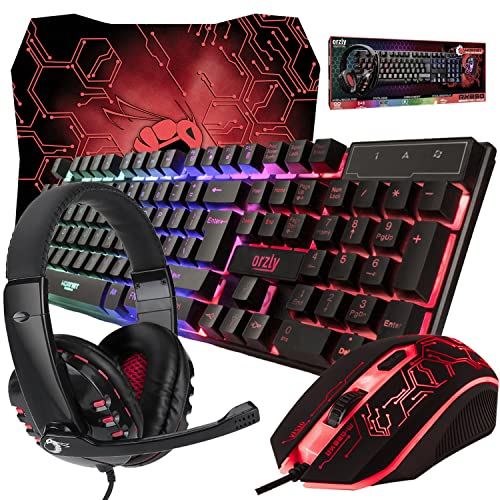
Gaming Keyboard and Mouse and Mouse pad and Gaming Headset, Wired LED RGB Backlight Bundle for PC Gamers and Xbox and PS4 Users - 4 in 1 Edition Hornet RX-250


As an Amazon Associate we earn from qualifying purchases. Product prices and availability are accurate as of the date/time indicated.

GEODMAER 65% Gaming Keyboard, Wired Backlit Mini Keyboard, Ultra-Compact Anti-Ghosting No-Conflict 68 Keys Membrane Gaming Wired Keyboard for PC Laptop Windows Gamer
As an Amazon Associate we earn from qualifying purchases. Product prices and availability are accurate as of the date/time indicated.

RedThunder K10 Wired Gaming Keyboard and Mouse and Wrist Rest Combo, RGB Backlit, Mechanical Feel Anti-ghosting Keyboard + 7D 7200 DPI Mice+Soft Leather Wrist Rest 3 in 1 PC Gamer Accessories(Black)
As an Amazon Associate we earn from qualifying purchases. Product prices and availability are accurate as of the date/time indicated.
Prices shown are approximate and for reference only. Prices change often, so please check the current price on Amazon before you buy.
Top Console Keyboards for PC Gamers Reviewed
Razer BlackWidow V4 Keyboard
The Razer BlackWidow V4 Keyboard is a keyboard with switches of mechanical green, size of full size, connection of wired USB, RGB of yes, and a price of $150 to $180. It has mechanical switches, RGB lighting, and a good value for gamers. It is a good choice if you want the best console keyboard for PC gamers with a proven Razer design, because it is one of the most trusted keyboards, it has mechanical switches, and it has RGB lighting. The BlackWidow V4 is made for gaming.
Logitech G Pro X TKL Keyboard
The Logitech G Pro X TKL Keyboard is a keyboard with switches of mechanical GX, size of tenkeyless, connection of wired USB, RGB of yes, and a price of $100 to $120. It has a tenkeyless size, mechanical switches, and a good value for gamers. It is a good choice if you want a Logitech keyboard with a tenkeyless size for PC gamers, because it has mechanical GX switches, it has a tenkeyless size, and it is made by a trusted brand. It is ideal for gamers who want a Logitech keyboard.
SteelSeries Apex Pro TKL Keyboard
The SteelSeries Apex Pro TKL Keyboard is a keyboard with switches of OmniPoint 2.0, size of tenkeyless, connection of wired USB, RGB of yes, and a price of $180 to $200. It has adjustable switches, a tenkeyless size, and a good value for gamers. It is a good choice if you want a SteelSeries keyboard with adjustable switches for PC gamers, because it has OmniPoint 2.0 switches, it has a tenkeyless size, and it is made by a trusted brand. It is a popular choice for gamers who want a SteelSeries keyboard.
Corsair K70 RGB Pro Keyboard
The Corsair K70 RGB Pro Keyboard is a keyboard with switches of mechanical Cherry MX, size of full size, connection of wired USB, RGB of yes, and a price of $150 to $180. It has mechanical switches, RGB lighting, and a good value for gamers. It is a good choice if you want a Corsair keyboard with mechanical switches for PC gamers, because it has Cherry MX switches, it has a full size design, and it is made by a trusted brand. It is a good entry level option for gamers who want a Corsair keyboard.
HyperX Alloy Origins 65 Keyboard
The HyperX Alloy Origins 65 Keyboard is a keyboard with switches of mechanical HyperX, size of 65%, connection of wired USB, RGB of yes, and a price of $80 to $100. It has a compact size, mechanical switches, and a good value for gamers. It is a good choice if you want a HyperX keyboard with a compact size for PC gamers, because it has a 65% size, it has mechanical switches, and it is made by a trusted brand. It is ideal for gamers who want a compact keyboard.
Keychron K8 Pro Keyboard
The Keychron K8 Pro Keyboard is a keyboard with switches of mechanical hot swappable, size of tenkeyless, connection of wired / wireless, RGB of yes, and a price of $90 to $100. It has hot swappable switches, a tenkeyless size, and a good value for gamers. It is a good choice if you want a Keychron keyboard with hot swappable switches for PC gamers, because it has hot swappable switches, it has a tenkeyless size, and it is made by a trusted brand. It is a good option for gamers who want a Keychron keyboard.
How to Choose a Keyboard Size for PC Gaming
To choose a keyboard size for PC gaming, first check your desk, with its space, so you know how much room you have, and check your mouse, with its movement, so you know if you need more space. Use a tenkeyless keyboard, with your gaming, so you have more mouse space, and use a full size keyboard, with your gaming, if you need a number pad. When you are done, check your keyboard, with its size, so you know it fits your desk. Always follow the manufacturer guidance for use.
Buying Guide: How to Choose the Best Console Keyboard for PC Gamers
Start with your games, your desk, and your budget. If you play FPS games, a keyboard such as the Logitech G Pro X TKL is a good choice, because it has a tenkeyless size. If you want a full size keyboard, a keyboard such as the Razer BlackWidow V4 is a good choice, because it has a number pad. If you want a compact keyboard, a keyboard such as the HyperX Alloy Origins 65 is a good choice, because it has a 65% size. If you want adjustable switches, a keyboard such as the SteelSeries Apex Pro TKL is a good choice, because it has OmniPoint switches.
Next, check switches, size, and connection. A keyboard with mechanical switches is better than a keyboard with membrane switches, because it is fast. A keyboard with a tenkeyless size is a good choice, because it saves desk space. A keyboard with a wired USB connection is better than a keyboard with a wireless connection, because it has no lag. A keyboard with RGB lighting is a good choice, because it looks good.
Check RGB, keycaps, and durability together. A keyboard with RGB lighting is better than a keyboard without, because it is colourful. A keyboard with durable keycaps is a good choice, because it lasts longer. A keyboard with a metal frame is better than a keyboard without, because it is strong. Check your desk, with its space, before buying, so you know the keyboard will fit, and check your games, with their keys, so you know which switches you need.
Check your budget, your use, and your future. Console keyboards for PC gamers typically cost $80 to $200. A keyboard from $80 to $100, such as the HyperX Alloy Origins 65, offers a good way to start with a budget keyboard. A keyboard from $90 to $100, such as the Keychron K8 Pro, offers a hot swappable design. A keyboard from $100 to $120, such as the Logitech G Pro X TKL, offers a tenkeyless design. A keyboard from $180 to $200, such as the SteelSeries Apex Pro TKL, offers a premium design.
Finally, do not buy a console keyboard for PC gamers based only on price or RGB. A keyboard with membrane switches will be slow, even if it is cheap, while a keyboard with a full size design will take up desk space, even if it has RGB. A keyboard with a wireless connection may have lag, even if it has mechanical switches. Choose a keyboard that is fast, with good switches, and with a price that fits your needs. Always check your keyboard specifications before buying, and follow the manufacturer guidance for use.
How to Set Up a Gaming Keyboard for PC
To set up a gaming keyboard for PC, first place your keyboard, with its location, on your desk, so it is comfortable, and connect your keyboard, with its USB cable, to your PC, so it works. Install your keyboard software, with its download, so you can customize RGB and keys, and adjust your keyboard, with its settings, so it is comfortable. When you are done, test your keyboard, with its keys, so you know it works. Always follow the manufacturer guidance for use.
Frequently Asked Questions
What is the best console keyboard for PC gamers?
What is the best console keyboard for PC gamers depends on your games and your budget. A keyboard with switches of mechanical GX, size of tenkeyless, connection of wired USB, RGB of yes, and a price under $120, such as the Logitech G Pro X TKL Keyboard at $100 to $120, is a good choice for most PC gamers, because it has mechanical switches, a tenkeyless size, and is a proven Logitech design. A keyboard with a lower price, such as the HyperX Alloy Origins 65 at $80 to $100, is also good, especially if you want a compact keyboard. Choose a keyboard that is fast and has mechanical switches.
Are mechanical keyboards better for gaming?
Are mechanical keyboards better for gaming, yes, mechanical keyboards are better for gaming, because they are faster, more durable, and more responsive than membrane keyboards. A keyboard such as the Razer BlackWidow V4 has mechanical switches. Use a mechanical keyboard, with your PC gaming, so it is fast, and check the switches, with their mechanical type, before you buy, so you know it is mechanical.
What keyboard size is best for PC gaming?
What keyboard size is best for PC gaming, a tenkeyless keyboard is best for PC gaming, because it saves desk space for your mouse and is comfortable to use. A keyboard such as the Logitech G Pro X TKL has a tenkeyless size. Use a tenkeyless keyboard, with your PC gaming, so you have more mouse space, and check the size, with its tenkeyless, before you buy, so you know it is right for you.
Should I buy a wired or wireless keyboard for PC gaming?
Should you buy a wired or wireless keyboard for PC gaming, you should buy a wired keyboard for PC gaming, because it has no lag and is more reliable than wireless. A keyboard such as the Razer BlackWidow V4 has a wired USB connection. Use a wired keyboard, with your PC gaming, so it has no lag, and check the connection, with its wired USB, before you buy, so you know it is wired.
Related guides
- DDR5 Myths to Avoid in 2026: Speed, Latency, Capacity, and Compatibility Lies That Waste PC Builders’ Money
- Best Premium CPU for Creators: 6 Best Premium CPU for Creators Picks in 2026
- Best PC Case Size for Motherboard in 2026: How to Pick a PC Case Size for Motherboard That Fits Your Board, Cools Well, and Works for Your Build
- Best Budget Microfiber Cloth for Monitor Cleaning in 2026: 6 Budget Microfiber Cloths, Lint-Free, With a Size and a Price Range, for Monitor Cleaning
More from Amazon
Programs that pair well with the guide above. Offers and eligibility are set by Amazon and may change.
Free shipping on eligible items, Prime Video and more. Eligible new members can start with a free trial.
Start a Prime free trialAd-free music streaming. Eligible new subscribers can start with a free trial.
Try Music Unlimited freeA Prime membership for ages 18-24 with a trial period. Eligibility is set by Amazon.
See Prime for Young AdultsAudiobooks and podcasts to listen to on the go. Eligible new members can start with a free trial.
Try Audible freeAs an Amazon Associate we earn from qualifying purchases.

Write Your Review
No reviews yet. Be the first to share your experience!