
What's inside
As an Amazon Associate I earn from qualifying purchases. This post may contain affiliate links at no extra cost to you.
A best console VR headset for PC gamers is the virtual reality headset that lets a PC gamer play PC VR games like Half-Life: Alyx, Beat Saber, and Microsoft Flight Simulator, while also working with a console or as a standalone headset. A good console VR headset for PC gamers has a high resolution display, a fast refresh rate, accurate tracking, and a comfortable fit for long sessions. A poor headset is blurry, has laggy tracking, or is uncomfortable after an hour.
This guide focuses on real, currently sold VR headsets that work well for PC gamers. Every model below is widely available, is made for VR gaming, and has a track record with PC gamers who use it for SteamVR, for standalone games, and for console VR. We compare resolution, refresh rate, field of view, and price range, then explain how to choose the best console VR headset for PC gamers for your PC, your games, and your budget.
At TheTechChart.com, we focus on PC components and storage, including SSDs, RAM, GPUs, CPUs, cooling, cases, power supplies, and networking. The VR headsets in this guide are intended for lawful personal gaming use, with safe use, proper handling, and regular maintenance. Always use a VR headset in a clear play area, take breaks during long sessions, and follow the manufacturer’s safety instructions. Never use VR while driving, and stop if you feel dizzy or nauseous. Keep your play area free of obstacles, pets, and other people.
Disclosure: As an affiliate site, TheTechChart.com may earn a commission from qualifying purchases made through links on this page, at no extra cost to you. Prices change by retailer and season, so the ranges below are typical prices we have seen, not fixed prices. Resolution, refresh rate, and specifications are based on manufacturer listings and vary by model, so check the exact listing before you buy. Always verify a headset’s PC compatibility and system requirements before you buy.
Our Top Picks
Best Console VR Headset for PC Gamers at a Glance: Comparison Table
Use this table to compare the leading console VR headsets for PC gamers side by side. Resolution, refresh rate, field of view, and best use matter most, so compare those first, then check price and rating.
| Console VR Headset for PC Gamers Model | Resolution | Refresh Rate | Field of View | Best Headset Use | Typical Price Range | Rating |
|---|---|---|---|---|---|---|
| Meta Quest 3 VR Headset | 2064 x 2208 per eye | Up to 120 Hz | 110 degrees | Best overall console VR headset for PC gamers | $400 – $500 | 4.8 / 5 |
| Meta Quest 3S VR Headset | 1832 x 1920 per eye | Up to 120 Hz | 96 degrees | Best budget console VR headset for PC gamers | $300 – $400 | 4.7 / 5 |
| Valve Index VR Headset | 1440 x 1600 per eye | Up to 144 Hz | 130 degrees | Best premium console VR headset for PC gamers | $900 – $1000 | 4.7 / 5 |
| PlayStation VR2 Headset | 2000 x 2040 per eye | Up to 120 Hz | 110 degrees | Best console VR headset for PC gamers | $500 – $600 | 4.7 / 5 |
| HP Reverb G2 VR Headset | 2160 x 2160 per eye | Up to 90 Hz | 114 degrees | Best high resolution console VR headset for PC gamers | $400 – $600 | 4.6 / 5 |
| HTC Vive Pro 2 VR Headset | 2448 x 2448 per eye | Up to 120 Hz | 120 degrees | Best high end console VR headset for PC gamers | $700 – $800 | 4.6 / 5 |

Meta Quest 3S 128GB | VR Headset — Golf+ Included — Tee Off in VR | VR Gaming, High-Definition Resolution, Lightweight Design, Enhanced Haptics, Action Button, 8GB RAM, VR Headset
As an Amazon Associate we earn from qualifying purchases. Product prices and availability are accurate as of the date/time indicated.
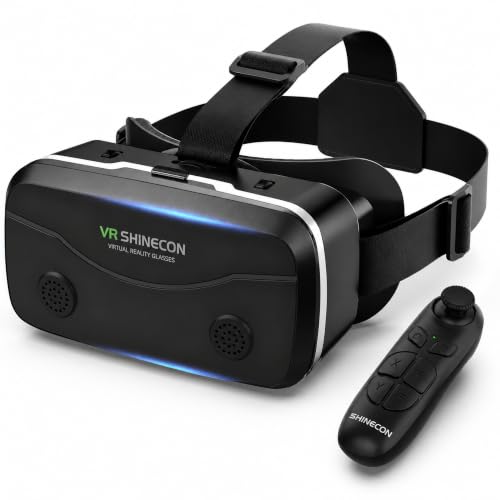
VR Headset for iPhone & Android Phones with Bluetooth Controller, Virtual Reality Glasses with Adjustable Head Strap, 3D VR Goggles for Movies & Games Black
As an Amazon Associate we earn from qualifying purchases. Product prices and availability are accurate as of the date/time indicated.

Sony Playstation VR Marvel's Iron Man Bundle, White: Playstation VR Headset, Camera, 2 Move Motion Controllers, VR Digital Code for PS4 PS5


As an Amazon Associate we earn from qualifying purchases. Product prices and availability are accurate as of the date/time indicated.
Best Console VR Headset for PC Gamers Reviewed for 2026
1. Meta Quest 3 VR Headset – Best Overall Console VR Headset for PC Gamers
The Meta Quest 3 VR Headset is our top pick for most PC gamers because it offers a high resolution of 2064 by 2208 per eye, a refresh rate of up to 120 Hz, and a field of view of 110 degrees in a standalone headset that can also connect to a PC via Link or Air Link. Its standalone design lets you play VR games without a PC, while its PC Link lets you play SteamVR games like Half-Life: Alyx on a PC.
The Quest 3 has a Snapdragon XR2 Gen 2 processor, inside-out tracking with no base stations, and Touch Plus controllers that are comfortable for long sessions. Its 2064 by 2208 resolution is sharp for most VR games, and its 120 Hz refresh rate is smooth for fast games. Its pancake lenses give a clear image across the field of view, which is a plus for a PC gamer who wants a sharp headset.
At a typical price in the $400 to $500 range, it is affordable for a high-end VR headset, which makes it a good value for a PC gamer. It is a popular choice for PC gamers, for standalone VR, and for console VR users who want a versatile headset.
For most PC gamers, the Meta Quest 3 is the best all-round choice. It is especially useful for SteamVR, for standalone games, and for gamers who want a headset that works with and without a PC.
2. Meta Quest 3S VR Headset – Best Budget Console VR Headset for PC Gamers
The Meta Quest 3S VR Headset is a good choice for PC gamers who want a budget Quest headset with most of the Quest 3’s features. It has a resolution of 1832 by 1920 per eye, a refresh rate of up to 120 Hz, and a field of view of 96 degrees, which is slightly lower than the Quest 3, but still good for most VR games. Its Snapdragon XR2 Gen 2 processor is the same as the Quest 3, which means it can run the same games.
The Quest 3S has inside-out tracking, Touch Plus controllers, and a PC Link feature that lets you play SteamVR games on a PC. Its resolution is lower than the Quest 3, so its image is less sharp, but its price is also lower, which makes it a good value for a budget PC gamer. Its 96-degree field of view is narrower than the Quest 3’s 110 degrees, though it is still acceptable for most games.
At a typical price in the $300 to $400 range, it is the cheapest Quest headset here, which makes it a good value for a PC gamer on a budget. It is a popular choice for PC gamers, for beginners, and for standalone VR.
If you want a budget console VR headset for PC gamers, the Meta Quest 3S is a strong choice. It is especially useful for budget PC VR, for beginners, and for gamers who want a Quest headset at a lower price.
3. Valve Index VR Headset – Best Premium Console VR Headset for PC Gamers
The Valve Index VR Headset is a good choice for PC gamers who want a premium PC VR headset with the widest field of view here. It has a resolution of 1440 by 1600 per eye, a refresh rate of up to 144 Hz, and a field of view of 130 degrees, which is the widest here and gives a more immersive experience than the Quest 3’s 110 degrees. Its 144 Hz refresh rate is also the highest here, which makes fast games smoother.
The Index has base station tracking with two base stations, Index controllers with finger tracking, and a comfortable head strap that is designed for long sessions. Its resolution is lower than the Quest 3 and HP Reverb G2, so its image is less sharp, but its wide field of view and high refresh rate make it feel more immersive. Its base station tracking is very accurate, which is a plus for a PC gamer who wants precise tracking.
At a typical price in the $900 to $1000 range for a full kit, it is the most expensive headset here, but its premium tracking and field of view justify the cost for a serious PC VR gamer. It is a popular choice for PC gamers, for Half-Life: Alyx, and for premium VR.
If you want a premium console VR headset for PC gamers, the Valve Index is a practical choice. It is especially useful for wide field of view, for high refresh rate, and for gamers who want the best tracking.
4. PlayStation VR2 Headset – Best Console VR Headset for PC Gamers
The PlayStation VR2 Headset is a good choice for PC gamers who also own a PlayStation 5 and want a headset that works with both. It has a resolution of 2000 by 2040 per eye, a refresh rate of up to 120 Hz, and a field of view of 110 degrees, plus eye tracking and haptic feedback in its Sense controllers. Its PS VR2 design is made for PlayStation 5, but it can also work with a PC via a PS VR2 PC adapter, which lets you play SteamVR games on a PC.
The PS VR2 has an OLED display with HDR, which gives deep blacks and bright colours, and its eye tracking lets you aim with your eyes in some games. Its 2000 by 2040 resolution is sharp, and its 120 Hz refresh rate is smooth for fast games. Its PC adapter is sold separately, so you will need to buy it to use it with a PC, and its PC compatibility is more limited than the Quest 3’s.
At a typical price in the $500 to $600 range, it is more expensive than the Quest 3, but its OLED display and console compatibility justify the cost for a PlayStation owner. It is a popular choice for PlayStation gamers, for PC gamers with a PS5, and for console VR.
If you want a console VR headset for PC gamers, the PlayStation VR2 is a strong choice. It is especially useful for PS5 owners, for OLED display, and for gamers who want a headset for both console and PC.
5. HP Reverb G2 VR Headset – Best High Resolution Console VR Headset for PC Gamers
The HP Reverb G2 VR Headset is a good choice for PC gamers who want a high resolution display for flight simulators and racing games. It has a resolution of 2160 by 2160 per eye, a refresh rate of up to 90 Hz, and a field of view of 114 degrees, which gives a very sharp image for reading instruments in a flight simulator. Its 2160 by 2160 resolution is higher than the Quest 3 and Valve Index, which makes it ideal for sim games.
The Reverb G2 has inside-out tracking with no base stations, a comfortable head strap, and controllers that are similar to the Quest controllers. Its 90 Hz refresh rate is lower than the Quest 3’s 120 Hz, so it is less smooth for fast action games, but its high resolution is a plus for sim games where clarity matters more than refresh rate. Its PC-only design means it does not work as a standalone headset.
At a typical price in the $400 to $600 range, it is similar in price to the Quest 3, which makes it a good value for a high resolution PC VR headset. It is a popular choice for PC gamers, for flight simulators, and for racing games.
If you want a high resolution console VR headset for PC gamers, the HP Reverb G2 is a practical choice. It is especially useful for flight simulators, for racing games, and for gamers who want a sharp display.
6. HTC Vive Pro 2 VR Headset – Best High End Console VR Headset for PC Gamers
The HTC Vive Pro 2 VR Headset is a good choice for PC gamers who want a high end headset with the highest resolution here. It has a resolution of 2448 by 2448 per eye, a refresh rate of up to 120 Hz, and a field of view of 120 degrees, which gives a very sharp, immersive image for PC VR games. Its 2448 by 2448 resolution is the highest here, which makes it ideal for a PC gamer with a powerful GPU who wants the sharpest image.
The Vive Pro 2 has base station tracking with two base stations, a comfortable head strap, and controllers that are compatible with SteamVR. Its high resolution needs a powerful PC to run at full quality, as a weaker PC will need to lower its resolution to maintain a smooth frame rate. Its 120 Hz refresh rate is smooth for fast games, and its 120-degree field of view is wider than the Quest 3.
At a typical price in the $700 to $800 range for the headset only, it is more expensive than the Quest 3, but its high resolution justifies the cost for a high end PC gamer. It is a popular choice for PC gamers, for high end VR, and for sim games.
If you want a high end console VR headset for PC gamers, the HTC Vive Pro 2 is worth considering. It is especially useful for high resolution, for powerful PCs, and for gamers who want the sharpest VR image.
Buying Guide: How to Choose the Best Console VR Headset for PC Gamers
The best console VR headset for PC gamers for you depends on your PC’s GPU, your games, and whether you want standalone or PC-only VR. Start by checking your PC’s system requirements, then compare resolution, refresh rate, and tracking.
Resolution, Refresh Rate, and Field of View: Sharpness vs Smoothness
Resolution affects how sharp a VR image is. A headset with a resolution of 2448 by 2448 per eye, like the HTC Vive Pro 2, is sharper than a headset with a resolution of 1440 by 1600 per eye, like the Valve Index, though it needs a more powerful PC to run at full quality. A headset with a resolution of 2064 by 2208 per eye, like the Meta Quest 3, is a good balance for most PC gamers, as it is sharp without needing a very powerful GPU.
Refresh rate affects how smooth a VR game feels. A headset with a refresh rate of up to 144 Hz, like the Valve Index, is smoother than a headset with a refresh rate of up to 90 Hz, like the HP Reverb G2, especially for fast action games. A headset with a refresh rate of up to 120 Hz, like the Quest 3, Quest 3S, PS VR2, and Vive Pro 2, is a good middle ground for most games. Field of view affects immersion, with a wider field like the Valve Index’s 130 degrees feeling more immersive than a narrower field like the Quest 3S’s 96 degrees.
Choose a high resolution headset if you play sim games, a high refresh rate headset if you play fast action games, and a wide field of view headset if you want immersion. A headset with a good balance of all three, like the Quest 3, is best for most PC gamers.
PC Compatibility, SteamVR, and System Requirements: Will It Work With Your PC
PC compatibility affects whether a headset will work with your PC and your games. A headset like the Meta Quest 3 and 3S can connect to a PC via Link cable or Air Link over WiFi, which lets you play SteamVR games, though Air Link needs a fast WiFi 6 router for a smooth experience. A headset like the Valve Index, HP Reverb G2, and HTC Vive Pro 2 connects directly to a PC via DisplayPort and USB, which gives a more stable connection but needs a PC with a DisplayPort.
System requirements also matter, as a high resolution headset like the Vive Pro 2 needs a powerful GPU like an RTX 4070 or better to run at full quality, while a Quest 3 can run standalone games without a PC and can play PC VR games on a mid-range GPU. A headset like the PlayStation VR2 needs a PS VR2 PC adapter to work with a PC, and its PC compatibility is more limited than the Quest 3’s.
Choose a Quest 3 if you want a versatile headset that works with and without a PC, and choose a PC-only headset like the Valve Index or Vive Pro 2 if you have a powerful PC and want the best PC VR experience. Check your PC’s GPU and ports before you buy.
Tracking, Base Stations vs Inside-Out, and Controllers: Accurate Tracking
Tracking affects how accurately a headset tracks your head and controllers. Inside-out tracking, like the Quest 3, Quest 3S, PS VR2, and HP Reverb G2, uses cameras on the headset to track your controllers, which is simple and does not need base stations, though it can lose tracking if your controllers are behind your back. Base station tracking, like the Valve Index and HTC Vive Pro 2, uses external base stations to track your headset and controllers, which is more accurate and does not lose tracking, though it needs base stations mounted in your room.
For most PC gamers, inside-out tracking is enough, as it is simple to set up and works well for most games. Base station tracking is better for a serious VR gamer who wants the most accurate tracking for competitive games or for full-body tracking. A headset’s controllers also matter, as a controller with finger tracking, like the Valve Index controllers, gives a more immersive experience than a standard controller.
Choose inside-out tracking if you want simple setup, and choose base station tracking if you want the most accurate tracking. A headset with good controllers is also important for a comfortable VR experience.
Comfort, Weight, and Play Area: Long Sessions and Safety
Comfort affects whether you can play VR for long sessions without neck strain or discomfort. A headset that is front-heavy, like some PC VR headsets, can cause neck strain after an hour, while a headset with a balanced design, like the Quest 3 with its pancake lenses, is more comfortable. A headset with a adjustable head strap and a facial interface that fits your face is also important for comfort, especially if you wear glasses.
Play area also matters for VR safety, as you need a clear area of at least 2 by 2 metres for room-scale VR, with no obstacles, pets, or other people in the area. A headset with a guardian system, like the Quest 3, lets you draw a play area boundary that warns you if you get too close to a wall. A headset without a guardian system needs a clear play area and a careful setup.
Choose a comfortable headset if you play for long sessions, and always use it in a clear play area. Take breaks every 30 to 60 minutes, and stop if you feel dizzy or nauseous.
Best Console VR Headset for PC Gamers: FAQ
What is the best console VR headset for PC gamers?
For most PC gamers, the Meta Quest 3 VR Headset is the best overall console VR headset for PC gamers because it offers a resolution of 2064 by 2208 per eye, a refresh rate of up to 120 Hz, and a field of view of 110 degrees at a typical price in the $400 to $500 range, all in a headset that is suitable for SteamVR, for standalone games, and for PC VR. If you want a budget headset, the Meta Quest 3S is a good alternative. If you want a premium headset with a wide field of view, the Valve Index is worth considering. If you own a PS5, the PlayStation VR2 is a strong choice. If you want a high resolution headset for sim games, the HP Reverb G2 is a practical choice. If you want the highest resolution, the HTC Vive Pro 2 is a good fit.
Can I use a Meta Quest 3 with a PC?
Yes, you can use a Meta Quest 3 with a PC, as it can connect to a PC via a Link cable or via Air Link over WiFi, which lets you play SteamVR games like Half-Life: Alyx on a PC. A Link cable gives a more stable connection than Air Link, though Air Link is more convenient as it is wireless. A Quest 3 needs a PC with a compatible GPU and a USB-C port for Link, or a fast WiFi 6 router for Air Link. A Quest 3 can also play standalone VR games without a PC, which makes it more versatile than a PC-only headset like the Valve Index.
Do I need a powerful PC for VR?
You need a powerful PC for VR if you want to play PC VR games at high resolution and high refresh rate, as VR needs a GPU that can render two high resolution images at 90 to 120 frames per second. A mid-range GPU like an RTX 4060 is enough for a Quest 3 with PC Link at medium settings, while a high-end GPU like an RTX 4070 or better is needed for a Vive Pro 2 at full resolution. A PC with a weaker GPU may need to lower its resolution or refresh rate to maintain a smooth frame rate, which can cause motion sickness. Check a headset’s system requirements before you buy, and make sure your PC meets them.
Is PlayStation VR2 compatible with PC?
Yes, PlayStation VR2 is compatible with PC via a PS VR2 PC adapter, which is sold separately and lets you connect the headset to a PC to play SteamVR games. Its PC compatibility is more limited than the Quest 3’s, as some PS VR2 features like eye tracking and haptic feedback may not work on PC, and it needs a PC with a DisplayPort and a compatible GPU. A PS VR2 is best for a gamer who owns a PS5 and wants a headset for both console and PC, while a Quest 3 is best for a PC gamer who wants a versatile headset. Check the PS VR2 PC adapter’s requirements before you buy.
FAQ
What is the best console VR headset for PC gamers?
Can I use a Meta Quest 3 with a PC?
Do I need a powerful PC for VR?
Is PlayStation VR2 compatible with PC?
Related guides
- Best RAM for Small Form Factor in 2026: 7 RAM Kits That Offer Fast Speed, Low Profile, and Reliable Use for Small Form Factor Builders
- Best Phone Microphone for Street Interviews in 2026: 7 Phone Microphones That Offer Clear Voice, Easy Setup, and Reliable Use for Street Interviewers
- Best Rechargeable Batteries for PC Toys in 2026: Panasonic Eneloop, EBL, XTAR, Pale Blue Earth, and Amazon Basics Batteries Compared for Controllers, RC Toys, and Desk Gadgets That Eat AAs
- Best Phone Case for Gym Lockers in 2026: 7 Phone Cases That Offer Strong Protection, Slim Design, and Reliable Use for Gym Users
More from Amazon
Programs that pair well with the guide above. Offers and eligibility are set by Amazon and may change.
Free shipping on eligible items, Prime Video and more. Eligible new members can start with a free trial.
Start a Prime free trialAd-free music streaming. Eligible new subscribers can start with a free trial.
Try Music Unlimited freeA Prime membership for ages 18-24 with a trial period. Eligibility is set by Amazon.
See Prime for Young AdultsAudiobooks and podcasts to listen to on the go. Eligible new members can start with a free trial.
Try Audible freeAs an Amazon Associate we earn from qualifying purchases.

Write Your Review
No reviews yet. Be the first to share your experience!