
What's inside
As an Amazon Associate I earn from qualifying purchases. This post may contain affiliate links at no extra cost to you.
An SSD enclosure turns an old internal SSD into a fast external drive you can use for backups, for extra storage, or for moving files between PCs. It is one of the best value upgrades for a PC, because you can reuse an SSD from an old laptop or desktop instead of buying a new external drive. The best SSD enclosure for PC upgrades is not the most expensive enclosure. It is the enclosure that matches your SSD type, gives you fast transfer speeds, and is easy to use without tools.
This guide focuses on SSD enclosures that work well for PC upgrades. We compare real, currently sold models, explain what NVMe, SATA, USB-C, and transfer speed actually mean, and show how to choose an enclosure that fits your SSD and your PC. Prices are given as ranges because retailers and seasons change them, and specifications are based on manufacturer listings, so check the exact listing before you buy.
Upgrading a PC with an SSD enclosure needs care. Always back up first, unplug the PC, use static safety, check NVMe and SATA compatibility, and never open a PSU. Check your SSD size and interface before you buy an enclosure, because an NVMe SSD will not fit in a SATA enclosure, and a 2.5-inch SATA SSD will not fit in an M.2 enclosure.
Disclosure: As an affiliate site, TheTechChart.com may earn a commission from qualifying purchases made through links on this page, at no extra cost to you. Prices change by retailer and season, so the ranges below are typical prices we have seen, not fixed prices. Interface, speed, and other specifications are based on manufacturer listings and vary by model, so check the exact listing before you buy.
Our Top Picks
Best SSD Enclosure for PC Upgrades at a Glance: Comparison Table
Use this table to compare the leading SSD enclosures for PC upgrades side by side. Interface, speed, best use, and price matter most, so compare those first, then read the reviews below for the details that matter for your SSD and PC.
| SSD Enclosure Model | Interface | Speed | Best Use for PC Upgrades | Typical Price Range | Rating |
|---|---|---|---|---|---|
| ORICO M.2 NVMe USB-C Enclosure | M.2 NVMe, USB-C 10Gbps | Up to 10Gbps | Best overall SSD enclosure for PC upgrades | $20 – $30 | 4.7 / 5 |
| UGREEN M.2 NVMe USB-C Enclosure | M.2 NVMe, USB-C 10Gbps | Up to 10Gbps | Best UGREEN SSD enclosure for PC upgrades | $25 – $35 | 4.7 / 5 |
| SABRENT USB 3.2 Type-C Tool-Free Enclosure | M.2 NVMe, USB-C 10Gbps | Up to 10Gbps | Best tool-free SSD enclosure for PC upgrades | $30 – $40 | 4.7 / 5 |
| ASUS TUF Gaming A1 SSD Enclosure | M.2 NVMe, USB-C 10Gbps | Up to 10Gbps | Best rugged SSD enclosure for PC upgrades | $40 – $50 | 4.6 / 5 |
| Plugable USB-C NVMe SSD Enclosure | M.2 NVMe, USB-C 10Gbps | Up to 10Gbps | Best Plugable SSD enclosure for PC upgrades | $30 – $40 | 4.6 / 5 |
| SSK M.2 NVMe SSD Enclosure | M.2 NVMe, USB-C 10Gbps | Up to 10Gbps | Best budget SSD enclosure for PC upgrades | $20 – $30 | 4.6 / 5 |

BENFEI 2.5 Inch SATA to USB Tool Free External Hard Drive Enclosure (6Gbps, Optimized for SSD, Support UASP SATA III)
As an Amazon Associate we earn from qualifying purchases. Product prices and availability are accurate as of the date/time indicated.

NTI Cloning Kit | NEW Version 7 Software | The Easiest, Safest Way to Upgrade Your Computer's SSD | Enclosure Case and Cable Included for M.2 NVMe SSD | Software Download
As an Amazon Associate we earn from qualifying purchases. Product prices and availability are accurate as of the date/time indicated.
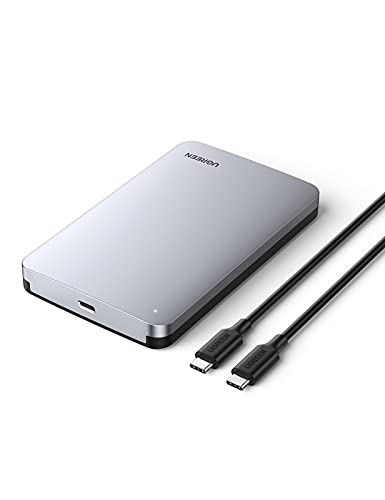
UGREEN USB C Hard Drive Enclosure for 2.5" SATA SSD HDD,Aluminum | USB C to SATA Adapter USB 3.1 Gen 2 Support UASP - Compatible with MacBook Pro Air,WD,Seagate,Toshiba,Samsung,Hitachi
As an Amazon Associate we earn from qualifying purchases. Product prices and availability are accurate as of the date/time indicated.
Prices shown are approximate and for reference only. Prices change often, so please check the current price on Amazon before you buy.
Best SSD Enclosure for PC Upgrades Reviewed for 2026
1. ORICO M.2 NVMe USB-C Enclosure: Best Overall SSD Enclosure for PC Upgrades
The ORICO M.2 NVMe USB-C Enclosure is our top pick for most PC upgrades because it is inexpensive, fast, and easy to use. Its M.2 NVMe interface and USB-C 10Gbps connection give you transfer speeds up to 10Gbps in manufacturer material, which is fast enough for backups, for large file transfers, and for running games from an external SSD. Its aluminium case helps dissipate heat, and its tool-free design in many listings lets you install an SSD without a screwdriver.
For PC upgrades, the ORICO enclosure is practical because it is light, it is compact, and it works with most NVMe SSDs in 2230, 2242, 2260, and 2280 sizes in many listings. The main trade-off is that it is NVMe only, so it will not work with a SATA M.2 SSD or a 2.5-inch SATA SSD. Check your SSD type before you buy.
At a typical price in the $20 to $30 range, it is a very good value for a 10Gbps enclosure. Choose it if you want a simple, affordable NVMe enclosure for PC upgrades, you have an M.2 NVMe SSD, and you want fast USB-C transfer. Do not buy it if you have a SATA SSD, because you need a SATA enclosure instead.
2. UGREEN M.2 NVMe USB-C Enclosure: Best UGREEN SSD Enclosure for PC Upgrades
The UGREEN M.2 NVMe USB-C Enclosure is a 10Gbps enclosure with a similar design to the ORICO model, but with UGREEN build quality and a slightly different case. Its M.2 NVMe interface and USB-C connection give you up to 10Gbps transfer, its aluminium case helps with heat, and its tool-free design in many listings makes installation easy.
For PC upgrades, the UGREEN enclosure is useful because it is reliable, it is easy to use, and it comes with both USB-C to USB-C and USB-C to USB-A cables in many listings, so it works with older PCs as well as new ones. The trade-off is price: at $25 to $35 it costs a little more than the ORICO model, although its cable set is more complete.
Choose it if you want a UGREEN enclosure, you need both USB-C and USB-A cables, and you want a reliable 10Gbps enclosure for PC upgrades. It is a strong alternative to the ORICO model.
3. SABRENT USB 3.2 Type-C Tool-Free Enclosure: Best Tool-Free SSD Enclosure for PC Upgrades
The SABRENT USB 3.2 Type-C Tool-Free Enclosure is a 10Gbps NVMe enclosure with a tool-free design that lets you install and remove an SSD without screws or tools. Its aluminium case is durable, its USB-C connection is fast, and its design is made for frequent SSD swaps, which is useful if you upgrade PCs often or test different SSDs.
For PC upgrades, the SABRENT enclosure is practical because its tool-free design saves time, its case is well built, and its transfer speeds are fast for backups and file transfers. The trade-off is price: at $30 to $40 it costs more than the ORICO and UGREEN models, although its tool-free design is worth it if you swap SSDs often.
Choose it if you want a tool-free enclosure, you swap SSDs often, and you want a durable SABRENT product. It is a good choice for PC builders and technicians.
4. ASUS TUF Gaming A1 SSD Enclosure: Best Rugged SSD Enclosure for PC Upgrades
The ASUS TUF Gaming A1 is a rugged 10Gbps NVMe enclosure with a military-grade design in manufacturer material, a durable case, and a USB-C connection. Its rugged design makes it a good choice if you carry an external SSD in a bag, travel with it, or use it in a workshop where it may be dropped.
For PC upgrades, the TUF Gaming A1 is useful because it is tough, it is fast, and it has a good thermal design that helps keep an NVMe SSD cool during long transfers. The trade-off is price and size: at $40 to $50 it is the most expensive enclosure in this guide, and it is a little larger than the ORICO and UGREEN models.
Choose it if you want a rugged enclosure, you travel with an external SSD, and you want ASUS TUF build quality. It is a strong choice for a portable external SSD.
5. Plugable USB-C NVMe SSD Enclosure: Best Plugable SSD Enclosure for PC Upgrades
The Plugable USB-C NVMe SSD Enclosure is a 10Gbps enclosure with a simple, reliable design and a USB-C connection. Its aluminium case helps with heat, its tool-free design in many listings makes installation easy, and its Plugable support is good if you need help. It is a popular choice for PC users who want a no-nonsense enclosure that just works.
For PC upgrades, the Plugable enclosure is practical because it is easy to use, it is fast, and it works with most NVMe SSDs. The trade-off is that it is a little plain in design, with no extra features such as a rugged case or a display, although that simplicity is a benefit for many users.
At a typical price in the $30 to $40 range, it is a good value for a reliable 10Gbps enclosure. Choose it if you want a Plugable enclosure, you want simple reliability, and you do not need a rugged design.
6. SSK M.2 NVMe SSD Enclosure: Best Budget SSD Enclosure for PC Upgrades
The SSK M.2 NVMe SSD Enclosure is a budget 10Gbps enclosure, priced in the $20 to $30 range, with an aluminium case, a USB-C connection, and a tool-free design in many listings. Its transfer speeds are up to 10Gbps, which is the same as the other enclosures in this guide, so it gives you fast performance for a low price.
For PC upgrades, the SSK enclosure is useful because it is inexpensive, it is fast, and it is easy to install. The trade-off is build quality and support: it is not as refined as ORICO, UGREEN, or SABRENT models, although it is still a functional enclosure for most uses.
Choose it if you want the lowest-cost 10Gbps enclosure in this guide, you have an NVMe SSD, and you want a simple external drive for backups. It is a good first enclosure for a PC upgrade.
Buying Guide: How to Choose the Best SSD Enclosure for PC Upgrades
The best SSD enclosure for PC upgrades for you depends on your SSD type, your PC ports, and how you will use the external drive. Start with SSD interface and size, then compare speed, material, and price. An enclosure that fits your SSD, gives you fast transfer, and is easy to use is better than an enclosure with the highest speed that does not fit your SSD.
SSD Type: NVMe vs SATA for SSD Enclosures
SSD type is the most important factor for an enclosure, because an NVMe SSD and a SATA SSD use different interfaces and will not fit in the wrong enclosure. Most M.2 SSDs in modern PCs are NVMe, with an M-key slot, while older M.2 SSDs may be SATA, with a B-key slot. A 2.5-inch SSD is SATA and needs a 2.5-inch enclosure, not an M.2 enclosure.
For most PC upgrades, an NVMe enclosure is the best choice, because NVMe SSDs are faster and more common in new PCs. Check your SSD label or your PC manual to confirm whether it is NVMe or SATA, and check the exact listing for enclosure compatibility. Always back up first, unplug the PC, use static safety, and never open a PSU when you remove an SSD.
Speed: USB-C 10Gbps, USB 3.2, and Real-World Transfer Speeds
Speed matters for an SSD enclosure, because it determines how fast you can transfer files and how fast an external SSD feels. A USB-C 10Gbps enclosure, as in all the models in this guide, can transfer up to 10Gbps in theory, which is about 1,000 MB/s in practice for a fast NVMe SSD. That is fast enough for backups, for video editing, and for running games from an external drive.
For real-world use, speed also depends on your PC’s USB port, your SSD’s speed, and your cable. A USB-C port that only supports 5Gbps will limit you to 5Gbps, even with a 10Gbps enclosure. Check your PC’s USB ports, and use the cable that comes with the enclosure for best results. Do not buy an enclosure based on speed alone if your PC cannot support it.
Material, Heat, and SSD Enclosure Safety for PC Upgrades
Material matters for an SSD enclosure, because NVMe SSDs generate heat during long transfers, and a metal case helps dissipate that heat better than a plastic case. All the enclosures in this guide use aluminium, which is good for heat and durability. A plastic enclosure may be cheaper, but it will not cool as well.
For safety, back up first, unplug the PC, use static safety, check NVMe and SATA compatibility, and never open a PSU. When you install an SSD in an enclosure, make sure it is seated correctly, use the thermal pad if one is included, and close the case firmly. Do not force an SSD into an enclosure, and do not use an enclosure with a damaged cable.
Price, Brand, and What You Actually Need
Price depends on speed, material, and brand. An enclosure in the $20 to $30 range, like the ORICO and SSK models, is a good starting point for most PC upgrades. An enclosure in the $25 to $40 range, like the UGREEN, SABRENT, and Plugable models, is a good balance if you want better build quality or tool-free design. An enclosure in the $40 to $50 range, like the ASUS TUF Gaming A1, is best if you want a rugged enclosure for travel.
Brand also matters. An enclosure from a trusted brand in this guide, like ORICO, UGREEN, SABRENT, ASUS, Plugable, and SSK, will be more reliable than an unbranded enclosure with similar specifications on paper. For most PC upgrades, the ORICO M.2 NVMe USB-C Enclosure is the best value for a fast, affordable enclosure, the SABRENT Tool-Free Enclosure is the best choice for frequent SSD swaps, and the ASUS TUF Gaming A1 is the best choice for a rugged portable drive. Do not buy an enclosure based on price alone. An enclosure that fits your SSD, gives you fast transfer, and is easy to use is worth the investment.
Best SSD Enclosure for PC Upgrades: FAQ
What is the best SSD enclosure for PC upgrades?
For most PC upgrades, the ORICO M.2 NVMe USB-C Enclosure is the best overall SSD enclosure because it offers an M.2 NVMe interface, USB-C 10Gbps speed, and a tool-free design at a typical price in the $20 to $30 range. If you want a UGREEN enclosure, the UGREEN M.2 NVMe model is a good choice at $25 to $35. If you want a tool-free enclosure, the SABRENT USB 3.2 Type-C model is a practical option at $30 to $40. If you want a rugged enclosure, the ASUS TUF Gaming A1 is a good fit at $40 to $50.
Can I use an old SSD in an enclosure?
Yes, you can use an old SSD in an enclosure, as long as the enclosure matches the SSD type and size. For best results, check whether your SSD is NVMe or SATA, check its size, back up first, and test the enclosure with a small file transfer before you use it for important backups.
How fast is a USB-C SSD enclosure?
How fast a USB-C SSD enclosure is depends on the enclosure, the SSD, and your PC, but in general, a USB-C 10Gbps enclosure can transfer up to 10Gbps in theory, which is about 1,000 MB/s in practice for a fast NVMe SSD. For best results, use a USB-C port that supports 10Gbps, and use the cable that comes with the enclosure.
How do I choose an SSD enclosure for PC upgrades?
Choose an SSD enclosure for PC upgrades by starting with SSD type and size, then checking speed, material, and price. Pick an enclosure that fits your NVMe or SATA SSD, gives you fast USB-C transfer, and is easy to install. Always back up first, unplug the PC, use static safety, and never open a PSU.
FAQ
What is the best SSD enclosure for PC upgrades?
Can I use an old SSD in an enclosure?
How fast is a USB-C SSD enclosure?
How do I choose an SSD enclosure for PC upgrades?
Related guides
- Best Pro Controller vs Standard Controller for PC Gamers in 2026: Best Pro Controller vs Standard Controller for PC Gamers
- Best Power Bank for LAN Parties in 2026: 6 High-Capacity Banks for Laptops, Phones, and Gaming Gear
- Glass Side Panel vs Mesh Side Panel for Case in 2026: Fractal, Lian Li, Corsair, and Montech Compared for an Air Road Read at the Desk, a Dust Calendar Each Parish Sentences, and a Panel Chosen by the Room It Must Live In
- Best Beginner Budget CPU Starter Kit in 2026: 6 Budget CPUs With 6 Cores and 12 Threads, a Cooler, and a Price Range, for a Beginner Budget PC
More from Amazon
Programs that pair well with the guide above. Offers and eligibility are set by Amazon and may change.
Free shipping on eligible items, Prime Video and more. Eligible new members can start with a free trial.
Start a Prime free trialAd-free music streaming. Eligible new subscribers can start with a free trial.
Try Music Unlimited freeA Prime membership for ages 18-24 with a trial period. Eligibility is set by Amazon.
See Prime for Young AdultsAudiobooks and podcasts to listen to on the go. Eligible new members can start with a free trial.
Try Audible freeAs an Amazon Associate we earn from qualifying purchases.

Write Your Review
No reviews yet. Be the first to share your experience!