
What's inside
- Best Wall Charger with Four Ports: Quick Comparison Table
- What Is a Best Wall Charger with Four Ports?
- Best Wall Charger with Four Ports Reviewed
- Buying Guide: How to Choose the Best Wall Charger with Four Ports
- How to Use a Wall Charger with Four Ports
- Which Best Wall Charger with Four Ports Should You Buy?
- Frequently Asked Questions About the Best Wall Charger with Four Ports
As an Amazon Associate I earn from qualifying purchases. This post may contain affiliate links at no extra cost to you.
It helps a user charge a laptop, a phone, a tablet, and earbuds at the same time, without four separate chargers, without a power strip, and without a charger that is too slow or too hot. A good wall charger with four ports is not just the highest wattage charger on the shelf. It is a practical charger for a desk, a bedroom, or travel, and the wrong one can charge slowly when all four ports are used, overheat, or not support fast charging for your devices.
That power gives enough wattage to charge a laptop at 65W, a phone at 20W, and two other devices at 10W to 20W, without needing a separate laptop charger. A smaller 40W charger can work well for phones and tablets, while a larger 150W charger is better for a user who wants to charge two laptops at once.
At thetechchart.com, we focus on tech gadgets. For this guide to the best wall charger with four ports in 2026, we compared current wall chargers that are widely sold, designed for home and travel use, and suitable for a buyer who wants the best wall charger with four ports. We looked at total power, port type, single-port power, GaN technology, size, weight, and price. Power, port, and weight figures are manufacturer listings, and real charging speed depends on your devices, your cables, and how many ports are used at once. Always check the charger specifications before you buy, and always use a cable that supports the wattage you need.
Our Top Picks
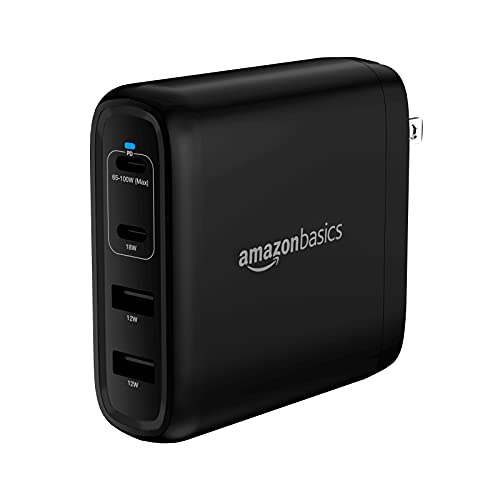 Amazon Basics 100W Four-Port GaN Wall Charger with100W3.17 x 1.16 x 3.15 inches0.56 poundsCheck on Amazon
Best Wall Charger with Four Ports: Quick Comparison Table
The table below compares seven wall chargers with four ports. Total power is the maximum combined power, where given. Ports is the port layout, where given. Max single port is the maximum power from one port, where given. GaN is whether the charger uses GaN technology, where given. Weight is the approximate weight, where given. Best for is a note on what the charger is best for, such as best wall charger with four ports.
| Wall Charger with Four Ports | Total Power | Ports | Max Single Port | GaN | Weight | Best For |
|---|---|---|---|---|---|---|
| Anker 747 GaNPrime Charger 150W | 150W | 3x USB-C, 1x USB-A | 100W USB-C | Yes, GaNPrime | About 0.6 lbs | Best overall, best wall charger with four ports |
| UGREEN Nexode 100W 4-Port Charger | 100W | 3x USB-C, 1x USB-A | 100W USB-C | Yes, GaN II | About 0.5 lbs | Best for UGREEN, Nexode 100W |
| Anker 735 Charger GaNPrime 65W | 65W | 2x USB-C, 1x USB-A, plus 1x USB-C | 65W USB-C | Yes, GaNPrime | About 0.4 lbs | Best for Anker, 735 65W |
| Baseus 100W USB-C Charger 4-Port | 100W | 2x USB-C, 2x USB-A | 100W USB-C | Yes, GaN | About 0.5 lbs | Best for Baseus, 100W |
| Satechi 165W USB-C 4-Port GaN Charger | 165W | 3x USB-C, 1x USB-A | 100W USB-C | Yes, GaN | About 0.7 lbs | Best high power, Satechi 165W |
| Spigen ArcStation Pro 100W Charger | 100W | 2x USB-C, 2x USB-A | 100W USB-C | Yes, GaN II | About 0.5 lbs | Best for Spigen, ArcStation Pro 100W |
| Anker 321 Charger 52W 4-Port | 52W | 2x USB-C, 2x USB-A | 30W USB-C | No, standard | About 0.3 lbs | Best budget, Anker 321 52W |
Amazon Basics 100W Four-Port GaN Wall Charger with 2 USB-C (100W, 18W) & 2 USB-A Ports (12W), PD 3.0, Foldable Plug, Portable Multi-Device Charging for Laptops, Tablets & Phones, Non-PPS,Black


As an Amazon Associate we earn from qualifying purchases. Product prices and availability are accurate as of the date/time indicated.

USB Charger Block, 2Pack 4 Port USB Fast Charging Block QC3.0 3.1A Wall Charger Blocks Multi USB Plug for iPhone 18/17/16/15/14/13 Pro Max,iPad,Samsung Galaxy,Android Phone,Multiple Devices
As an Amazon Associate we earn from qualifying purchases. Product prices and availability are accurate as of the date/time indicated.

USB C Charger Block, 2-Pack 40W 4-Port USB C Wall Charger Fast Charging Dual Port PD Power Adapter+QC Double Wall Plug Multiport Type C Brick Chargers for iPhone 16 15 14 13 12 11 Pro Max XS,Samsung
As an Amazon Associate we earn from qualifying purchases. Product prices and availability are accurate as of the date/time indicated.
Prices shown are approximate and for reference only. Prices change often, so please check the current price on Amazon before you buy.
Note: Total power, max single port, and weight figures are manufacturer listings, and a charger that lists 100W total may not deliver 100W to one port when all four ports are used, because power is shared between ports. Always check the charger’s power distribution, port layout, and current price with the retailer. The best wall charger with four ports should have at least one high-power USB-C port for a laptop before you buy.
What Is a Best Wall Charger with Four Ports?
It helps you charge, travel, and declutter, without a power strip full of chargers or a charger that is too slow for a laptop.
A best wall charger with four ports is different from a single-port charger alone, which is made for one device, while a four-port charger is made for a desk or a family. It is also different from a power bank alone, which is made for charging on the go with a battery, while a wall charger is made for charging at home or in a hotel with a wall outlet.
A best wall charger with four ports is best for a user who has a laptop, a phone, a tablet, and earbuds, wants to charge them all at once, has a budget of $25 to $120, and wants a simple, reliable charger that can be used at home or for travel.
Best Wall Charger with Four Ports Reviewed
1. Anker 747 GaNPrime Charger 150W – Best Wall Charger with Four Ports Overall
It is one of the most powerful four-port chargers, and it is easy to see why: it can charge a laptop at 100W, a phone at 30W, and two other devices at the same time.
Anker designs the 747 with a focus on a charger that is powerful and smart. GaNPrime technology helps the charger stay cool, PowerIQ 4.0 distributes power intelligently between ports, and the charger has a foldable plug for travel. It is a good choice for a user who wants to charge a MacBook, a phone, a tablet, and earbuds from one charger.
The main limitation is size and price. Choose the Anker 747 if you want the best overall four-port charger, you want 150W, and you have a budget of $80 to $110.
2. UGREEN Nexode 100W 4-Port Charger – Best Wall Charger with Four Ports for Value and Power
It is a good choice for a user who wants 100W power at a lower price than Anker.
UGREEN designs the Nexode with a focus on a charger that is compact, powerful, and safe. The GaN II technology helps it stay cool, the 100W USB-C port can charge a laptop, and the charger has overcurrent, overvoltage, and overheating protection. It is a practical choice for a desk, a bedroom, or travel, and it is easy to use for a first-time buyer.
The main limitation is that the total power is 100W, so charging two laptops at once will be slower than with a 150W charger. Choose the UGREEN Nexode 100W if you want a 100W charger, you want UGREEN, and you have a budget of $50 to $70.
3. Anker 735 Charger GaNPrime 65W – Best Wall Charger with Four Ports for Travel
It is a compact charger that is ideal for travel, with a foldable plug and a light weight of about 0.4 pounds.
Anker designs the 735 with a focus on a charger that is small, light, and powerful enough for a laptop. The 65W USB-C port can charge a MacBook Air or a similar laptop, the other ports can charge a phone and earbuds, and the charger has PowerIQ 4.0 for smart power distribution. It is a good choice for a student, a traveller, or a user who wants one charger for a bag.
The main limitation is total power. At 65W, it will not charge a 16 inch MacBook Pro at full speed, though it will charge it slowly. Choose the Anker 735 if you want a travel charger, you want Anker, and you have a budget of $40 to $60.
4. Baseus 100W USB-C Charger 4-Port – Best Wall Charger with Four Ports for Baseus Users
It is a low-cost 100W charger with a balanced port layout for phones and laptops.
Baseus designs this charger with a focus on a charger that is affordable and powerful. The 100W USB-C port can charge a laptop, the USB-A ports are useful for older devices and earbuds, and the charger has a compact design with a foldable plug in some versions. It is a practical choice for a family or a desk with many devices.
The main limitation is brand support compared with Anker or UGREEN, though Baseus is a well-known charger brand. Choose the Baseus 100W if you want a 100W charger, you want Baseus, and you have a budget of $40 to $60.
5. Satechi 165W USB-C 4-Port GaN Charger – Best Wall Charger with Four Ports for High Power
It is the highest-power charger in this guide, and it is a good choice for a user who wants to charge two laptops at once.
Satechi designs this charger with a focus on a desktop charger that is powerful and well-built. The 165W total power lets you charge a laptop at 100W, a second laptop at 45W, and a phone and earbuds at the same time, and the charger has a compact design for its power. It is a practical choice for a home office or a desk with many devices.
The main limitation is size and price. Choose the Satechi 165W if you want the highest power, you want Satechi, and you have a budget of $90 to $120.
6. Spigen ArcStation Pro 100W Charger – Best Wall Charger with Four Ports for Spigen Users
It is a well-built 100W charger with a balanced port layout.
Spigen designs the ArcStation Pro with a focus on a charger that is safe, compact, and easy to use. The GaN II technology helps it stay cool, the 100W USB-C port can charge a laptop, and the charger has overcurrent and overheating protection. It is a good choice for a desk or a bedroom, and it is easy to use for a first-time buyer.
The main limitation is that it has two USB-C ports, not three, so it has fewer USB-C ports than the Anker 747 or UGREEN Nexode. Choose the Spigen ArcStation Pro 100W if you want Spigen, you want 100W, and you have a budget of $50 to $70.
7. Anker 321 Charger 52W 4-Port – Best Budget Wall Charger with Four Ports
It is the lowest-priced four-port charger in this guide, and it is a good choice for a user who only needs to charge phones, tablets, and earbuds, not a laptop.
Anker designs the 321 with a focus on a simple, affordable charger for a family or a bedroom. The 30W USB-C port can fast-charge a phone, the other ports can charge a tablet and earbuds, and the charger is light at about 0.3 pounds. It is a practical choice for a first four-port charger, or for a user on a tight budget.
The main limitation is power. At 52W total and 30W max, it will not charge a laptop at full speed, though it can charge a small laptop slowly. Choose the Anker 321 if you want the best budget charger, you only charge phones and tablets, and you have a budget of $25 to $35.
Buying Guide: How to Choose the Best Wall Charger with Four Ports
Before you buy, think about what devices you need to charge, whether it is a laptop, a phone, a tablet, or earbuds, how much power each device needs, whether it is 65W for a laptop or 20W for a phone, how many USB-C ports you need, and how much you want to spend. A charger that is perfect for phones may be too weak for a laptop, and a charger that is perfect for a laptop may be too large for travel.
1. Total Power: 52W vs 65W vs 100W vs 150W, and Your Devices
Total power is the first decision. Total power is the maximum combined power, usually 52W for phones and tablets, 65W for a small laptop, 100W for a laptop and phones, and 150W to 165W for two laptops. A charger that lists 100W total may not deliver 100W to one port when all four ports are used, because power is shared.
Choose a 52W charger if you only charge phones and tablets, you want a low price, or you have a budget of $25 to $35. Choose a 65W charger if you have a small laptop, you travel, or you have a budget of $40 to $60. Choose a 100W charger if you have a laptop, a phone, and a tablet, or you have a budget of $40 to $70. Choose a 150W to 165W charger if you have two laptops, you work in an office, or you have a budget of $80 to $120. For most users, a 100W charger is the best balance, because it can charge a laptop and three other devices.
2. Port Layout: USB-C vs USB-A, and Your Cables
Port layout is the second decision. USB-C is the modern standard for laptops, phones, and tablets, while USB-A is useful for older devices, earbuds, and accessories. A charger with three USB-C ports and one USB-A port is best for a modern user, while a charger with two USB-C and two USB-A ports is best for a family with mixed devices.
Choose a charger with three USB-C ports if you have modern devices, you want fast charging, or you have a budget of $50 to $110. Choose a charger with two USB-C and two USB-A ports if you have older devices, you want flexibility, or you have a budget of $25 to $70. Check your cables before you buy, because you will need a USB-C to USB-C cable for a laptop, and a USB-A to USB-C cable for older devices.
3. Single-Port Power: 30W vs 65W vs 100W, and Your Laptop
Single-port power is the third decision. Single-port power is the maximum power from one port, usually 30W for a phone, 65W for a small laptop, and 100W for a large laptop. A laptop that needs 65W will charge slowly on a 30W port, while a phone that needs 20W will charge fast on a 65W port, though it will only draw 20W.
Choose a charger with a 30W max port if you only charge phones, you want a low price, or you have a budget of $25 to $35. Choose a charger with a 65W max port if you have a MacBook Air or a similar laptop, you travel, or you have a budget of $40 to $60. Choose a charger with a 100W max port if you have a MacBook Pro, a Windows laptop, or a budget of $40 to $120. For most users, a 100W max port is the best choice, because it can charge almost any laptop.
4. GaN Technology: Size, Heat, and Your Charger
GaN technology is the fourth decision. GaN, or gallium nitride, is a material that lets a charger be smaller, lighter, and cooler than a traditional silicon charger. A GaN charger with 100W power can be about half the size of a silicon charger with the same power, and it will run cooler.
Choose a GaN charger if you want a compact charger, you travel, or you have a budget of $40 to $120. Choose a standard charger if you want the lowest price, you only charge phones, or you have a budget of $25 to $35. For most users in 2026, GaN is the better choice, because it is smaller, cooler, and more efficient.
5. Size, Weight, and Travel: Desk vs Travel, and Your Bag
Size and weight are the fifth decision. A wall charger with four ports should fit in a backpack, a desk drawer, or a hotel room, without taking up too much space. A charger that weighs 0.3 to 0.4 pounds is easy to carry, while a charger that weighs 0.6 to 0.7 pounds may feel heavy in a small bag.
Choose a light charger such as Anker 321 at about 0.3 pounds if you travel, you want a small bag, or you have a budget of $25 to $35. Choose a heavier charger such as Satechi 165W at about 0.7 pounds if you use it on a desk, you need high power, or you have a budget of $90 to $120. Check for a foldable plug, which makes a charger easier to pack and safer in a bag.
6. Price, Safety, and Choosing a Wall Charger with Four Ports on a Budget
Consider total cost and safety as well as price. Choose a charger from a trusted brand with overcurrent, overvoltage, and overheating protection, and do not buy a cheap, unbranded charger that has no safety certification. A charger that matches your devices, your power needs, and your budget will charge faster and safer than a charger that is cheap but too weak, or expensive but too large for travel.
How to Use a Wall Charger with Four Ports
Using a wall charger with four ports starts with plugging it into a wall outlet, connecting your devices with the correct cables, and checking that each device shows fast charging. Connect your laptop to the highest-power USB-C port, usually labelled C1, connect your phone to the next USB-C port, and connect earbuds and a tablet to the USB-A ports. Use a cable that supports the wattage you need, such as a 100W USB-C cable for a laptop, and a 20W cable for a phone.
For a first use, charge one device at a time to check the speed, then charge all four at once to see how power is shared. If your laptop charges slowly when all four ports are used, unplug one device or use a higher-power charger. After use, unplug the charger from the wall, and store it in a dry place. Do not use a charger with a damaged cable or a cracked case, and do not cover it while it is charging, because it needs airflow to stay cool.
Which Best Wall Charger with Four Ports Should You Buy?
If you want the best wall charger with four ports, buy the Anker 747 GaNPrime Charger 150W.
If you want a 100W charger, buy the UGREEN Nexode 100W 4-Port Charger. If you want a travel charger, buy the Anker 735 Charger GaNPrime 65W. If you want a low-cost 100W charger, buy the Baseus 100W USB-C Charger 4-Port. If you want the highest power, buy the Satechi 165W USB-C 4-Port GaN Charger. If you want Spigen, buy the Spigen ArcStation Pro 100W Charger. If you want the best budget charger, buy the Anker 321 Charger 52W 4-Port.
All seven chargers in this guide are currently sold, designed for home and travel use, and suitable for a buyer who wants the best wall charger with four ports. Pick the one that matches your devices, whether it is a laptop, a phone, a tablet, or earbuds, your power needs, and your budget, and always check the power distribution before you buy.
Disclosure: thetechchart.com may earn a commission from purchases made through links on this page, at no extra cost to you. Total power, max single port, and weight figures are manufacturer claims and can vary by model, cable, device, and use.
Frequently Asked Questions About the Best Wall Charger with Four Ports
Can a 100W four-port charger charge a laptop at full speed?
If you charge four devices at once, the power is shared, so the laptop may charge slower, though it will still charge.
What is GaN in a wall charger?
GaN chargers are more efficient, they generate less heat, and they are a good choice for travel and for a desk with many devices.
How many devices can I charge at once with a four-port charger?
The total power is shared, so each device may charge slower than when charged alone, though it will still charge. Check the power distribution in the manual before you buy.
What is the best budget wall charger with four ports?
Choose Anker 321 if you only charge phones and tablets, and Baseus if you want a laptop charger.
Related guides
- Best Soundbar vs Speakers for PC Setups in 2026: Razer, Creative, Edifier, and Kanto Compared for a Desk Measured Before a Format Is Chosen, Nearfield Honesty at Arm’s Length, and a Subwoofer Parish the Neighbours Agree To
- Best Budget Power Supply for Remote Workers in 2026: 6 Quiet, Reliable PSUs for Your Home Office
- Best Console for PC Multiplayer Games in 2026: 6 Handheld PC Consoles With a 7-Inch Display, at Least 16GB RAM, and a Price Range, for PC Multiplayer Games
- Best Phone Case for Beach Lifeguards in 2026: OtterBox, Catalyst, Ghostek, and Pelican Compared for a Sealing Read in the Maker’s Own Documents, a Salt Rinse at Every Shift’s End, and a Phone That Never Pretends to Be the Rescue Radio
More from Amazon
Programs that pair well with the guide above. Offers and eligibility are set by Amazon and may change.
Free shipping on eligible items, Prime Video and more. Eligible new members can start with a free trial.
Start a Prime free trialAd-free music streaming. Eligible new subscribers can start with a free trial.
Try Music Unlimited freeA Prime membership for ages 18-24 with a trial period. Eligibility is set by Amazon.
See Prime for Young AdultsAudiobooks and podcasts to listen to on the go. Eligible new members can start with a free trial.
Try Audible freeAs an Amazon Associate we earn from qualifying purchases.

Write Your Review
No reviews yet. Be the first to share your experience!