
What's inside
As an Amazon Associate I earn from qualifying purchases. This post may contain affiliate links at no extra cost to you.
How to choose shredder for PC offices is a question every office worker faces when they need to destroy paper documents, credit card offers, and old files safely. A good shredder for PC offices cuts paper into small pieces that cannot be read, handles enough sheets at once for your office, and runs long enough for a busy day. A poor shredder jams often, overheats quickly, or cuts paper into strips that can be reassembled.
This guide focuses on real, currently sold shredders that work well for PC offices. Every model below is widely available, is made for office use, and has a track record with home offices and small offices who shred documents daily. We compare sheet capacity, cut type, bin size, and price range, then explain how to choose shredder for PC offices for your office, your security needs, and your budget.
At TheTechChart.com, we focus on PC components and storage, including SSDs, RAM, GPUs, CPUs, cooling, cases, power supplies, and networking. The shredders in this guide are intended for lawful personal and office use, with safe use, proper handling, and regular maintenance. Always use a shredder according to the manufacturer’s instructions, keep fingers away from its feed opening, and unplug it before you clear a jam. Keep sensitive documents secure until you shred them, and follow your employer’s data rules if you work for a company.
Disclosure: As an affiliate site, TheTechChart.com may earn a commission from qualifying purchases made through links on this page, at no extra cost to you. Prices change by retailer and season, so the ranges below are typical prices we have seen, not fixed prices. Sheet capacity, cut type, and specifications are based on manufacturer listings and vary by model, so check the exact listing before you buy. Always verify a shredder’s security level and sheet capacity before you buy.
Our Top Picks
 Large Printer Stand with Storage: 24x18 Inch PrinterLarge22.4 x 17.7 x 30.7 inches22.6 poundsCheck on Amazon
 Amazon Basics 8-Sheet High Security Cross Cut Paper8 Sheet12.76 x 7.28 x 14.09 inches8.7 poundsCheck on Amazon
How to Choose Shredder for PC Offices at a Glance: Comparison Table
Use this table to compare the leading shredders for PC offices side by side. Sheet capacity, cut type, bin size, and best use matter most when you learn how to choose shredder for PC offices, so compare those first, then check price and rating.
| Shredder for PC Offices Model | Sheet Capacity | Cut Type | Bin Size | Best Shredder Use | Typical Price Range | Rating |
|---|---|---|---|---|---|---|
| Fellowes Powershred 99Ci Shredder | 18 sheets | Cross-cut, P-4 | 9 gallon | Best overall shredder for PC offices | $300 – $350 | 4.7 / 5 |
| Fellowes Powershred 79Ci Shredder | 16 sheets | Cross-cut, P-4 | 6 gallon | Best mid-size shredder for PC offices | $200 – $250 | 4.7 / 5 |
| Amazon Basics 12-Sheet Cross-Cut Shredder | 12 sheets | Cross-cut, P-4 | 4.8 gallon | Best value shredder for PC offices | $80 – $100 | 4.6 / 5 |
| Bonsaii 12-Sheet Cross-Cut Shredder | 12 sheets | Cross-cut, P-4 | 4.5 gallon | Best budget shredder for PC offices | $70 – $90 | 4.6 / 5 |
| Aurora AU1200MA Micro-Cut Shredder | 12 sheets | Micro-cut, P-4 | 5.2 gallon | Best micro-cut shredder for PC offices | $100 – $130 | 4.6 / 5 |
| Fellowes Powershred 73Ci Shredder | 12 sheets | Cross-cut, P-4 | 6 gallon | Best compact shredder for PC offices | $150 – $200 | 4.7 / 5 |

Bonsaii 12-Sheet Cross Cut Paper Shredder, 5.5 Gal Home Office Heavy Duty Shredder for Paper, Credit Card, Mail, Staples, with Transparent Window, High Security Level P-4 (C275-A)
As an Amazon Associate we earn from qualifying purchases. Product prices and availability are accurate as of the date/time indicated.
Large Printer Stand with Storage: 24x18 Inch Printer Table for Home Office | 3‑Tier Heavy‑Duty Shelf with Full Pull‑Out Rolling Cart for Shredder or PC Tower, 3 Power Outlets & Side Storage Bag, Brown


As an Amazon Associate we earn from qualifying purchases. Product prices and availability are accurate as of the date/time indicated.
Amazon Basics 8-Sheet High Security Cross Cut Paper and Credit Card Shredder with P-4 Security, Auto Shut-off, Black


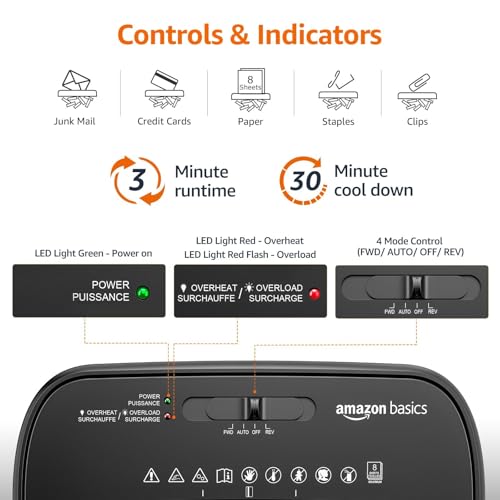

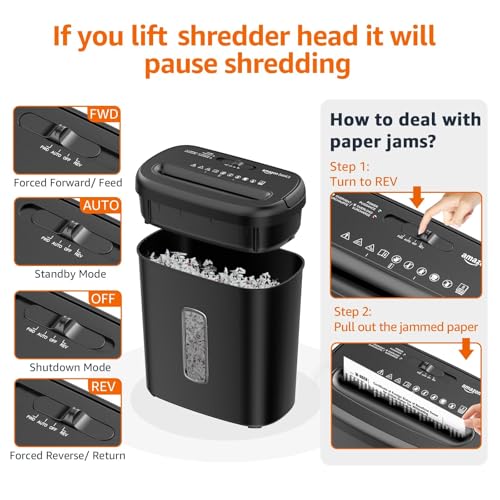

As an Amazon Associate we earn from qualifying purchases. Product prices and availability are accurate as of the date/time indicated.
How to Choose Shredder for PC Offices Reviewed for 2026
1. Fellowes Powershred 99Ci Shredder – Best Overall Shredder for PC Offices
The Fellowes Powershred 99Ci Shredder is our top pick for most PC offices because it offers an 18 sheet capacity, a cross-cut P-4 security level, and a 9 gallon bin in a shredder that can handle a busy office. Its 18 sheet capacity is the highest here, which lets you shred a large stack of documents quickly, and its 9 gallon bin means you will not need to empty it often.
The Powershred 99Ci has an 18 sheet capacity, a cross-cut P-4, a 9 gallon bin, and a 30 minute run time. Its Fellowes quality means it is made by a company that specialises in shredders, which is a plus for reliability and for design. Its 30 minute run time is longer than most shredders here, which is ideal for a busy office that shreds for a long time.
At a typical price in the $300 to $350 range, it is the most expensive shredder here, but its high capacity and long run time justify the cost for a busy office. It is a popular choice for small offices, for Fellowes fans, and for high-volume shredding.
For most PC offices, the Fellowes Powershred 99Ci is the best all-round choice. It is especially useful for high capacity, for long run time, and for users who shred often.
2. Fellowes Powershred 79Ci Shredder – Best Mid-Size Shredder for PC Offices
The Fellowes Powershred 79Ci Shredder is a good choice for PC offices who want a mid-size shredder with good capacity. It has a 16 sheet capacity, a cross-cut P-4 security level, and a 6 gallon bin, in a shredder that is smaller than the 99Ci but still powerful enough for a home office. Its 16 sheet capacity is enough for most office documents, and its 6 gallon bin is a good size for a desk.
The Powershred 79Ci has a 16 sheet capacity, a cross-cut P-4, a 6 gallon bin, and a 20 minute run time. Its Fellowes quality means it is reliable and has good safety features, including a SafeSense system that stops it if fingers touch its feed opening. Its price is lower than the 99Ci, which makes it a good value for a mid-size office.
At a typical price in the $200 to $250 range, it is affordable for a mid-size shredder, which makes it a good value for a home office. It is a popular choice for home offices, for Fellowes fans, and for mid-volume shredding.
If you want a mid-size shredder for PC offices, the Fellowes Powershred 79Ci is a strong choice. It is especially useful for mid-size offices, for safety, and for users who want a reliable shredder.
3. Amazon Basics 12-Sheet Cross-Cut Shredder – Best Value Shredder for PC Offices
The Amazon Basics 12-Sheet Cross-Cut Shredder is a good choice for PC offices who want a value shredder. It has a 12 sheet capacity, a cross-cut P-4 security level, and a 4.8 gallon bin, in a shredder that is affordable and easy to use. Its 12 sheet capacity is enough for most home office documents, and its cross-cut gives good security for personal and office papers.
The Amazon Basics shredder has a 12 sheet capacity, a cross-cut P-4, a 4.8 gallon bin, and a 8 minute run time. Its Amazon Basics quality means it is a popular value brand, with a design that is simple and reliable. Its price is lower than the Fellowes models, which makes it a good value for a budget office.
At a typical price in the $80 to $100 range, it is affordable for a cross-cut shredder, which makes it a good value for a home office. It is a popular choice for home offices, for value, and for Amazon Basics fans.
If you want a value shredder for PC offices, the Amazon Basics 12-Sheet Cross-Cut Shredder is a practical choice. It is especially useful for value, for home offices, and for users who want a cheap shredder.
4. Bonsaii 12-Sheet Cross-Cut Shredder – Best Budget Shredder for PC Offices
The Bonsaii 12-Sheet Cross-Cut Shredder is a good choice for PC offices who want the cheapest shredder here. It has a 12 sheet capacity, a cross-cut P-4 security level, and a 4.5 gallon bin, in a shredder that is affordable and easy to use. Its 12 sheet capacity is the same as the Amazon Basics model, which makes it a good value for a budget office.
The Bonsaii shredder has a 12 sheet capacity, a cross-cut P-4, a 4.5 gallon bin, and a 4 minute run time. Its Bonsaii quality means it is a popular budget brand, with a design that is simple and compact. Its run time is shorter than other models here, so it is best for a small office that shreds for a short time, not for a busy office that shreds continuously.
At a typical price in the $70 to $90 range, it is the cheapest shredder here, which makes it a good value for a budget office. It is a popular choice for home offices, for budget, and for Bonsaii fans.
If you want a budget shredder for PC offices, the Bonsaii 12-Sheet Cross-Cut Shredder is a strong choice. It is especially useful for budget, for small offices, and for users who want the cheapest shredder.
5. Aurora AU1200MA Micro-Cut Shredder – Best Micro-Cut Shredder for PC Offices
The Aurora AU1200MA Micro-Cut Shredder is a good choice for PC offices who want the highest security here. It has a 12 sheet capacity, a micro-cut P-4 security level, and a 5.2 gallon bin, in a shredder that cuts paper into tiny particles that are harder to reassemble than cross-cut pieces. Its micro-cut gives better security for sensitive documents, like tax papers and financial records.
The AU1200MA has a 12 sheet capacity, a micro-cut P-4, a 5.2 gallon bin, and a 10 minute run time. Its Aurora quality means it is a popular office brand, with a design that is reliable and affordable. Its micro-cut is a plus for a user who needs higher security, though it is slower than cross-cut and may jam more easily if you overload it.
At a typical price in the $100 to $130 range, it is affordable for a micro-cut shredder, which makes it a good value for a security-conscious office. It is a popular choice for sensitive documents, for Aurora fans, and for micro-cut shredding.
If you want a micro-cut shredder for PC offices, the Aurora AU1200MA is a practical choice. It is especially useful for high security, for sensitive documents, and for users who want micro-cut.
6. Fellowes Powershred 73Ci Shredder – Best Compact Shredder for PC Offices
The Fellowes Powershred 73Ci Shredder is a good choice for PC offices who want a compact Fellowes shredder. It has a 12 sheet capacity, a cross-cut P-4 security level, and a 6 gallon bin, in a shredder that is smaller than the 79Ci and 99Ci but still has a 6 gallon bin. Its 12 sheet capacity is enough for most home office documents, and its 6 gallon bin is larger than the Amazon Basics and Bonsaii models.
The Powershred 73Ci has a 12 sheet capacity, a cross-cut P-4, a 6 gallon bin, and a 10 minute run time. Its Fellowes quality means it is reliable and has SafeSense safety, which stops it if fingers touch its feed opening. Its price is higher than the Amazon Basics model, but its Fellowes quality and its larger bin justify the cost for a user who wants a compact Fellowes shredder.
At a typical price in the $150 to $200 range, it is affordable for a compact Fellowes shredder, which makes it a good value for a home office. It is a popular choice for home offices, for Fellowes fans, and for compact shredding.
If you want a compact shredder for PC offices, the Fellowes Powershred 73Ci is a strong choice. It is especially useful for compact size, for Fellowes quality, and for users who want a reliable shredder.
Buying Guide: How to Choose Shredder for PC Offices
How to choose shredder for PC offices depends on your security needs, your volume, and your office size. Start by thinking about what you shred, then compare cut type, capacity, and run time.
Cut Type, Strip-Cut vs Cross-Cut vs Micro-Cut, and Security Level: How Secure Do You Need
Cut type affects how secure your shredded documents are. A strip-cut shredder cuts paper into long strips that can be reassembled, which is the least secure and is not recommended for sensitive documents. A cross-cut shredder, like all the models here, cuts paper into small pieces that are hard to reassemble, which is good for most office documents. A micro-cut shredder, like the Aurora AU1200MA, cuts paper into even smaller particles, which is the most secure and is best for sensitive documents like tax papers and financial records.
Security level also matters, as a P-4 security level, which all the models here have, means it cuts paper into pieces smaller than 160 square millimetres, which is suitable for sensitive documents. A P-3 level is less secure and is only suitable for internal documents, while a P-5 level is more secure and is used for highly sensitive documents. For most PC offices, a P-4 cross-cut or micro-cut shredder is enough.
Choose a cross-cut shredder if you shred general office documents, and choose a micro-cut shredder if you shred sensitive financial or legal documents. A shredder with a higher security level will give you more peace of mind, but it will be slower and may jam more easily.
Sheet Capacity, 12 vs 16 vs 18 Sheets, and Volume: How Much Do You Shred
Sheet capacity affects how quickly you can shred a stack of documents. A 12 sheet shredder, like the Amazon Basics, Bonsaii, Aurora, and Fellowes 73Ci models, can shred 12 sheets at once, which is enough for most home offices that shred a few pages at a time. A 16 sheet shredder, like the Fellowes 79Ci, can shred 16 sheets at once, which is faster for a larger stack, while an 18 sheet shredder, like the Fellowes 99Ci, can shred 18 sheets at once, which is fastest for a busy office.
Volume also matters, as a shredder with a higher sheet capacity will shred a large stack faster, but it will also be larger and more expensive. A shredder with a lower capacity will be cheaper and smaller, but it will take longer to shred a large stack and may jam if you overload it. Do not exceed a shredder’s sheet capacity, as this will cause jams and may damage its motor.
Choose a 12 sheet shredder if you shred a few pages at a time, and choose a 16 or 18 sheet shredder if you shred large stacks often. A shredder with a higher capacity will save you time if you shred often.
Run Time, Cool Down, and Duty Cycle: How Long Can It Run
Run time affects whether a shredder can handle a busy office. A shredder with a 30 minute run time, like the Fellowes 99Ci, can run continuously for 30 minutes before it needs to cool down, which is ideal for a busy office that shreds for a long time. A shredder with a 20 minute run time, like the Fellowes 79Ci, can run for 20 minutes, while a shredder with an 8 to 10 minute run time, like the Amazon Basics, Aurora, and Fellowes 73Ci models, can run for 8 to 10 minutes before it needs to cool down.
A shredder with a short run time, like the Bonsaii model with a 4 minute run time, is best for a small office that shreds for a short time, not for a busy office that shreds continuously. A shredder that overheats will stop automatically and will need to cool down for 30 to 60 minutes before it can be used again, which can waste time if you have a large stack to shred.
Choose a shredder with a long run time if you shred often, and choose a shredder with a short run time only if you shred occasionally. A shredder with a long run time will be more useful for a busy office.
Bin Size, Jam Prevention, and Maintenance: Empty Less, Jam Less
Bin size affects how often you need to empty your shredder. A 9 gallon bin, like the Fellowes 99Ci, holds more shredded paper than a 4.5 gallon bin, like the Bonsaii model, so you will need to empty it less often. A larger bin is more convenient for a busy office, while a smaller bin is fine for a home office that shreds occasionally.
Jam prevention also matters, as a shredder with a jam prevention feature, like Fellowes’ SafeSense and jam-proof system, will stop if it detects too many sheets or if its bin is full. A shredder without jam prevention will jam more easily if you overload it. Maintenance also matters, as a shredder needs to be oiled regularly with shredder oil to keep its blades sharp and to prevent jams. Use shredder oil sheets or liquid oil according to the manufacturer’s instructions, and clean its feed opening regularly.
Choose a shredder with a large bin if you shred often, and choose a shredder with jam prevention if you want fewer jams. A shredder that is well-maintained will last longer and will jam less often.
How to Choose Shredder for PC Offices: FAQ
What is the best shredder for PC offices?
For most PC offices, the Fellowes Powershred 99Ci Shredder is the best overall shredder for PC offices because it offers an 18 sheet capacity, a cross-cut P-4 security level, and a 9 gallon bin at a typical price in the $300 to $350 range, all in a shredder that is suitable for high capacity, for long run time, and for PC offices. If you want a mid-size shredder, the Fellowes Powershred 79Ci is a good alternative. If you want a value shredder, the Amazon Basics 12-Sheet Cross-Cut Shredder is worth considering. If you want a budget shredder, the Bonsaii 12-Sheet Cross-Cut Shredder is a strong choice. If you want a micro-cut shredder, the Aurora AU1200MA is a practical choice. If you want a compact shredder, the Fellowes Powershred 73Ci is a good fit.
How do I choose a shredder for my office?
How you choose a shredder for your office depends on your security needs, your volume, and your office size, but in most cases, you should choose a cross-cut or micro-cut shredder with a P-4 security level, a sheet capacity of at least 12 sheets, and a run time of at least 10 minutes for a home office, or 20 to 30 minutes for a busy office. A shredder with a larger bin will need emptying less often, and a shredder with jam prevention will jam less often. Check your office’s shredding volume, your security needs, and your budget before you buy a shredder, and choose one that matches your needs. A shredder that is too small for your office will jam and overheat, while a shredder that is too large will be more expensive than you need.
What is the difference between cross-cut and micro-cut shredders?
The difference between cross-cut and micro-cut shredders is that a cross-cut shredder cuts paper into small pieces, usually about 5 by 30 millimetres, which are hard to reassemble, while a micro-cut shredder cuts paper into even smaller particles, usually about 2 by 15 millimetres, which are even harder to reassemble and give higher security. A cross-cut shredder is faster and less likely to jam than a micro-cut shredder, while a micro-cut shredder is more secure but is slower and may jam more easily if you overload it. A cross-cut shredder is enough for most office documents, while a micro-cut shredder is best for sensitive financial or legal documents. Choose a cross-cut shredder for general office use, and a micro-cut shredder for high security.
How often should I oil my shredder?
How often you should oil your shredder depends on how often you use it, but in most cases, you should oil it every time you empty its bin, or at least once a month if you use it regularly, by using shredder oil sheets or by dripping shredder oil across its feed opening and running it in reverse for a few seconds. A shredder that is not oiled will become dull, will jam more often, and may overheat. A shredder that is oiled regularly will run smoothly, will cut cleanly, and will last longer. Follow your shredder’s manual for its specific oiling instructions, as each model is slightly different, and use only shredder oil, not other oils, as other oils can damage its blades.
FAQ
What is the best shredder for PC offices?
How do I choose a shredder for my office?
What is the difference between cross-cut and micro-cut shredders?
How often should I oil my shredder?
Related guides
- Best Green Screen for PC Streaming: 6 Green Screens for PC Streaming in 2026
- Best Budget Cable Sleeves for PC Build in 2026: 7 Best Budget Cable Sleeves for PC Build With Clear Management, Simple Install, and Easy Use for PC Builds
- Best Gimbal for PC Phones in 2026: 6 Top Gimbals for PC Phones, Phone Gimbals, and Easy Use
- Best Backup Drive for Gaming PCs in 2026: 7 Best Backup Drives for Gaming PCs With Clear Storage, Simple Backup, and Easy Use for Gaming
More from Amazon
Programs that pair well with the guide above. Offers and eligibility are set by Amazon and may change.
Free shipping on eligible items, Prime Video and more. Eligible new members can start with a free trial.
Start a Prime free trialAd-free music streaming. Eligible new subscribers can start with a free trial.
Try Music Unlimited freeA Prime membership for ages 18-24 with a trial period. Eligibility is set by Amazon.
See Prime for Young AdultsAudiobooks and podcasts to listen to on the go. Eligible new members can start with a free trial.
Try Audible freeAs an Amazon Associate we earn from qualifying purchases.

Write Your Review
No reviews yet. Be the first to share your experience!