
What's inside
- Why Case Fan vs CPU Fan for Airflow Matters for PC Cooling
- Case Fan vs CPU Fan for Airflow: CFM, Static Pressure and Noise
- Case Fan vs CPU Fan for Airflow Comparison Table
- Top Fans for Case Fan vs CPU Fan Airflow Reviewed
- Case Fans vs CPU Fans: What Is the Difference
- Buying Guide: Case Fan vs CPU Fan for Airflow
- How to Set Up Case Fans and CPU Fans for Best Airflow
- Frequently Asked Questions
As an Amazon Associate I earn from qualifying purchases. This post may contain affiliate links at no extra cost to you.
Understanding case fan vs CPU fan for airflow is about choosing fans that move air through your PC case and cool your CPU, with a design that is quiet, efficient, and with a price that fits a PC builder who wants a reliable cooling setup without a large, expensive premium model that is too loud for a home. A good fan for airflow should have a good CFM, a low noise, and a price that gives you value. It should also be simple to use, with a design that is suitable for a beginner. Always check the fan size, CFM, and noise before buying, and follow the manufacturer guidance for installation.
This guide explains case fan vs CPU fan for airflow, how to compare case fans and CPU fans by size, CFM, static pressure, noise, and price, and which fans work well in 2026 for PC airflow. We focus on practical use for builders who set up PC cooling for the first time, with fans that are used for moving air in a gaming PC, and with a design that is suitable for a beginner. Whether you build with an air cooler or an AIO, the same principles apply: choose fans that move air, with low noise, and with a price that fits your needs. Always check your fan specifications before buying.
Our Top Picks
Why Case Fan vs CPU Fan for Airflow Matters for PC Cooling
Case fan vs CPU fan for airflow matters for PC cooling because a case fan such as the Noctua NF-A12x25 is designed to move air through your case, while a CPU fan is designed to cool your CPU heatsink. A case fan is better than a CPU fan for case airflow, because it moves air in and out. A CPU fan is better than a case fan for CPU cooling, because it has high static pressure. A fan with a high CFM is a good choice, because it moves more air. A fan with a low noise is better if you want a quiet PC, because it does not disturb you.
A fan for airflow also needs the right size. A fan with a size of 120 mm is a good choice, because it fits most cases. A fan with a size of 140 mm is better if you want more airflow, because it moves more air at lower speed. A fan with a good price is a good choice, because it gives you value. Look for a fan with a good bearing, so it lasts longer.
Case Fan vs CPU Fan for Airflow: CFM, Static Pressure and Noise
CFM matters most for case fan vs CPU fan for airflow, because it determines how much air your fan moves. Fans with a CFM of 60 or more are a good choice for most PCs, while fans with a CFM of 100 or more are better if you want high airflow. Fans with a high CFM are better than fans without, because they cool better. Fans with a low noise are a good choice, because they are quiet.
Static pressure also matters for fans. Fans with a high static pressure are better than fans without, because they push air through a heatsink or radiator. Fans with a low noise are a good choice, because they are quiet. Fans with a size of 120 mm are better than fans with a smaller size, because they move more air. Fans with a good price are a good choice, because they give you value.
Case Fan vs CPU Fan for Airflow Comparison Table
| Model | Fan Size | CFM | Static Pressure | Noise Level |
|---|---|---|---|---|
| Noctua NF-A12x25 PWM Fan | 120 mm | 102 CFM | 2.34 mmH2O | 22.6 dBA |
| Arctic P12 PWM PST Fan | 120 mm | 56 CFM | 2.20 mmH2O | 22.5 dBA |
| Corsair ML120 Pro RGB Fan | 120 mm | 75 CFM | 4.20 mmH2O | 37 dBA |
| be quiet! Silent Wings 4 Fan | 120 mm | 76 CFM | 2.76 mmH2O | 18.9 dBA |
| Lian Li UNI Fan SL120 V2 Fan | 120 mm | 65 CFM | 2.60 mmH2O | 29 dBA |
| Thermalright TL-C12C Fan | 120 mm | 66 CFM | 1.53 mmH2O | 25.6 dBA |
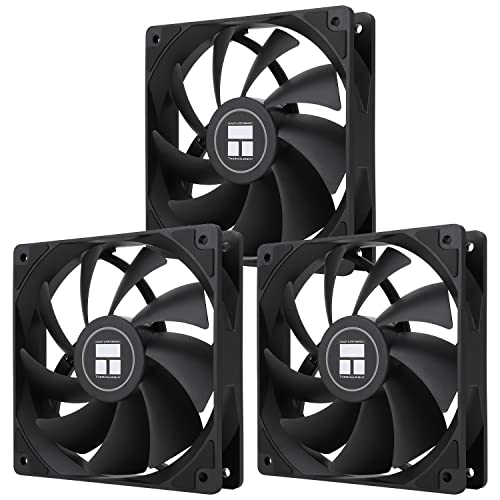
Thermalright TL-C12C X3 CPU Fan 120mm Case Cooler Fan, 4pin PWM Silent Computer with S-FDB Bearing Included, up to 1550RPM Cooling Fan(3 Quantities)
As an Amazon Associate we earn from qualifying purchases. Product prices and availability are accurate as of the date/time indicated.

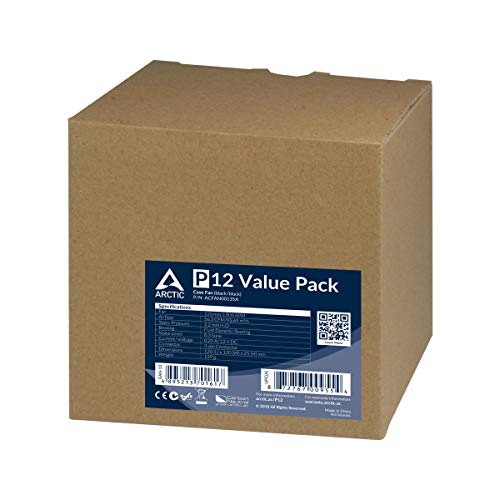
ARCTIC P12 (5 Pack) - PC Fans, 120mm Case Fan, Pressure-optimised, Quiet Motor, Computer, Fan Speed: 1800 RPM - Black


As an Amazon Associate we earn from qualifying purchases. Product prices and availability are accurate as of the date/time indicated.

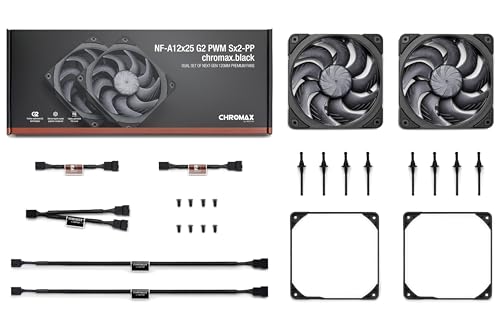
Noctua NF-A12x25 G2 PWM Sx2-PP chromax.Black, High-End Quiet Fans 2x120mm | High Airflow & Static Pressure, Low-Noise 25mm Thick Fans, Speed-Offset 2-Pack, for Coolers/Radiators/Cases, 1800rpm 4-Pin




As an Amazon Associate we earn from qualifying purchases. Product prices and availability are accurate as of the date/time indicated.
Prices shown are approximate and for reference only. Prices change often, so please check the current price on Amazon before you buy.
Top Fans for Case Fan vs CPU Fan Airflow Reviewed
Noctua NF-A12x25 PWM Fan
It has a very high CFM, a low noise, and a good value for builders. It is a good choice if you want to understand case fan vs CPU fan for airflow with a proven Noctua design, because it is one of the most trusted fans, it has 102 CFM, and it is quiet. The 120 mm size fits most cases.
Arctic P12 PWM PST Fan
It has a low price, a good static pressure, and a good value for builders. It is a good choice if you want an Arctic fan with a low price for airflow, because it is very affordable, it has 2.20 mmH2O static pressure, and it is quiet. It is ideal for builders who want a budget fan.
Corsair ML120 Pro RGB Fan
It has a very high static pressure, RGB lighting, and a good value for builders. It is a good choice if you want a Corsair fan with a very high static pressure for airflow, because it has 4.20 mmH2O, it has RGB, and it is made by a trusted brand. It is a popular choice for builders who want RGB fans.
be quiet! Silent Wings 4 Fan
The be quiet! It has a very low noise, a good CFM, and a good value for builders. It is a good choice if you want a be quiet! fan with a very low noise for airflow, because it is only 18.9 dBA, it has 76 CFM, and it is quiet. It is a good entry level option for builders who want a quiet PC.
Lian Li UNI Fan SL120 V2 Fan
It has a good CFM, RGB lighting, and a good value for builders. It is a good choice if you want a Lian Li fan with RGB for airflow, because it has RGB, it has 65 CFM, and it is easy to connect. It is ideal for builders who want a stylish fan.
Thermalright TL-C12C Fan
It has a low price, a good CFM, and a good value for builders. It is a good choice if you want a Thermalright fan with a low price for airflow, because it is very affordable, it has 66 CFM, and it is quiet. It is a good option for builders who want a budget fan.
Case Fans vs CPU Fans: What Is the Difference
The difference between case fans and CPU fans is that case fans move air through your case, while CPU fans cool your CPU heatsink. A case fan such as the Noctua NF-A12x25 is a good choice for case airflow, because it has high CFM. A CPU fan such as the Corsair ML120 Pro is a good choice for CPU cooling, because it has high static pressure. Use case fans, with your PC, so air flows in and out, and use a CPU fan, with your CPU cooler, so your CPU stays cool.
The pros of case fans include high airflow, because they move a lot of air, and low noise, because they run at low speed. The cons of case fans include low static pressure, because they do not push air through a heatsink well. The pros of CPU fans include high static pressure, because they push air through a heatsink, and the cons include higher noise, because they run faster. Check your cooling needs, with their airflow, before choosing, so you know which fan is right for you.
Buying Guide: Case Fan vs CPU Fan for Airflow
Start with your case size, your CPU cooler, and your budget. If you need case airflow, a fan such as the Noctua NF-A12x25 is a good choice, because it has 102 CFM. If you need CPU cooling, a fan such as the Corsair ML120 Pro is a good choice, because it has 4.20 mmH2O static pressure. If you want a low price fan, a fan such as the Arctic P12 is a good choice. If you want a quiet fan, a fan such as the be quiet! Silent Wings 4 is a good choice, because it is only 18.9 dBA.
Next, check CFM, static pressure, and noise. A fan with a CFM of 60 or more is better than a fan with a lower CFM, because it moves more air. A fan with a high static pressure is a good choice for CPU cooling, because it pushes air through a heatsink. A fan with a low noise is better than a fan with a loud noise, because it is quiet. A fan with a size of 120 mm is a good choice, because it fits most cases.
Check bearing, RGB, and connection together. A fan with a good bearing is better than a fan without, because it lasts longer. A fan with RGB is a good choice, because it adds style to your PC. A fan with PWM is better than a fan without, because it lets you control speed. Check your case, with its fan mounts, before buying, so you know the fan will fit, and check your motherboard, with its fan headers, so you know it can connect.
Check your budget, your use, and your future. Silent Wings 4, offers a quiet design.
Finally, do not buy a fan for airflow based only on price or CFM. A fan with high CFM but low static pressure will not cool a CPU heatsink well, even if it is cheap, while a fan with high static pressure but high noise will be loud, even if it is expensive. A fan that does not fit your case will not install, even if it has a good CFM. Choose a fan that moves air, with low noise, and with a price that fits your needs. Check the fan size, CFM, and noise before buying, and follow the manufacturer guidance for installation. Always check your fan specifications before buying.
How to Set Up Case Fans and CPU Fans for Best Airflow
To set up case fans and CPU fans for best airflow, first place your intake fans, with their direction, at the front of your case, so cool air comes in, and place your exhaust fans, with their direction, at the rear and top, so hot air goes out. Mount your CPU fan, with its direction, so it pushes air through your heatsink, and connect your fans, with their cables, to your motherboard, so they have power. Set your fan curves, with software, so they run quiet at idle and faster under load, and check your temperatures, with software, so you know they cool well. When you are done, clean your fans, with a cloth, so dust is removed. Always follow the manufacturer guidance for installation.
Frequently Asked Questions
What is case fan vs CPU fan for airflow?
What is case fan vs CPU fan for airflow, case fans move air through your PC case, while CPU fans cool your CPU heatsink. A fan with fan size of 120 mm, CFM of 102 CFM, static pressure of 2.34 mmH2O, noise level of 22.6 dBA, and a price under $35, such as the Noctua NF-A12x25 PWM Fan at $30 to $35, is a good choice for case airflow, because it has high CFM and low noise. Choose a fan that fits your cooling need.
Do I need both case fans and a CPU fan?
Do you need both case fans and a CPU fan, yes, you need both case fans and a CPU fan, because case fans move air through your case and a CPU fan cools your CPU. A fan such as the Noctua NF-A12x25 is a good choice for case airflow. Use case fans, with your PC, so air flows, and use a CPU fan, with your CPU cooler, so your CPU stays cool. Check your case, with its fan mounts, before you buy, so you know how many fans you need.
What is more important, CFM or static pressure?
What is more important, CFM or static pressure, CFM is more important for case fans, because they need to move a lot of air, while static pressure is more important for CPU fans, because they need to push air through a heatsink. A fan such as the Noctua NF-A12x25 has high CFM. Use a high CFM fan, with your case, so air flows, and use a high static pressure fan, with your CPU cooler, so it cools well. Check the CFM, with its number, before you buy, so you know how much air it moves.
How many case fans do I need?
How many case fans do you need, you need at least 2 case fans, one intake and one exhaust, because it creates airflow. A fan such as the Arctic P12 is a good choice, because it is affordable. Use 2 fans, with your PC, so air flows in and out, and use more fans, with your PC, such as 3 intake and 2 exhaust, if you have a high end PC. Check your case, with its fan mounts, before you buy, so you know how many fans fit.
Related guides
- Best Tablet Case for Field Workers in 2026: Drop Protection That Survives Concrete, Rain, Gloves, and a Full Shift
- Best Hard Drive Dock vs USB Adapter for PCs: 6 Best Hard Drive Dock vs USB Adapter for PCs Picks in 2026
- Best Durable GPU Long Term Gaming in 2026: NVIDIA GeForce RTX and AMD Radeon RX Compared for a Memory Parish Sized for the Decade, Fans Treated as Consumables, and a Case and Power Supply Sentenced Beside the Card
- Best Handheld Console Accessory Kit for PC Gamers in 2026: 6 Best Handheld Console Accessory Kit for PC Gamers Picks for Protection, Docking, and Reliable Portable Gaming
More from Amazon
Programs that pair well with the guide above. Offers and eligibility are set by Amazon and may change.
Free shipping on eligible items, Prime Video and more. Eligible new members can start with a free trial.
Start a Prime free trialAd-free music streaming. Eligible new subscribers can start with a free trial.
Try Music Unlimited freeA Prime membership for ages 18-24 with a trial period. Eligibility is set by Amazon.
See Prime for Young AdultsAudiobooks and podcasts to listen to on the go. Eligible new members can start with a free trial.
Try Audible freeAs an Amazon Associate we earn from qualifying purchases.

Write Your Review
No reviews yet. Be the first to share your experience!