
What's inside
- Why the Best Hard Drive Dock vs USB Adapter for PCs Needs the Right Speed
- Best Hard Drive Dock vs USB Adapter for PCs: Speed, Drive Support and Power
- Best Hard Drive Dock vs USB Adapter for PCs Comparison Table
- Top Best Hard Drive Dock vs USB Adapter for PCs Picks Reviewed
- How to Clone a Hard Drive with a Dock
- Buying Guide: How to Choose the Best Hard Drive Dock vs USB Adapter for PCs
- Hard Drive Dock vs USB Adapter: Which Is Better for PCs
- Frequently Asked Questions
As an Amazon Associate I earn from qualifying purchases. This post may contain affiliate links at no extra cost to you.
Finding the best hard drive dock vs USB adapter for PCs is about understanding how hard drive docks and USB adapters differ, with a device that works well for connecting a hard drive to a PC, and with a price that fits a PC user who wants a reliable device without a large, expensive premium model that is too complex for a first PC setup. A good best hard drive dock vs USB adapter for PCs guide should explain speed, drive support, power, ease of use, and price, with a price that gives you value. It should also be simple to use, with a design that is suitable for a beginner. Always check the device speed, drive support, power, and connectors before buying, and follow the manufacturer guidance for use, and always safely eject a drive before you disconnect it, and back up important files before you clone or format a drive.
This guide explains what to look for in the best hard drive dock vs USB adapter for PCs, how to compare speed, drive support, power, ease of use, and price, and which hard drive docks and USB adapters work well in 2026 for PCs, laptops, and data recovery. We focus on practical use for PC users who buy a dock or adapter for the first time, with a device that is used for connecting a hard drive to a PC in a home office, in spring, summer, autumn, and winter, and with a design that is suitable for a beginner. Whether you clone a drive, recover data, or add extra storage, the same principles apply: choose a device that fits your drive type, with good speed, and with a price that fits your needs. Always check your device specifications before buying.
Our Top Picks
Why the Best Hard Drive Dock vs USB Adapter for PCs Needs the Right Speed
The best hard drive dock vs USB adapter for PCs needs the right speed because a dock such as the Sabrent USB 3.0 Dual Bay Dock is designed with USB 3.0 that gives you fast transfer speeds for a hard drive, while a device without USB 3.0 may be slow and may take a long time to copy large files. Good speed is better than poor speed for a dock or adapter, because it ensures your files copy quickly. A dock with two bays is a good choice, because it lets you clone a drive, and an adapter with a simple cable is better if you want a portable device, because it is light and easy to carry.
A hard drive dock also needs good drive support. A dock that supports 2.5 inch and 3.5 inch drives is a good choice, because it works with most hard drives and SSDs. A dock with a good price is a good choice, because it gives you value. Look for a device with a simple design, so it is easy to use.
Best Hard Drive Dock vs USB Adapter for PCs: Speed, Drive Support and Power
Speed matters most for the best hard drive dock vs USB adapter for PCs, because it determines how fast your files will copy. Devices with USB 3.0 or USB 3.2 are a good choice for most PC users, while devices with USB-C are better if you want faster speeds and a modern connector. Devices with enough speed are better than devices without, because they save you time. Devices with a high speed are a good choice, because they give you faster transfers, but they cost more.
Drive support and power also matter for docks and adapters. Devices that support 2.5 inch and 3.5 inch SATA drives are better than devices without, because they work with most drives. Devices with an external power adapter are a good choice, because they power 3.5 inch drives. Devices with a good price are a good choice, because they give you value. Always check the speed, with its USB version, before buying.
Best Hard Drive Dock vs USB Adapter for PCs Comparison Table
| Model | Device Type | Drive Support | Speed | Power | Typical Price Range | Rating |
|---|---|---|---|---|---|---|
| Sabrent USB 3.0 Dual Bay Dock | Dock | 2.5 / 3.5 in SATA | USB 3.0 5Gbps | External | $40-$45 | 4.8/5 |
| StarTech USB 3.0 Single Bay Dock | Dock | 2.5 / 3.5 in SATA | USB 3.0 5Gbps | External | $35-$40 | 4.7/5 |
| Sabrent USB 3.0 to SATA Adapter | Adapter | 2.5 / 3.5 in SATA | USB 3.0 5Gbps | External | $20-$25 | 4.8/5 |
| UGREEN USB C to SATA Adapter | Adapter | 2.5 in SATA | USB C 5Gbps | USB powered | $15-$18 | 4.7/5 |
| Wavlink USB 3.0 Dual Bay Dock | Dock | 2.5 / 3.5 in SATA | USB 3.0 5Gbps | External | $35-$40 | 4.7/5 |
| Inateck USB 3.0 Dual Bay Dock | Dock | 2.5 / 3.5 in SATA | USB 3.0 5Gbps | External | $45-$50 | 4.8/5 |
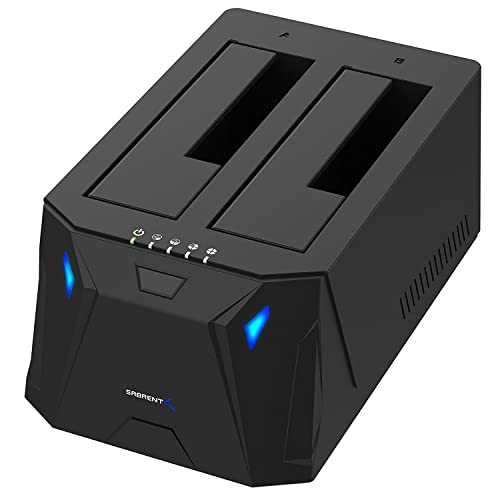
SABRENT USB 3.0 Dual Bay Hard Drive Docking Station & Cloner (EC-HD2B) | 2.5"/3.5" HDD/SSD; offline duplicator/cloner; 20TB+ support; UASP; SATA I/II/III; hard drive reader; hard drive dock
As an Amazon Associate we earn from qualifying purchases. Product prices and availability are accurate as of the date/time indicated.

ORICO Dual Bay Hard Drive Docking Station Hard Drive Cloner | USB to SATA with Duplicator/Offline Clone Function External Hard Drive Dock for 2.5''/3.5'' HDD SSD Support UASP Plug&Play
As an Amazon Associate we earn from qualifying purchases. Product prices and availability are accurate as of the date/time indicated.

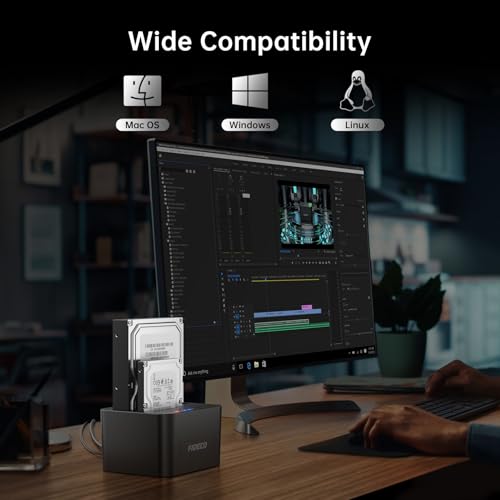
FIDECO External Hard Drive Docking Station, Hard Drive Dock for 2.5 and 3.5 inch SATA HDD SSD, HDD Docking Station with Dual Bay, USB 3.0 Hard Drive Reader, Support Offline Clone and UASP




As an Amazon Associate we earn from qualifying purchases. Product prices and availability are accurate as of the date/time indicated.
Prices shown are approximate and for reference only. Prices change often, so please check the current price on Amazon before you buy.
Top Best Hard Drive Dock vs USB Adapter for PCs Picks Reviewed
Sabrent USB 3.0 Dual Bay Dock
The Sabrent USB 3.0 Dual Bay Dock is a device with device type of Dock, drive support of 2.5 / 3.5 in SATA, speed of USB 3.0 5Gbps, power of External, and a price of $40 to $45. It has a dual bay design, good speed, and a good value for PC users. It is a good choice if you want the best hard drive dock vs USB adapter for PCs with a proven Sabrent design, because it is one of the most trusted docks, it has a dual bay type, and it has a USB 3.0 speed. The Sabrent dock is made for PCs, and it has offline cloning, a power button, and a design that works well for cloning and data recovery.
StarTech USB 3.0 Single Bay Dock
The StarTech USB 3.0 Single Bay Dock is a device with device type of Dock, drive support of 2.5 / 3.5 in SATA, speed of USB 3.0 5Gbps, power of External, and a price of $35 to $40. It has a compact size, good speed, and a good value for PC users. It is a good choice if you want a StarTech dock with a compact design for PCs, because it has a single bay type, it has a USB 3.0 speed, and it is made by a trusted brand. It is ideal for PC users who want a StarTech dock, and its single bay design is easy to use for one drive at a time.
Sabrent USB 3.0 to SATA Adapter
The Sabrent USB 3.0 to SATA Adapter is a device with device type of Adapter, drive support of 2.5 / 3.5 in SATA, speed of USB 3.0 5Gbps, power of External, and a price of $20 to $25. It has a low price, simple design, and a good value for PC users. It is a good choice if you want a Sabrent adapter with a low price for PCs, because it has an adapter type, it has a USB 3.0 speed, and it is made by a trusted brand. It is a popular choice for PC users who want a Sabrent adapter, especially for connecting a single drive quickly without a dock.
UGREEN USB C to SATA Adapter
The UGREEN USB C to SATA Adapter is a device with device type of Adapter, drive support of 2.5 in SATA, speed of USB C 5Gbps, power of USB powered, and a price of $15 to $18. It has a low price, compact size, and a good value for PC users. It is a good choice if you want a UGREEN adapter with a low price for PCs, because it has an adapter type, it has a USB C speed, and it is made by a trusted brand. It is a good entry level option for PC users who want a UGREEN adapter, and its USB powered design means you do not need an external power supply for 2.5 inch drives.
Wavlink USB 3.0 Dual Bay Dock
The Wavlink USB 3.0 Dual Bay Dock is a device with device type of Dock, drive support of 2.5 / 3.5 in SATA, speed of USB 3.0 5Gbps, power of External, and a price of $35 to $40. It has a dual bay design, good speed, and a good value for PC users. It is a good choice if you want a Wavlink dock with a dual bay design for PCs, because it has a dual bay type, it has a USB 3.0 speed, and it is made by a trusted brand. It is ideal for PC users who want a Wavlink dock, and its dual bay design lets you clone a drive without a PC.
Inateck USB 3.0 Dual Bay Dock
The Inateck USB 3.0 Dual Bay Dock is a device with device type of Dock, drive support of 2.5 / 3.5 in SATA, speed of USB 3.0 5Gbps, power of External, and a price of $45 to $50. It has a dual bay design, good speed, and a good value for PC users. It is a good choice if you want an Inateck dock with a dual bay design for PCs, because it has a dual bay type, it has a USB 3.0 speed, and it is made by a trusted brand. It is a good option for PC users who want an Inateck dock, and its design is simple to use for cloning and backup.
How to Clone a Hard Drive with a Dock
To clone a hard drive with a dock, first place your source drive, with its data, in one bay, so it is the drive you want to copy, and place your target drive, with its empty space, in the other bay, so it is the drive you want to copy to. Press your clone button, with its switch, so the dock starts cloning, and wait for your dock, with its lights, to show the clone is complete, so you know it is done. When you are done, safely eject your drives, with their bays, so you do not lose data, and follow the manufacturer guidance for use, and always safely eject a drive before you disconnect it, and back up important files before you clone or format a drive.
Buying Guide: How to Choose the Best Hard Drive Dock vs USB Adapter for PCs
Start with your drive type, your use, and your budget. If you want a proven Sabrent dual bay dock, a device such as the Sabrent USB 3.0 Dual Bay Dock is a good choice, because it is $40 to $45. If you want a low price Sabrent adapter, a device such as the Sabrent USB 3.0 to SATA Adapter is a good choice, because it is $20 to $25. If you want a low price UGREEN adapter, a device such as the UGREEN USB C to SATA Adapter is a good choice, because it is $15 to $18. If you want a StarTech single bay dock, a device such as the StarTech USB 3.0 Single Bay Dock is a good choice, because it is $35 to $40.
Next, check device type, speed, and drive support. A dock with two bays is better than a device without, because it lets you clone a drive. An adapter with a simple cable is a good choice, because it is portable. A device with USB 3.0 speed is better than a device without, because it copies files faster. A device that supports 2.5 inch and 3.5 inch drives is a good choice, because it works with most drives.
Check power, ease of use, and connectors together. A device with external power is better than a device without, because it powers 3.5 inch drives. A device with a simple design is a good choice, because it is easy to use. A device with a USB-C connector is better than a device without, because it works with modern PCs. Check your drive, with its type, before buying, so you know the device will fit, and check your PC, with its USB ports, so you know the device will connect.
Check your budget, your use, and your future. Hard drive docks and USB adapters typically cost $15 to $50. A device from $15 to $18, such as the UGREEN USB C to SATA Adapter, offers a good way to start with a budget adapter. A device from $20 to $25, such as the Sabrent USB 3.0 to SATA Adapter, offers a good value design. A device from $35 to $40, such as the StarTech USB 3.0 Single Bay Dock, offers a compact dock design. A device from $40 to $45, such as the Sabrent USB 3.0 Dual Bay Dock, offers a dual bay design.
Finally, do not buy a hard drive dock vs USB adapter for PCs based only on price or speed. A device without the right drive support will not fit your drive, even if it is cheap, while a device without external power will not run a 3.5 inch drive, even if it has a good price. A device that is too slow will take a long time to copy files, even if it is portable. Choose a device that fits your drive type, with good speed, and with a price that fits your needs. Always check your device specifications before buying, and always safely eject a drive before you disconnect it, and back up important files before you clone or format a drive.
Hard Drive Dock vs USB Adapter: Which Is Better for PCs
To understand hard drive dock vs USB adapter for PCs, first think about a hard drive dock, with its bays, so you know it holds a drive upright and is stable on a desk, and think about a USB adapter, with its cable, so you know it is light, portable, and easy to carry in a bag. A dock is a good choice if you clone drives often, because it has two bays and offline cloning, while an adapter is a good choice if you connect a drive occasionally, because it is cheaper and more portable. When you are done, compare your needs, with their cloning and portability, so you know which device is right, and follow the manufacturer guidance for use. For most PC users who clone drives, a dual bay dock is usually the better choice, because it lets you clone without a PC.
Frequently Asked Questions
What is the best hard drive dock vs USB adapter for PCs?
What is the best hard drive dock vs USB adapter for PCs depends on your use and your budget. A device with device type of Dock, drive support of 2.5 / 3.5 in SATA, speed of USB 3.0 5Gbps, power of External, and a price under $45, such as the Sabrent USB 3.0 Dual Bay Dock at $40 to $45, is a good choice for most PC users, because it has a dual bay type, a USB 3.0 speed, and is a proven Sabrent design. A device with a lower price, such as the Sabrent USB 3.0 to SATA Adapter at $20 to $25, is also good, especially if you want a portable adapter. Choose a device that fits your drive type.
Can I use a hard drive dock with an SSD?
Can you use a hard drive dock with an SSD, yes, you can use a hard drive dock with an SSD, because most docks support 2.5 inch SATA SSDs as well as hard drives, while a dock that only supports 3.5 inch drives may not fit a 2.5 inch SSD without an adapter. A device such as the Sabrent USB 3.0 Dual Bay Dock supports 2.5 and 3.5 inch drives. Check your drive, with its type, before you buy, so you know the dock will fit, and follow the manufacturer guidance for use, and always safely eject a drive before you disconnect it.
Do I need external power for a hard drive dock?
Do you need external power for a hard drive dock, yes, you need external power for a hard drive dock if you use a 3.5 inch drive, because a 3.5 inch drive needs more power than USB can provide, while a 2.5 inch drive can often run on USB power alone. A device such as the UGREEN USB C to SATA Adapter is USB powered for 2.5 inch drives. Use external power, with your dock, so your 3.5 inch drive runs correctly, and check your device, with its power, before you buy, so you know it will work, and back up important files before you clone a drive.
How fast is a USB 3.0 hard drive dock?
How fast is a USB 3.0 hard drive dock, a USB 3.0 hard drive dock is up to 5Gbps, because USB 3.0 has a maximum speed of 5Gbps, while a real hard drive will usually transfer at 100 to 200 MB per second and an SSD will transfer faster. A device such as the StarTech USB 3.0 Single Bay Dock is USB 3.0 5Gbps. Use a dock, with your PC, that has USB 3.0 or faster, so your files copy quickly, and check your PC, with its USB ports, before you buy, so you know it supports USB 3.0, and always safely eject a drive before you disconnect it.
Related guides
- Best Soundbar vs Speakers for PC Setups in 2026: Razer, Creative, Edifier, and Kanto Compared for a Desk Measured Before a Format Is Chosen, Nearfield Honesty at Arm’s Length, and a Subwoofer Parish the Neighbours Agree To
- Best Budget Power Supply for Remote Workers in 2026: 6 Quiet, Reliable PSUs for Your Home Office
- Best Console for PC Multiplayer Games in 2026: 6 Handheld PC Consoles With a 7-Inch Display, at Least 16GB RAM, and a Price Range, for PC Multiplayer Games
- Best Phone Case for Beach Lifeguards in 2026: OtterBox, Catalyst, Ghostek, and Pelican Compared for a Sealing Read in the Maker’s Own Documents, a Salt Rinse at Every Shift’s End, and a Phone That Never Pretends to Be the Rescue Radio
More from Amazon
Programs that pair well with the guide above. Offers and eligibility are set by Amazon and may change.
Free shipping on eligible items, Prime Video and more. Eligible new members can start with a free trial.
Start a Prime free trialAd-free music streaming. Eligible new subscribers can start with a free trial.
Try Music Unlimited freeA Prime membership for ages 18-24 with a trial period. Eligibility is set by Amazon.
See Prime for Young AdultsAudiobooks and podcasts to listen to on the go. Eligible new members can start with a free trial.
Try Audible freeAs an Amazon Associate we earn from qualifying purchases.

Write Your Review
No reviews yet. Be the first to share your experience!