
What's inside
As an Amazon Associate I earn from qualifying purchases. This post may contain affiliate links at no extra cost to you.
The best tablet case for field workers is not a fashion accessory with a rugged name; it is the difference between a tool that finishes the shift and a screen that finishes its life on a warehouse floor, a loading dock, or the gravel of a job site, taking the day’s inspections, work orders, and signatures with it. Field tablets fall from forklift dashboards and tailgates, ride in cabs through summer heat and winter cold, get used with gloves on, in drizzle, under fluorescent flicker and noon glare, and a case earns the word field-ready only when it answers all of that at once: certified-class drop protection, sealed ports against dust and rain, a hand strap or shoulder carry for the worker whose other hand is always full, and buttons and a stand that work at a workbench’s pace. This guide grades six real, currently sold rugged cases for the major tablet lines on exactly those duties, with the compatibility warning that governs the whole category stated early and repeated in the steps: a rugged case is built for one exact tablet model and generation, and the wrong-generation case, however close it looks, will misalign ports, buttons, cameras, and pencils, so the model number is the first specification and every other virtue is second.
Understand what field protection actually certifies before the table, because the category’s language is generous. Drop claims should trace to a test standard, the military’s MIL-STD-810H being the common reference, and the honest reading of any such claim is that the case survived the standard’s specified drops in a laboratory, which correlates with, but does not guarantee, survival of your tablet’s fall onto your site’s concrete at your angle. Ingress claims divide by kind: most rugged cases are dust-and-splash resistant by design, port covers and sealed buttons shedding the day’s grit and drizzle, while true waterproofing, an IP rating for immersion, belongs to specialized enclosures and to the tablet’s own rating where it has one, and no case in this table should be trusted for a dunk its maker has not rated it for. The third protection is the screen’s, raised bezels and a built-in protector or a tempered-glass partner, since the field tablet’s commonest death is not the corner drop but the face-down slide across a truck bed’s grit. Grade the rows below, therefore, as systems, shell, screen, ports, and carry together, because a case is only its weakest surface.
Our Top Picks
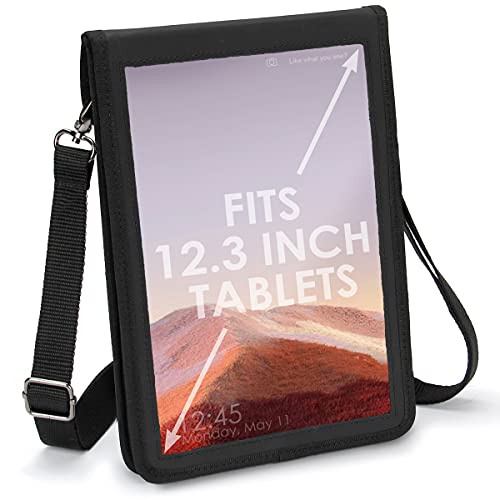 USA GEAR 12" Tablet Case Neoprene Sleeve CoverOne Size12.5 x 8.75 x 1.25 inches0.84 poundsCheck on Amazon
Best Tablet Case for Field Workers: Drop Ratings, Sealed Ports, and Carry Systems
Drop Protection and Build: Layers, Corners, and Honest Standards
The rugged case’s architecture is consistent across the good ones because physics is consistent: a rigid inner frame that holds the tablet’s shape against the impact, a softer outer layer that absorbs and spreads the energy, and corners reinforced beyond the rest, since tablets, like toast, land on their corners with a reliability that design can exploit. What varies is the execution’s honesty, the standard the drop claim cites, the height it claims, and the fit’s precision, a case that shifts on the tablet being a case whose corners are not where the drawing put them. The field worker’s own checks are the doorstep drop’s safer cousins: the case seated with every clip and screw as designed, the buttons acting with a positive click through their covers, the ports aligning to their cutouts without strain on the cable, and the whole assembly’s weight accepted with open eyes, because rugged cases double a tablet’s heft and the worker carries that decision for ten hours a day. A case that is protective in the listing and exhausting in the hand will be left in the cab, where its drop rating is a rumor, so comfort and carry, the next section’s subject, are protection features in the only accounting that matters, the one taken at the end of a shift.
Carry and Use in the Field: Hand Straps, Shoulder Straps, and Stands
The field case earns its keep in the hand more than in the fall. A rotating hand strap on the back is the category’s signature feature for a reason: it lets the worker hold the tablet securely one-handed at chest height, turning to show a customer a diagram, reading a torque table at a machine, signing with the other hand, and the best implementations rotate for portrait and landscape and adjust for a gloved hand’s thickness, a detail to test with your own gloves since a strap sized for a bare hand in August is a strap unused in January. The shoulder strap is the second citizen, for the inspector whose route is a mile of plant floor and whose hands carry gauges, coffee, and railings in rotation, and its attachment points should be the case’s structure, not its decoration. The kickstand closes the trio, rated by whether it survives being deployed a hundred times a week on a workbench and whether its angles serve both the desk’s typing and the presentation’s tilt. Pencil and stylus storage belongs in this audit too, a holder that grips rather than suggests, since the field loses loose pencils the way the sea loses bottles, and charging compatibility, the pencil that must attach magnetically through the case’s side, is a model-specific check the steps will name.
Ports, Buttons, and the Glove Test
Field conditions tax the case’s small interfaces daily. Port covers keep the charging port and any audio jack from packing with the site’s dust and the day’s drizzle, and they should open with a gloved fingernail and close with a felt seat, since a cover that fights will be torn off by Friday and a port that fills with grit will charge badly by the month’s end. Buttons under covers must actuate cleanly, volume and power found by feel through a glove, because the field worker does not remove a glove to wake a screen in January if the case can be bought that lets them keep it on. The screen’s own glove performance belongs to the tablet’s settings, many field tablets offering a glove mode, and the case’s screen protector must be tested against it, some thick built-in protectors dulling touch enough to matter. Heat is the final interface: a sealed rugged case in a summer cab insulates a tablet that is already throttling, so the field routine includes shade and sense, and the case’s color and material, black rubber in a parked truck being a solar oven’s lining, is a legitimate selection point for the crews who work where the sun is a coworker.
Best Tablet Case for Field Workers: Quick Comparison
| Rugged Tablet Case Model | Key Specs | Best For | Typical Price Range | Rating |
|---|---|---|---|---|
| OtterBox Defender Series (tablet class) | Multi-layer build in class, port covers, built-in screen protection in line, stand/shield in class | Best tablet case for field workers overall | $70 – $100 by model | 4.7 / 5 |
| SUPCASE Unicorn Beetle Pro (tablet class) | Rugged full-body build in class, built-in screen protector and kickstand in line, hand/shoulder strap options positioning | Best value rugged | $25 – $45 by model | 4.5 / 5 |
| Griffin Survivor All-Terrain class | Sealed rugged build in class, high drop claim positioning in line, port seals | Best sealed protection | $60 – $90 by model | 4.5 / 5 |
| Urban Armor Gear (UAG) Metropolis / Scout class | Feather-light rugged positioning in class, MIL-STD claim in line, folio and stand variants | Best lighter rugged | $45 – $75 by model | 4.4 / 5 |
| Targus Field-Ready / SafePort class | Enterprise rugged in class, hand strap and stand positioning in line, fleet availability | Best for company fleets | $60 – $90 by model | 4.4 / 5 |
| Gumdrop DropTech class | Education/fleet rugged in class, reinforced corners positioning, asset-tag friendly in line | Best for fleets and schools | $50 – $80 by model | 4.3 / 5 |
USA GEAR 12" Tablet Case Neoprene Sleeve Cover with Rigid Exterior & Carry Strap Compatible with 12" Tablets - Hands Free Carrying Perfect for Airline Workers, Classroom Devices, and Employee Fleets





As an Amazon Associate we earn from qualifying purchases. Product prices and availability are accurate as of the date/time indicated.

Tactical Notebook Covers Military Tablet Cover System | Zippered with Adjustable Corner Holders | Durable Tablet Protection for EDC & Field Use - Black


As an Amazon Associate we earn from qualifying purchases. Product prices and availability are accurate as of the date/time indicated.
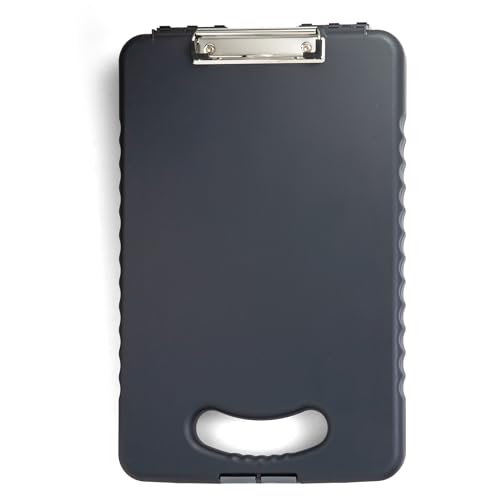
Officemate® OIC Tablet Clipboard Case, 16 1/10"H x 10 1/5"W x 1 3/10"D, Charcoal

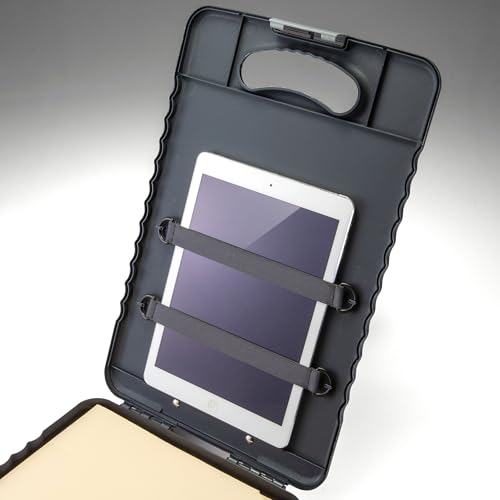


As an Amazon Associate we earn from qualifying purchases. Product prices and availability are accurate as of the date/time indicated.
Prices shown are approximate and for reference only. Prices change often, so please check the current price on Amazon before you buy.
All rugged cases are model-specific; prices vary by tablet model and generation. Specs summarize manufacturers’ published information for current versions. Ratings are editorial, weighing drop protection honesty, sealing, carry and stand systems, glove usability, and value.
The Six Field Tablet Cases Reviewed
1. OtterBox Defender: Best Overall
The Defender is the rugged case the field standardized on for the reason standards happen: a multi-layer build whose drop record across a decade of job sites is the category’s reference, port covers that seal with authority, a shield stand in the line that works at the bench, and an ecosystem of replacements, holsters, and support that treats a broken case as a service event rather than a repurchase. Its costs are its class’s: weight that doubles the tablet’s presence, a price at the table’s top, and a screen protector feel that some crews replace with glass where the model allows. For the worker whose tablet is a livelihood, it is the recommendation this guide defends, bought by exact model, fitted once with care, and then forgotten in the way only genuinely protective equipment earns.
2. SUPCASE Unicorn Beetle Pro: Best Value
SUPCASE’s Beetle line delivers the rugged formula, full-body shell, built-in screen protector, kickstand, sealed ports, at prices that routinely halve the leader’s, with hand and shoulder strap variants in the line for the field models that matter. Its fit precision and materials sit a half-step below the premium rows, varying by tablet model in a way the buyer should verify in the first fit, and its drop claims should be read with the guide’s standard skepticism applied evenly. For the self-employed inspector, the small crew, and the household whose field is a farm, it is the value row with a real argument, and its rating reflects protection that crews actually use because its price let them buy it for every tablet they own.
3. Griffin Survivor All-Terrain: Best Sealed
The Survivor line stakes its name on sealing: a case that closes around the tablet with port seals and covered buttons to a degree the splash-and-dust class respects, under a drop claim in the high class of its maker’s testing. Its sealed nature makes it the row for the dirtiest duties, the grain elevator, the quarry, the food plant’s washdown-adjacent zones, with the standing caution that sealed against the day is not rated for immersion unless the model says so in an IP figure. Its bulk is its sealing’s price, and its model range should be checked for your exact tablet. For the crew whose enemy is the environment more than the fall, it is the considered first choice.
4. UAG Metropolis / Scout: Best Lighter Rugged
Urban Armor Gear’s tablet lines answer the weight complaint: rugged builds with military-standard drop claims in their class, in shells notably lighter and slimmer than the heavy class’s, with folio covers and stands in the Metropolis manner for the worker whose field includes a desk’s presentations. The trade is the heavy class’s ultimate margin, a calculation the mobile professional, whose drops are office-and-sidewalk class and whose carry is all day, may rationally accept. Its styling, armored without fancy dress, suits the client-facing field roles. Graded as the weight class’s champion, it reminds the table that protection carried is protection indeed, and protection left in the truck for its heft is a specification without a fact.
5. Targus Field-Ready / SafePort: Best for Fleets
Targus builds for the buyer who purchases by the hundred: rugged cases with hand straps, stands, and the enterprise virtues, consistent SKUs by model, availability through business channels, and designs that assume an IT department will deploy, tag, and support them. Its per-unit price sits in the fleet’s negotiating band, its protection is the honest class’s, and its features favor the managed tablet’s life, including healthcare-adjacent variants in the wider line. For the company equipping crews, it is the procurement row, and its rating reflects a case whose excellence is partly logistical, which, at fleet scale, is a form of excellence the field feels every day.
6. Gumdrop DropTech: Best for Fleets and Schools
Gumdrop’s DropTech line grew up in education, where tablets are dropped by professionals in the field of dropping things, and its virtues transfer to industry intact: reinforced corners, a build that survives institutional life, and fleet-friendly details, clear backs or windows for asset tags in the line’s variants, so the numbered tablet stays identifiable inside its armor. Its sealing and carry systems are its class’s, its model range favors the common fleet tablets, and its price suits the bulk purchase. For the school district, the rental fleet, and the operation whose tablets are assets first and gadgets second, it is the closing row with a constituency that renews it by the pallet.
Buying Guide: How to Choose the Best Tablet Case for Field Workers
Step One: Match the Case to the Exact Tablet, Then to the Site’s Hazards
Begin with the tablet’s full identity, maker, model, generation, and screen size, read from its settings or its box rather than from memory, and shop only the cases built for that exact device, since a millimeter’s difference in a button’s place is a case returned. Then write the site’s hazards in the order they will actually occur: falls from what height onto what surface, which sets the drop class; dust, drizzle, or washdown, which sets the sealing; sun and cab heat, which argues for color and for the routine’s shade discipline; and the carry’s shape, one-handed rounds, two-handed bench work, vehicle mounts, which chooses the strap, the stand, and the mount compatibility. Match the case to that list rather than to the listing’s adjectives, and check the two compatibilities that ambush field deployments: the charging dock or vehicle mount the crew already uses, whose fit a thick case may break, and the stylus’s magnetic charging, which some shells interrupt. A case that fits the tablet but not the workflow is a case exchanged at the project’s expense, and the time to discover it is this step, on paper.
Step Two: Fit It Once, Completely, and Test With Gloves
Install the case as its maker directs, every layer seated, every clip engaged, every screw where the design has screws, because a rugged case at ninety percent assembled is a decorative case with a rugged accent. Then run the field test in the yard rather than on the route: every button actuated through its cover, bare-handed and gloved; every port opened, charged through, and resealed; the hand strap adjusted to the gloved hand and rotated through its positions; the stand deployed and loaded; the screen worked with the glove mode on, where the tablet offers it, noting any protector’s dulling while a return is still a remedy. Confirm the camera and any barcode-scanning use the crew makes of it, since a case that shadows a lens or a flash taxes the very workflows it was bought to protect. Only then issue it, with the spare screen protector or the replacement plan recorded, because the field will test the case in ways the yard cannot, and the second unit’s logistics should be a decision already made.
Step Three: Build the Case Into the Crew’s Routine
A case protects best inside a routine that respects it. Clean it on the week’s rhythm, grit brushed from the seals and port covers before it grinds them, the screen protector wiped with the cloths that will not scour it, and the case inspected at the corners and clips after any known drop, since a cracked shell’s rating left with the crack. Manage the heat as the guide directs, the tablet out of the parked cab’s oven, the case’s insulation remembered in summer routing. Keep the charging honest, cables seated through the port covers without forcing angles that tear them, docks checked against the case’s bulk at every vehicle change. And close the loop with the fleet’s paperwork where a fleet exists, the case and tablet paired by asset number, the replacement cycle budgeted, because field equipment fails on a schedule whether or not the budget admits it. Run so, the best case in this table becomes what it was bought to be, the reason a dropped tablet is a story told at lunch rather than a report filed to a manager, and the crew’s work, orders, inspections, and signatures, rides out the shift and comes home.
Frequently Asked Questions About Tablet Cases for Field Workers
Will a rugged case fit my tablet if it is the same size but a different generation?
Assume no, and verify before you rely on it, because tablet generations that share a screen size routinely differ in the details a rugged case is built around: button positions and sizes, camera module shapes, speaker and port placements, thickness by fractions that a rigid shell cannot forgive, and the stylus’s magnetic charging strip, whose misalignment silently disables the pencil the crew depends on. A soft folio may forgive a generation; a sealed, multi-layer rugged case, the kind this guide exists to grade, is a precision garment and should be bought by the exact model and generation, confirmed against the case maker’s compatibility list rather than the marketplace listing’s headline. The cost of the check is two minutes in the tablet’s settings; the cost of skipping it is a crew’s deployment delayed by a return, which is why this guide puts model identity before every other specification and why fleet buyers order one sample case, fitted and tested by Step Two, before the pallet follows.
Are rugged tablet cases waterproof?
Generally no, in the strict sense, and the distinction matters enough to spend a paragraph on: the cases in this table are built to resist the field’s water, rain, drizzle, splashes, and wet hands, through port covers, sealed buttons, and raised bezels, and they do that job well; they are not, as a class, rated for immersion, and a tablet in one should not be submerged, hosed, or trusted in a downpour beyond its maker’s stated resistance. True immersion protection is an IP-rated property, published as a figure, belonging to specialized enclosures and to some tablets’ own native ratings, and where a crew’s work genuinely involves immersion risk, the purchase should be made on that figure and on nothing else. The practical doctrine for the rest of the field: treat the case as weatherproof in the working sense, dry the tablet and the case’s seals after a wet shift, and never charge a tablet whose port is wet, a rule that protects more field tablets than any case in this table.
Do rugged cases work with gloves and vehicle mounts?
With gloves, mostly yes by design and always by verification: the good field cases size their hand straps for a gloved hand’s adjustment, cover their buttons with actuators a glove can work, and leave the screen to the tablet’s own glove mode, which the case’s screen protector must be tested against, since a thick built-in protector can dull the sensitivity the mode provides, a combination to audition in Step Two rather than discover in January. With vehicle mounts and docks, compatibility is the case-by-case check this guide insists on, because a rugged shell’s added thickness and its strap hardware routinely break a dock or cradle fitted for the bare tablet, and mount makers answer with case-compatible and rugged-case-specific mounts that should be chosen as part of the same purchase. The fleet doctrine is to standardize the trio, tablet, case, and mount, as one tested unit, since a field system is only ever as integrated as its least considered interface, and the mount is the interface fleets forget until the first dashboard drop teaches them.
How long does a rugged tablet case last in field service?
The shell itself, years, commonly outliving the tablet’s first assignment; the consumables within it, on the field’s own schedule: screen protectors scratched and clouded by grit across seasons and replaced as the cheap restoration they are, port covers fatiguing at their hinges, hand straps fraying at their adjustment points, and kickstand hinges loosening under their hundred weekly deployments. The case should be retired, or demoted to a spare tablet’s duty, when its structure is compromised, a cracked frame, a corner crushed by the drop it died preventing, a seal that no longer seats, since a rugged case’s rating is a property of its integrity and a compromised case is a heavy ordinary one. Budgeted honestly, case replacement and protector refresh are line items beside the tablet’s own cycle, and the arithmetic flatters the category: a case and two protectors across a tablet’s life cost a fraction of one screen replacement, let alone one lost day of a crew’s work, which is the comparison that should be quoted whenever the case’s price is questioned by anyone who has not yet dropped a tablet on concrete.
Related guides
- Best Handheld Console Grip for Competitive Gamers in 2026: Satisfye, Skull and Co, JSAUX, and dbrand Compared for an Exact Console Fit, Sessions Judged at Their Third Hour, and Vents a Grip Must Never Cover
- Best USB C Cable for PC Streamers in 2026: Best USB C Cable for PC Streamers
- Best Small Form Factor PC Case in 2026: How to Pick a Small Form Factor PC Case That Is Compact, Cools Well, and Fits Your Mini-ITX Build
- Best Webcam for Live Streaming on PC in 2026: 6 Webcams for Twitch, YouTube, and Video Calls
More from Amazon
Programs that pair well with the guide above. Offers and eligibility are set by Amazon and may change.
Free shipping on eligible items, Prime Video and more. Eligible new members can start with a free trial.
Start a Prime free trialAd-free music streaming. Eligible new subscribers can start with a free trial.
Try Music Unlimited freeA Prime membership for ages 18-24 with a trial period. Eligibility is set by Amazon.
See Prime for Young AdultsAudiobooks and podcasts to listen to on the go. Eligible new members can start with a free trial.
Try Audible freeAs an Amazon Associate we earn from qualifying purchases.

Write Your Review
No reviews yet. Be the first to share your experience!