
Key takeaways
- Five Amazon software picks for typing, Spanish, maths and classic learning games, with version, system and detailed disc-format checks before you buy.
What's inside
- Quick Picks
- How to Choose
- 1. Typing Instructor Gold – Typing Training for Kids and Adults to Learn to Type or Improve their Typing Skills – Teaches Keyboard Basics Following One of 20+ Skill-Appropriate Typing Plans – PC – CD
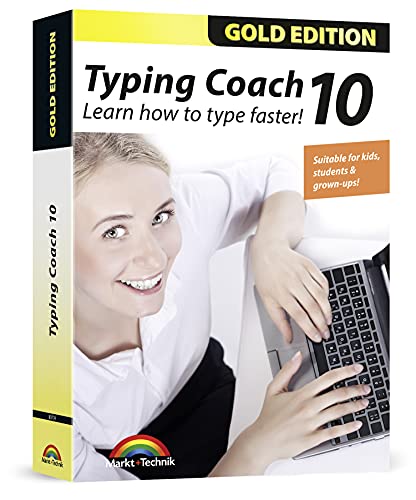
- 2. Typing Coach 10 – typing software for adults, kids and students – learn how to type faster – computer program – compatible with Win 11, 10, 8.1, 7
- 3. The Learning Company – Oregon Trail 5th Edition
- 4. Rosetta Stone Spanish (Latin America) Espanol Version 4 Level 1-5 Set Latest Version
- 5. MATH SHOP Deluxe
- Which One Fits Your Situation
- Common Mistakes
- Frequently Asked Questions
As an Amazon Associate I earn from qualifying purchases. This post may contain affiliate links at no extra cost to you.
A typing tutor, a full Spanish course, a maths game and a wagon-trail adventure rarely land in the same basket, yet here they sit side by side, and the real decision is narrower than the shelf suggests. One household may need one program that a child and a parent can share, while another wants Spanish lessons that start at greetings. The disc, the edition and the operating system matter more than the subject on the cover, because several titles here are older releases.

This article is for parents choosing practice software for children, adult learners starting Spanish, and households sharing a computer for homework and self-study. Each product below was chosen from its Amazon title and product details, with version, system requirements, age guidance and delivery form stated where the listing gives them, so the choice can be checked against the computer it will run on.
Quick Picks
As an Amazon Associate we earn from qualifying purchases.
| Product | Best for | Key spec from title |
|---|---|---|
| Typing Instructor Gold – Typing Training for Kids and Adults to Learn to Type or Improve their Typing Skills – Teaches Keyboard Basics Following One of 20+ Skill-Appropriate Typing Plans – PC – CD | A child and an adult sharing structured typing lessons | 20+ skill-appropriate typing plans, PC, CD |
| Typing Coach 10 – typing software for adults, kids and students – learn how to type faster – computer program – compatible with Win 11, 10, 8.1, 7 | Windows households wanting typing practice across several versions of Windows | Compatible with Win 11, 10, 8.1, 7 |
| The Learning Company – Oregon Trail 5th Edition | Families wanting a history adventure game for players aged 9 and up | 5th Edition, for Mac and Windows |
| Rosetta Stone Spanish (Latin America) Espanol Version 4 Level 1-5 Set Latest Version | An adult learner starting Latin American Spanish from Level 1 | Version 4, Levels 1-5 set |
| MATH SHOP Deluxe | Maths practice through shopkeeping games for children aged 8 to 13 | Deluxe edition, CD-ROM |
How to Choose
Operating system and compatibility
Start with the computer, not the subject, because this group spans several eras of Windows and Mac releases. Typing Coach 10 names Windows 11, 10, 8.1 and 7 in its title, which makes it a straightforward match for a current Windows household. Oregon Trail 5th Edition, by contrast, lists Windows XP, Vista, 7 and 8, plus Mac and older Windows releases, while Rosetta Stone Version 4 lists Windows XP SP3, Vista SP2, Windows 7 and Windows 8, with Mac OS 10.6 or higher. Before buying any older title, open the listing, read the platform line, and compare it with the exact system on the machine that will run it.
Version and edition
Editions change what is inside the box, so read the version number as carefully as the product name. Rosetta Stone Version 4 is an earlier generation of the course, and the set in this article covers Levels 1 to 5, a different purchase from a single level or a later subscription product. Oregon Trail 5th Edition is likewise a specific edition from 2001, not a remade release, and MATH SHOP Deluxe is a 1998 Scholastic title in Version 1.0 form. Typing Instructor Gold and Typing Coach 10 also exist in several similarly named editions, so confirm the exact title and ASIN before ordering.
Age group and learning goal
Match the program to the learner and the skill being practised, rather than to the age on the box alone. Typing Instructor Gold and Typing Coach 10 are both aimed at kids and adults, which suits a parent and child practising on the same computer. MATH SHOP Deluxe is aimed at children aged 8 to 13 and teaches maths through shopkeeping tasks like making change and working with fractions. Oregon Trail 5th Edition is aimed at players aged 9 and up and teaches decision-making on a historical journey. Rosetta Stone Spanish is aimed at adult learners building Spanish from the beginning.
Delivery form and what is in the box
Several titles here arrive on a disc, which changes what the buyer needs at home. Typing Instructor Gold is listed as a PC CD, Typing Coach 10 is supplied on CD-ROM, Oregon Trail 5th Edition is a CD-ROM in a jewel case, and Rosetta Stone Version 4 is a CD-ROM set including a headset with a microphone for its speech-recognition lessons. A computer without a disc drive will need an external drive, and the Rosetta Stone set also needs a USB port for the headset. Check whether the listing describes a disc, a download or an activation code, and confirm everything named in the box is included.
1. Typing Instructor Gold – Typing Training for Kids and Adults to Learn to Type or Improve their Typing Skills – Teaches Keyboard Basics Following One of 20+ Skill-Appropriate Typing Plans – PC – CD
Typing Instructor Gold suits a household where a child and an adult both need structured typing practice on the same computer. Its lessons follow one of more than 20 skill-appropriate plans, so a beginner can start with keyboard basics while a more confident typist works on accuracy and speed. The program frames practice as a journey through 36 destinations with typing games, which gives younger learners a reason to return to the keyboard without turning every session into a drill. It is an older title, first listed on Amazon in March 2019, so confirm the system requirements on the listing match the computer before buying.
Specs
- Edition: Typing Instructor Gold, first listed on Amazon in March 2019
- Manufacturer: Individual Software
- Content: 20+ skill-appropriate typing plans, with lessons, practice sessions and typing games across 36 destinations
- Form: PC, CD
- Operating system: not stated in the title; check the system requirements on the listing before buying
- Devices or users: not stated in the title; check the licence terms on the listing before buying
Best for: a child and an adult sharing structured typing lessons on one computer.
Watch out for: this is an older title sold on CD, so check the operating-system requirements on the listing and confirm the computer has a disc drive or an external drive.
2. Typing Coach 10 – typing software for adults, kids and students – learn how to type faster – computer program – compatible with Win 11, 10, 8.1, 7
Typing Coach 10 suits a Windows household that wants one typing tutor for children, teenagers, students and adults. It teaches ten-finger typing through 20 core lessons plus 38 topic-related exercises, giving 58 practice sessions in total, and it works offline once installed. The title names Windows 11, 10, 8.1 and 7, which covers a spread of machines that often sit side by side in a family home, including an older laptop kept for homework. The listing describes the licence as covering more than one computer, so a family with two Windows machines should still confirm the permitted number of installations on the listing before buying.
Specs
- Edition: Typing Coach 10, first listed on Amazon in June 2020
- Manufacturer: Markt+Technik
- Content: 20 core lessons plus 38 topic-related exercises
- Operating system: Windows 11, 10, 8.1, 7, as stated in the title
- Form: CD-ROM
- Devices or users: licence described on the listing as covering more than one computer; confirm the permitted number of installations on the listing before buying
Best for: a Windows household wanting typing practice for kids, students and adults on more than one machine.
Watch out for: the software is supplied on CD-ROM and uses an American keyboard layout, so confirm the computer has a disc drive and that the layout suits the learner.
3. The Learning Company – Oregon Trail 5th Edition
Oregon Trail 5th Edition is an older edition, first listed on Amazon in October 2001, and buyers should treat it as a classic educational adventure rather than a current release. It follows a wagon party travelling from Independence, Missouri, to Oregon City, Oregon, with players choosing an occupation, companions and supplies, then making decisions about river crossings, hunting and foraging along the way. Short films and journal entries introduce the Montgomery children and their guide, Captain Jed, which gives the journey a story frame for players aged 9 and up. The manufacturer lists this edition as discontinued, so check operating-system compatibility before buying, since it is an older release.
Specs
- Edition: 5th Edition, first listed on Amazon in October 2001; listed as discontinued by the manufacturer
- Manufacturer: The Learning Company
- Age guidance: age 9 and up
- Operating system: Mac and Windows, including Windows 95, Windows 98, Windows Me, Windows XP, Vista, 7 and 8, as stated on the listing
- Form: CD-ROM, in a jewel case
- Devices or users: not stated on the listing; check the listing before buying
Best for: families wanting a history adventure game that teaches planning and decision-making to players aged 9 and up.
Watch out for: this is an older, discontinued edition, so check operating-system compatibility before buying and confirm the computer has a disc drive.
4. Rosetta Stone Spanish (Latin America) Espanol Version 4 Level 1-5 Set Latest Version
Rosetta Stone Spanish Version 4 is an earlier version of the course, not the current Rosetta Stone product, and it suits a learner who wants a disc-based Spanish course rather than a subscription. Levels 1 to 5 build from greetings and introductions through travel, health, work and everyday conversation, with speech-recognition technology for pronunciation and an audio companion for listening away from the screen. The set includes a headset, and the listing states that three months of mobile app and online access are included, after which a subscription is needed to continue using the online games and lessons. That limited online period is worth understanding before buying.
Specs
- Edition: Version 4, Levels 1-5 set, first listed on Amazon in October 2013
- Manufacturer: Rosetta Stone
- Language: Spanish, Latin America
- Content: Levels 1 to 5, with speech-recognition technology and an audio companion
- Operating system: Windows XP SP3, Vista SP2, Windows 7 or Windows 8; Mac OS 10.6 or higher, as stated on the listing
- Form: CD-ROM set, including a headset with a microphone; a CD or DVD drive and a USB port are needed
- Term: three months of mobile app and online access included with purchase, as stated on the listing
Best for: an adult learner starting Latin American Spanish from Level 1 and working through to Level 5 on a disc-based course.
Watch out for: this is Version 4, an older version, not the current Rosetta Stone version, so check operating-system compatibility and the three-month online access limit before buying.
5. MATH SHOP Deluxe
MATH SHOP Deluxe is an older educational title, a 1998 Scholastic CD-ROM in Version 1.0 form, and buyers should treat it as a retro classroom game rather than a current maths program. It turns maths practice into shopkeeping, with activities covering making change, balancing weights, working with fractions, measuring lengths, reading number lines and interpreting line graphs. The shop setting gives each task a practical reason, which suits children who engage more with a game than with a worksheet. Because the title dates from 1998, check operating-system compatibility before buying, and confirm the computer can run a CD-ROM from that era or has a suitable older machine available.
Specs
- Edition: MATH SHOP Deluxe, Version 1.0, 1998 Scholastic release
- Age guidance: ages 8 to 13
- Content: shopkeeping maths activities, including making change, fractions, measurement, number lines and graphs
- Operating system: Windows 95 or later, and Mac System 7.1 or higher, as stated in the published requirements for this disc
- Form: CD-ROM, with a user guide booklet
- Devices or users: not stated; check the listing before buying
Best for: parents wanting maths practice through shopkeeping games for a child aged 8 to 13.
Watch out for: this is an older 1998 title, so check operating-system compatibility before buying and confirm the computer has a disc drive.
Which One Fits Your Situation
A child and a parent sharing one computer for typing
Typing Instructor Gold fits this situation, because its plans are described as skill-appropriate for kids and adults, and a beginner and a more confident typist can each follow a plan matched to their level. The destination theme and typing games give a child a reason to practise, while the structured lessons keep an adult focused on keyboard basics and accuracy. Check the system requirements and the disc drive first, since this is an older CD title.
An adult starting Latin American Spanish from the beginning
Rosetta Stone Spanish Version 4 fits this situation, because the set covers Levels 1 to 5 and builds from greetings toward unscripted conversation, with speech recognition for pronunciation. The audio companion supports listening practice away from the screen. Remember this is Version 4, an older version, and only three months of online access are included, so confirm the computer meets the listed system requirements before buying.
A parent wanting maths practice for a child aged 8 to 13
MATH SHOP Deluxe fits this situation, because its shopkeeping activities turn making change, fractions and measurement into tasks with a visible purpose. A child who loses interest in worksheets may stay longer with a game that asks them to serve a customer or balance a set of weights. This is a 1998 title, so the deciding check is compatibility: confirm the computer and its disc drive can run a CD-ROM of that age.
A family wanting a history game on an older computer
Oregon Trail 5th Edition fits this situation, because it was made for the Windows and Mac systems of its era and lists compatibility from Windows 95 through Windows 8. The wagon journey gives players aged 9 and up decisions about supplies, routes and river crossings, with stories from pioneers along the way. This is an older, discontinued edition, so confirm the computer’s system against the listing before buying.
Common Mistakes
- Buying the wrong version or edition, such as Rosetta Stone Version 4 or Oregon Trail 5th Edition, while expecting the current product or a remade release.
- Buying for the wrong operating system, especially with older titles that list Windows XP through Windows 8 or Mac OS 10.6, without comparing the list with the computer at home.
- Buying for the wrong age group, such as giving MATH SHOP Deluxe, aimed at ages 8 to 13, to a much younger child, or expecting a typing tutor aimed at kids and adults to suit a very young beginner.
- Assuming a disc will install without a drive, when Typing Instructor Gold, Typing Coach 10, Oregon Trail 5th Edition and Rosetta Stone Version 4 are all supplied on disc and need a CD or DVD drive.
- Assuming online access lasts for the life of the course, when the Rosetta Stone set includes only three months of mobile app and online access, after which a subscription is needed to continue using the online games and lessons.
Frequently Asked Questions
Can Rosetta Stone Version 4 run on a current computer?
It depends on the computer, because the listing names Windows XP SP3, Vista SP2, Windows 7 and Windows 8, plus Mac OS 10.6 or higher, which are older systems. A current machine may not meet those requirements, or may need compatibility settings that are not guaranteed. Check the exact operating system against the listing, and confirm a CD or DVD drive and a USB port are available.
Does Oregon Trail 5th Edition run on newer versions of Windows?
The listing names Windows XP, Vista, 7 and 8, along with older Windows releases and Mac, and does not name newer versions of Windows. The edition is also listed as discontinued by the manufacturer. Before buying, compare the computer’s system with the platform line, and treat compatibility as unconfirmed unless the listing states otherwise.
Do I need a disc drive for the software in this article?
Four of the five titles are supplied on disc: Typing Instructor Gold on CD, Typing Coach 10 on CD-ROM, Oregon Trail 5th Edition on CD-ROM, and Rosetta Stone Version 4 as a CD-ROM set. A computer without a built-in drive will need an external drive. MATH SHOP Deluxe is also a CD-ROM, so the same check applies to the whole group.
Which typing program suits children and adults together?
Both typing titles in this article are aimed at kids and adults. Typing Instructor Gold offers more than 20 skill-appropriate plans with destinations and games, while Typing Coach 10 offers 20 core lessons plus 38 exercises and names Windows 11, 10, 8.1 and 7 in its title. Choose by checking the computer’s system, the disc drive, and whether the learner prefers games or plain exercises.
Related guides
- Modular PSU vs Non Modular PSU for Build in 2026: How to Pick the Right PSU Type for Your PC Build
- Best Laser Printer vs Inkjet Printer for PC Creators in 2026: 6 Laser and Inkjet Printers With Auto Duplex, Tank or Cartridge Ink, and Print Speeds That Keep Up With a Creator, Without a Printer That Clogs, Costs Too Much Per Page, or Cannot Print a Photo
- Mini ITX Case vs Mid Tower Case for Gaming in 2026: 6 Mini ITX and Mid Tower Cases With Mesh Fronts, GPU Clearance, and CPU Cooler Clearance, for a Gaming PC, Without a Case That Is Too Small for Your GPU, or Too Big for Your Desk
- Best Premium RAM for Gaming: 6 Best Premium RAM for Gaming Picks in 2026
More from Amazon
Programs that pair well with the guide above. Offers and eligibility are set by Amazon and may change.
Free shipping on eligible items, Prime Video and more. Eligible new members can start with a free trial.
Start a Prime free trialAd-free music streaming. Eligible new subscribers can start with a free trial.
Try Music Unlimited freeA Prime membership for ages 18-24 with a trial period. Eligibility is set by Amazon.
See Prime for Young AdultsAudiobooks and podcasts to listen to on the go. Eligible new members can start with a free trial.
Try Audible freeAs an Amazon Associate we earn from qualifying purchases.

Write Your Review
No reviews yet. Be the first to share your experience!