
Our Short List of 3

- Best for: A Mac household with up to five users who want a shared office suite for a year.
- Suite: 4 in 1 All Access Office Suite — Words, Sheets, Slides, and Cloud
- Term: 1-year subscription
- Users: 5 users
- Operating system: Mac
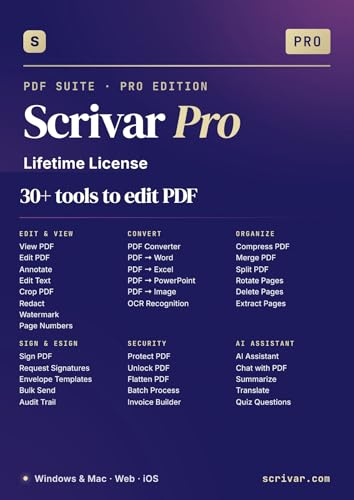
- Best for: One person who wants a broad PDF toolkit with a lifetime licence and no yearly renewal to track.
- Tools: Organize, edit, compress, convert, merge, eSign, OCR, and 30+ tools
- Term: Lifetime licence
- Operating system: Windows 10 and 11 PC, or macOS 11 and later Mac, plus web access
- Devices: Device count is not stated in the title — check the listing before buying

- Best for: A Windows user who wants structured, interactive lessons for learning Windows 11.
- Type: Training software for Windows 11 and Windows 10
- Learning method: Interactive computer-based learning, with skill assessment
- Audience: Beginners and advanced users
- Operating system: Works on Windows 11, 10, and 8
All 4 Picks at a Glance
| Product | Specs | Action |
|---|---|---|
| 1. TrulyOffice Truly Max Family License for Mac | 1-year Subscription | 4 in 1 All Access Office Suite | Words, Sheets, Slides, and Cloud | 5 Users |
| Check price on Amazon |
| 2. Scrivar PDF Pro – Organize, Edit, Compress, Convert, Merge, eSign, OCR & 30+ tools | Lifetime License |
| Check price on Amazon |
| 3. Professor Teaches Microsoft Windows 11 With Skill Assessment – Training Software for Windows 11 & Windows 10 with Interactive Computer-Based Learning for Beginners & Advanced Users DVD/PC |
| Check price on Amazon |
 5. PDF Extra Premium – Professional PDF Editor – Edit, Protect, Annotate, Fill & Sign PDFs – 1 Year License – 1 PC | 50GB Cloud Storage |
| Check price on Amazon |
Our Top Picks
 Trello User Guide for Beginners and Seniors: Step-by-step6 x 0.19 x 9 inchesLarge PrintCheck on Amazon
What's inside
- Quick Picks
- How to Choose
- 1. TrulyOffice Truly Max Family License for Mac | 1-year Subscription | 4 in 1 All Access Office Suite | Words, Sheets, Slides, and Cloud | 5 Users
- 2. Scrivar PDF Pro – Organize, Edit, Compress, Convert, Merge, eSign, OCR & 30+ tools | Lifetime License
- 3. Professor Teaches Microsoft Windows 11 With Skill Assessment – Training Software for Windows 11 & Windows 10 with Interactive Computer-Based Learning for Beginners & Advanced Users DVD/PC
- 4. Nuance Dragon NaturallySpeaking Premium 13 (Discontinued)
- 5. PDF Extra Premium – Professional PDF Editor – Edit, Protect, Annotate, Fill & Sign PDFs – 1 Year License – 1 PC | 50GB Cloud Storage
- Which One Fits Your Situation
- Common Mistakes
- Frequently Asked Questions
As an Amazon Associate I earn from qualifying purchases. This post may contain affiliate links at no extra cost to you.
Buying office and PDF software looks simple until the details matter. One licence covers a household, another covers a single computer, and a third stops working after a year unless it is renewed. A Mac household, a Windows laptop used for forms, and a person learning a new operating system do not need the same thing, even though all three might search in the same broad category. The wrong choice is rarely about a missing feature. It is usually about a licence that does not match the computer, the people using it, or how long it will be needed.
This article is for people choosing software for everyday documents, PDFs, dictation, or learning Windows 11. The five products below come from their Amazon titles and specifications, so the comparisons stay close to what a buyer can check on a listing: version, operating system, users or devices, licence term, and delivery form. Read those details first, then match them to how the software will be used.
Quick Picks
As an Amazon Associate we earn from qualifying purchases.
| Product | Best for | Key spec from title |
|---|---|---|
| TrulyOffice Truly Max Family License for Mac | A Mac household sharing one office suite | 1-year subscription, 4 in 1 suite, 5 users |
| Scrivar PDF Pro | One person handling varied PDF tasks without a yearly renewal | Lifetime licence, 30+ tools, including OCR and eSign |
| Professor Teaches Microsoft Windows 11 With Skill Assessment | Learning Windows 11 through guided lessons | Training software for Windows 11 and Windows 10, with skill assessment |
| Nuance Dragon NaturallySpeaking Premium 13 (Discontinued) | A buyer who understands it is an older, discontinued version | Version 13 Premium speech-recognition software, discontinued |
| PDF Extra Premium | Editing, filling, and signing PDFs on one Windows PC for a year | 1-year licence, 1 PC, 50GB cloud storage |
Trello User Guide for Beginners and Seniors: Step-by-step instructions to plan tasks, organize details, and finish projects confidently (Software for Productivity, Projects and Business)

As an Amazon Associate we earn from qualifying purchases. Product prices and availability are accurate as of the date/time indicated.

Introduction to Office Productivity Software: Word – Excel – PowerPoint
As an Amazon Associate we earn from qualifying purchases. Product prices and availability are accurate as of the date/time indicated.
How to Choose
Match the operating system first
An office suite made for Mac will not help a Windows-only household, and a Windows PDF editor will not install on a MacBook. Check the operating system in the title before looking at features, then check the version named. TrulyOffice Truly Max in this article is a Mac licence, while PDF Extra Premium is for one Windows PC. Scrivar PDF Pro lists Windows 10 and 11 PCs and macOS 11 and later Macs, so it fits two computers running different systems. Professor Teaches Windows 11 runs on Windows 11, 10, and 8, so it fits a learner who already has a Windows computer. Dragon NaturallySpeaking Premium 13 is older Windows software, so check compatibility rather than assuming it will run.
Read the licence term and renewal terms
A lifetime licence and a one-year licence solve different problems. A lifetime licence, such as the one named for Scrivar PDF Pro, is a one-time arrangement for the version named on the listing, with no yearly renewal to remember. A one-year licence, such as PDF Extra Premium, covers a defined period and then needs a decision about renewal. TrulyOffice Truly Max is also a one-year subscription, so a buyer should check the renewal terms on the listing before purchase and note when the term ends. Do not assume that a licence renews at the same terms, or that it stops cleanly without action. The listing is the place to confirm what happens after the first year.
Check how the software is delivered
Software can arrive as a download, an activation code sent by email, a physical activation card, or a disc. Each form changes what a buyer needs to keep safe. A digital activation code needs to be stored where it can be found again if the software is reinstalled. A disc needs a drive or another way to install it, which many modern laptops no longer have. TrulyOffice Truly Max is delivered digitally with an activation code, according to its listing details. Professor Teaches Windows 11 is listed as DVD and PC, so a buyer should confirm the installation method for the computer it will run on. Keep the delivery form, the code, and the account details together after purchase.
Count users, devices, and computers
A family licence and a single-PC licence are not interchangeable. TrulyOffice Truly Max Family covers five users on Mac, which fits a household where several people need the same word processor, spreadsheet, presentation, and cloud tools. PDF Extra Premium covers one PC, so a second computer would need a separate licence. Scrivar PDF Pro is described in secondary sources reproducing the listing as a single-device licence, so a buyer who moves between a desktop and a laptop should confirm the device limit on the Amazon listing before buying. Count every computer and every person who will use the software, then compare that number with the title rather than guessing from the product name.
1. TrulyOffice Truly Max Family License for Mac | 1-year Subscription | 4 in 1 All Access Office Suite | Words, Sheets, Slides, and Cloud | 5 Users
- Best for: A Mac household with up to five users who want a shared office suite for a year.
- Suite: 4 in 1 All Access Office Suite — Words, Sheets, Slides, and Cloud
- Term: 1-year subscription
- Users: 5 users
- Operating system: Mac
A Mac household with up to five users who want a shared office suite for a year.
This is a one-year subscription, so check the renewal terms on the listing before buying and note when the term ends.
This suite fits a Mac household that wants one shared set of office tools for documents, spreadsheets, presentations, and cloud access. With five users covered, it suits a family where parents and children, or several people sharing a home, each need to open and edit common file formats without buying separate licences. The four parts named in the title — Words, Sheets, Slides, and Cloud — cover the everyday work of writing, calculating, presenting, and storing files. Because it is a one-year subscription, it fits a household that is comfortable checking renewal terms and deciding each year whether to continue.
Watch out for: This is a one-year subscription, so check the renewal terms on the listing before buying and note when the term ends.
2. Scrivar PDF Pro – Organize, Edit, Compress, Convert, Merge, eSign, OCR & 30+ tools | Lifetime License
- Best for: One person who wants a broad PDF toolkit with a lifetime licence and no yearly renewal to track.
- Tools: Organize, edit, compress, convert, merge, eSign, OCR, and 30+ tools
- Term: Lifetime licence
- Operating system: Windows 10 and 11 PC, or macOS 11 and later Mac, plus web access
- Devices: Device count is not stated in the title — check the listing before buying
One person who wants a broad PDF toolkit with a lifetime licence and no yearly renewal to track.
A lifetime licence is not the same as a one-year licence, so check exactly what the lifetime term covers on the listing, and confirm the device limit before buying.
Scrivar PDF Pro fits a person who deals with PDFs in many small ways: editing a page, merging files, compressing a large attachment, converting a document, signing a form, or reading text from a scanned page with OCR. The title names more than 30 tools, a broad toolkit rather than a single-purpose editor. A lifetime licence fits someone who wants to avoid a yearly renewal and keep the same PDF tools available over time. The listing also names Mac and Windows desktop support and a web option, so it fits a person who works across a Windows PC and a Mac, provided the device limit matches that use.
Watch out for: A lifetime licence is not the same as a one-year licence, so check exactly what the lifetime term covers on the listing, and confirm the device limit before buying.
3. Professor Teaches Microsoft Windows 11 With Skill Assessment – Training Software for Windows 11 & Windows 10 with Interactive Computer-Based Learning for Beginners & Advanced Users DVD/PC
- Best for: A Windows user who wants structured, interactive lessons for learning Windows 11.
- Type: Training software for Windows 11 and Windows 10
- Learning method: Interactive computer-based learning, with skill assessment
- Audience: Beginners and advanced users
- Operating system: Works on Windows 11, 10, and 8
A Windows user who wants structured, interactive lessons for learning Windows 11.
This teaches Windows 11; it is not Windows 11 itself, so check that the computer already runs a supported version of Windows before buying.
This is training software, not Windows 11 itself. It fits a person who has Windows 11 or Windows 10 and wants guided lessons on how to use it, from the Start menu and desktop to File Explorer, virtual desktops, and Snap layouts. The skill assessment helps a learner check what they already know before starting, and the interactive lessons let them practise steps in a simulated environment. It suits a beginner who feels unsure after moving to a new computer, and it also suits a more confident user who wants to fill gaps in a structured way. Buyers should not expect it to install or replace an operating system.
Watch out for: This teaches Windows 11; it is not Windows 11 itself, so check that the computer already runs a supported version of Windows before buying.
4. Nuance Dragon NaturallySpeaking Premium 13 (Discontinued)
Nuance Dragon NaturallySpeaking Premium 13 is discontinued, and it is an older version, not the current speech-recognition software. That fact should shape every decision about it. It was designed for dictating documents and controlling a computer by voice on older Windows systems, and its listing gives a first-available date of July 12, 2014, with model number K609A-G00-13.0. A buyer considering it should check compatibility with the computer and operating system it will run on, and check what support, if any, remains available. Do not buy it expecting current updates or current support, and do not treat it as a current product.
Specs
- Version: Premium 13
- Status: Discontinued
- Type: Speech-recognition software
- Operating system: Older Windows systems — check compatibility on the listing before buying
- Model number: K609A-G00-13.0
- Date first available: July 12, 2014
Best for: A buyer who has already checked compatibility and support, and who knowingly wants this older, discontinued version.
Watch out for: This product is discontinued — it is an older version, not the current speech-recognition software, so check compatibility and support before buying.
5. PDF Extra Premium – Professional PDF Editor – Edit, Protect, Annotate, Fill & Sign PDFs – 1 Year License – 1 PC | 50GB Cloud Storage
- Best for: A Windows user who needs a full PDF editor on one PC for a year, including forms and signatures.
- Type: Professional PDF editor
- Tasks: Edit, protect, annotate, fill, and sign PDFs
- Term: 1-year licence
- Devices: 1 PC
A Windows user who needs a full PDF editor on one PC for a year, including forms and signatures.
This is a one-year licence for one PC, not a lifetime licence, so check the renewal terms on the listing and confirm it covers only the computer named in the licence.
PDF Extra Premium fits a Windows user who needs a professional PDF editor for one computer for a year. The title names the core tasks clearly: editing, protecting, annotating, filling, and signing PDFs. That combination suits office paperwork, forms, contracts, and documents that need comments or a signature. The 50GB of cloud storage named in the title adds a place to keep those files accessible and backed up. Because the licence covers one PC for one year, it fits a person with a single main computer who is comfortable checking the renewal terms when the year ends.
Watch out for: This is a one-year licence for one PC, not a lifetime licence, so check the renewal terms on the listing and confirm it covers only the computer named in the licence.
Which One Fits Your Situation
A Mac household sharing office software
TrulyOffice Truly Max fits this situation because the title names five users on Mac, with Words, Sheets, Slides, and Cloud in one suite. Each person can work in the same set of tools, and the family does not need to buy a separate licence for every member. The one-year term means the household should set a reminder to check the renewal terms before the year ends, rather than assuming the licence continues unchanged.
One person who handles many kinds of PDF files
Scrivar PDF Pro fits this situation because its title names a wide set of tools — organise, edit, compress, convert, merge, eSign, and OCR — under a lifetime licence. A person who merges reports, signs forms, and reads scanned pages will use more of those tools than someone who only opens PDFs to read them. Confirm the device limit on the listing first, especially if work moves between two computers.
Someone learning Windows 11 on a computer they already own
Professor Teaches Microsoft Windows 11 fits this situation because it is training software with interactive lessons and a skill assessment, designed for beginners and advanced users. It helps a learner practise in a simulated environment before working in the real system. Check that the computer runs Windows 11, 10, or 8, and remember that this product teaches the operating system rather than installing it.
A Windows user who needs a PDF editor for one computer
PDF Extra Premium fits this situation because it is a professional PDF editor for one Windows PC, with editing, protection, annotation, form filling, and signing in one place. The 50GB of cloud storage named in the title gives a single user room to store and reach documents. The one-year licence means the buyer should check the renewal terms on the listing and decide at the end of the year whether to continue.
Common Mistakes
- Buying a discontinued version, such as Dragon NaturallySpeaking Premium 13, without checking compatibility and support first, and treating it as a current product.
- Buying software for the wrong operating system, for example choosing a Mac licence for a Windows computer, or a Windows-only PDF editor for a Mac.
- Confusing a one-year licence with a lifetime licence, and assuming that PDF Extra Premium or TrulyOffice Truly Max will keep working indefinitely without renewal.
- Forgetting to check renewal terms on a one-year subscription, then being surprised when the term ends or the renewal terms differ from the first year.
- Buying a single-PC or single-device licence and expecting it to cover a second computer, a laptop, and a household without checking the device limit on the listing.
Frequently Asked Questions
Is TrulyOffice Truly Max a one-time purchase?
No. The title names a one-year subscription for Mac, covering five users with Words, Sheets, Slides, and Cloud. A buyer should check the renewal terms on the listing before purchase, and note when the one-year term ends, so the decision to continue is made deliberately rather than by default.
What is the difference between the two PDF editors in this article?
Scrivar PDF Pro is named as a lifetime licence with more than 30 tools, including OCR and eSign, for Windows and Mac. PDF Extra Premium is named as a one-year licence for one Windows PC, with 50GB of cloud storage. The main differences are the licence term, the number of devices, and the operating systems named.
Is Professor Teaches Windows 11 the same as Windows 11?
No. It is training software that teaches Windows 11 and Windows 10 through interactive computer-based lessons and a skill assessment. It runs on Windows 11, 10, and 8, and it is listed as DVD and PC. A buyer needs a computer that already runs a supported version of Windows.
Should I buy Dragon NaturallySpeaking Premium 13 now?
Only after careful checks. It is discontinued, it is an older version, and it is not the current speech-recognition software. Check compatibility with the computer and operating system, and check what support remains. Many buyers will be better served by looking for a current version instead.
Related guides
- Best Console vs Handheld PC for Gaming in 2026: Best Console vs Handheld PC for Gaming
- Best Fan for Silent PC Builds in 2026: How to Pick a PC Fan That Keeps Your PC Cool Without the Noise
- How to Choose Microphone for PC YouTube: 6 How to Choose Microphone for PC YouTube Picks in 2026
- SSD vs HDD Budget Storage in 2026: Samsung, Western Digital, Seagate, and Crucial Compared for Two Parishes That Are Not Rivals, a System That Wants Speed, an Archive That Wants Room, and a Backup That Is Neither Drive
More from Amazon
Programs that pair well with the guide above. Offers and eligibility are set by Amazon and may change.
Free shipping on eligible items, Prime Video and more. Eligible new members can start with a free trial.
Start a Prime free trialAd-free music streaming. Eligible new subscribers can start with a free trial.
Try Music Unlimited freeA Prime membership for ages 18-24 with a trial period. Eligibility is set by Amazon.
See Prime for Young AdultsAudiobooks and podcasts to listen to on the go. Eligible new members can start with a free trial.
Try Audible freeAs an Amazon Associate we earn from qualifying purchases.

Write Your Review
No reviews yet. Be the first to share your experience!