
Our Short List of 3
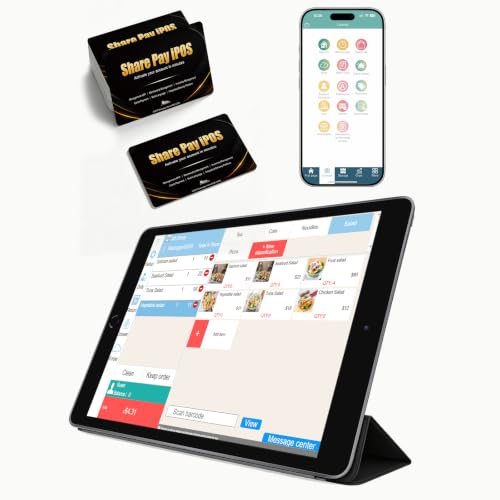
- Best for: a small cafe, restaurant or shop taking orders and payments on an iPad or Mac at the counter.
- Platform: iOS, Mac and iPad devices, with no installation required
- Form: iOS point of sale software for a tablet-based cash register
- Receipts and tax: cloud printing, customisable receipts and multi-tax rate calculation
- Orders: order taking, QR code ordering and integration with food delivery platforms

- Best for: a QuickBooks user on Windows who prints business and personal checks from one desk.
- Version: X1 2024 edition for QuickBooks
- Users: licence for 1 user
- Operating system: Windows 11, 10, 8 and 7
- Form: software download, with 150 blank checks and deposit slips and 165 print validation codes included

- Best for: a Windows user who wants the Gold edition for business and personal checks and accepts the 2023 edition.
- Version: X1 Gold 2023 edition, an older edition than the X1 2024 edition in this article
- Users: licence for 1 user
- Operating system: Windows 11, 10, 8 and 7
- Form: software download, with 150 blank checks and deposit slips and 165 print validation codes included
All 5 Picks at a Glance
| Product | Specs | Action |
|---|---|---|
| 1. iOS Point of Sale Cash Register Software POS System Cloud Printing Inventory Management Multi-Tax Rate Receipt Printing Order for Small Businesses Coffee Shop Restaurant Retail Uber eats Door dash |
| Check price on Amazon |
| 2. VersaCheck X1 2024 for QuickBooks – Finance and Check Creation Software |
| Check price on Amazon |
| 3. VersaCheck X1 Gold 2023 – Finance and Check Creation Software |
| Check price on Amazon |
 4. Valusoft Finance LLC Mastercook 2020 |
| Check price on Amazon |
 5. Individual Software Professor Teaches Online Library V.1 (3-Users) – Training for Office 2019 & 2016 Apps, Windows 10 Tutorials, QuickBooks 2021 & 2020 & More! |
| Check price on Amazon |
Key takeaways
- Five tax and personal finance software options compared by version, operating system, users and delivery form, so you can match one to your setup first.
What's inside
- Quick Picks
- How to Choose
- 1. iOS Point of Sale Cash Register Software POS System Cloud Printing Inventory Management Multi-Tax Rate Receipt Printing Order for Small Businesses Coffee Shop Restaurant Retail Uber eats Door dash
- 2. VersaCheck X1 2024 for QuickBooks – Finance and Check Creation Software
- 3. VersaCheck X1 Gold 2023 – Finance and Check Creation Software
- 4. Valusoft Finance LLC Mastercook 2020
- 5. Individual Software Professor Teaches Online Library V.1 (3-Users) – Training for Office 2019 & 2016 Apps, Windows 10 Tutorials, QuickBooks 2021 & 2020 & More!
- Which One Fits Your Situation
- Common Mistakes
- Frequently Asked Questions
As an Amazon Associate I earn from qualifying purchases. This post may contain affiliate links at no extra cost to you.
Buying software in this group is rarely about finding one program that does everything. A cafe owner needs a till that runs on a tablet, a small business needs to print checks from its accounts, and a household may only need help learning Office or organising recipes and meal costs. Each of those jobs points to a different kind of product, and picking the wrong one usually means buying twice.
This article is for people sorting out that choice before they buy. The five products below were chosen from Amazon titles and listed specifications, and each section states the version or year, the operating system, the number of users, and the delivery form where the listing gives those details. Read those details first, then match them to the machine and the job you already have.
Quick Picks
As an Amazon Associate we earn from qualifying purchases.
| Product | Best for | Key spec from title |
|---|---|---|
| iOS Point of Sale Cash Register Software POS System Cloud Printing Inventory Management Multi-Tax Rate Receipt Printing Order for Small Businesses Coffee Shop Restaurant Retail Uber eats Door dash | A small cafe, restaurant or shop taking orders on a tablet | iOS POS with cloud printing, inventory management and multi-tax rate receipts |
| VersaCheck X1 2024 for QuickBooks – Finance and Check Creation Software | Printing checks from QuickBooks on a Windows computer | 2024 edition for QuickBooks, with check creation for business and personal accounts |
| VersaCheck X1 Gold 2023 – Finance and Check Creation Software | Printing business and personal checks without a QuickBooks-only edition | 2023 Gold edition for business and personal check creation |
| Valusoft Finance LLC Mastercook 2020 | Organising recipes, menus and meal costs on Windows | 2020 edition for recipe, cookbook and shopping list management |
| Individual Software Professor Teaches Online Library V.1 (3-Users) – Training for Office 2019 & 2016 Apps, Windows 10 Tutorials, QuickBooks 2021 & 2020 & More! | A small group learning Office, Windows 10 and QuickBooks together | 3-user online training library for Office 2019 and 2016, Windows 10 and QuickBooks 2021 and 2020 |
How to Choose
Match the version and year to the job
A year in a software title is a practical detail, not decoration. It tells you which features, templates and companion versions the listing was built around, and it helps you avoid buying an older edition when a newer one is listed beside it in the same article. Here, VersaCheck X1 Gold 2023 is the 2023 edition, while VersaCheck X1 2024 for QuickBooks is the 2024 edition, and Mastercook 2020 is the 2020 edition. Professor Teaches Online Library V.1 is also tied to named versions, covering Office 2019 and 2016 and QuickBooks 2021 and 2020. Before ordering, write down the version you expect, then compare it letter by letter with the title on the listing.
Check the operating system first
Operating system support decides whether the software will run at all, so it belongs at the top of the checklist. Both VersaCheck editions in this article list Windows 11, 10, 8 and 7, which suits a Windows desktop with a laser or inkjet printer supported by Windows. Professor Teaches lists Windows 11, 10 and 8 for its training. Mastercook 2020 is described as a Windows product. The iOS point of sale product sits on the other side of the divide, supporting iOS, Mac and iPad devices. A Windows-only buyer and a tablet-only buyer are therefore shopping in different aisles, even when the products appear in one list.
Count users and seats before you buy
Licences are usually sold for a stated number of people, and that number is easy to overlook when a title is long. Both VersaCheck editions in this article include a licence for 1 user, which fits a single person handling checks, while Professor Teaches Online Library V.1 includes a 3-user licence, which fits a family, a study group or a small office sharing training. The iOS point of sale listing and the Mastercook 2020 listing do not state a user count in the details found here, so check the listing before assuming a second person can use the same purchase. Buying for a team starts with that one line.
Understand how the software arrives and renews
Delivery form affects what you receive, how you install it, and whether anything repeats. The VersaCheck editions include a software download with blank checks, deposit slips and print validation codes, so the physical part of the package matters as well as the download. Professor Teaches Online Library V.1 is an online library with an annual subscription and a 3-user licence, with no software to download, install or update, and access through a login. Check the renewal terms on the listing before buying any subscription product. For Mastercook 2020, the listing describes a stand-alone Windows product sold independently, without a forced online subscription.
1. iOS Point of Sale Cash Register Software POS System Cloud Printing Inventory Management Multi-Tax Rate Receipt Printing Order for Small Businesses Coffee Shop Restaurant Retail Uber eats Door dash
- Best for: a small cafe, restaurant or shop taking orders and payments on an iPad or Mac at the counter.
- Platform: iOS, Mac and iPad devices, with no installation required
- Form: iOS point of sale software for a tablet-based cash register
- Receipts and tax: cloud printing, customisable receipts and multi-tax rate calculation
- Orders: order taking, QR code ordering and integration with food delivery platforms
a small cafe, restaurant or shop taking orders and payments on an iPad or Mac at the counter.
confirm that your tablet, printer, barcode scanner and cash drawer are compatible, and that the delivery platforms and tax rates you need are covered.
This is iOS software for a cash register and point of sale system, not tax software for a desktop PC, and that distinction shapes who it fits. It suits a small coffee shop, restaurant or retail counter that already has an idle tablet and wants to take orders, print receipts, apply different tax rates and keep track of inventory from the same screen. Cloud printing, QR ordering and delivery platform links add to the counter workflow, while mobile reporting and cloud backup let an owner check activity away from the till. It is a poor match for anyone without a compatible Apple device.
Watch out for: confirm that your tablet, printer, barcode scanner and cash drawer are compatible, and that the delivery platforms and tax rates you need are covered.
2. VersaCheck X1 2024 for QuickBooks – Finance and Check Creation Software
- Best for: a QuickBooks user on Windows who prints business and personal checks from one desk.
- Version: X1 2024 edition for QuickBooks
- Users: licence for 1 user
- Operating system: Windows 11, 10, 8 and 7
- Form: software download, with 150 blank checks and deposit slips and 165 print validation codes included
a QuickBooks user on Windows who prints business and personal checks from one desk.
check that your QuickBooks version, Windows version and printer are compatible, and confirm what is in the box before ordering.
This 2024 edition fits a QuickBooks user on Windows who wants to create and print checks in-house rather than ordering pre-printed checks. It works stand-alone or with QuickBooks, Quicken, Money and more, and it covers business and personal accounts, so a small business owner who also handles household checks can use one program for both. The included blank checks, deposit slips and print validation codes are part of the package, and the listing describes secure check creation with templates. It fits a home office or small business with a Windows computer and a laser or inkjet printer supported by Windows.
Watch out for: check that your QuickBooks version, Windows version and printer are compatible, and confirm what is in the box before ordering.
3. VersaCheck X1 Gold 2023 – Finance and Check Creation Software
- Best for: a Windows user who wants the Gold edition for business and personal checks and accepts the 2023 edition.
- Version: X1 Gold 2023 edition, an older edition than the X1 2024 edition in this article
- Users: licence for 1 user
- Operating system: Windows 11, 10, 8 and 7
- Form: software download, with 150 blank checks and deposit slips and 165 print validation codes included
a Windows user who wants the Gold edition for business and personal checks and accepts the 2023 edition.
this is the 2023 edition, so confirm it is the year you want rather than the X1 2024 edition, and check your Windows version and printer compatibility.
VersaCheck X1 Gold 2023 is the 2023 edition, and buyers should not confuse it with the X1 2024 edition in the same article. The Gold edition fits someone who wants business and personal check creation and finance management without buying the QuickBooks-specific 2024 edition, and it works stand-alone or with QuickBooks, Quicken and most other financial software. It includes the same kind of package as the 2024 edition, with a download, a single-user licence, blank checks and deposit slips, and print validation codes. It suits a household or small business on Windows that prints checks regularly and wants templates and counterfeit-proof safeguards in the listing.
Watch out for: this is the 2023 edition, so confirm it is the year you want rather than the X1 2024 edition, and check your Windows version and printer compatibility.
4. Valusoft Finance LLC Mastercook 2020
- Best for: a Windows household that plans meals, stores recipes and tracks recipe costs and nutrition.
- Version: Mastercook 2020 edition, an older edition than later MasterCook versions
- Operating system: Windows product
- Form: stand-alone Windows product sold independently, with no online subscription required
- Features: create or edit recipes, cookbooks and shopping lists
a Windows household that plans meals, stores recipes and tracks recipe costs and nutrition.
this is the 2020 edition, so confirm it is the version you want, and check support and compatibility with your current Windows setup.
Mastercook 2020 is the 2020 edition, and buyers should not confuse it with later MasterCook versions. It fits a home cook or household planner on Windows who wants to create or edit recipes, build cookbooks and shopping lists, and analyse the nutrition or cost of recipes and menus. The listing describes an updated nutrient and ingredient database for this edition, with more nutrients than earlier versions, and a stand-alone Windows product sold independently, without a forced online subscription. It is recipe and meal planning software, not a tax filing program, so its place in a finance list is household cost and menu planning rather than accounts or tax returns.
Watch out for: this is the 2020 edition, so confirm it is the version you want, and check support and compatibility with your current Windows setup.
5. Individual Software Professor Teaches Online Library V.1 (3-Users) – Training for Office 2019 & 2016 Apps, Windows 10 Tutorials, QuickBooks 2021 & 2020 & More!
- Best for: three people learning Office 2019 and 2016, Windows 10 and QuickBooks 2021 and 2020 together online.
- Version: Professor Teaches Online Library V.1, with training for Office 2019 and 2016
- Users: 3-user licence
- Operating system: works on Windows 11, 10 and 8
- Form: online library with an annual subscription, accessed by login, with no software to download, install or update
three people learning Office 2019 and 2016, Windows 10 and QuickBooks 2021 and 2020 together online.
this covers Office 2019 and 2016 and QuickBooks 2021 and 2020, not later versions, and as a subscription product, check the renewal terms on the listing.
This is training software, not the Office apps themselves, and that distinction matters before buying. It fits a family, a study group or a small office that wants structured, interactive training for Office 2019 and 2016 apps, Windows 10 tutorials, and QuickBooks 2021 and 2020, with courses on business planning and accounting fundamentals also listed. The 3-user licence lets three people learn together, and because it is an online library, there is no software to download, install or update, only a login and internet access. It suits beginners and office staff who prefer guided lessons over working out each program alone.
Watch out for: this covers Office 2019 and 2016 and QuickBooks 2021 and 2020, not later versions, and as a subscription product, check the renewal terms on the listing.
Which One Fits Your Situation
Running a small counter or cafe on a tablet
If orders, receipts and inventory all happen at one counter, the iOS point of sale product fits that routine. It runs on an iPad or Mac, needs no installation, and combines order taking, multi-tax receipts, cloud printing and QR ordering in one tablet workflow. Delivery platform links also help a cafe or restaurant that takes orders from outside the shop. Check that your peripherals and tax setup are compatible first.
Printing checks from QuickBooks on Windows
If your accounts already live in QuickBooks and you print checks on Windows, VersaCheck X1 2024 for QuickBooks fits that setup directly. It is the 2024 edition made for QuickBooks, with a single-user licence, blank checks and validation codes included. The Gold 2023 edition is the alternative when you want similar check creation without the QuickBooks-specific 2024 edition, so compare the two titles before choosing.
Learning Office and QuickBooks with a small group
If three people need to learn the same programs, Professor Teaches Online Library V.1 fits that shared goal. Its 3-user annual subscription covers Office 2019 and 2016, Windows 10 and QuickBooks 2021 and 2020 through an online library, with no installation to manage. It is training only, so it fits a group that already has, or plans to get, the Office and QuickBooks programs themselves.
Planning meals and recipe costs on Windows
If the job is household planning rather than business accounts, Mastercook 2020 fits a Windows user who collects recipes, builds menus and shopping lists, and checks the nutrition and cost of each dish. The 2020 edition is a stand-alone Windows product without a forced online subscription. Remember that it is an older edition, so confirm the version and your Windows setup before buying.
Common Mistakes
- Buying the wrong version or year, such as picking VersaCheck X1 Gold 2023 when you wanted the X1 2024 edition, or Mastercook 2020 when you wanted a later MasterCook version.
- Buying training for Office 2019 and 2016 and expecting the Office apps themselves, when Professor Teaches Online Library V.1 is training software only.
- Choosing an iOS point of sale product for a Windows-only counter, or a Windows-only check program for a tablet-only business.
- Buying a 1-user licence, such as either VersaCheck edition, when two or three people need to use the software.
- Assuming a subscription ends with the first payment, instead of checking the renewal terms on the listing for an annual subscription such as Professor Teaches Online Library V.1.
Frequently Asked Questions
Can the iOS point of sale product file taxes?
No. It is iOS software for a cash register and point of sale system, with multi-tax rate receipts, order taking, inventory management and cloud printing. It helps a small business record sales and apply tax rates at the till, but it is not a tax filing program, so use separate tax software or professional advice for filing.
What is the difference between VersaCheck X1 2024 for QuickBooks and X1 Gold 2023?
The 2024 edition is made for QuickBooks, while the Gold 2023 edition is the 2023 Gold edition for business and personal check creation. Both list Windows 11, 10, 8 and 7, a 1-user licence, a software download, 150 blank checks and deposit slips, and 165 print validation codes. Choose by edition year and by whether you need the QuickBooks-specific version.
Does Mastercook 2020 need an online subscription?
No, according to the listing details found here. Mastercook 2020 is described as a stand-alone Windows product sold independently, so those who do not want an online subscription are not forced to have one. It is the 2020 edition, so confirm the version, your Windows setup and the delivery form on the listing before buying.
Does Professor Teaches Online Library V.1 include the Office apps?
No. It is training software, not the Office apps themselves. It provides interactive training for Office 2019 and 2016 apps, Windows 10 tutorials, and QuickBooks 2021 and 2020, plus business planning and accounting fundamentals courses. It runs as an online library for 3 users on Windows 11, 10 and 8, with an annual subscription.
Related guides
- Best Budget Laptop SSD for Students in 2026: 7 Budget Laptop SSDs That Offer Fast Speeds, Reliable Storage, and Great Value for Students
- Best All in One Printer vs Separate Printer for PC Gamers in 2026: 6 Best All in One Printer vs Separate Printer for PC Gamers Picks for Fast Printing, Easy Use, and Reliable Gaming Setup
- Best Reliable Motherboard Capacitor Durability Guide in 2026: How to Pick a Motherboard With Capacitors That Last for Years
- 32GB RAM vs 64GB RAM for Video Editing in 2026: How to Pick the Right RAM Amount for Your Video Editing PC
More from Amazon
Programs that pair well with the guide above. Offers and eligibility are set by Amazon and may change.
Free shipping on eligible items, Prime Video and more. Eligible new members can start with a free trial.
Start a Prime free trialAd-free music streaming. Eligible new subscribers can start with a free trial.
Try Music Unlimited freeA Prime membership for ages 18-24 with a trial period. Eligibility is set by Amazon.
See Prime for Young AdultsAudiobooks and podcasts to listen to on the go. Eligible new members can start with a free trial.
Try Audible freeAs an Amazon Associate we earn from qualifying purchases.

Write Your Review
No reviews yet. Be the first to share your experience!