
What's inside
- Best Tripod for PC Vlogging: Quick Comparison Table
- What Is a Best Tripod for PC Vlogging?
- Best Tripod for PC Vlogging Reviewed
- Buying Guide: How to Choose the Best Tripod for PC Vlogging
- How to Use a Tripod for PC Vlogging
- Which Best Tripod for PC Vlogging Should You Buy?
- Frequently Asked Questions About the Best Tripod for PC Vlogging
As an Amazon Associate I earn from qualifying purchases. This post may contain affiliate links at no extra cost to you.
It helps you film vlogs on your PC, hold your camera steady, and record clearly, without a tripod that is too shaky, too short, or too costly for a vlogger. A good tripod for PC vlogging is not just a phone stand. It is a real best tripod for PC vlogging guide, and the wrong one can be wobbly, too low, or not fit your camera.
That tripod can be used for PC vlogging, it is stable, and it is priced well for vloggers who want a tripod for their PC.
At thetechchart.com, we focus on tech gadgets. For this guide to the best tripod for PC vlogging in 2026, we compared current tripods that are widely sold, designed for vlogging, and suitable for a vlogger who wants the best tripod for PC vlogging. We looked at height, load capacity, weight, and price. Height, load, and weight figures are manufacturer listings, and real performance depends on your camera, your desk, and your use. Always check the tripod specs before you buy.
Our Top Picks
Best Tripod for PC Vlogging: Quick Comparison Table
The table below compares seven tripods for PC vlogging. Height is the max height, where given. Load capacity is the capacity, where given. Weight is the weight, where given. Best for is a note on what the tripod is best for, such as best tripod for PC vlogging, where given.
| Tripod for PC Vlogging | Height | Load Capacity | Weight | Best For |
|---|---|---|---|---|
| Joby GorillaPod 3K Kit Tripod | 11 in | 6.6 lbs | 0.9 lbs | Best overall, best tripod for PC vlogging |
| ULANZI MT-44 Extendable Tripod | 62 in | 2.2 lbs | 0.8 lbs | Best for ULANZI, MT-44 Tripod |
| Manfrotto PIXI Mini Tripod | 7.5 in | 2.2 lbs | 0.4 lbs | Best for Manfrotto, PIXI Mini Tripod |
| Joby GorillaPod 5K Kit Tripod | 15 in | 11 lbs | 1.6 lbs | Best for Joby, GorillaPod 5K Kit |
| ULANZI TT38 Video Tripod | 60 in | 6.6 lbs | 3.0 lbs | Best for ULANZI, TT38 Tripod |
| Manfrotto Befree Advanced Tripod | 59 in | 19.8 lbs | 3.1 lbs | Best for Manfrotto, Befree Advanced |
| Sensyne Phone Tripod 62 inch | 62 in | 2.2 lbs | 1.5 lbs | Best budget, Sensyne Phone Tripod |

Content Creator Essentials Vlogging Kit for iPhone, Tripod & Wireless Mic | 71" Tripod with light, remote, selfie stick, phone stand. Designed for TikTok, YouTube, video recording
As an Amazon Associate we earn from qualifying purchases. Product prices and availability are accurate as of the date/time indicated.
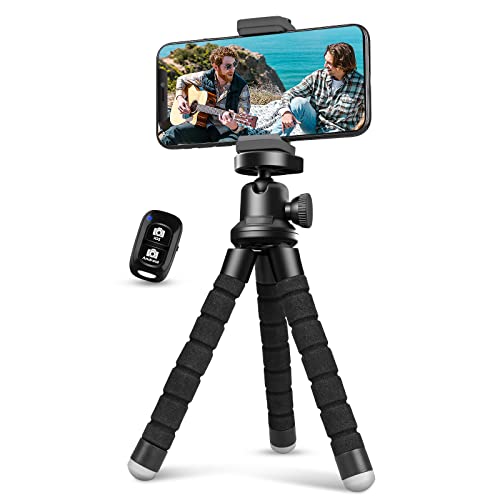
Aureday Phone Tripod, Flexible Tripod for iPhone and Android Cell Phone, Come with Wireless Remote and Clip for Video Recording/Vlogging/Selfie
As an Amazon Associate we earn from qualifying purchases. Product prices and availability are accurate as of the date/time indicated.

Content Creator Essentials Vlogging Kit, Magnetic Tripod & 2 Lights 2 Mics | 68" Magnetic Tripod for iPhone MagSafe/Android with Remote & 2 in 1 Magnetic Holder for Video Recording/Travel/Vlogging
As an Amazon Associate we earn from qualifying purchases. Product prices and availability are accurate as of the date/time indicated.
Prices shown are approximate and for reference only. Prices change often, so please check the current price on Amazon before you buy.
Note: Height, load capacity, and weight figures are manufacturer listings, and a tripod that lists 62 inches may be less stable at full height, because stability depends on legs and load. Always check the tripod’s height, load capacity, and weight in the manual, and confirm the current price with the retailer. Best tripod for PC vlogging should be stable, be flexible, and fit your desk before you buy.
What Is a Best Tripod for PC Vlogging?
It helps you film, hold, and record, without a tripod that is wobbly.
A best tripod for PC vlogging is different from a full-size tripod alone, which is for outdoors, while a PC tripod is for desk use. It is also different from a webcam alone, which is for PC, while a tripod is for a camera or phone.
A best tripod for PC vlogging is best for a vlogger who vlogs on PC, wants a tripod, has a camera or phone, and wants a simple, reliable best tripod for PC vlogging.
Best Tripod for PC Vlogging Reviewed
1. Joby GorillaPod 3K Kit Tripod – Best Tripod for PC Vlogging Overall
It has a good design, a good flexibility, and a build that is made for vloggers.
Joby designs the GorillaPod 3K Kit with a focus on a tripod that is for PC vlogging and has a flexible design. The tripod is a good option for a vlogger who wants Joby gear, and who wants the best overall design for best tripod for PC vlogging.
The main limitation is height. At 11 in, it is short for standing, though it is perfect for a desk. Choose the GorillaPod 3K if you want the best overall tripod, you want Joby, and you have a budget of $50 to $80.
2. ULANZI MT-44 Extendable Tripod – Best Tripod for PC Vlogging for ULANZI MT-44
It has a good design, a good height, and a build that is made for vloggers.
ULANZI designs the MT-44 with a focus on a tripod that is for PC vlogging and has an extendable design. The tripod is a good option for a vlogger who wants ULANZI gear, and who wants an MT-44.
The main limitation is load. At 2.2 lbs, it is good for phones, though it is not for heavy cameras. Choose the MT-44 if you want ULANZI, you want height, and you have a budget of $30 to $50.
3. Manfrotto PIXI Mini Tripod – Best Tripod for PC Vlogging for Manfrotto PIXI Mini
It has a good design, a good compactness, and a build that is made for vloggers.
Manfrotto designs the PIXI Mini with a focus on a tripod that is for PC vlogging and has a mini design. The tripod is a good option for a vlogger who wants Manfrotto gear, and who wants a PIXI Mini.
The main limitation is height. At 7.5 in, it is very short, though it is portable. Choose the PIXI Mini if you want Manfrotto, you want compact, and you have a budget of $20 to $30.
4. Joby GorillaPod 5K Kit Tripod – Best Tripod for PC Vlogging for Joby GorillaPod 5K
It has a good design, a good strength, and a build that is made for vloggers.
Joby designs the GorillaPod 5K Kit with a focus on a tripod that is for PC vlogging and has a strong design. The tripod is a good option for a vlogger who wants Joby gear, and who wants a GorillaPod 5K.
The main limitation is price. Choose the GorillaPod 5K if you want Joby, you want strong, and you have a budget of $80 to $120.
5. ULANZI TT38 Video Tripod – Best Tripod for PC Vlogging for ULANZI TT38
It has a good design, a good video head, and a build that is made for vloggers.
ULANZI designs the TT38 with a focus on a tripod that is for PC vlogging and has a video design. The tripod is a good option for a vlogger who wants ULANZI gear, and who wants a TT38.
The main limitation is weight. At 3.0 lbs, it is heavy, though it is tall. Choose the TT38 if you want ULANZI, you want video, and you have a budget of $80 to $120.
6. Manfrotto Befree Advanced Tripod – Best Tripod for PC Vlogging for Manfrotto Befree Advanced
It has a good design, a good strength, and a build that is made for vloggers.
Manfrotto designs the Befree Advanced with a focus on a tripod that is for PC vlogging and has a strong design. The tripod is a good option for a vlogger who wants Manfrotto gear, and who wants a Befree Advanced.
The main limitation is price. Choose the Befree Advanced if you want Manfrotto, you want strong, and you have a budget of $150 to $200.
7. Sensyne Phone Tripod 62 inch – Best Budget Tripod for PC Vlogging
It has a low price, a good design, and a build that is made for vloggers.
Sensyne designs the Phone Tripod with a focus on a tripod that is affordable and has a simple design. The tripod is a good option for a vlogger who wants Sensyne gear, and who wants a Phone Tripod.
Choose the Sensyne Tripod if you want a low price tripod, you want Sensyne, and you have a budget of $20 to $30.
Buying Guide: How to Choose the Best Tripod for PC Vlogging
Before you buy, think about how you vlog on PC, whether it is for desk or standing, what height you need, whether it is 7 or 62 inches, what load capacity you need, whether it is 2 or 20 lbs, what weight you need, whether it is 0.4 or 3.1 lbs, and how much you want to spend. A tripod that is perfect for a desk may be too short for standing, and a tripod that is perfect for standing may be too bulky for a desk.
1. Height: Desk Tripod vs Full Tripod, and Your Setup
Height is the first decision. Height is how tall your tripod is, usually 11 inches for desk, while 62 inches is for standing. A vlogger often buys a desk tripod and finds it is too low for a standing shot.
Choose 11 in if you want desk, you film at a PC, or you have a budget of $50 to $80. Choose 62 in if you want standing, you film full body, or you have a budget of $20 to $50. For most PC vloggers, a desk tripod like the GorillaPod 3K is best.
2. Load Capacity: Phone vs Camera, and Your Gear
Load capacity is the second decision. Load capacity is how much weight your tripod can hold, usually 2.2 lbs for phone, while 11 lbs is for camera. A vlogger often puts a DSLR on a phone tripod and finds it falls over.
Choose 2.2 lbs if you want phone, you vlog with a phone, or you have a budget of $20 to $50. Choose 6.6 lbs if you want camera, you vlog with a mirrorless camera, or you have a budget of $50 to $80. For most PC vloggers, a 6.6 lb capacity is safe for most cameras.
3. Flexibility: GorillaPod Legs vs Straight Legs, and Your Angles
Flexibility is the third decision. Flexibility is how your tripod legs bend, usually GorillaPod for flexible, while straight is for stable. A vlogger often wants to wrap a tripod around a pole and finds straight legs cannot.
Choose GorillaPod if you want flexible, you film in different places, or you have a budget of $50 to $120. Choose straight if you want stable, you film on a desk, or you have a budget of $20 to $200. For most PC vloggers, a flexible GorillaPod is the most versatile.
4. Mount: Phone Holder, Ball Head, and Your Camera
Mount is the fourth decision. Mount is how your camera attaches, usually phone holder for phone, while ball head is for camera. A vlogger often buys a tripod without a phone holder and finds they cannot mount their phone.
Choose phone holder if you want phone, you vlog with a phone, or you have a budget of $20 to $50. Choose ball head if you want camera, you need angle adjustment, or you have a budget of $50 to $200. For most PC vloggers, a tripod with both a phone holder and a ball head is best.
5. Stability: Weight, Base, and Your Desk
Stability is the fifth decision. Stability is how steady your tripod is, usually heavy base for stable, while light is for portable. A vlogger often uses a light tripod on a desk and finds it shakes when they type.
Choose heavy if you want stable, you type while filming, or you have a budget of $50 to $200. Place the tripod on a stable desk, away from your keyboard, and use a remote shutter. For most PC vloggers, a 0.9 lb GorillaPod on a desk is stable enough.
6. Price, Total Cost, and Choosing Tripod for PC Vlogging on a Budget
Consider total cost as well as price. Do not buy the cheapest tripod if its load is too low, and do not buy the most expensive tripod if you only film on a desk. A tripod that matches your height, your load, and your budget will vlog better than a tripod that is cheap but shaky, or expensive but too tall for best tripod for PC vlogging.
How to Use a Tripod for PC Vlogging
Using a tripod for PC vlogging starts with placing the tripod on your desk, mounting your phone or camera, and framing your shot at eye level. Use a Joby GorillaPod 3K or Manfrotto PIXI Mini, and adjust the ball head so your face is centred.
For a first vlog, use a ULANZI MT-44 or Sensyne Tripod, set your camera to 1080p, and test lighting. If your video shakes, tighten the legs, and if your framing is low, raise the tripod. Always use good lighting, and test audio before you record.
Which Best Tripod for PC Vlogging Should You Buy?
If you want the best tripod for PC vlogging, buy the Joby GorillaPod 3K Kit Tripod.
If you want ULANZI MT-44, buy the ULANZI MT-44 Extendable Tripod. If you want Manfrotto PIXI, buy the Manfrotto PIXI Mini Tripod. If you want Joby 5K, buy the Joby GorillaPod 5K Kit Tripod. If you want ULANZI TT38, buy the ULANZI TT38 Video Tripod. If you want Manfrotto Befree, buy the Manfrotto Befree Advanced Tripod. If you want the best budget, buy the Sensyne Phone Tripod 62 inch.
All seven tripods in this guide are currently sold, designed for vlogging, and suitable for a vlogger who wants the best tripod for PC vlogging. Pick the one that matches your height, whether it is 11 in, your load, and your budget, and always test stability before you record.
Disclosure: thetechchart.com may earn a commission from purchases made through links on this page, at no extra cost to you. Height, load capacity, and weight figures are manufacturer claims and can vary by model, camera, and use.
Frequently Asked Questions About the Best Tripod for PC Vlogging
What tripod is best for PC vlogging?
Choose GorillaPod if you want flexible desk use, and MT-44 if you want tall standing use.
Can I use a phone tripod for PC vlogging?
Use a phone holder, set your phone to 1080p, and use good lighting for best results.
How tall should a tripod be for PC vlogging?
Place the tripod on your desk at eye level, and use a full tripod only if you film standing.
What is the best budget tripod for PC vlogging?
Choose PIXI if you want compact desk use, and Sensyne if you want tall standing use.
Related guides
- Best Budget Modular PSU Under 100 in 2026: Best Budget Modular PSU Under 100
- Best Cheap Cable Management Kit for PC in 2026: 6 Kits Under $25 That Clean Up a Desk and Improve Airflow Without Spending $50
- Best High End Cooling Setup for Creators: 6 Best High End Cooling Setup for Creators Picks in 2026
- Best PSU Wattage for GPU Compatibility in 2026: Corsair, Seasonic, be quiet!, and MSI Compared for a Recommendation Read From the Card’s Own Documents, Transients Priced Beside Averages, and Connectors Counted Before Watts
More from Amazon
Programs that pair well with the guide above. Offers and eligibility are set by Amazon and may change.
Free shipping on eligible items, Prime Video and more. Eligible new members can start with a free trial.
Start a Prime free trialAd-free music streaming. Eligible new subscribers can start with a free trial.
Try Music Unlimited freeA Prime membership for ages 18-24 with a trial period. Eligibility is set by Amazon.
See Prime for Young AdultsAudiobooks and podcasts to listen to on the go. Eligible new members can start with a free trial.
Try Audible freeAs an Amazon Associate we earn from qualifying purchases.

Write Your Review
No reviews yet. Be the first to share your experience!