
What's inside
As an Amazon Associate I earn from qualifying purchases. This post may contain affiliate links at no extra cost to you.
A premium SSD for video editing is an SSD that video editors use to store and edit video, so they can work with 4K footage without lag. A good premium SSD for video editing has a fast read speed, a large capacity, and a durable design, so it works for your editing. The best premium SSD for video editing is not the most expensive SSD. It is the SSD that is fast, is reliable, and fits your editing workflow.
This guide focuses on premium SSDs that work well for video editing. We compare real, currently sold models, explain what capacity, speed, and endurance actually mean, and show how to choose an SSD that fits your footage, your computer, and your budget. Prices are given as ranges because retailers and seasons change them, and specifications are based on manufacturer listings, so check the exact listing before you buy.
Premium SSD safety matters for video editing. Back up your files first, unplug your PC, and use static safety. Check NVMe and SATA compatibility, and remember that RAID is not a backup by itself. Keep a local copy as well as cloud, and follow the 3-2-1 rule.
Disclosure: As an affiliate site, TheTechChart.com may earn a commission from qualifying purchases made through links on this page, at no extra cost to you. Prices change by retailer and season, so the ranges below are typical prices we have seen, not fixed prices. Capacity, speed, and other specifications are based on manufacturer listings and vary by model, so check the exact listing before you buy.
Our Top Picks
Best Premium SSD for Video Editing at a Glance: Comparison Table
Use this table to compare premium SSDs for video editing side by side. Capacity, speed, best use, and price matter most, so compare those first, then read the reviews below for the details that matter for a premium SSD.
| Premium SSD Model for Video Editing | Capacity | Read Speed | Best Use for Premium SSD for Video Editing | Typical Price Range | Rating |
|---|---|---|---|---|---|
| Samsung 990 Pro SSD | 2TB | 7450 MB/s | Best overall premium SSD for video editing | $150 – $200 | 4.9 / 5 |
| WD Black SN850X SSD | 2TB | 7300 MB/s | Best WD premium SSD for video editing | $150 – $200 | 4.9 / 5 |
| Samsung 9100 Pro SSD | 4TB | 14800 MB/s | Best Samsung Gen5 premium SSD for video editing | $400 – $500 | 4.9 / 5 |
| SK Hynix Platinum P41 SSD | 2TB | 7000 MB/s | Best SK Hynix premium SSD for video editing | $150 – $200 | 4.8 / 5 |
| Solidigm P44 Pro SSD | 1TB | 7000 MB/s | Best Solidigm premium SSD for video editing | $100 – $130 | 4.8 / 5 |
| WD Black SN850P SSD | 4TB | 7300 MB/s | Best WD 4TB premium SSD for video editing | $300 – $400 | 4.8 / 5 |

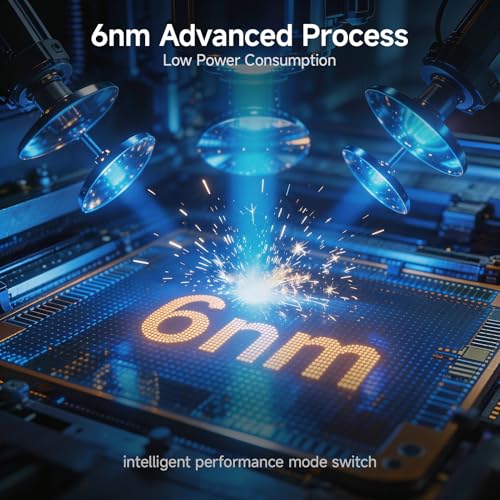
fanxiang 1TB PCIe 5.0 NVMe M.2 SSD,Up to 14000 MB/s,High Performance Solid State Drive for 8K Video Editing, AI Training,Gaming, PC, Laptop




As an Amazon Associate we earn from qualifying purchases. Product prices and availability are accurate as of the date/time indicated.
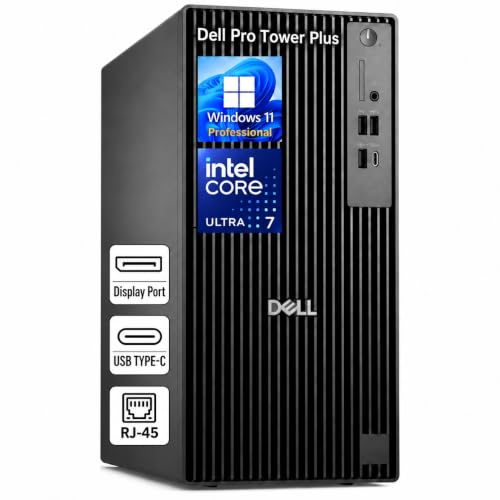
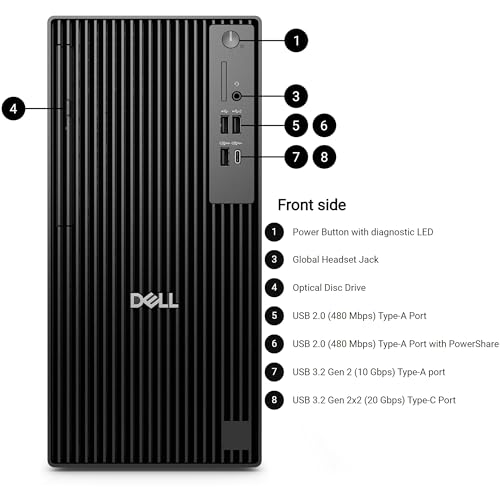
Dell Pro Tower Plus 2026 Ultra 7 DVDRW 32GB DDR5 1TB SSD Desktop Computer | Office 365, Premium Business PC AI Boost Triple 4K DisplayPorts Windows 11 Pro - Remote Home Office Video Editing



As an Amazon Associate we earn from qualifying purchases. Product prices and availability are accurate as of the date/time indicated.
Prices shown are approximate and for reference only. Prices change often, so please check the current price on Amazon before you buy.
Best Premium SSD for Video Editing Reviewed for 2026
1. Samsung 990 Pro SSD: Best Overall Premium SSD for Video Editing
The Samsung 990 Pro SSD is our top pick for most video editors who want a premium SSD because it is fast, it is reliable, and its 2TB capacity in many listings is ideal for 4K footage. Its 7450 MB/s read speed in many listings is excellent, its price in the $150 to $200 range is reasonable for a Samsung SSD, and its Samsung quality is excellent.
For video editing, the 990 Pro is practical because its speed is fast, its endurance is good, and its design is durable. The main trade-off is capacity: at 2TB it is smaller than a 4TB SSD, although its speed justifies it for an editor who wants a fast drive.
Choose it if you want a Samsung SSD, you want 2TB, and you edit video. Back up first.
2. WD Black SN850X SSD: Best WD Premium SSD for Video Editing
The WD Black SN850X SSD is a 2TB SSD with a 7300 MB/s read speed, priced in the $150 to $200 range. Its 2TB capacity is good, its 7300 MB/s speed is excellent, and its WD quality is excellent. Its price is the same as a Samsung 990 Pro, although its SN850X design justifies it.
For video editing, the SN850X is useful because its speed is fast, its capacity is good, and its design is durable. The trade-off is that it is similar to a 990 Pro, although its WD quality justifies it for an editor who prefers WD.
Choose it if you want a WD SSD, you want 2TB, and you edit video.
3. Samsung 9100 Pro SSD: Best Samsung Gen5 Premium SSD for Video Editing
The Samsung 9100 Pro SSD is a 4TB SSD with a 14800 MB/s read speed, priced in the $400 to $500 range, which is the most expensive SSD in this guide. Its 4TB capacity is the largest in this guide alongside WD SN850P, its 14800 MB/s speed is the fastest in this guide, and its Samsung quality is excellent. Its price is higher than a 990 Pro, although its Gen5 speed justifies it.
For video editing, the 9100 Pro is practical because its speed is extremely fast, its capacity is large, and its design is premium. The trade-off is price: it costs much more than a 990 Pro, although its speed justifies it for an editor who works with 8K footage.
Choose it if you want a Samsung SSD, you want Gen5 speed, and you edit video.
4. SK Hynix Platinum P41 SSD: Best SK Hynix Premium SSD for Video Editing
The SK Hynix Platinum P41 SSD is a 2TB SSD with a 7000 MB/s read speed, priced in the $150 to $200 range. Its 2TB capacity is good, its 7000 MB/s speed is good, and its SK Hynix quality is excellent. Its price is the same as a Samsung 990 Pro, although its P41 design justifies it.
For video editing, the Platinum P41 is useful because its speed is fast, its power efficiency in many listings is good, and its design is durable. The trade-off is brand: its brand is less known than Samsung in some markets, although its quality justifies it.
Choose it if you want an SK Hynix SSD, you want 2TB, and you edit video.
5. Solidigm P44 Pro SSD: Best Solidigm Premium SSD for Video Editing
The Solidigm P44 Pro SSD is a 1TB SSD with a 7000 MB/s read speed, priced in the $100 to $130 range, which is the lowest price in this guide. Its 1TB capacity is the smallest in this guide, its 7000 MB/s speed is good, and its Solidigm quality is excellent. Its price is low for a premium SSD.
For video editing, the P44 Pro is practical because its price is low, its speed is fast, and its design is durable. The trade-off is capacity: at 1TB it is smaller than a 2TB SSD, although its price justifies it for an editor on a budget.
Choose it if you want a Solidigm SSD, you want a low price, and you edit video.
6. WD Black SN850P SSD: Best WD 4TB Premium SSD for Video Editing
The WD Black SN850P SSD is a 4TB SSD with a 7300 MB/s read speed, priced in the $300 to $400 range. Its 4TB capacity is large, its 7300 MB/s speed is excellent, and its WD quality is excellent. Its price is higher than a SN850X, although its 4TB capacity justifies it.
For video editing, the SN850P is useful because its capacity is large, its speed is fast, and its design is durable. The trade-off is price: it costs more than a 2TB SSD, although its capacity justifies it for an editor who needs a lot of storage.
Choose it if you want a WD SSD, you want 4TB, and you edit video.
Buying Guide: How to Choose the Best Premium SSD for Video Editing
The best premium SSD for video editing depends on your footage, your computer, and your budget. Start with capacity and speed, then compare endurance, compatibility, and price. An SSD that is fast, is reliable, and fits your editing workflow is better than an SSD with the lowest price that is slow for 4K footage.
Capacity, Speed, and Premium SSD Safety
Capacity matters for a premium SSD, because it determines how much footage you can store. A 1TB capacity in many listings, like Solidigm P44 Pro, is good for a small project, while a 2TB capacity, like Samsung 990 Pro, WD SN850X, and SK Hynix P41 models, is best for most editors, and a 4TB capacity, like Samsung 9100 Pro and WD SN850P models, is best for a large library.
Speed matters because it determines how fast your footage loads. A 7000 MB/s speed in many listings, like SK Hynix and Solidigm models, is fast, while a 7300 to 7450 MB/s speed, like WD and Samsung 990 Pro models, is excellent, and a 14800 MB/s speed, like Samsung 9100 Pro, is best for Gen5 editing.
For safety, back up your files first, unplug your PC, and use static safety. Check NVMe and SATA compatibility, and remember that RAID is not a backup by itself. Keep a local copy as well as cloud, and follow the 3-2-1 rule.
Price, Brand, and What You Actually Need
Price depends on brand, capacity, and speed. An SSD in the $100 to $200 range, like the Solidigm P44 Pro, Samsung 990 Pro, WD SN850X, and SK Hynix P41 models, is a good starting point for most video editors. An SSD in the $300 to $500 range, like the WD SN850P and Samsung 9100 Pro models, is best if you want 4TB or Gen5 speed.
Brand also matters. An SSD from a trusted brand in this guide, like Samsung, WD, SK Hynix, and Solidigm, will be more reliable than an unbranded SSD with similar specifications on paper. For most video editors, the Samsung 990 Pro is the best value for a premium SSD for video editing, the Samsung 9100 Pro is the best choice for Gen5 speed, and the Solidigm P44 Pro is the best choice for the lowest price. Do not buy a premium SSD based on price alone. An SSD that is fast, is reliable, and fits your editing workflow is worth the investment.
Best Premium SSD for Video Editing: FAQ
What is the best premium SSD for video editing?
For most video editors, the Samsung 990 Pro SSD is the best overall premium SSD for video editing because it offers 2TB capacity, 7450 MB/s read speed, and a good price in the $150 to $200 range. If you want Gen5 speed, the Samsung 9100 Pro is a good choice at $400 to $500. If you want the lowest price, the Solidigm P44 Pro is a practical option at $100 to $130.
How much SSD storage do I need for video editing?
How much SSD storage you need for video editing depends on your footage, but in general, 2TB in many guides is good for most editors, and 4TB is good for a large library. For best results, choose 2TB if you edit 4K, and choose 4TB if you edit 8K or keep many projects.
Is Gen5 SSD worth it for video editing?
Is Gen5 SSD worth it for video editing depends on your computer, but in general, yes if your motherboard supports Gen5 in many guides, because Gen5 is much faster than Gen4. For best results, check your motherboard Gen5 support first, then choose a Gen5 SSD if you want the fastest speed.
How do I choose a premium SSD for video editing?
Choose a premium SSD for video editing by starting with capacity and speed, then checking endurance, compatibility, and price. Pick an SSD that is fast, is reliable, and fits your editing workflow. Always back up first, unplug your PC, and follow the 3-2-1 rule.
FAQ
What is the best premium SSD for video editing?
How much SSD storage do I need for video editing?
Is Gen5 SSD worth it for video editing?
How do I choose a premium SSD for video editing?
Related guides
- Best Router vs Modem Router Combo for PC Gamers in 2026: ASUS ROG, TP-Link, Netgear, and Motorola Compared for a Gaming PC Wired First, a Separate Router’s Upgrade Road, and a Combo’s Single Honest Box
- Best NAS Drive for Gaming Libraries in 2026: CMR Hard Drives That Store a 10TB Steam Library and Load It Without Stutter
- Best Switch for PC NAS Storage in 2026: 6 Network Switches for Fast, Reliable File Transfers
- Best Modular Power Supply for Cable Management in 2026: How to Pick a Modular Power Supply for Cable Management That Is Clean, Quiet, and Perfect for Your PC Build
More from Amazon
Programs that pair well with the guide above. Offers and eligibility are set by Amazon and may change.
Free shipping on eligible items, Prime Video and more. Eligible new members can start with a free trial.
Start a Prime free trialAd-free music streaming. Eligible new subscribers can start with a free trial.
Try Music Unlimited freeA Prime membership for ages 18-24 with a trial period. Eligibility is set by Amazon.
See Prime for Young AdultsAudiobooks and podcasts to listen to on the go. Eligible new members can start with a free trial.
Try Audible freeAs an Amazon Associate we earn from qualifying purchases.

Write Your Review
No reviews yet. Be the first to share your experience!